
BEOK TR33 WIFI Smart Thermostat
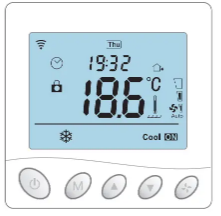
Product Overview
This series of thermostat has Floor Heating, Fan Coil, and Integrated version, meeting the requirements under different scenarios.
| Version | System mode | Model | Application |
|
Floor heating |
Floor heating |
EP | Built-in & floor sensor, floor limit sensor + Weekly programming |
| WP | A NC/NO dual-output + Weekly programming | ||
| WPB | A NC/NO dual-output + Weekly programming+ Potential-free output | ||
| Fan Coil | Heating /Cooling / Ventilation | AC2 | Timer task + 2-pipe system |
| AC2-485 | Timer task + 2-pipe system + 485Modbus (optional) + Potential-free output + Room card (optional) | ||
| AC4 | Timer task + 4-pipe system + 485Modbus (optional) + Potential-free output + Room card (optional) | ||
| Integrated | Heating / Cooling / Ventilation/Floor heating / Floor heating + Heating | AWY | Floor heating & fan coil, weekly programming + Potential-free output + Timer task + 485Modbus (optional) + Room card (optional) |
Display Symbols

Temperature Control Mode(Floor Heating/Integrated)
 Auto Mode
Weekly-circled programme, up to 6 heating events can be set per day. Heating events, workdays and temperature can be separately customized based on personal routines. Manual Mode
Thermostat works based on manually-set temperature, disconnecting from auto mode.- Temporary Mode
Thermostat works based on manually-set temperature temporarily and then shifts back to auto mode till next event.
User Operation
- Power on/off : Press “
 ” shortly to turn on/off the thermostat
 - Auto-mode : Press “ M ” for 3 seconds to edit auto-mode settings. (Floor Heating/Integrated)
- Timer task: Press “
 ” for 3 seconds to edit timer task. (Integrated)
 - Time setting: Press “ ” for 3 seconds to set time. (Floor Heating)
Press “ ” twice for 3 seconds to set time. (Automatic time synch for Wi-Fi version) - Temp setting: Press “
 ” or “
  ” shortly to change setting temperature by 0.5°C.
 - Child-lock: Press “ ” + “ ” for 3 seconds to activate child-lock.
- System mode: Press “ M ” shortly to switch cooling/heating/ventilation(Fan Coil/Integrated)
Press “ M ” shortly to switch cooling/heating/ventilation/floor heating/floor heating + heating. (Integrated) - Temp control mode: Press “ M ” shortly to switch manual/auto mode. (Floor heating)
Press “ ” shortly to switch manual/auto mode. (Integrated, floor heating) - Fan speed setting: Press “ ” shortly to adjust fan speed.(Integrated)
- ECO mode: Press“ ”shortly to set to ECO mode 18°C(65°F). (Floor heating)
- Customized exclusive temperature plan – up to 6 events allowed to set per day
- Sail shape design-delicate and elegant
- Large LCD screen-better user experience
- 485 modbus and room card linkage – customized equipment (optional)
Parameter
- Supply voltage: AC100~240V; 50/60Hz
- Power consumption: 1W Max (Wi-Fi 3W Max)
- Temp. setting range: 5~95℃(41~99℉)
- Floor limited range: 20~90℃(68~99℉)
- Temp. Dif.: 0.5~10℃(1~10℉), Factory setting ±1℃
- Ambient temperature: -5~50℃(23~122℉)
- Protection level: IP20
- Shell material: Anti-Flammable PC
Auto-mode Setting (Floor Heating/Integrated)
|
Events |
Symbols | Time | Temperature | |||
| Default value | Modify | Default value |
Modify |
|||
|
Workdays |
1 | 06:00 | Press “ ”or “ ” |
20℃(68℉) | Press “ ”or “ ” |
|
| 2 | 08:00 |
15℃(59℉) |
||||
|
3 |
11:30 | 15℃(59℉) | ||||
| 4 |
|
12:30 | 15℃(59℉) | |||
| 5 | 17:00 |
22℃(72℉) |
||||
|
6 |
22:00 | 15℃(59℉) | ||||
| Weekends | 1 | 08:00 |
20℃(68℉) |
|||
|
2 |
22:00 |
15℃(59℉) |
||||
Advanced Setting (Usually for Professional Technicians)
|
Code |
Meaning | “ ”or“ ” |
Default Value | Integrated | Fan Coil | Floor Heating | |
| AC2-485 AC4 | AC2 |
EP/WP/WPB |
|||||
| 00 | Postal address(optional) | Adjustment range 0x00~0xFA | 00 | √ | √ | × | √ |
| 01 | -9.9~9.9℃(-9~9℉) | -3℃ | √ | √ | √ | √ | |
| 02 | 0.5~10℃(1~10℉) | ±1℃ | √ | √ | √ | √ | |
| 03 | 5~95℃(41~99℉) | 50℃ | √ | √ | √ | √ | |
| 04 | 5~47℃(41~99℉) | 5℃ | √ | √ | √ | √ | |
| 05 | Frost protection | ON: frost protection on
OFF: frost protection off |
OFF | √ | √ | √ | √ |
| 06 | ℃/℉ | ℃ | √ | √ | √ | √ | |
|
07 |
Sensor selection |
IN |
√ |
× |
× |
√ | |
| 08 | Floor limited temp. | 20~90℃(68~99℉) | 35℃ | √ | × | × | √ |
| 09 | Weekly programming setting | 12345: 5/2 week mode 123456: 6/1 week mode 1234567: 7/0 week mode | 12345 | √ | × | × | √ |
|
10 |
Status of potential -free and main power outputs |
00: both outputs are normally open 01: main power output is normally
closed; potential-free output is normally open 02: both outputs are normally closed 03: both outputs are normally closed; under power-off, frost protection is off either |
00 |
√ |
√ |
× |
√ |
| 11 | Delay time of outputs | 0~5min | 0 | √ | √ | × | √ |
|
12 |
Child-lock |
00: Child-lock inactivate when screen off; lock all when child-lock activate
01: Child-lock activate when screen off; lock all when child-lock activate 02: Child-lock activate when screen off; lock all except Fan Speed, Up and Down when child-lock activate 03: Child-lock activate when screen off; lock all except Power on/off when child-lock activate |
00 |
√ |
√ |
√ |
√ |
| 13 | Power-on-reset | 00: stay power-off after Power-on-reset 01: stay power-on after Power-on-reset
02: recovery after Power-on-reset |
02 | √ | √ | √ | √ |
|
14 |
Door card status |
00: turn off room card function
01: set to ECO temp. after pulling room card out 02: stay power-off after pulling room card out |
00 |
√ |
√ |
× |
× |
| 15 | Room card heating
ECO temp. |
10~21℃(50-69℉) | 18℃ | √ | √ | × | × |
| 16 | Room card cooling
ECO temp. |
22~32℃(72-89℉) | 26℃ | √ | √ | × | × |
| 17 | Fan coil mode setting | 00: Cooling and heating 01: Cooling only | 00 | √ | √ | √ | × |
| 18 | Weekly programming for Integrated | 00: turn on
01: turn off |
01 | √ | × | × | × |
| 19 | Reset | Press “ ”for 3 seconds to reset | / | √ | √ | √ | √ |
Sensor failure
Please select work mode of sensors correctly. When it shows E0/E1 error, thermostat will stay power-off till the error is eliminated.
- E0: built-in sensor is short-circuited or disconnected.
- E1: floor sensor is short-circuited or disconnected.
Timer Task Setting (Fan Coil / Integrated )
Press “ ” for 3 seconds to enter timer task setting; press “ M ” to change settings;
press “ ” or “ ” to adjust parameters; press “ ” to save and exit.

Dimensions (Unit: mm)

Mounting Steps
The thermostat adopt pre-guide and limited snap-fit design. It is easy to mount.
- Release front cover by inserting a head screw-driver into bottom crack.

- Insert the wires and then fix these wires with screws. Suggested wire-stripping length is 7-9mm.
- Mount backing plate into wall-cassette, put screws and then fix thermostat.
Make sure that the thermostat is fixed without deformation. Suggested torque is 0.2~0.4N.m (2.0~4. 1kgf.cm).

- Re-mount the front cover via snap-fit connection.

Connecting Diagram
The thermostat operates in full capacity in areas with the altitude of less than 2500 above sea level. Power rating of external load should be less than or equal to 80% rated power of the thermostat in areas with altitude of 2500m to 4200m.
- Floor Heating
- #TR33 WIF EP
- # TR33 EP

- #TR33-WIFI-WP
- # TR33-WP
- #TR33-WIFI-WPB
- # TR33-WPB

Linkage control; delay time of linkage control is adjustable

Linkage control; delay time of linkage control is adjustable

Linkage control; delay time of linkage control is adjustable
- Fan Coil
- #TR33-WIFI-AC2
- # TR33-AC2

- #TR33-WIFI-AC2-485
- # TR33-AC2-485

- #TR33-WIFI-AC4
- # TR33-AC4

- Integrated
- #TR33-WIFI-AWY
- # TR33-AWY

REFERENCE
DOWNLOAD MANUAL
BEOK TR33WIFI Large LCD Screen Smart Thermostat Instruction Manual