
BEOK BOT-205-X Wireless Heating Thermostat

Product Specifications
- Power Supply: Receiver:230Vac 50/60HZ
- Display accuracy: 0.5°C
- Probe sensor: NTC(10k)1%
- Contact capacity: 5A/250V(BW;WW);16A/250V(WE
- Working environment temperature: 0~70°C
- Range of temperature adjustment: 5~35°C
- Range of temperature display: 0~40°C
- Insulating condition: Normal environment
- Running program: Set per 1 week as a cycle
- Output: Switch relay
- Installation: Wall mounted or on battery seat
- Size(mm):86*86*27
Operation Key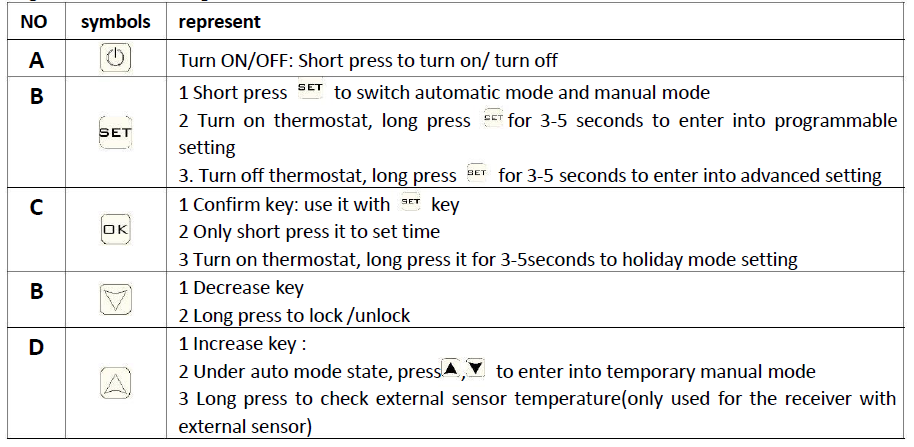
Icon Instruction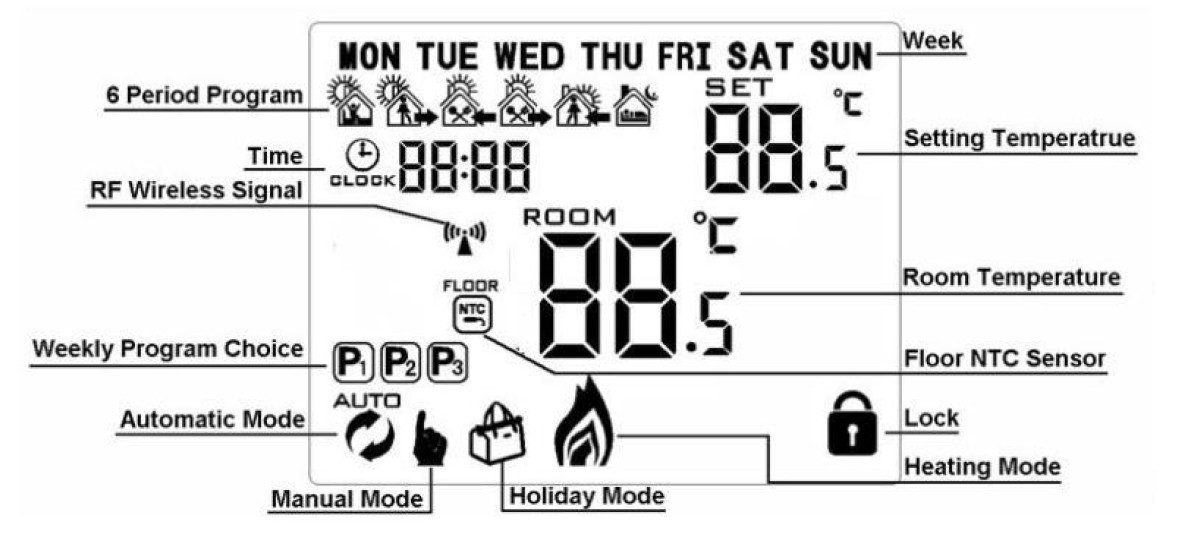
Programmable Mode Setting
Advanced options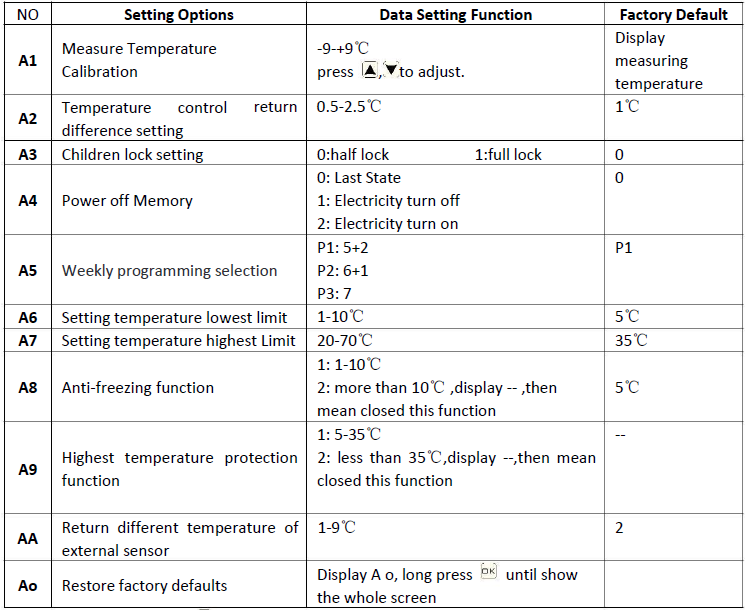
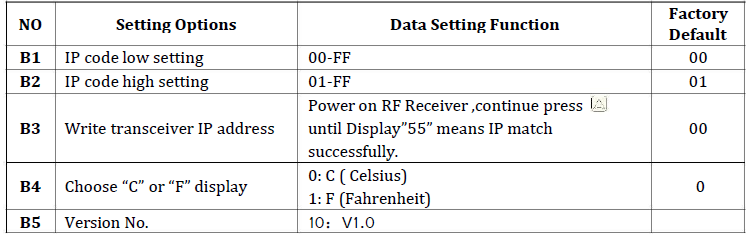
Setting IP code
Turn on the receiver, and keep the transmitter on power off state, long press the button and enter into setting interface. for 3-5 seconds to B1:press or to set any number or letter(if you have more than one transceiver, make sure to set different number or letter for each transceiver ) Then press transceiver, make sure to set different number or letter for each transceiver ) Then press to switch to B3 , continuously click until the transmitter display “55” means that to switch to B2:press or to set any number or letter(if you have more than one 4. 5. matched successfully
Transceiver tips
- Receiver LED display instruction:
- Power light (green light): it’s bright when powered on
- Signal light(orange light): it’s bright within 10s after power on (match IP), the signal light is off when it receives match, the signal light is blinking within 10s after power off
- Load light/fault light (red light):
- A、When no fault: light bright when load output, light off when no load output
- B、When fault:
- Light blink 2 times indicates IP is at fault
- Light blink 3 times indicates it does not receive wireless signal for 1 hour
- Light blink 4 times indicate the built-out sensor is faulty (only for a receiver with external
Sensor fault display: please choose the correct working way of the built-in and external sensor, if choose wrongly or the sensor fault (breakdown), “E1” or “E2” will be displayed on the screen. The thermostat will stop heating until the fault is eliminated.
Wiring Diagram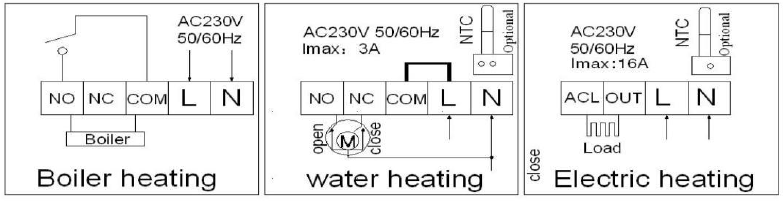
Cautions on Installation and Use
- To prevent the thermostat display from a high fluctuation, special treatment has been made to the program. Therefore, it is normal that the thermostat cannot immediately display the sudden change of temperature
- The thermostat installed 1.5m above the ground
- For the thermostat installed, please take care not to install it to the wall corner, door/window side or behind the door or in such an unheated area as the exterior wall. Avoid hot/cold air ducts, radiators, flues or thermal pipe
- If you have any problem for the installation, please contact our company hymen, and we will make a demonstration for you
- Only professional technicians are permitted to open the transmitter and receiver box of the thermostat for installation. When installing the power supply, make sure that the power cable is well insulated.
- The thermostat is an unrepairable product. The user shall not open the internal circuit board.
- Before installing the thermostat, make sure that the system is disconnected. The maximum voltage of the system shall meet the requirements specified intheInstructionManual(Max. ACVoltage: 240V).
Warranty
We offer a warranty of 24 months, from the sales day. The products of our company can have a lifetime warranty if it is not the quality problems, or beyond the warranty period, we will charge for the after-sale service.
REFERENCE
DOWNLOAD MANUAL
BEOK BOT-205-X Wireless Heating Thermostat User Manual