Becasmart BHT-003 Series Smart Heating Thermostat
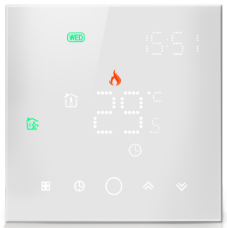
INTRODUCTION
To enable clever control over heating systems, Becasmart developed the BHT-003 Series Smart Heating Thermostat. For specific details, please refer to the manufacturer’s website or product manual.
Key Features of the Becasmart BHT-003 Series Smart Heating Thermostat:
- Smart Control: Users of the BHT-003 Series may be able to control certain aspects of their heating from anywhere with an internet connection by using a smartphone app.
- Energy Efficiency: This thermostat can help reduce energy use by providing precise control over heating schedules and temperature.
- It is compatible with a range of heating systems, including central heating, underfloor heating, and other electric heating options. Always confirm the product’s compatibility with your particular system with the manufacturer.
- Voice assistant integration: Depending on the model, voice control may be available through integration with well-known voice assistants like Amazon Alexa or Google Assistant.
- Touchscreen Interface: For simple on-device control and programming, many smart thermostats come with a touchscreen interface.
- Options for Scheduling: Users can often create daily or weekly schedules to automate heating in accordance with their routine.
- Multi-Room manage: Some models could allow you to independently manage the heating in several zones or rooms across your house.
- Temperature Sensors and Reporting: Using sophisticated temperature sensors, the device might be able to maintain the precise temperature that is wanted, and some versions might provide energy usage reporting.
- Design and Construction: Smart thermostats frequently have streamlined, contemporary designs to go with different interior decors.
- Installation is simple for the majority of users, but for individuals without experience with wiring or heating systems, expert installation may be advised.
- Warranty and Support: Manufacturers frequently offer warranties and support for their products; for details on the BHT-003 Series, contact Becasmart.
Conclusion
A contemporary approach to home heating control, the Becasmart BHT-003 Series Smart Heating Thermostat may provide ease, energy cost reductions, and connection with other smart devices. Users should consult the product handbook, get in touch with the manufacturer directly, or go to the Becasmart website if they want full information on specifications, features, and compatibility.
SPECIFICATION
- Power Supply: 95-240VAC,50-60/
- Accuracy:‡0.5C
- Timing Error: <1%
- Protection Class: IP 20
- Set Temp.Range: 5-35°C
- Sensor: NTC3950, 10K
- Storage Temp.:-5-45 °C
- Ambient Temp.: 0-45 °C
- Dispaly Temp.Range: 5 – 99°C
- Power Consumption:<1.5W
- Shell Material: PC+ABS (Fireproof
- Buttons: Capacitive Touch Button
- Wire Terminals:Wire 2 x 1.5 mm’or
- Current Load: 5A (water heating /gas boiler) 16A(elec
- Ambient Humidity: 5-95 %RH (Nor
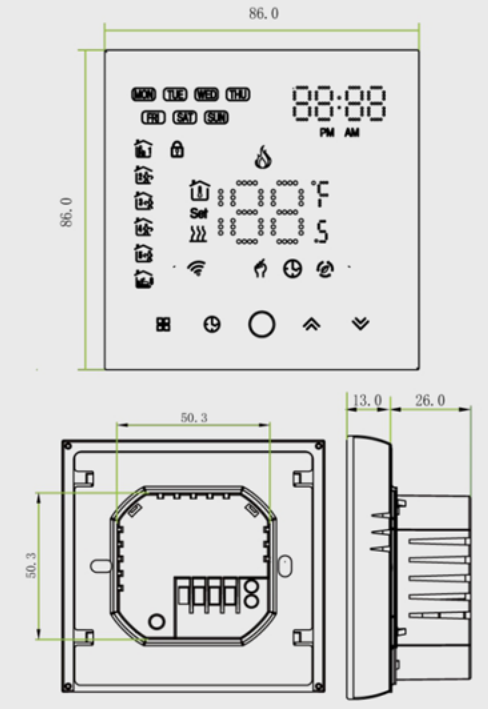
- Installation Box: 86X 86mm Squal 60mm Round Box
On Functionality:
- Full display of colorful LED ;
- ABS+ PC Shell ;
- Touch the operation button ;
- Support OEM/ODM customization ;
- Optional customization of WiFi / Modbus / room card.
DIMENSION
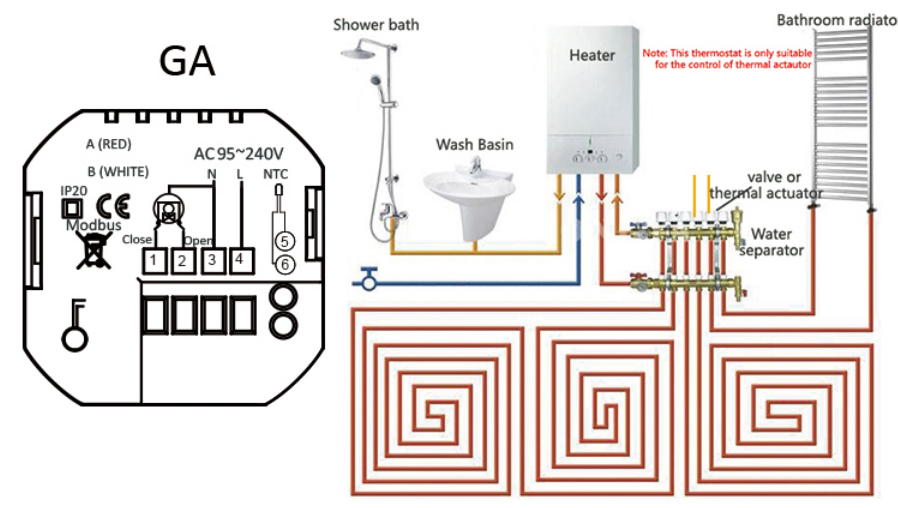
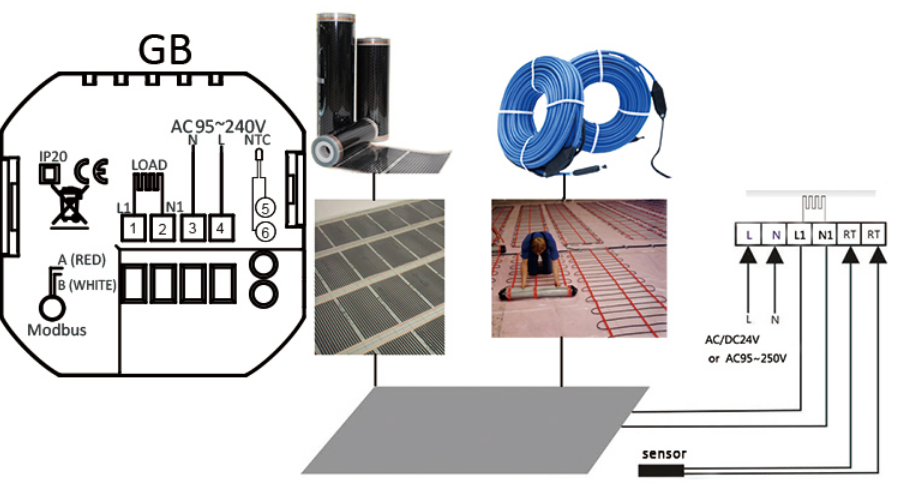
WIRING DIAGRAM
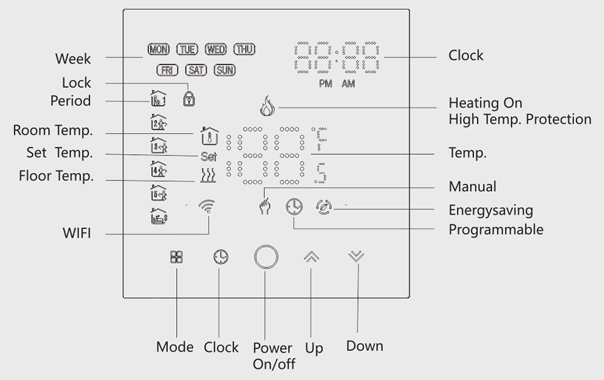
PRODUCT DISPLAY
Installation
- Step 1. Keep the power off. See Fig 1.
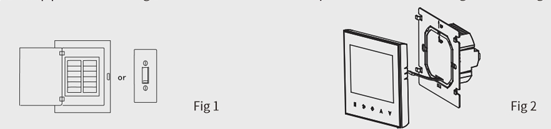
- Step 2. Remove the mounting Plate. See Fig 2.
- Step 3. Connect the power supply, load and external (floor) sensor into the appropriate terminals if there is the external sensor. (see “Wiring your thermostat” for details and Fig 3).
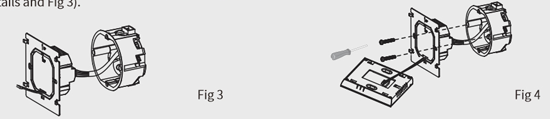
- Step 4. Fix the mounting plate into the wall with screws in the box. See Fig 4
- Step 5. Fasten body of the thermostat and the mounting plate through the groove. See Fig 5.
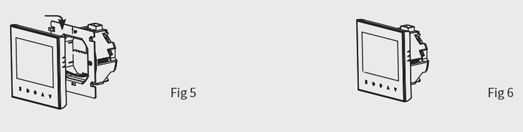
- Step 6. Installation complete. See Fig 6.
Your thermostat is suitable for installation within a standard 86mmpattress box or European 60mm pattress box.pattress box or European 60mm pattress box.
USAGE
Becasmart BHT-003 Series Smart Heating Thermostat Usage:
- Temperature Control: When a user sets a desired temperature, the thermostat manages the heating system to keep the space at that temperature. Remote Control: If the gadget has Wi-Fi capabilities, customers can adjust the thermostat remotely using a smartphone app while they’re away from home.
- Users may be able to configure specific heating schedules that permit varying temperature settings for certain times of day or days of the week.
- Integration with Smart Home Systems: If the thermostat is compatible, it may be included in a larger smart home system that enables voice control using assistants like Google Assistant or Amazon Alexa.
- Energy Savings: By enabling precise heating control and scheduling, the thermostat can help decrease energy use by reducing or turning off the heat when it’s not required.
- Multi-Zone Control: If it supports it, users can adjust different temperatures for various rooms throughout the house.
- Installation: Smart thermostats generally need to be installed correctly, which usually involves some simple wiring.
- For people who are experienced with household electrical work, it might be a DIY project, but expert installation might be advised.
- Maintenance: Typically, the system needs to undergo routine maintenance such as checking for firmware updates, cleaning, and making sure the heating system is functioning properly.
- Users should check to see if the thermostat is compatible with their particular heating system.
- It should be possible to find information about compatibility in the product literature or by contacting the manufacturer’s support.
- Features that increase safety include kid locks, which stop unauthorized modifications to settings, and notifications if the temperature exceeds a predetermined level. Weather Integration: Some cutting-edge smart thermostats can change settings depending on weather information from the internet or local weather stations, enabling adaptive heating control.
- User Interface: The thermostat may include physical buttons or a touchscreen for on-device control, depending on the design.
customization: To suit the user’s preferences or home decor, features like themes or display customization may be available. For extensive and precise information on the BHT-003 Series Smart Heating Thermostat, please refer to the product handbook, the manufacturer’s website, or get in touch with Becasmart directly. It’s important to adhere to the precise information provided by the manufacturer because each model could have different features or specifications.
FAQS
The Becasmart BHT-003 Series Smart Heating Thermostat is what it sounds like.
It is a smart thermostat made to regulate and automate home heating systems. Wi-Fi or other smart home integrations are available for remote control.
Is it capable of being operated by a smartphone?
You can usually alter the temperature of these devices remotely using a smartphone app that is compatible with them.
Is voice assistant compatibility available?
The BHT-003 series may enable connectivity with well-known voice assistants like Amazon Alexa and Google Assistant, depending on the model.
What types of heating systems does it support?
Different heating systems can be used with the BHT-003 series. It is advisable to verify specific compatibility information with the manufacturer.
How does the BHT-003 Series aid in energy conservation?
It can decrease needless heating and encourage energy saving by enabling precise temperature control and scheduling.
How is the setup procedure going?
For people who are experienced with thermostat wiring, installation may be simple, but for others, expert installation may be advised.
Is multi-zone control supported?
Multi-zone control may be supported by some BHT-003 series models, enabling varied temperature settings in various rooms.
What is the device’s permitted operating temperature range?
The exact model and heating system in use would determine this. For comprehensive information, consult the product documentation.
Is the user interface touchscreen?
For simple control, some BHT-003 series machines might have touchscreens.
What are the terms of the warranty?
It is advisable to verify with the store where you made the purchase or refer to the product manual for warranty information since it will vary by seller and location.
Is it compatible with other smart home appliances?
Integration with other smart home systems and appliances may be feasible, depending on the model.
Does a kid lock or other security measure?
A child lock is one example of a safety feature some models may have to stop unauthorized changes to the settings.
What is the necessary power supply?
Model-specific details may include a battery-operated model or a power supply range of 95–240V.
Is it possible to make weekly schedules?
In most cases, you can program weekly plans to automate heating based on your preferences.
Where can I purchase the Becasmart BHT-003 Series Smart Heating Thermostat?
It is normally available at a variety of online vendors as well as at shops that specialize in HVAC and smart home products.

Becasmart BHT-003 Series Smart Heating Thermostat User Manual