Beca BAC-8000 Series Touch Screen Room Thermostats

INTRODUCTION
Thank you for your purchase. Please confirm that this product is suitable for your heating equipment before installation; Before installation or maintenance, please make sure to keep the power off; Please strictly follow the wiring diagram for wiring installation; For Installation to the wall, please confirm that the fasteners are suitable for this product; Do not pull the cable too hard, otherwise the product will be damaged; If a hard plastic wire is used in the installation process, it must be bent to an appropriate angle in advance; Please arrange for professionals to install; Please contact the after-sales service for equipment failure, please do not try to repair it yourself; After installation, please refer to this manual to check again to ensure normal and safe use, and keep this manual properly. In the box you will find
IN THE BOX
- Thermostat 1pc
- QC Passed 1pc
- Screws 2pc
- User Guide 1pc
MODEL DEFINITION
- A: Two pipes; Control Fan Coll Unit and Two Wired Motorized Valve
- M: Two pipes; Control Fan Coll Unit and 0-lOV Motorized Valve
- E: Four pipes; Control Fan Coll Unit and Two Wired Heat Valve and Two Wired Cool Valve.
- N: Modbus RTU communication
- W: Wlfl connection
- K: Keycard
- T: Clock
- W2:Wlndow
- P: Programmable
- E: External Sensor
- For f! Xtlmple: BAC-8000 ALW
FEATURES
On Appearance
- A negative black screen will bring you to a secret world.
- 51mm round display area helps to protect your eyes.
- Touch buttons to make simple operation.
- Amazing Silver Frame opens your modern life.
- The visible thickness above the wall is only 11mm.
- Rotation to connect gives you easy installation.
- Wall mounted or suitable for installation of Europe, China, Japan, USA and Italy.
- White, black or brushless stainless steel housing creates your colorful life.
On Functionality
- Powerful functions are available such as WIFI etc,.
- 0.5℃ accuracy keeps the temperature within the level you set.
- ℃&℉is changeable.(On thermostat)
- 5+1+1 four periods programmable.
- Temporary programmable.
- Holiday mode.
- All setting languages synchronize your time zone, address and language.
- No limit to adding thermostats in the App.
- Support Smart Scene.
- Support to make a group and two-stage groups.
- Support device sharing.
TECHNICAL DATA
- Power Supply: AC/DC24V ±10%
- Current Load: 1A (Inductive) 3A (Resistance)
- Sensor: NTC3950, 10K
- Set Temp. Range: 42-122℉(5~50℃)
- Accuracy: ±1℉
- Display Temp. Range: 41~210℉(5~99℃)
- Ambient Temp: 32~113℉(0~45℃)
- Ambient Humidity: 5~95%RH(Non Condensing)
- Storage Temp: 23~113℉ (-5~45℃)
- Timing Error: <1%
- Power Consumption: <1.5W
- Shell Material: PC+ABS(Fireproof)
- Available Installation 1: Wall mounted
- Available Installation 2: Hole Distance of 62±5mm (Europe, China and Japan)
- Available Installation 3: Hole Distance of 86±3mm (USA and Italy etc,.)
- Wire Terminals: Wire 2×1.5mm2 or 1×2.5mm2
- Protection Class: IP20
- Buttons: Capacitive Touch Buttons
DIMENSION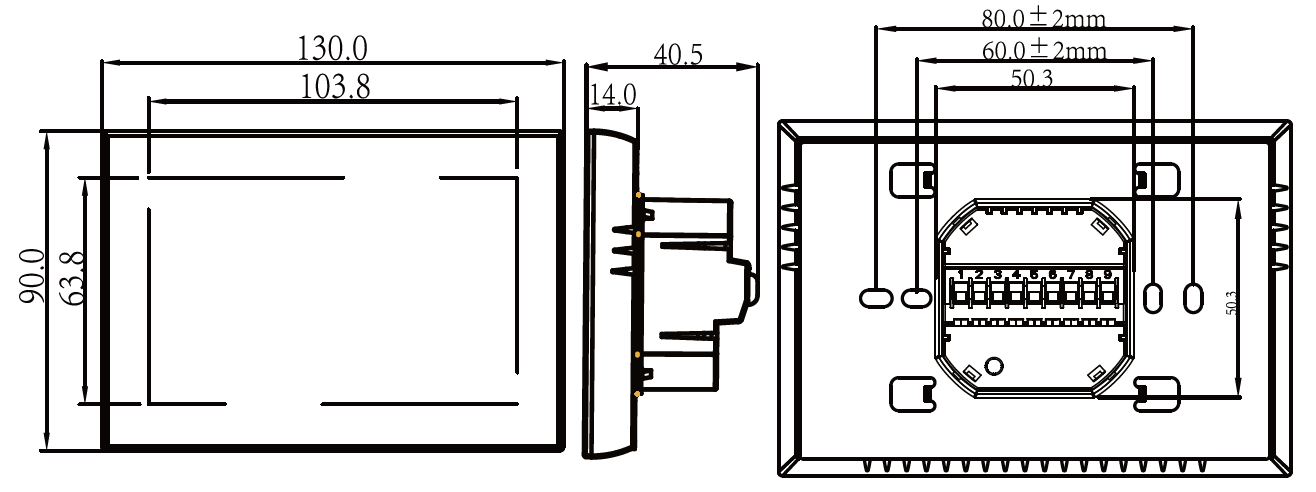
HOME QUICK REFERENCE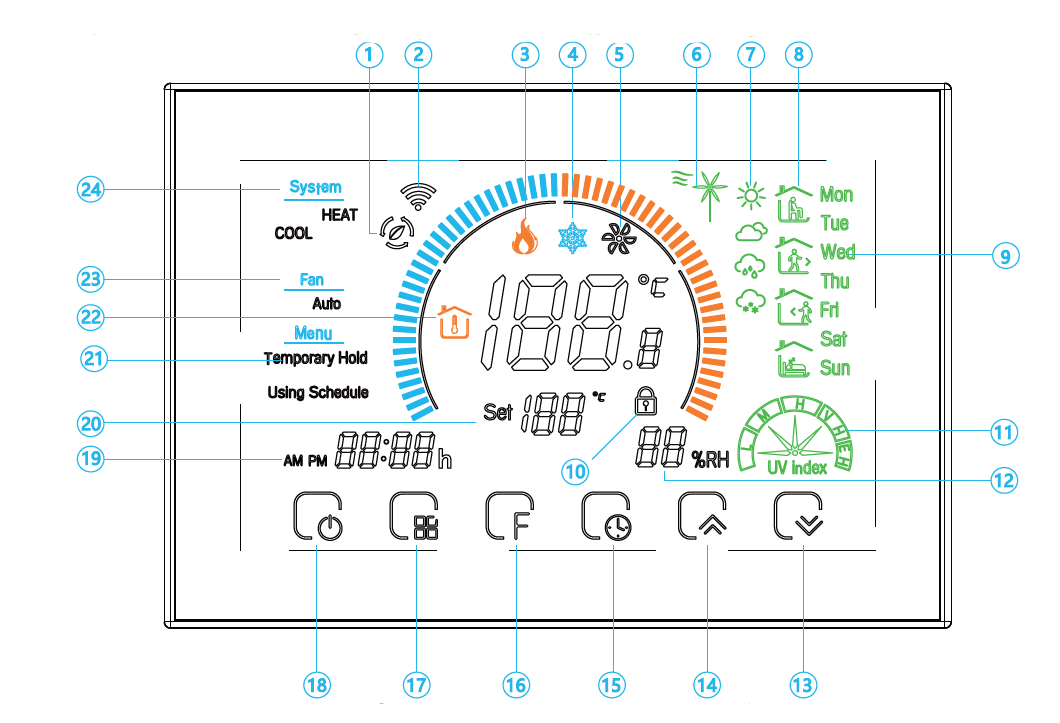
BEFORE WIRING AND INSTALLATION
- Read these instructions carefully. Failure to follow them could damage the product or cause a hazardous condition.
- Check the rathings given in the instructions and on the product to make sure the product is suitable for your application.
- Installer must be a trained, experienced service technician.
- After installation is complete, check out product operation as provided in these instructions.
WIRING
INSTALLATION
- Your thermostat Is suitable for Installation within a standard 86mm pattress box or a European 60mm pattress box.
- Step 1. Keep the power off. See Fig 1.
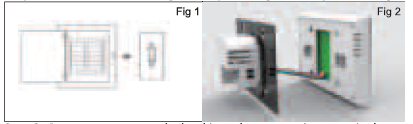
- Step 2. Remove the mounting Plate by rotating the LCD part. See Fig 2.
- Step 3. Connect the power supply, oad into the appropriate terminals. (see “Wiring your thermostat” for details and Fig 3).
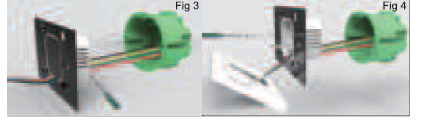
- Step 4. Fix the mounting plate Into the wall with screws In
- Step S. Fasten body of the thermostat and the mounting plate through rotating, See Fig 5.
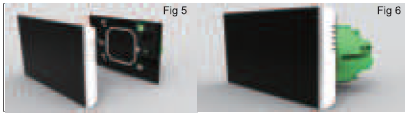
- Step 6. Installation complete. See Fig 6.
OPERATION
- Power On/off: Press
 to turn the thermostat on/off.
 - Function & Programmable
- Press
 once, and you will see Permanent Hold flashing, press”
 to switch to Using Schedule. Press” “again and press “” to switch to Permanent Hold.
 - Permanent Hold-Manual. In this mode, Press:
 to set the temperature.
 - Using Schedule. 7 days a week, four periods programmable daily.
- Adjusting/Setting the Clock
- Press “” once, and you will see Permanent Hold flashing, press ” ” again, you will see the minutes of time flashing.
- Press the” “to set your minutes.
- Then press” “, you will see the hour of the time flashing, press “” to set your hour.
- Then press” “, and you wlll see the week of the time flashing (on the right side of the screen}, press the .. r,;: /Q “to set your week.
- Locking your Thermostat
- Press and hold the• “for 5 seconds to lock/unlock your thermostat In item 3 of high senior options, you can select full lock or half lock.
- Adjusting/Setting the Programmable Schedules
- Press “five times in a row. You can see”MON-FRI “and”
 , the minutes of the time are flashing, press the “ ” to set the minutes;
 - Then press ““, the hour of the time is flashing, press ” ” to set the hour;
- Then press “Gil “, the setting temperature is flashing, press “ “to set the temperature;
In this way, you have completed the setting of the 1st time period. - Repeat the above steps to complete the 2-6th time period from Monday to Friday.
- Press “ ” again to enter the Saturday plan setting (SAT will be displayed on the right side of the screen).
- Repeat the above process to set the period and temperature. And Sunday timetable.
- Press “” again to confirm and exit.
Default settings for program schedule
|
Timedisplay |
WEEKDAY (MONDAY- FRIDAY)
(12345showsonscreen) |
WEEKEND(SATURDAY)
l6showsonscreen) |
(7showsonscreen) |
|||
| TIME | TEMPERATURE | TIME | TEM E ATU E | TIME | TEMPERATURE | |
| Period 1 | 06:00 | 200( | 06:00 | 20°( | 06:00 | 20°( |
| Period 2
Period 3 Period 4 |
08:00
11:30 13:30 |
15°( | 08:00
11:30 13:30 |
20 | 08:00
11:30 13:30 |
20°(
20°( 20°( |
Setting the Functions and Options
When turned off, Press  . in the order to reach system function. Then press to scroll through the available functions, and use thearrows to change the available options. All settings are confirmed automatically.
| Code | Function | Setting and options | Default |
|
1 |
Temperature
compensation |
-9to9 C | -3 |
|
2 |
Deadzone Tern | 1-5C | 01 |
| 3 | Time Display | 0:12h Ol:24h | 01 |
|
4 |
Button Locking |
01:AII buttons are locked except
power button 01:AII buttons are locked |
01 |
|
5 |
Fan controllable | O: Controllable
1: Uncontrollable |
0 |
|
6 |
Min.Set Temp | 5-15 C | s |
|
7 |
Min.Set Temp | 5-45C | 35 |
|
8 |
Standby
Brightness |
3-99 | 2200 |
|
9 |
Energy
saving Mode |
00:Energy saving Mode 01:Non-energy
saving Mode |
00 |
|
A |
Energy saving
Temp |
0-30C | 20 |
|
B |
geration temperature |
0-30C |
26 |
ABOUT WIFI
WIFI CONNECTION
Before using your Wi-Fi thermostat for the first time, you must configure the Wi-Fi signal and settings through your smartphone or tablet, This will allow communication between your connected devices
- Step 1 Download your APP (Fig 1-1)
- Step 2. Connect the thermostat
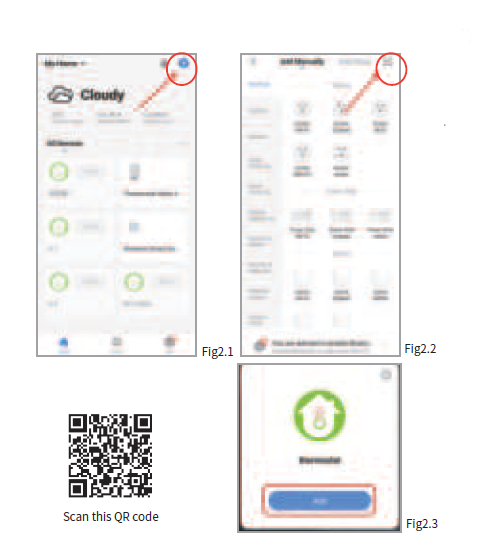
- Method 2: Ordinary distribution network guidance (Fig. 2. 1&Fig. 2.3.1)
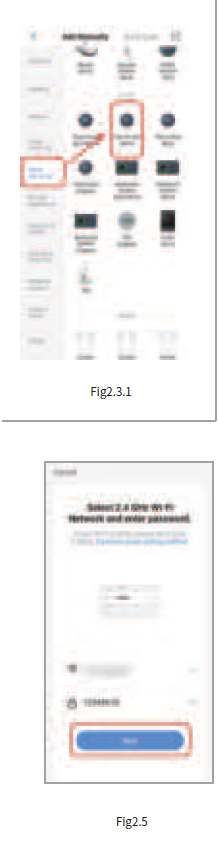
- Network distribution mode:
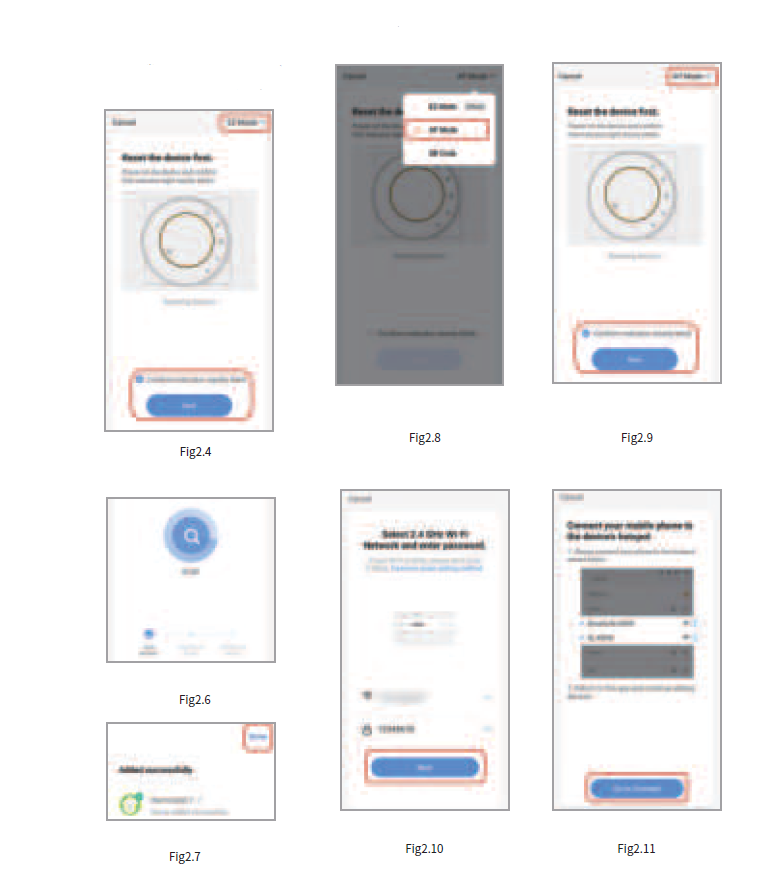
- EZ Mode When the thermostat is off, press and hold the ” “until the thermostat screen flashes quickly and displays the ” ” icon, and then operate according to the following figure (Fig 2.4-Fig 2.7).
- AP Mode When the thermostat is off, press and hold the ” ” until the thermostat screen flashes slowly and the ” ” icon is displayed (if the ” ” icon appears, continue to press the ” ” until the thermostat screen Flashes slowly and displays the “ ” icon), and then operate according to the following figure (Fig 2.8-
APP operation interface description (FCU thermostat))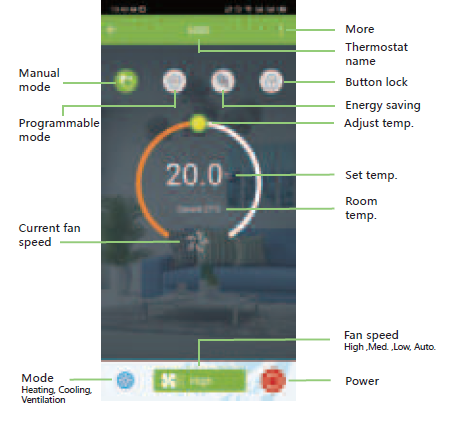
SIMPLE EXCEPTION HANDLING
| No. | Phenomenons | Handling |
| Power is on but without display. | * Check if the terminals between LCD panel and Power Unit Box is loosen. | |
| Without output but display works. | * Use a new LCD panel or new Power Unit Box to replace the old one. | |
| Room Temp. Is a little different from the actual. | *Do temperature calibration in item 1 of high senior options |
SERVICE
Your thermostat carries a 24 months warranty from the date of purchase. Service outwith the warranty period may incur a charge. For more detail please contact us directly.
REFERENCE
DOWNLOAD MANUAL
Beca BAC-8000 Series Modern Square Touch Screen Room Thermostats User Guide

Beca BAC-8000 Series Touch Screen Room Thermostats User Guide