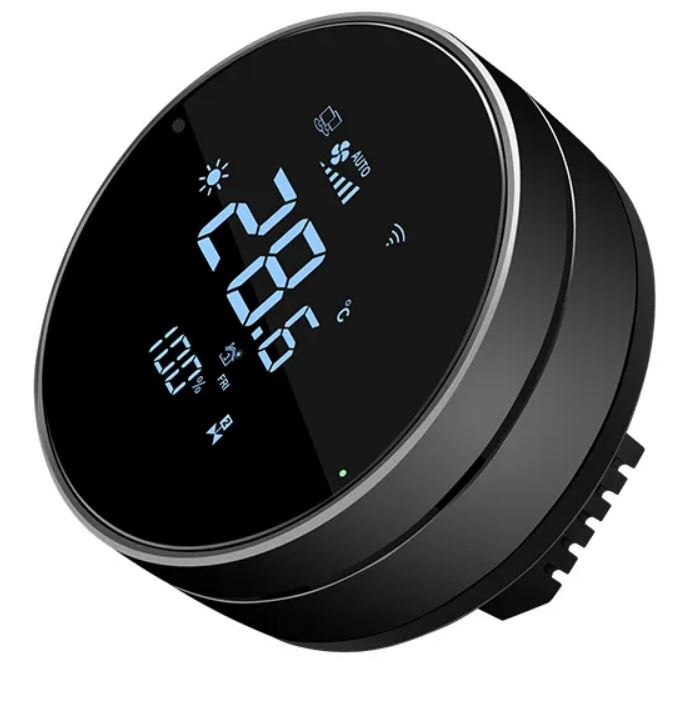
Bandary FC610 Smart Wifi Thermostat
Specifications
- Project Solution Capability: Graphic Design
- Warranty: 3 years
- Type: HVAC Systems
- Material: ABS
- Communication: RS485 Modbus protocol
- Sensor: NTC Sensor or build -in sensor
- Design Style: Modern
- Output voltage: Relay or analog output
- Occupied sensor: Room card sensor
- Power supply: 24v DC/AC 50/60Hz
- Power consumption: Max. 3W
- Max load current: <3A:
- Measuring range temp: +1~+50 °C
- Accuracy temperature: ±1K (typ. at 21 °C)
- Control functions: Set point adjustment +1..+50 °C, (default +16..+30 °C)
- Display: LCD Ø49 mm, black background white lighting
- Protection: IP20 according to EN 60529
- Cable entry: Rear entry
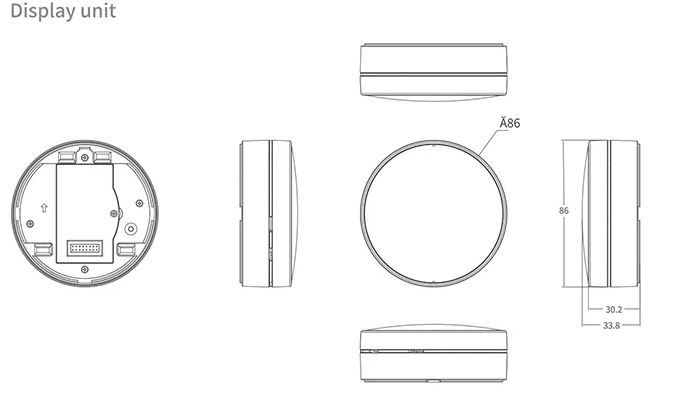
- Dimension(L*W*H): 86*86*61mm
- Brand: Bandary
Introduction
The Bandary FC610 Smart Wifi Thermostat is a programmable thermostat that allows you to control the temperature of your home remotely using your smartphone or tablet. The thermostat can be connected to your home WiFi network and is compatible with both iOS and Android devices. With the Bandary FC610, you can easily create a heating or cooling schedule that suits your lifestyle. The thermostat has a large color touchscreen display that is easy to read and navigate. You can also use voice commands to adjust the temperature if you have a compatible voice assistant device.
The Bandary FC610 also features advanced energy-saving features, such as adaptive recovery and intelligent sensing. These features help to minimize energy waste and reduce your energy bills without sacrificing comfort. Installation of the Bandary FC610 is easy and can be done without the need for professional assistance. The thermostat comes with a user manual that provides step-by-step instructions and diagrams to guide you through the installation process.
What’s In the Box
- Smart Wifi Thermostat
- Wall plate for mounting
- Screws and anchors for mounting the wall plate
- User manual
Dimension
Product Description
Features
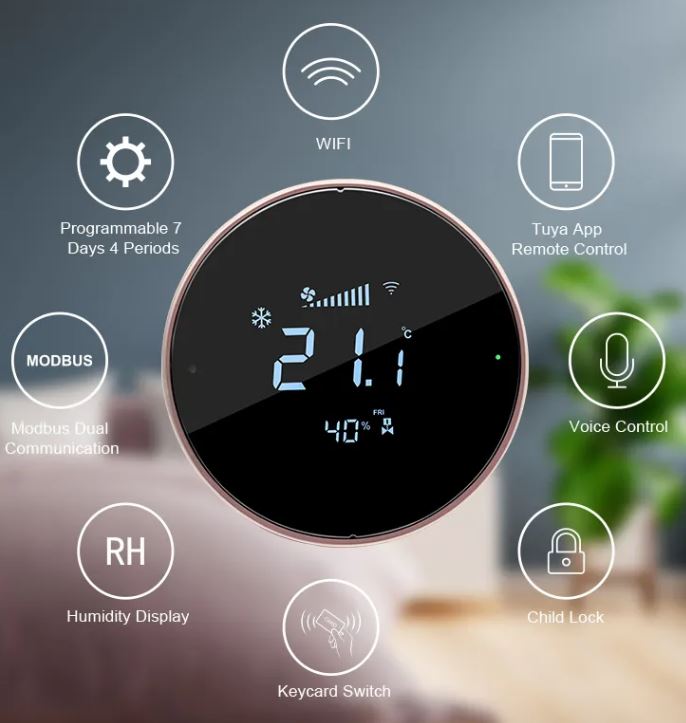
- WiFi Connectivity: The Bandary FC610 can be connected to your home WiFi network, allowing you to control the temperature remotely using your smartphone or tablet.
- Programmable Schedule: You can create a customized heating or cooling schedule for your home using the Bandary FC610. This allows you to automatically adjust the temperature based on your daily routine.
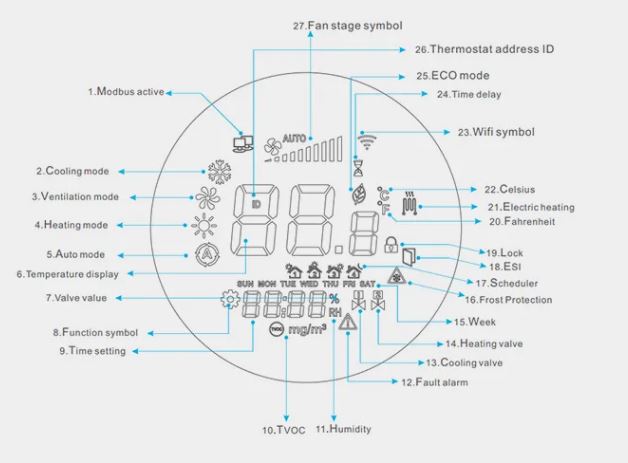
- Color Touchscreen Display: The thermostat features a large, easy-to-read color touchscreen display that displays the current temperature, set temperature, and other information.
- Voice Control: The Bandary FC610 is compatible with voice assistants such as Amazon Alexa and Google Assistant, allowing you to adjust the temperature using voice commands.
- Energy-Saving Features: The thermostat features energy-saving features such as adaptive recovery and intelligent sensing, which can help to reduce energy waste and lower your energy bills.
- Easy Installation: The Bandary FC610 can be easily installed without the need for professional assistance. The user manual provides clear instructions and diagrams to guide you through the installation process.
- Compatible with Most HVAC Systems: The thermostat is compatible with most heating and cooling systems, including gas, electric, and heat pump systems.
- Multiple User Support: The Bandary FC610 supports multiple users, allowing multiple family members to control the temperature using their smartphones or tablets.
Wifi Smart Thermostat
How To Install
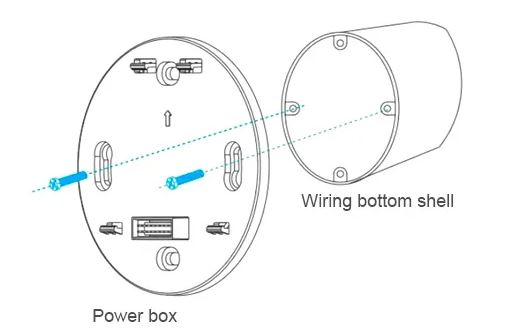
- Please connect the wires according to the wiring diagram.
- Install the thermostat power box to the wall box using two installation fasteners with a 60mm distance between the axes.
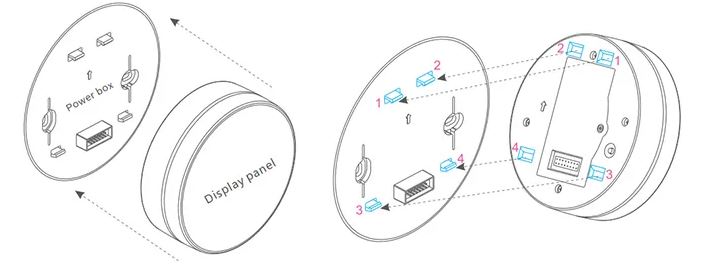
- The power box and display device must be secured. Do not press the panel in order to protect the LCD, and place the plastic cover over the panel.
Voice Control
The Bandary FC610 Smart Wifi Thermostat can be controlled using voice commands if you have a compatible voice assistant device, such as Amazon Alexa or Google Assistant. Here are the steps to set up voice control:
- Install the Bandary app: Install the Bandary app on your smartphone or tablet and create an account.
- Connect the thermostat to your home WiFi network: Follow the instructions in the user manual to connect the thermostat to your home WiFi network.
- Enable voice control: Open the Bandary app and navigate to the settings menu. Select the option to enable voice control and follow the prompts to link your Bandary account to your Amazon Alexa or Google Assistant account.
- Issue voice commands: Once you have set up voice control, you can issue voice commands to control the temperature of your home. For example, you can say “Alexa, set the temperature to 72 degrees” or “Hey Google, increase the temperature by 2 degrees.”
How To Use?
- Download the Bandary app: The first step is to download the Bandary app from the App Store or Google Play Store and create an account.
- Connect the thermostat to your home WiFi network: Follow the instructions in the user manual to connect the thermostat to your home WiFi network.
- Set up your preferences: Use the Bandary app to set up your preferences, such as your preferred temperature and schedule. You can create multiple schedules to suit your lifestyle and preferences.
- Monitor and adjust the temperature: You can monitor and adjust the temperature using the Bandary app on your smartphone or tablet. You can also use voice commands if you have a compatible voice assistant device.
- Use energy-saving features: The Bandary FC610 Smart Wifi Thermostat comes with energy-saving features such as adaptive recovery and intelligent sensing. You can use these features to minimize energy waste and reduce your energy bills without sacrificing comfort.
- Set alerts: You can set alerts for when the temperature goes above or below a certain threshold. This can help you to avoid potential damage to your home or HVAC system.
- Customize the display: You can customize the display settings to suit your preferences. You can choose the color scheme and font size, and select which information is displayed on the home screen.
Frequently Asked Questions
Q: What HVAC systems are compatible with the Bandary FC610 Smart Wifi Thermostat?
A: The Bandary FC610 Smart Wifi Thermostat is compatible with most 24-volt heating and cooling systems, including gas, oil, electric, and radiant systems. It is not compatible with line voltage systems or proprietary systems that use communication protocols other than WiFi.
Q: Can I control the thermostat remotely?
|A: Yes, you can control the thermostat remotely using the Bandary app on your smartphone or tablet. As long as your device is connected to the internet, you can adjust the temperature, set schedules, and monitor your energy usage from anywhere.
Q: Can I set up multiple schedules?
A: Yes, you can set up multiple schedules to suit your lifestyle and preferences. For example, you can set different schedules for weekdays and weekends, or create a vacation schedule for when you’re away from home.
Q: Is the Bandary FC610 Smart Wifi Thermostat easy to install?
A: Yes, the Bandary FC610 Smart Wifi Thermostat is designed to be easy to install. It comes with a wall plate and mounting hardware, and the wiring is straightforward as long as you follow the instructions in the user manual. However, if you are unsure about any aspect of the installation, it is always recommended to consult a licensed HVAC professional.
Q: Does the Bandary FC610 Smart Wifi Thermostat have energy-saving features?
A: Yes, the Bandary FC610 Smart Wifi Thermostat has energy-saving features such as adaptive recovery and intelligent sensing. These features help to minimize energy waste and reduce your energy bills without sacrificing comfort.
Q: Can I use voice commands to control the thermostat?
A: Yes, you can use voice commands to control the Bandary FC610 Smart Wifi Thermostat if you have a compatible voice assistant device, such as Amazon Alexa or Google Assistant. Simply follow the setup instructions in the Bandary app to enable voice control.