Autani 1000172-01 Wireless Thermostat
Description
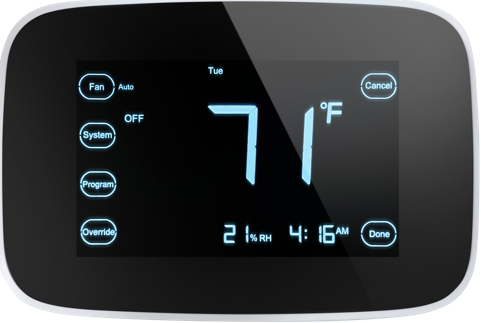
Autani’s Wave Thermostat is a wirelessly networked thermostat featuring a touchscreen interface and integrated humidity control designed for use with Autani’s EnergvCenter HVAC Management System. EnergvCenter manages heating and cooling based upon schedule, occupancy, and demand response events.
Simple to install, the Wave is a direct replacement for many existing thermostats and can sense temperature either at the stat or via a remote sensor. Input from contact or occupancy sensors can toggle the occupancy status of a particular room or area. “Occupied” and “Unoccupied” settings are used to vary heating and cooling setpoints, and maximize savings.
Connectivity between Thermostats and other EnergvCenter devices is via the secure, reliable autaniNet wireless mesh network. The Wave Thermostat maintains local HVAC control, even if network communication is lost.
EnergvCenter devices are managed with an Autani Manager appliance running EnergvCenter software and can be part of an EnergvCenter integrated energy management system.
Applications
Wove Thermostats ore suitable for renovation, upgrade, and new construction projects.
- Private & Open Offices
- Corridors & Hallways
- Classrooms & Gymnasiums
- Warehouse Spaces & Manufacturing Areas
- Patient Care Rooms
- Transportation Terminals
- Retail & Grocery Stores
Features
- Touchscreen interface for intuitive operation
- Integrated humidity control
- Easy to install, fast to configure, manage Thermostat is compatible with most commercial and residential HVAC Systems
- Configuration options support multiple equipment types from one hardware platform
- Can limit the minimum and maximum values for heat and cool set-points
- Supports remote temperature sensor input or contact/occupancy sensor input
- Web-based, remote access and management
- User-definable occupied and unoccupied setpoints can be varied based upon schedule and curtailment stages
- autaniNetsecure wireless 2.4GHz communications with other network devices
- Large backlit display with keyboard locks
- Available wired and wireless door/window contacts to set back HVAC when doors and windows are open.
Specifications
SETPOINT RANGE
- Heating: 41 °Fto 120°F (5°Cto 49°C)
- Cooling: 43°Fto 122°F (6°C to 50°C)
EQUIPMENT COMPATIBILITY
- Heat Only
- Heat/1 Coo
- Cool Only
- Heat/2 Cool
- Heat/1 Cool Heat Pump with AUX Heat
- Heat/2 Cool Heat Pump with AUX Heat
- Heat/2 Cool Dual Fuel Heat Pump with AUX Heat
- Heat/1 Cool Dual Fuel Heat Pump with AUX Heat
- Heat/1 Cool – Multi-speed fan
- Heat/1 Cool Heat Pump with Emergency Heat
- Heat/1 Cool Heat Pump with AUX & Emergency Heat
RADIO NETWORK (autaniNet)
- IEEE 802.15.4-2003 2.4GHz ISM
- Range: Up to 2000′ LOS transmit/ receive
REGULATORY APPROVALS
- FCC ID: V8NZRB1000152
- IC: 7737A-ZRB1000152
ENVIRONMENTAL
- Operating AmbientTemp: 32°F to 122°F (0°C to 50°C)
- Shipping Temp: 14 °F to 140°F (-10°c to 60°C)
- Operating RH (Non-condensing): IRS-1: 5% to 95%, ORS-1: 5%to 95%
- Humidity Display Range: 0% to 99%
PHYSICAL
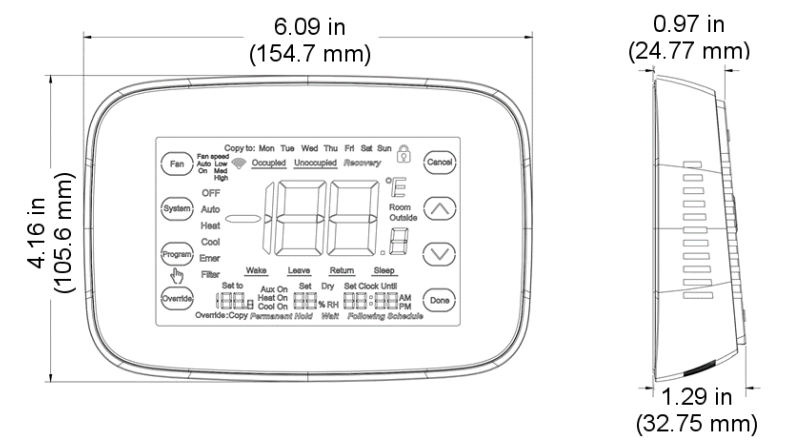
- Dimensions (HxWxD): 4.6 x 6.09 x 1.29 in
- Color: Black
Indoor use only
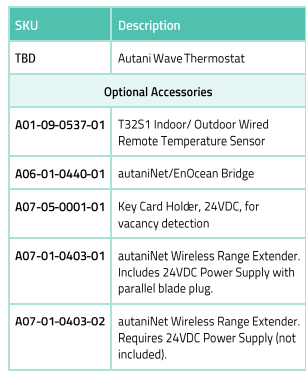
ORDERING INFORMATION
DIMENSIONS
REFERENCE
DOWNLOAD MANUAL:
Autani 1000172-01 Wireless Thermostat Product Specification GUIDE
OTHER MANUALS:
Autani 1000172-01 Wireless Thermostat Quick Installation Sheet
Autani 1000172-01 Touchscreen Programmable Thermostat Installation Guide

Autani 1000172-01 Wireless Thermostat Product Specification GUIDE