Aprilaire 8870 Communicating Thermostat

CAUTION: Do not set to OFF mode during periods when freezing temperatures could occur.
Thank you for your recent purchase of an Aprilaire® Communicating Thermostat. With this purchase, you have invested in the highest quality thermostat currently available.
This Model 8870 Communicating Thermostat operates similarly to a conventional thermostat but has the unique capability of being controlled, either locally or remotely (from a home automation system). The Model 8870 thermostat is capable of integration into your home automation system or independently operated with the Aprilaire Model 8823 System Controller.
Note: This manual covers basic operation of the thermostat, which may be altered by the home automation system setup
GETTING FAMILIAR WITH THE APRILAIRE THERMOSTAT
MESSAGE DISPLAY – Two types of messages are displayed, Permanent and Temporary Messages. Permanent Messages are those that scroll continually during thermostat operation. Temporary (flashing) Messages are intended to catch your eye and must be reset to be removed from the display. Thermostats are shipped with default (permanent) status messages (i.e. mode status, fan status, equipment status).
- SCROLL/SET-UP BUTTONS – The Scroll/Set-Up buttons function with the set-up features of the thermostat (refer to page 7).
- MODE BUTTON – Five modes of operation are available on the Model 8870 thermostat: OFF, COOL, HEAT or COOL, EM. HEAT (for heat pumps only), and HEAT. The mode of operation indicates how you want your heating and cooling equipment to operate.
- ADJUST BUTTON – The Adjust buttons adjust the heating and cooling temperature settings.
- FAN BUTTON – The fan can be operated continuously (FAN ON) or only when there is a need to heat or cool.
- ENTER (NETWORK OVERRIDE) BUTTON – The Enter button is used to override the home automation system, to clear temporary flashing messages on the message display and with the set-up features of the thermostat.
- MAIN DISPLAY – The MAIN DISPLAY (see Figure 2) provides the mode status, temperature and system status information.
- MODE STATUS – Shows the current mode of operation: OFF, COOL, HEAT or COOL, EM. HEAT (for heat pumps only), and HEAT. The current mode will flash to show when the equipment is running.
- SET POINTS – Shows the Heating and/or Cooling temperature settings.
- FAN STATUS – FAN ON indicates the fan is set to operate continuously.
- LOCKOUT – The lockout setting shows the thermostat buttons have been locked out and the thermostat settings can not be changed at the thermostat.
- ROOM TEMPERATURE – Shows the current room temperature. The temperature can be displayed in °F or °C. This would show relative humidity (%) if the thermostat has been installed with an optional humidity control senor.

- REMOTE TEMPERATURE/RELATIVE HUMIDITY – A temperature and/or a relative humidity value will be displayed alternately here when an optional remote temperature and/or humidity sensor has been installed (typical use is for outdoor temperature).
- NETWORK OVERRIDE – When NETWORK OVERRIDE is displayed, the thermostat has been taken off-line from the system. The thermostat can then only be operated at the thermostat.
- NETWORK STATUS – This computer icon shows the thermostat is connected to the system. The icon will flash when the thermostat sends or receives information. If there is no activity on the system for 15 minutes the icon will be crossed out. This does not mean the thermostat is unable to communicate, only that there has been no communication to this thermostat in 15 minutes.
OPERATING THE THERMOSTAT
Notes on temperature adjustments:
- The COOL setting must always be a minimum of 2° (F or C) higher than the HEAT setting. The thermostat will automatically maintain the 2° difference. For example, if the Cooling set point is 75°F and one changes the Heating set point to 74°F, the thermostat will automatically change the Cooling set point to 76°F.
- The lockout
 icon will appear on the display when attempting to make a change, if the thermostat has been configured to be locked out or the desired change violates the ther-mostat limits (i.e. lowest allowable HEAT setting is 40°F, highest allowable COOL setting is 90°F, etc.). Lockout configuration can be altered in set-up menu (see section 5).
SELECT THE MODE
The thermostat can be set to OFF, COOL, HEAT or COOL (AUTO-CHANGEOVER), EM. HEAT (for heat pumps only), and HEAT modes. To set, press the MODE button until the desired mode appears on the display (see Figure 3).
- OFF – Select the OFF mode to prevent the heating and cooling equipment from operating.
CAUTION: Do not set to OFF mode during periods when freezing temperatures could occur. - COOL – COOL appears on the display and only the cooling equipment will be operated to maintain the temperature at the COOL setting. COOL will flash on the main display when the cooling equipment is operating.
- HEAT OR COOL (AUTO-CHANGEOVER) – HEAT or COOL appears on the display. Either the heating or cooling equipment will operate to maintain the room temperature at or above the HEAT setting and at or below the COOL setting. HEAT or COOL will flash when the respective equipment is operating.
- EMERGENCY HEAT (EM. HEAT for heat pump equipment only) –EM. HEAT appears on the display and only the back-up heat source will be operated to maintain the room temperature above the HEAT setting. This is generally more expensive than using the heat pump (HEAT MODE), so use accordingly. Typical usage is when the heat pump has malfunctioned.
- HEAT – HEAT appears on the display and only the heating equipment will be operated to maintain the temperature at the HEAT setting. HEAT will flash on the main display when the heating equipment is operating.
SETTING TEMPERATURES
- Press the Up or Down adjust button. The setting to be changed will begin to flash. Press and hold the button to change the setting.
- If operating in the HEAT mode, the only temperature set point available to change is the Heat setting. When the room temperature drops below this setting the heat will come on (call for heating) to raise the temperature. EM. HEAT mode uses the HEAT setting.
- If operating in the COOL mode, the only temperature set point available to change is the COOL setting. When the room temperature rises above this setting the Cooling will come on (call for cooling) to lower the temperature.
- If operating in the HEAT or COOL mode the first press of the Up or Down adjust button will indicate which of the two temperature settings will be adjusted – it will be the one flashing. If this is not the desired temperature to adjust, press the Mode button to access the other temperature setting.
FAN OPERATION
The thermostat can operate the fan either continually (FAN ON), or only during Heating and Cooling calls. Press the Fan button to toggle between these two options. FAN ON is recommended for media/electronic air cleaners, and ventilating equipment, and to allow for humidification in mild climates.
BACKLIGHT OPERATION
The operation of the backlight is configured in the Thermostat Set-Up. Depending on the setup, the backlight will light at the press of any button, or it can be disabled (refer to page 11). The backlight will stay on for 10 seconds after the last press of a button.
NETWORK OVERRIDE
If the Network Override has not been disabled in the Thermostat Set-Up, the Network Override can be initiated by pressing the Enter  button. When initiated, the thermostat is taken off-line from the automation system. The thermostat can then only be operated at the thermostat. Pressing the Enter button again will restore network communication.
CLEARING A TEMPORARY FLASHING MESSAGE
Custom Home Automation systems have the ability to send a temporary message to the message display. This message will flash until the user acknowledges the message. To acknowledge message press the Enter button.
THERMOSTAT SET-UP
The thermostat has many features that can be adjusted to customize operations. Temperature Control Set-Up, Balance Point Set-Up and Communications Set-Up, in particular, should only be adjusted with the help of a qualified service technician.
TO ACCESS THESE FEATURES – When first powered up, the Message Display will scroll through the current mode status, fan status, and Heating/Cooling output status. This is referred to as Passive Display because you do not interact with it. To get into the set-up menu, press the ENTER button and MODE button at the same time.
Thermostat Set-Up is menu driven but only one menu item is visible at a time. Figure 4 shows the entire Main Menu. Selecting any one of the Main Menu items (by pressing the Enter button) will enter a corresponding Sub-Menu. The Scroll Up and Scroll Down buttons are used to move between menu items or change adjustable values. The Enter button is used to select a menu item or enter a value. When in Thermostat Set-Up, if none of the three navigation buttons are pressed in 5 minutes, the display will return to Passive Display. Again, one menu item can be seen at a time.
THE FOLLOWING ITEMS ARE CONFIGURABLE IN THE THERMOSTAT SET-UP:
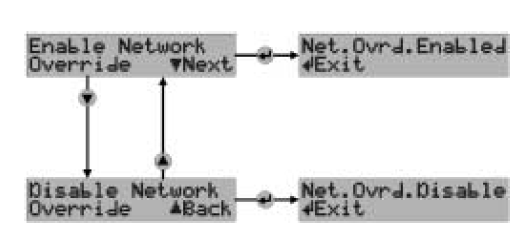
- NETWORK OVERRIDE SET-UP –This enables or disables the Network Override feature. When Network Override has been invoked the thermostat will only respond to the buttons of the thermostat; commands sent by the automation system are ignored. Pressing the Enter button activates Network Override. However, you can disable this feature if you don’t want users to be able to activate Network Override. Enabling and Disabling of this feature is done through Thermostat Set-Up (see Figure 5).
- THERMOSTAT BUTTON LOCKOUT – This feature disables the buttons of the thermostat completely, or to a limited degree. For example, the MODE and FAN status can be set and then locked, so the buttons will not allow those settings to be changed. Additionally, this can be set to allow changes for a limited time and amount of change. For example, you can limit temperature changes to ±3°, if desired (see Figure 6 ).

- SECURITY SET-UP – This prevents unauthorized individuals from accessing Thermostat Set-Up. A code can be setup that must be entered to gain entry into Thermostat Set-Up. Master key pass word is 7777 (see Figures 7 and 8 ).


- COMMUNICATIONS SET-UP – This is where the thermostat address is entered. Additionally, the total number of thermostats is entered here to optimize communication timing. This thermostat also has the ability to communicate at a baud rate of 19200, which can be selected in the Communications Set-Up. Consult a qualified service technician before changing any of the values in this Sub-Menu (Sub-Menu not shown).
- TEMPERATURE SET-UP – The first and second-stage differentials can be changed, as can the display temperature offset. The differentials set the tightness of the temperature control. If the equipment is operating too often, or the temperature swings are uncomfortably large, the differentials can be increased or decreased respectively. The temperature offset (calibration) allows the user to “customize” the temperature shown on the display. Consult a qualified service technician before changing any of the values in this Sub-Menu (Sub-Menu not shown).
- BACKLIGHTING SET-UP – Both displays have backlighting which can be controlled in three ways (see Figure 9 ). First, backlighting can be turned on every time a button is pushed. Second, it can be configured to come on with a button push, but only when the ambient light is below a preset value. When “only when needed” is selected, the user can select from two levels of ambient light. Finally, it can be disabled.

- BALANCE POINT SET-UP Balance points limit heat pump operation when the outdoor temperature is too high or too low. It requires an optional support module with an outdoor temperature sensor. Consult a qualified service technician before changing any of the values in this Sub-Menu (Sub-Menu not shown).
- DISPLAY SET-UP Here the temperature scale can be changed to °C or °F, and the temperature settings can be setup to always display or only when being changed (see Figure 10 ). The message display, when not being used for Thermostat Set-Up will, by default, scroll through three messages showing the status of the mode, fan, and equipment output, a fourth date and time can be added to this list. The date and time must be sent daily to the thermostat from the automation system to maintain the accurate time. If this programming cannot be done, it is best to not have the time and date displayed.

IN CASE OF POWER FAILURE
This thermostat does not require a battery. If the power goes out, the screen is blank. During the period the power is off, the heating/cooling system will not operate. When power is restored, the thermostat will return to the previous settings.
The thermostat is equipped with a continuous memory feature which does not require a battery.
CLEANING
If the surface of the thermostat becomes dirty it can be cleaned with plain water or with a non-abrasive household cleaner, including glass cleaner. When using any cleaner be careful not to get any into the interior of the thermostat. Do not spray any liquid directly onto the thermostat. Spray the cleaner onto a soft cloth and wipe the surface of the thermostat.
WARRANTY
ELECTRONIC THERMOSTAT TWO-YEAR LIMITED WARRANTY
Your Research Products Corporation Aprilaire® Thermostat unit is expressly warranted for two (2) years from date of installation to be free from defects in materials and workmanship.
Research Products Corporation’s exclusive obligation under this warranty shall be to supply, without charge, a replacement for any thermostat which is found to be defective within a two (2) year period and which is returned, together with the date of installation, no later than thirty (30) days after said two (2) year period by you to either your original supplier or to Research Products Corporation, Madison, Wisconsin 53701.
THIS WARRANTY SHALL NOT OBLIGE RESEARCH PRODUCTS CORPORATION FOR ANY LABOR COSTS AND SHALL NOT APPLY TO DEFECTS IN WORKMANSHIP OR MATERIALS FURNISHED BY YOUR INSTALLER AS CONTRASTED TO DEFECTS IN THE THERMOSTAT ITSELF.
IMPLIED WARRANTIES OF MERCHANTABILITY OF FITNESS FOR A PARTICULAR PURPOSE SHALL BE LIMITED IN DURATION TO THE AFORESAID TWO (2) YEAR PERIOD. RESEARCH PRODUCTS CORPORATION’S LIABILITY FOR INCIDENTAL OR CONSEQUENTIAL DAMAGES, OTHER THAN DAMAGES FOR PERSONAL INJURIES, RESULTING FROM ANY BREACH OF THE AFORESAID IMPLIED WARRANTIES OR THE ABOVE-LIMITED WARRANTY IS EXPRESSLY EXCLUDED. THIS LIMITED WARRANTY IS VOID IF DEFECT(S) RESULT FROM FAILURE TO HAVE THIS THERMOSTAT INSTALLED BY A QUALIFIED HEATING AND AIR CONDITIONING CONTRACTOR. IF THE LIMITED WARRANTY IS VOID DUE TO FAILURE TO USE A QUALIFIED CONTRACTOR, ALL DISCLAIMERS OF IMPLIED WARRANTIES SHALL BE EFFECTIVE UPON INSTALLATION.
Some states do not allow limitations on how long an implied warranty lasts or the exclusion or limitation of incidental or consequential damages, so the above exclusion of limitations may not apply to you.
This warranty gives you specific legal rights and you may also have other rights which vary from state to state.
The Aprilaire® Indoor Air Comfort System is an integrated group of air quality enhancement products designed to work with your heating and cooling systems to make your home more comfortable. For the best in indoor air quality, ask your heating and cooling contractor about these fine Aprilaire products, or visit us at www.aprilaire.com to solve your Indoor Air Comfort needs.
- Aprilaire® Automatic Humidifiers
The world’s first computer-equipped, completely automatic humidifiers. - Aprilaire® High-Efficiency Air Cleaners
Delivers the cleanest, healthiest air ever available from a whole-house air cleaner. - Aprilaire® Energy Recovery Ventilators
Your best value for a constant, controlled supply of fresh air with energy recovery. - Aprilaire® Zone Control Systems
The most reliable way to achieve temperature control in every area of your home. - Aprilaire® Electronic Thermostats
Ultra-thin, easy-to-use digital, programmable, and communicating controls featuring pinpoint accuracy.
P.O. BOX 1467
MADISON, WI 53701-1467
REFERENCE
Download Manual:
Aprilaire 8870 Communicating Thermostat Operating Instructions
 Aprilaire 8870 Communicating Thermostat Operating Instructions