
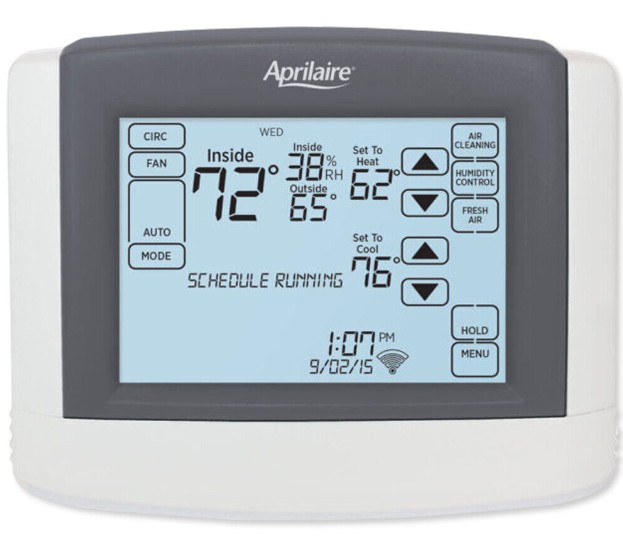
Aprilaire 8620 Programmable Thermostat
INSTALLATION
INSTALLATION LOCATION RECOMMENDATIONS
Thermostat should be mounted:
- On an interior wall, in a frequently occupied space.
- Approximately 5‘ above floor.
- At least 18” from outside wall.
- Thermostat can be mounted to a vertical junction box.
Do not mount thermostat:
- Behind doors, in corners or other dead air spaces.
- In direct sunlight, near lighting fixtures, or other appliances that give off heat.
- On an outside or unconditioned area wall.
- In the flow of a supply register, in stairwells, or near outside doors.
- On a wall with concealed pipes or ductwork.
OUTDOOR TEMPERATURE SENSOR (INCLUDED)
Outdoor temperature can be measured by attaching the included 8052 sensor to the S1 and S2 terminals. The outdoor sensor must be enabled in the installer setup menu.
Heat pump models can use the outdoor temperature to effectively utilize the heat pump:
- When the outdoor temperature is less than the Low Balance Point, the heat pump will be locked out and only auxiliary heating will be used.
- When the outdoor temperature is higher than the High Balance Point, the auxiliary heating will be locked out and only the heat pump will be used to provide heating.
Indoor Air Quality functions can use the outdoor temperature sensor to:
- Control humidification setpoint based on outdoor temperature to prevent condensation
- Lock out humidification for temperatures over 60°F or below -30°F.
- Lock out ventilation based on high and/or low outdoor temperatures.
- Display outdoor temperature on thermostat.
Outdoor temperature sensor should be mounted:
- On side of building out of direct sunlight (north side recommended).
- Above snow line.
- At least 3’ away from exhaust vents and condensing lines.
- Using less than 300’ of wire.
- Do not route wires along 120 VAC lines.

REMOTE TEMPERATURE SENSOR (OPTIONAL)
A remote temperature sensor can be used if the thermostat has to be mounted in a concealed location. A 8051 flush mount or 8053 surface mount remote temperature sensor can be attached to the T1 and T2 terminals and mounted in a recommended area. The remote sensor must be enabled in the installer setup menu. When the remote sensor is installed it overrides the internal sensor.
Remote temperature sensor should be mounted:
- On an interior wall, in a frequently occupied space.
- Approximately 5‘ above floor.
- At least 18” from outside wall.
- Using less than 300’ of wire.
Do not mount remote sensor:
- Behind doors, in corners or other dead air spaces.
- In direct sunlight, near lighting fixtures, or other appliances that give off heat.
- On an outside or unconditioned area wall.
- In the flow of a supply register, in stairwells, or near outside doors.
- On a wall with concealed pipes or ductwork.
- Near 120 VAC lines.

THERMOSTAT MOUNTING
- Remove the rear mounting plate from the thermostat.
- Pull wires through the opening on the back of the thermostat.
- Position and level the mounting plate of the thermostat on wall and mark the hole locations with a pencil.
- Drill 1/4” holes and insert supplied anchors (drywall only).
- Place mounting plate over anchors, insert and tighten screws.
- Seal wire entry holes to prevent drafts affecting temperature readings.

POWER & RESET OPTIONS
The thermostat is dual power. It can either be AC or battery powered, or both (to provide backup power for the clock). Batteries are optional if your thermostat was wired to run on AC power when installed.
For heat pump systems the C terminal must be connected to the common of the 24VAC transformer in order for the system fault and emergency heat indicators to operate.
The thermostat has a memory backup that saves the thermostat settings in case of a power interruption. The system settings will be retained but the clock will reset after 90 seconds with no battery or AC power.
The reset button located under the battery cover can be used to reset the thermostat to factory defaults. The system settings will also be reset to default.
Note: The reset button is disabled when the thermostat is removed from the wall for programming.
WIRING TERMINAL
Wire specifications:
18-24 gauge thermostat wire
Installation notes:
- Ensure power at the HVAC equipment is off.
- Loosen screw terminals, insert stripped wire and re-tighten.
- Push the excess wire back into the opening and plug the wall opening to prevent drafts.
- I1 & I2 – Indoor Air Quality control output
- C – Common (optional when powered by batteries) O/B – Reversing valve
- Y – 1st stage cooling/compressor
- Y2 – 2nd stage cooling/compressor
- G – Fan
- RC – 24VAC supply cooling1
- R – 24VAC supply heating1
- W2 – 2nd stage heat / auxiliary
- W – 1st stage heat / auxiliary
- L – System fault indicator (optional) (heat pump only) S1 & S2 – outdoor temperature sensor (included)
- T1 & T2 – remote temperature sensor (optional)
- 1 Jumper between RC & R is used in single transformer systems (see wiring diagrams).
CONVENTIONAL HEAT/COOL WIRING DIAGRAMS

HEAT PUMP WIRING DIAGRAMS
INDOOR AIR QUALITY EQUIPMENT WIRING DIAGRAMS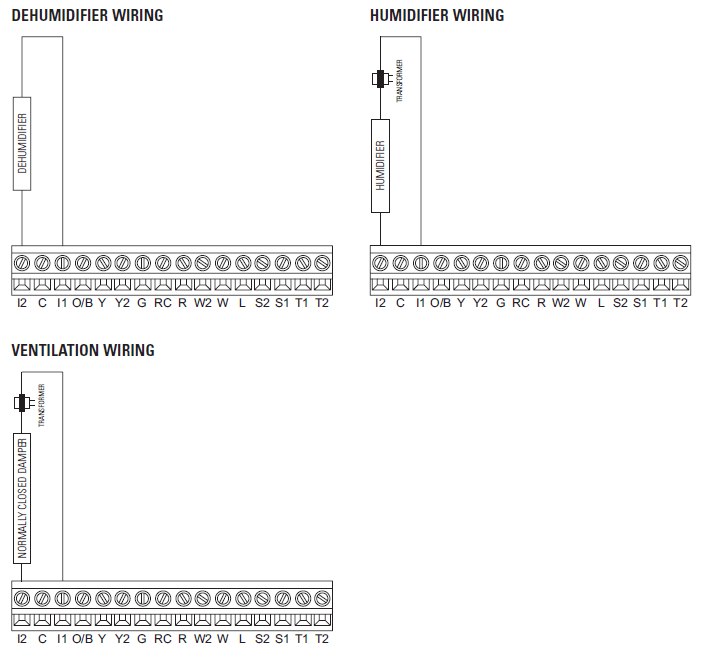
SETUP & TESTING
EQUIPMENT TYPE SELECTION SWITCH (SW1)
This thermostat has the option of being used in heat pump or heat/cool systems. Switch SW1 located on the back of the thermostat’s face is used to select this option. This setting is displayed in the Installer System Settings under Equipment Type.
Note: Thermostat reboots within 10 seconds after switch position is changed.

INSTALLER SETUP MENU
HOW TO ENTER THE INSTALLER SETUP MENU AND SELECT EQUIPMENT TO SETUP:
In the Installer Setup, HVAC or Indoor Air Quality setup can be selected. If Indoor Air Quality setup is selected, the user can then select to set up Air Cleaning, Humidification, Dehumidification or Ventilation.
- Press [MODE] to set system to OFF.
- Press [MENU] to enter main menu.
- Press and hold [SETUP] for seven seconds, [INSTALL SETUP] appears.
- Press [INSTALL SETUP] to enter installer setup menu.
- Press
 to adjust the option.
 - Press [MENU] to exit.
- Press [NEXT] to select option.
- If IAQ (Indoor Air Quality) was selected, Press or to adjust the Outdoor Sensor setting or IAQ (Indoor Air Quality) option.
- Press [NEXT] to select Outdoor Sensor setting or IAQ (Indoor Air Quality) option.
- System Settings can now be changed.

CHANGE SYSTEM SETTINGS
- Press [NEXT] or [BACK] to page through the settings.
- Pressto adjust the setting.
- Press [DONE] to save and exit, or [CANCEL] to exit without saving.
- The thermostat will discard changes and exit if nothing is pressed within 60 seconds.
- To reset the installer settings to the default, reset the thermostat by pressing the [RESET] button for 5 seconds.
SETUP & TESTING
HVAC INSTALLER SYSTEM SETTINGS TABLE
The following table contains the system settings and their details. Default settings are shown in bold. Some settings are only available dependent upon the value of other settings.
|
System setting |
Description |
factory default setting (bold) and setting range |
| 00 . Equipment Type | Equipment type set by SW1 . | Heat /Cool
Heat Pump |
| 31 . Reversing Valve | Selects O or B operation. | O – On in cooling B – On in heating |
| 01 . Control Setup | Used to lockout heating or cooling outputs. (Only available in Heat/Cool mode .) | Heat and Cool
Heat Only Cool Only |
| 02. Number of Stages | Number of equipment stages. | One
Two |
| 03. Aux Heat Stages | Number of auxiliary heat equipment stages. | One
Two |
| 04 . Temperature Scale | Set the thermostat to Fahrenheit or Celsius mode. | fahrenheit
Celsius |
| 05. Heat/Cool: Fan Control in Heating
Heat Pump: Auxiliary Equipment Type |
Heat/Cool: Determines if the thermostat or equipment controls the fan in heating .
Heat Pump: Auxiliary Equipment type. |
gas/Oil Heat (equipment controls fan) Electric Heat (thermostat controls fan) |
| 06. Extended Fan – Heat | Extends fan operation after heat call ends. | Disable
Enable (90 second extension) |
| 07. Extended Fan – Cool | Extends fan operation after cool call ends. | Disable
Enable (90 second extension) |
| 08 . Internal Temp Sensor Offset | Field adjustment of internal temperature sensor. | 0° (no offset applied)
-4°F to +4°F (-2°C to +2°C) |
| 35 . Internal RH Sensor Offset | Field adjustment of internal RH sensor. | 0 (no offset applied)
-5% to +5% |
| 09 . Auto Changeover | Enable or disable auto changeover mode . | Disable
Enable |
| 26 . Deadband | Auto Changeover mode deadband . | 3°f (2°C)
2°F to 9°F (1°C to 5°C) |
| 10 . Remote Sensor | Select if remote sensor is attached . | No
Yes |
| 11 . Outdoor Sensor | Select if outdoor sensor is attached or not . | No
Yes |
| 12. Compressor Min Off Time | Minimum off time for compressor protection. | 5 minutes
1 to 5 minutes |
| 13. Heating Min Off Time | Minimum off time for heating. | 2 minutes
1 to 5 minutes |
| 14. Equipment Min On Time | Minimum on time for heating and cooling. | 2 minutes
1 to 5 minutes |
| 15 . Auto Changeover Time | Minimum time between heating and cooling calls. | 4 minutes
1 to 5 minutes |
| 16. First Stage Differential | 1st stage differential . | 1°f (0.5°C)
1°F to 9°F (0.5°C to 4.5°C) |
| 17 . Second Stage Differential | 2nd stage differential . | 1°f (0.5°C)
1°F to 9°F (0.5°C to 4.5°C) |
| 18 . Third Stage Differential | 3rd stage differential . | 1°f (0.5°C)
1°F to 9°F (0.5°C to 4.5°C) |
|
System setting |
Description |
factory default setting (bold) and setting range |
| 19. Fourth Stage Differential | 4th stage differential . | 1°f (0.5°C)
1°F to 9°F (0.5°C to 4.5°C) |
| 20. Heat Blast | Enables the Heat Blast feature. | Disable
Enable |
| 21. Blast Offset | Amount of heating when Heat Blast is initiated. | 3°f (2°C)
3°F to 5°F (2°C to 3°C) |
| 22. Screen Lockout | Screen lockout level . (Override lockout by holding [MENU] for 7 seconds.) | Off Part Full |
| 23. Partial Lockout Type | Select lockout type . (Only available when screen lockout is set to partial .) | fan/Mode/Setpt Fan/Setpoints Setpoints Only |
| 24. Max Temp Setpoint Change In Lockout | Select temperature setpoint limits . (Only available when screen lockout is set to partial .) | 3 degrees
0 to 20 degrees |
| 41. Max Dehum Setpoint Change In Lockout | Select dehumidification setpoint limits . (Only available when screen lockout is set to partial .) | 5 percent RH
0 to 15 Percent RH |
| 25 . Stage Rate | Accumulation of equipment run time in equipment staging determination .
1 = more rapid staging of equipment (comfort) 5 = slower staging of equipment (economy) |
2
1 to 5 or “OFF” to ignore accumulated run time . |
| 27 . Progressive Recovery | Enable or disable progressive recovery . | Disable
Enable |
| 28. Low Balance Point | Outdoor temperature low balance point . (This option is only displayed if the outdoor sensor is enabled .) | 20°f (-6°C)
10°F to 50°F (-12°C to 9°C) or OFF to ignore |
| 29. High Balance Point | Outdoor temperature high balance point . (This option is only displayed if the outdoor sensor is enabled .) | 65°f (18°C)
40°F to 85°F(3°C to 18°C) or OFF to ignore |
| 30. Program Format | Select weekly program format . | 7-Day (Mon, Tue, Wed, Thu, Fri, Sat, Sun) 5/1/1 (weekdays, Saturday and Sunday) 5/2 Weekdays (weekdays and weekends) Non-Prog |
| 32 . Events Per Day | Number of program events per day. | four
Two |
| 33 . Reset Service Reminders | Clears the Change Air Filter and HVAC and Dehumidifier Service reminders if they are active and resets the start date to the current date .
Clears the Change Water Panel reminder if it is active. If the reminder is set to timed, the clock will be reset . |
No
Yes |
| 37 . HVAC Service Reminder | The period for displaying the “HVAC Service Reminder” message. | Off
1 to 12 months or “Off” to disable |
| 38. Constant Backlight | Enable constant, low intensity backlight when 24VAC is present . | Disable
Enable |
| 39. Backlight Intensity | Backlight intensity as a percentage of full on. | 100 Percent
0 to 100 Percent |
| 40 . Auto Daylight Savings | Enable or disable auto daylight savings . | Off
March (second Sunday in March to the first Sunday in November) April (first Sunday in April to the last Sunday in October) |
SETUP & TESTING
INDOOR AIR QUALITY SYSTEM SETTINGS TABLES
The following tables contain the Indoor Air Quality system settings and their details. Default settings are shown in bold. Some settings are only present dependent upon the value of other settings.
The use of the included outdoor temperature sensor (recommended) enables additional Indoor Air Quality functionality. If the outdoor temperature sensor was not enabled in the HVAC system settings, HVAC system setting 11, outdoor sensor, will be presented prior to entering the Indoor Air Quality system settings.
Please refer to the Model 8620 Owner’s Manual for further information about thermostat features.
Air Cleaning System Settings Table
|
System setting |
Description |
factory default setting (bold) and setting range |
| Air Cleaner Installed | Selects if an air cleaner is installed. (If set to no, no other air cleaning settings will be available .) | No
Yes |
| Change Air Filter Reminder | The period for displaying the “Change Air Filter” message. | Off
1 to 12 months or “Off” to disable |
Humidifier System Settings Table
Note: A humidifier can only be installed if ventilation is not installed and dehumidifier control is not set to whole home.
|
System setting |
Description |
factory default setting (bold) and setting range |
| Humidifier Installed | Selects if a humidifier is installed. (If set to no, no other humidifier settings will be available .) | No
Yes |
| Humidifier Mode | Selects auto or manual mode . Auto mode controls humidity based on the humidity setting and outdoor temperature .
Manual mode controls humidity based on the %RH setpoint. (Auto mode is only available if outdoor sensor is set to yes .) |
Auto
Manual |
| Humidity Setpoint Deadband | Select the minimum difference between the humidifier and dehumidifier setpoints . (Only available if humidifier
mode is set to manual and dehumidifier control is set to air conditioner . Available in both set-ups .) |
10 Percent RH
10 to 20 Percent RH |
| Humidifier Operation | Selects when humidification is allowed to occur relative to heating and fan operation . | Heat Only Heat or Fan Forces Fan |
| Change Water Panel Reminder | Selects the when the “Change Water Panel” message is displayed . | Off
1 Per Season 2 Per Season 300 Hours 600 Hours |
| Reminder Month (Change Water Panel Reminder set to 1 per Season)
First Reminder Month (Change Water Panel Reminder set to 2 per Season) |
Change Water Panel Reminder set to 1 per Season: Determines the month the “Change Water Panel” message is displayed .
Change Water Panel Reminder set to 2 per Season: Determines the first month the “Change Water Panel” message is displayed . |
October November December January February March April
May June July August September |
| Second Reminder Start Month | Determines the second month the “Change Water Panel” message is displayed . (Only available when Change Water Panel Reminder set to 2 per Season .) | October November December January February March April
May June July August September |
Dehumidifier System Settings Table
Note: Dehumidifier control can only be set to whole home if ventilation and humidification are not installed.
|
System setting |
Description |
factory default setting (bold) and setting range |
| Dehumidifier Control | Selects method of dehumidification.(If set to none, no other dehumidifier settings will be available .) | None (no dehumidification installed) Whole Home
Air Conditioner |
| Humidity Setpoint Deadband | Select the minimum difference between the humidifier and dehumidifier setpoints . (Only available if humidifier mode is set to manual and dehumidifier control is set to air conditioner . Available in both
set-ups .) |
10 Percent RH
10 to 20 Percent RH |
| Lockout Dehumidifier During Cooling | Selects if dehumidification is disabled during a cooling call . (Only available if dehumidifier control is set to whole home .) | No
Yes |
| Dehumidifier Forces Fan | Select if dehumidification can turn on the fan . (Only available if dehumidifier control is set to whole home .) | No
Yes |
| Dehumidifier Service Reminder | The period for displaying the “Dehum Service Reminder” message. (Only available if dehumidifier control is set to whole home .) | Off
1 to 12 months or “Off” to disable |
| Dehumidifier Overcooling Limit | Selects the amount of overcooling that can occur for dehumidification . (Only available if dehumidifier control is set to air conditioner .) | 3°f (1.5°C)
1°F to 3°F (0.5°C to 1.5°C) |
| Dehumidify in Vacation Mode | Selects if dehumidification with the air conditioner is done in Vacation Mode. (Only available if dehumidifier control is set to air conditioner . | No
Yes |
| Vacation Dehumidifier Low Temp Limit | Sets the lowest temperature the air conditioner will cool to meet RH setpoint in Vacation Mode. (Only available if dehumidifier control is set to air conditioner .) | 75°f (24°C)
70°F to 85°F (21°C to 29°C) |
Ventilation System Settings Table
Note: Ventilation can only be installed if humidification is not installed and dehumidifier control is not set to whole home.
|
System setting |
Description |
factory default setting (bold) and setting range |
| Fresh Air Vent Installed | Selects if ventilation is installed .
(If set to no, no other ventilation settings will be available.) |
No
Yes |
| Fresh Air Forces Fan | Selects if ventilation forces the fan on . | No
Yes |
| Fresh Air Setup | Selects if ventilation is configured through the ASHRAE setup or Timed. If ASHRAE setup is selected, the hourly ventilation time will be calculated using the ASHRAE recommendations . If Timed set-up is selected, the hourly ventilation time will be determined based on the Fresh Air Time value. | Timed
ASHRAE |
| Fresh Air Time | Selects how many minutes per hour that ventilation will be active . (Only available if fresh air setup is set to timed .) | 30 MIN/HR
0 to 60 MIN/HR |
| High Limit Outdoor Temp | Selects if ventilation is disabled if the outdoor temperature exceeds the outdoor high limit. (Only available if fresh air setup is set to timed and an outdoor temperature sensor is installed .) | No
Yes |
| Outdoor High Limit | Sets the high temperature limit for ventilation . (Only available if high limit outdoor temp set to yes .) | 100°f (38°C)
90°F to 100°F (32°C to 38°C) |
| Low Limit Outdoor Temp | Selects if ventilation is disabled if the outdoor temperature exceeds the outdoor low limit. (Only available if fresh air setup is set to timed and an outdoor temperature sensor is installed .) | No
Yes |
| Outdoor Low Limit | Sets the low temperature limit for ventilation . (Only available if low limit outdoor temp set to yes .) | 10°f (-11°C)
-10°F to 30°F (-23°C to -1°C) |
| High Limit Indoor RH | Selects if ventilation is disabled if the indoor RH exceeds the indoor RH limit . (Only available if fresh air setup is set to timed .) | No
Yes |
| Indoor RH Limit | Sets the high indoor RH limit for ventilation . (Only available if high limit indoor RH is set to yes .) | 60%
50% to 70% |
|
System setting |
Description |
factory default setting (bold) and setting range |
| Number of Bedrooms | Selects the number of bedrooms to be used for the ASHRAE calculation . (Only available if fresh air setup is set to ASHRAE .) | 3 bedrooms
1 to 6 Bedrooms |
| Number of Occupants | Selects the number of occupants to be used for the ASHRAE calculation . (Only available if fresh air setup is set to ASHRAE .) | 4 Occupants
1 to 10 Occupants |
| Home Size | Selects the home size to be used for the ASHRAE calculation . (Only available if fresh air setup is set to ASHRAE .) | 2500 SQ fT
1000 to 5000 SQ FT |
| Fresh Air CFM | Selects the ventilation CFM to be used for the ASHRAE calculation . (Only available if fresh air setup is set to ASHRAE .) | 60 CfM
30 to 200 CFM |
| Select Climate | Selects the climate to be used for the ASHRAE calculation . (Only available if fresh air setup is set to ASHRAE .) To determine what region you are in, refer to the map below. | Normal
Very Hot/Humid Very Cold |
| ASHRAE Cycle Time | Displays the Fresh Air Time calculated by the ASHRAE standard . (Only displayed if fresh air setup is set to ASHRAE .) | Minutes/Hour |
Note: In ASHRAE set-up temperature and humidity limits are disabled.
Note: Refer to manuals for humidifier, dehumidifier, air cleaner and ventilation products for recommended installation and operation.
CLIMATE MAP FOR ASHRAE FRESH AIR SETUP
Removal of Indoor Air Quality Control Buttons 
If any of the Indoor Air Quality control features are not installed, the corresponding button can be removed using the following procedure:
- Step 1: Verify the specific Indoor Air Quality control feature is not installed in the installer set-up (see pages 10-12).
- Step 2: From the home screen (see page 17), press and hold the IAQ button for 7 seconds.
- Step 3: The message center will display REMOVE BUTTON and the options of NO and YES (NO will be flashing).
- Step 4: Press to select YES.
- Step 5: Press [DONE].
- Step 6: The button is now removed.
Note: Once the button is removed it can be brought back by installing the corresponding Indoor Air Quality feature (see pages 10-12).
SYSTEM TEST MENU
The system test menu is used to test a system after installation. The outputs of the thermostat can be manually activated to test their function. The instructions below show how to enter the test mode and turn outputs on and off.
HOW TO ENTER THE SYSTEM TEST MENU:
- Press [MODE] to set system to off.
- Press and hold [FAN] and [MODE] for three seconds to enter system test mode.
- The first screen of the installer test displays the equipment configuration.
- Press [NEXT] to enter the first installation test or [CANCEL] to exit.
SYSTEM TEST STEPS
Heating equipment test Cooling equipment test Fan equipment test Humidification equipment test Dehumidification equipment test Ventilation equipment test
Each equipment test will begin with the selection of turning on the output or stage as shown below.
Press or to change the selection.
Press [NEXT] to accept the selection and proceed to the next step.
If YES is selected, the thermostat will test the corresponding output. If NO is selected, the thermostat will proceed to the next step.

SYSTEM TEST TABLES
| Heat / Cool Heating Equipment Test | ||||||
| Heat Type | W | W2 | Y | Y2 | g | |
| Gas | 1st Stage Test | ON | ||||
| Gas | 2nd Stage Test | ON | ON | |||
| Electric | 1st Stage Test | ON | ON | |||
| Electric | 2nd Stage Test | ON | ON | ON | ||
| Heat pump Heating Equipment Test (Electric Heat) | |||||||||
| Compressor Stages | Aux Stages |
W |
W2 |
Y |
Y2 |
O/b set to |
g |
||
| O | b | ||||||||
| 1 | 1 | 1st Stage Test | ON | ON | ON | ||||
| 1 | 1 | 2nd Stage Test | ON | ON | ON | ON | |||
| 2 | 1 | 1st Stage Test | ON | ON | ON | ||||
| 2 | 1 | 2nd Stage Test | ON | ON | ON | ON | |||
| 2 | 1 | 3rd Stage Test | ON | ON | ON | ON | ON | ||
| 1 | 2 | 1st Stage Test | ON | ON | ON | ||||
| 1 | 2 | 2nd Stage Test | ON | ON | ON | ON | |||
| 1 | 2 | 3rd Stage Test | ON | ON | ON | ON | ON | ||
| 2 | 2 | 1st Stage Test | ON | ON | ON | ||||
| 2 | 2 | 2nd Stage Test | ON | ON | ON | ON | |||
| 2 | 2 | 3rd Stage Test | ON | ON | ON | ON | ON | ||
| 2 | 2 | 4th Stage Test | ON | ON | ON | ON | ON | ON | |
Note: System Variable 31, O/B operation selects O or B.
| Heat pump Heating Equipment Test (gas Heat) | |||||||||
| Compressor Stages | Aux Stages |
W |
W2 |
Y |
Y2 |
O/b set to |
g |
||
| O | b | ||||||||
| 1 | 1 | 1st Stage Test | ON | ON | ON | ||||
| 1 | 1 | 2nd Stage Test | ON | ON | |||||
| 2 | 1 | 1st Stage Test | ON | ON | ON | ||||
| 2 | 1 | 2nd Stage Test | ON | ON | ON | ON | |||
| 2 | 1 | 3rd Stage Test | ON | ON | |||||
| 1 | 2 | 1st Stage Test | ON | ON | ON | ||||
| 1 | 2 | 2nd Stage Test | ON | ON | |||||
| 1 | 2 | 3rd Stage Test | ON | ON | ON | ||||
| 2 | 2 | 1st Stage Test | ON | ON | ON | ||||
| 2 | 2 | 2nd Stage Test | ON | ON | ON | ON | |||
| 2 | 2 | 3rd Stage Test | ON | ON | |||||
| 2 | 2 | 4th Stage Test | ON | ON | ON | ||||
Note: System Variable 31, O/B operation selects O or B.
| Heat / Cool Cooling Equipment Test | |||||
| W | W2 | Y | Y2 | g | |
| 1st Stage Test | ON | ON | |||
| 2nd Stage Test | ON | ON | ON | ||
| Heat pump Cooling Equipment Test | |||||||
|
W |
W2 |
Y |
Y2 |
O/b set to |
g |
||
| O | b | ||||||
| 1st Stage Test | ON | ON | ON | ||||
| 2nd Stage Test | ON | ON | ON | ON | |||
Note: System Variable 31, O/B operation selects O or B.
| fan Equipment Test | ||||
| W | W2 | Y | Y2 | g |
| ON | ||||
| Humidification Equipment Test | |
| I1/ I2 | g |
| ON | ON |
| Dehumidification Equipment Test | |
| I1/ I2 | g |
| ON | ON |
| Ventilation Equipment Test | |
| I1/ I2 | g |
| ON | ON |
QUICK REFERENCE TO CONTROLS & DISPLAY
HOME SCREEN

MAIN MENU

TROUBLESHOOTING
DISPLAY IS BLANK
- Check circuit breaker and reset if necessary.
- Make sure power switch at the heating & cooling system is on.
- Make sure furnace door is closed securely.
- If the thermostat is battery-powered, make sure fresh AA alkaline batteries are correctly installed.
Temperature settings do not change
Make sure heating and cooling temperatures are set to acceptable ranges:
- Heat: 40° to 90°F (4° to 32°C).
- Cool: 50° to 99°F (10° to 37°C).
Heatin g system does not respond
(“HEATING” appears on screen)
Cooling system does not respond
(“COOLING” appears on screen)
- Check for 24VAC at the equipment on the secondary side of the transformer between power and common. If voltage is not present, check the cooling equipment to find the cause of the problem
- Check for 24VAC between the cooling terminal (Y) and the transformer common. If 24VAC is present, the thermostat is functional. Check the cooling system to find the cause of the problem.
- Check for loose or broken wires between the thermostat and the cooling equipment.
Fan does not turn on in a call for heat
Check System Setting 05 (Fan Control), to make sure the fan control is properly set to match the type of system (see page 8).
Heat pump issues cool air in heat mode, or warm air in cool mode
Check System Setting 31 (O/B Operation) to make sure the reversing valve operation matches the heat pump.
Heat /cool both on at same time
- Check SW1 (Equipment Type), to make sure it is set to match the installed heating/cooling equipment (see page 8).
- Check to make sure heating and cooling wires are not shorted together.
Heatin g equipment is running in cool mode
Check SW1 (Equipment Type), to make sure it is set to match the installed heating/cooling equipment (see page 8).
“HEATING” is not displayed
- Check Installer System Setting number 01 (Control Setup) is set correctly.
- Change the System Mode to Heat, and set the temperature level above the current room temperature.
“COOLING” is not displayed Humidifier does not operate in Auto Mode
- Check Installer System Setting number 01 (Control Setup) is set correctly.
- Change the System Mode to Cool, and set the temperature level below the current room temperature.
- Check Installer System Setting number 11 (Outdoor Sensor) is set to yes.
- Verify that the outdoor sensor is functioning correctly. If the sensor is functioning correctly the outdoor temperature will display in the outdoor temperature location (see Home Screen on page 17 for the location).
Error Codes
If the thermostat enters an error mode, all outputs are turned off. The thermostat attempts to recover every 10 minutes.
If the error does not clear, use the reset button. This will return all settings back to factory default.
| Error code | Message | Error Description |
| 01 |
“SENSOR ERROR” |
Open temperature sensor circuit |
| 02 | Shorted temperature sensor circuit | |
| 04 | “EEPROM ERROR” | Error in permanent memory |
THERMOSTAT FEATURES
- Indoor air quality control.
- Humidification automatic or manual control.
- Dehumidification.
- Event-Based™ air cleaning.
- Ventilation with temperature and humidity limits.
- Temperature control.
- Heat Blast™ raises the room temperature 3°F to 5°F.
- Large touch screen with adjustable backlight – constant backlight option available.
- Message center provides feedback and instructions.
- 7 day programmability or separately programmable weekday/weekend schedules.
- Thermostat can be removed from the wall for easy programming (batteries must be installed).
- Dual power option (24VAC or battery).
- Front battery door access for fast, easy replacement.
- Displays room temperature, room humidity, temperature setting, and outdoor temperature.
- Air filter, humidifier, dehumidifier, and HVAC service reminders.
- Programmable fan control with fan circulation mode.
- Easy to use temperature control can override program schedule at any time.
- Progressive recovery ensures proper temperature at the start of a program event.
- Built in compressor protection prevents damage to your equipment.
- System test mode.
SPECIFICATIONS
| Environment | |
| Temperature | Operating: 32° to 120°F (0° to 48.9°C) Shipping: -30° to 150°F (-34.4° to 65.5°C) |
| Relative humidity | Operating: 5% to 90% R .H . (non-condensing) |
| Electrical | |
| Operating voltage | 24VAC (18 – 30VAC) |
| Current | Maximum: 2.5A (total), 1.0A (single output) Maximum surge current: 5A |
|
Power supply |
Dual power . Can be battery or 24VAC powered .
When both the sources are available, battery will be used as back up power . |
| Battery power | Battery power: AA size alkaline battery x 2 Battery life: Approximately 1 year |
| Thermal | |
| Outdoor & Remote temperature sensor | Maximum distance: 300 feet |
| Room temperature measurement | Display range: 32° to 99°F (0° to 40°C) |
| Outdoor temperature measurement | Display range: -20° to 130°F (-30° to 55°C) |
| Setpoint temperature range | Heat: 40° to 90°F (4° to 32°C) Cool: 50° to 99°F (10° to 37°C) |
| Setpoint humidity range | Humidification: 10% to 50% R .H .
Dehumidification: 40% to 90% R .H . |
P.O. Box 1467 Madison, WI 53701-1467 Phone: 800/334-6011
Fax: 608/257-4357
www.aprilairepartners.com
U.S. Patent Number 8,146,376 (and other patents pending)
© 2012 Aprilaire – A division of Research Products Corporation
Reference
Download manual: Aprilaire 8620 Programmable Thermostat Owner Guide