Siemens RDS110.R Smart Wireless Thermostat

INTRODUCTION
To control heating applications in apartments, single-family homes, dormitories, and other residential as well as commercial spaces.
- Backlit, 90 mm color LCD touch screen for intuitive local operation
- Mobile app for smartphones
- Patented1) self-learning algorithm with PID response
- Green leaf for energy-optimized operation
- Operates automatically following a schedule
- Presence detection via geo-fencing
- Multifunctional inputs for remote sensors
- Communicates with in-house devices via Thread
- Integration into any BACnet system
- Satisfies Class IV according to the Eco design directive
1) Patent pending
Room thermostat features
- Direct temperature and operating mode selection
- RoomOptiControl1) function with Green leaf indication for energy-optimized operation
- Temperature setting limitation for use in public spaces
- Air quality indication: “Good”
 , “Okay”
 , “Poor”
 Screen lock protection against unauthorized access
 - Manual switchover between “At home”, “Away” and “Off” on the touch screen
- Room temperature detection and control using the built-in temperature sensor or an optional remote sensor
- Optional temperature averaging using an additional remote temperature sensor
- Patented self-learning algorithm with PID response (patent pending) guaranteeing optimum temperature control performance in all room types
- Optimum start control function that advances the switch-on time to ensure the selected setpoint is reached as required
- Floor temperature limitation using a remote, wired sensor in electric floor-heating applications
- Humidity control using the built-in humidity sensor or an optional remote sensor
- Two multifunctional inputs, optional and configurable for remote sensors (see section Use [▶ 3] for more information)
- Periodic pump/valve operation to protect against seizing
- Navigation wizard for guided, fast commissioning
- Wireless communication with receiver RCR114.1 and radiator valve SSA911.01TH through Thread
- Local modification of BACnet settings (see the User Guide [A6V11562455] for more information)
- Remote firmware upgrade capability
Automatically detect unnecessary energy consumption in the room and display it using Green Leaf on the thermostat. When the leaf is red, the thermostat setting has been changed. Touch the red leaf to return the setting to energy-optimized operation. See the User Guide (A6V11562455) for more information on this function.
Remote operation and monitoring
- Mobile app for smartphones based on iOS and Android operating systems
- Support “Dark” and “Light” background colors on the mobile app
- Manual switchover between “At home”, “Away” and “Off” operating modes on the mobile app
- Presence detection using geofencing for energy-efficient operation
- Individual schedules for each day of the week can be programmed using the mobile app with the following operating modes (maximum 8 modes per day)
- “Comfort”: To enjoy comfort and coziness when you are at home.
- “Economy”: To save energy when maximum comfort is not required, for example, in the evening or at night.
- “Unoccupied”: To save energy costs by reducing the temperature setpoint, for example, when the room is unoccupied.
- Individual schedule for domestic hot water boiler
- User account management
- Monitoring of actual and historical temperature and humidity values
- Secure access and data transmission with the Siemens Cloud Computing Platform.
Use
The RDS110.R is designed to control heating applications in apartments, single family homes, dormitories, and other residential and commercial spaces.
The RDS110.R controls the following plant components with its peripherals:
RDS110.R with radiator valve actuator (SSA911.01TH):
- Radiator with valve (SSA911.01TH)
NOTE: The RDS110.R can control a maximum of 6 valve actuators in parallel, with the same control settings.
RDS110.R with the wireless receiver (RCR114.1):
- Gas boiler
- Radiator with pump
- Electric floor heating
- Fan with electric heating
- Floor heating with valve
- Floor heating with pump
- Electric radiator
- Electric boiler
- Generic heating device
NOTICE
When selecting the gas boiler application, ensure hydronic heating is used. The RDS110.R is not calibrated for use in combination with a gas-fired ducted heating system.
The RDS110.R can control a maximum of 6 receivers in parallel, with the same control settings.
The RCR114.1 has two relay outputs, one of which is for heating equipment (listed above).
The other relay is available to optionally control a domestic hot water (DHW) boiler, humidifier, or dehumidifier.
The RDS110.R has two multifunctional inputs, optional and configurable for:
- Operating mode switchover contact
- The thermostat switches to the “OFF” mode if the input has been configured as Normally Open. Useful for a room or key card.
- Remote room temperature sensor
- The remote temperature sensor can acquire the current room temperature. If the sensor input signal is lost, the thermostat controls the room according to the internal sensor.
- Floor temperature sensor
- The floor heating limitation function prevents the floor temperature from exceeding a preset value.
- Outside air temperature sensor
- The outside air temperature sensor can acquire outside air temperature information for display on the touch screen.
- Remote humidity sensor
- The thermostat can control a standalone humidifier or dehumidifier. The relative humidity is measured by the remote humidity sensor or internal humidity sensor.
- VOC and CO2 sensors
- Condensation monitor
- Universal contact. A notification shows up in the mobile application when the input status switches to “Normally closed” (the circuit is closed).
- Presence detector. The thermostat switches from “Unoccupied” to “Comfort” if the detector detects someone in the room. It remains in “Unoccupied” for a maximum of one hour after the last presence detection.
NOTICE
See the User guide (doc ID: A6V11562455) for more information about input configurations.
Topology

NOTES:
- Install the receiver close to the RDS110.R if possible. The communication range in a building is typically 60 m, without any blockages. Note that range can vary, because walls, floors, wireless interference and other factors may reduce the signal strength.
- Add a repeater (RCR114.1) if the connection fails due to low signal strength (distance or blockagers [walls, and so on]).
- The thermostat can only connect to one heating system. It cannot simultaneously control the wireless relay and the valve actuator.
- The thermostat can control up to six wireless relays or valve actuators.
Mechanical design
The room thermostat consists of the following parts:
- Housing front with touchscreen
- Housing rear with terminals and temperature sensor
- Metallic mounting plate for wall mounting
- Accessories
Operation and settings
| 1 | Tap to display detailed information and additional settings. |
| 2 | Tap to display additional measurements, for example, outside air temperature. (Only if external sensor is connected) |
| 3 | Tap to display notifications (only visible if applicable) |
| 4 | Room temperature |
| 5 | Tap to toggle between “At home” and “AWAY”. |
| 6 | Displays whether the thermostat is following a schedule ( ) or your setpoint changes permanently ( ) or your setpoint changes permanently ( ). Following a schedule can mean the following: ). Following a schedule can mean the following:
● If you are connected to a network and you have set your schedule, the thermostat follows your schedule. Your temporary change of the temperature setpoint only takes effect during the currently scheduled mode. ● If you are connected to a network but no schedule is set, the thermostat applies the system’s default schedule. For more information about default schedules, see Time-based schedules. ● Without a network connection or valid time, the thermostat cannot retrieve schedule information from the Cloud. It only works under the “Comfort” mode. |
| 7 | Tap or slide to change the room temperature setpoint. *
|
 The thermostat is in heating mode – at some point, the relay will be energized, depending on the heating demand and application type.
 The thermostat is not in heating mode.
NOTICE!
- There is a few seconds delay between the color change in the temperature bar and the reaction of the relays.
- After initial setup of the thermostat, the displayed room temperature may not be correct because the temperature sensors need time for calibration. Wait for at least one hour for the thermostat to calibrate.
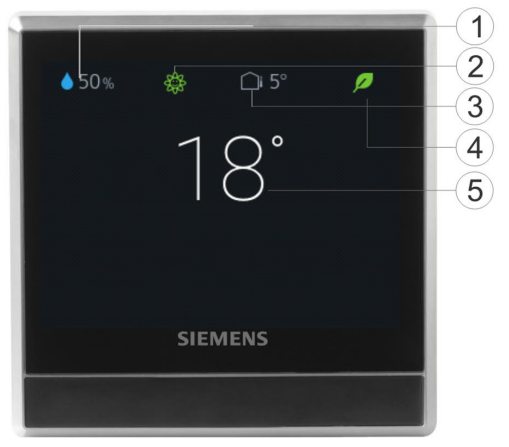
The RDS110.R screen switches to idle mode after 2 minutes of inactivity. The idle screen of the RDS110.R can be displayed as a simple screen with basic room values, or as a blank, black screen. The simple screen is the default setting.

| 1 | Relative room humidity |
| 2 | Room air quality status:“Good” , “Okay”, “Poor”
. (Displayed only if an external air quality sensor is connected to the thermostat) |
| 3 | Outside air temperature (displayed only if an external temperature sensor is connected to the thermostat) |
| 4 | Green leaf: Energy-optimized mode.
Red leaf: Tap to restore the energy-optimized mode. |
| 5 | Room temperature |
NOTE: The icons displayed in idle mode may differ if you’ve connected external sensors to your thermostat. For example, the idle screen may display room air quality status or outside air temperature if a related external sensor is connected to the thermostat. However, the relative room humidity value and green leaf indication are always displayed on the idle screen.
To set idle display
- On the Home screen, tap
 , then tap until the “Settings” page displays.
 - Tap
 and then tap
  to set the idle screen as pure blank or with values.
Type summary
| Product number | Stock number | Description |
| RDS110.R | S55772-T103 | Smart Thermostat Wireless |
Ordering
- When ordering, indicate product number, stock number and description.
- Order valve actuators separately.
Inbox items
| Items | Quantity |
| Thermostat (front and rear) | 1 |
| Metallic mounting plate | 1 |
| Set of screws and plastic insert | 1 |
| Quick guide | 1 |
| Mounting instructions | 1 |
| Activation code sticker | 1 |
| Wiring sticker | 1 |
Equipment combinations
Receiver
| Type of unit | Product number | Stock number | Datasheet* |
| Smart Thermostat Receiver | RCR114.1 | S55772-T104 | A6V11562464 |
Actuator
| Type of unit | Product number | Stock number | Datasheet* |
| Radiator valve act. THREAD | SSA911.01TH | S55181-A101 | A6V11739247 |
Remote sensors
| Type of unit | Product no. | LG- Ni1000
at 0 °C |
Pt1000
at 0 °C |
NTC 10k
at 25 °C |
DC 0…10 V | Datasheet* |
| Room temperature sensors | ||||||
| – Wall-mounted | QAA24 | x | CM1N1721 | |||
| QAA2012 | x | CE1N1745 | ||||
| QAA2030 | x | CE1N1745 | ||||
| Type of unit | Product no. | LG- Ni1000
at 0 °C |
Pt1000
at 0 °C |
NTC 10k
at 25 °C |
DC 0…10 V | Datasheet* |
| QAA2061 | x | CE1N1749 | ||||
| QAA2061D2) | x | CE1N1749 | ||||
| – Flush-mounted1) | AQR2531AN W | x | CE1N1408 | |||
| AQR2532NN W | x | CE1N1411 | ||||
| – Concealed | QAA64
(vandal-proof) |
x | CM1N1722 | |||
| Outdoor temperature sensors | ||||||
| QAC22 | x | CE1N1811 | ||||
| QAC2012 | x | CE1N1811 | ||||
| QAC2030 | x | CE1N1811 | ||||
| QAC3161 | x | CE1N1814 | ||||
| Cable temperature sensors | ||||||
| QAP21.3 | x | CE1N1832 | ||||
| QAP22 | x | CE1N1831 | ||||
| QAP21.3/800 0 | x | CE1N1832 | ||||
| QAP2012.150 | x | CE1N1831 | ||||
| QAP1030.200 | x | CE1N1831 | ||||
| Room humidity sensors | ||||||
| – Wall-mounted | QFA2000 | Owing when mountin gunit | x | CE1N1857 | ||
| – Wall-mounted including temperature | QFA2020 | x (T) | x (r.h.) | CE1N1857 | ||
| QFA2060 | x (T+r.h.) | CE1N1857 | ||||
| QFA2060D2) | x (T+r.h.) | CE1N1857 | ||||
| – Flush-mounted1) including temperature | AQR2534AN W
+ AQR2540Nx |
x (T) | x (r.h.) | CE1N1410 | ||
| AQR2535NN W
+ AQR2540Nx |
x (T+r.h.) | CE1N1410 | ||||
| Indoor air quality sensors | ||||||
| Type of unit | Product no. | LG- Ni1000
at 0 °C |
Pt1000
at 0 °C |
NTC 10k
at 25 °C |
DC 0…10 V | Datasheet* | ||
| – CO2 | QPA2000 | x | 149-910 | |||||
| – VOC + CO2 | QPA2002 | x | 149-910 | |||||
| QPA2002D1) | x | 149-910 | ||||||
| – CO2 including temperature | QPA2060 | x(CO2+T) | 149-910 | |||||
| QPA2060D1) | x(CO2+T) | 149-910 | ||||||
| – Duct-mount CO2 | QPM2100 | x | 149-909 | |||||
| – Duct-mount VOC
+ CO2 |
QPM2102 | x | 149-909 | |||||
| – Duct-mount CO2 including temperature | QPM2160 | x(CO2+T) | 149-909 | |||||
| – VOC | QPA1000 | x | CE1N1961 | |||||
| Condensation monitors | ||||||||
| – Condensation monitor | QXA2100 | A6V107410 72 | ||||||
| – Condensation monitor with offset sensor | QXA2101 | A6V107410 72 | ||||||
* The documents can be downloaded from http://siemens.com/bt/download by specifying the product number as shown in the above table.
- Requires a mounting plate and/or design frames.
- With digital display.
Accessories (Optional)
| Type of unit | Product no. | Datasheet* | |
| White decorative frame and metallic |  |
ARG100.01 | A6V11190640 |
| mounting plate for installation on rectangular conduit box (1 set) | S55772-T102 | ||
NOTE: Accessories are not included with the unit and should be ordered separately.
* The documents can be downloaded from http://siemens.com/bt/download by specifying the product number as shown in the above table.
Product Documentation
| Topic | Title | Document ID |
| Mounting and installation | RDS110.R Mounting instruction | A6V11562441 |
| Installation and operation | RDS110.R User guide | A6V11562455 |
| Startup wizard | RDS110.R Quick guide | A6V11562445 |
| CE declaration | A6V11802452 | |
| Product environmental declaration | A6V11806767 | |
Related documents such as environmental declarations, CE declarations etc., can be downloaded from http://siemens.com/bt/download.
Notes
Security
CAUTION
National safety regulations
Failure to comply with national safety regulations may result in personal injury and property damage
● Observe any national provisions and comply with appropriate safety regulations.
Engineering
See the product documentation for information on engineering, selection and sizing connecting cables for supply voltage and field devices.
Installation
The mounting plate of the thermostat can be installed on CEE/VDE conduit boxes and on square boxes 75 x 75 mm. For installation on a rectangular conduit box (for example 105 x 72 mm), accessory ARG100.01 must be ordered, which includes a white decorative frame and a bigger mounting plate.
WARNING
No internal line protection for supply lines to external consumers Risk of fire and injury due to short-circuits
- Adapt the line diameters as per local regulations to the rated value of the installed overcurrent protection device.
- The AC 230 V mains supply line must have an external circuit breaker with a rated current of no more than 10 A.
- Use only AC 230 V isolated wired cables, as the conduit box carries AC 230 V mains voltage.
- Inputs X1-M-X2: Several switches may be connected in parallel. Consider the overall maximum contact sensing current of the switch rating.
- Disconnect from power supply before removing the thermostat cover.
Commissioning
See the Quick guide and User guide (see Product Documentation) to configure your device.
Commissioning includes the following:
- Internet connection
- Application setup
- Account registration and device pairing
NOTE:
Before configuring your thermostat, ensure that you are connected to the Internet, have a valid email address, and a smartphone.

Mounting
Note the following when mounting the unit:
- The devices are suitable for wall mounting.
- Recommended height: 1.50 m above the floor.
- Do not mount the devices in recesses, on shelves, behind curtains or doors, or above or near heat sources.
- Avoid direct sunlight.
- Seal the conduit box or the installation tube if any, as air currents can affect sensor readings.
- Observe to allowed ambient conditions.
Operation
End users can operate the thermostat directly on the touch screen, or download the mobile app “Siemens Smart Thermostat RDS”and perform operations on their smartphones, including:
- Creating and managing accounts
- Setting the operating mode (Auto, away, home, manual)
- Changing the room temperature (by setting new setpoints)
- Setting a weekly schedule (heating and domestic hot water)
- Opting for geo-fencing
- Selecting the Green leaf (switching to energy-optimized operation)
- Viewing temperature, humidity and heat demand trends
Supported smartphone types are as follows:
Operating system
| OS | OS version | App store |
| iOS | iOS 12 or above | App store® |
| Android | AndroidTM 10.0 or above | Google PlayTM |
Maintenance
The thermostat is designed for maintenance-free operation.
Disposal
The device is considered an electronic device for disposal in accordance with European Guidelines and may not be disposed of as domestic garbage.
- Dispose of the device through channels provided for this purpose.
- Comply with all local and currently applicable laws and regulations.
Warranty
Technical data on specific applications are valid only together with Siemens products listed under “Equipment combinations”. Siemens rejects any and all warranties in the event that third-party products are used.
Radio equipment directive
The equipment is using harmonized frequency in Europe and complies with the Radio
Equipment Directive (2014/53/EU, formerly 1999/5/EC).
Technical data
Power supply
| Power supply | |
| Operating voltage | AC 230 V (+10% / -15%) |
| Frequency | 48…63 Hz |
| Power consumption | Max. 9 VA |
| Standby power consumption (LCD off) | 1.6 W |
| Maximum external supply line fusing | 10 A circuit breaker |
Radio parameters
| Radio parameters | |
| Frequency band | 2.4…2.4835 GHz |
| Maximum radio-frequency power | 18 dBm |
| WLAN standard | IEEE 802.11b/g/n (HT20) |
| WLAN channel | 1~13 |
| Frequency band | 2.4…2.4835 GHz |
| Maximum radio-frequency power | 15 dBm |
| Thread standard | IEEE 802.15.4 |
| Thread channel | 11-26 |
Inputs
| Connections to multifunctional inputs X1 – M – X2 | |
| Passive temperature sensors
– Cable length max. (copper cable section)
– NTC type Room temperature range Outdoor temperature range Floor temperature range*
– Ni type Room temperature range Outdoor temperature range Floor temperature range*
– Pt type Room temperature range Outdoor temperature range Floor temperature range* |
90 m (1.5 mm2 wire), 70 m (1 mm2 wire) 60 m (0.75 mm2 wire), 40 m (0.5 mm2 wire)
NTC10K at 25 °C 0…50 °C -50…80 °C -50…80 °C
Ni1000 at 0 °C 0…50 °C -50…80 °C -50…80 °C
Pt1000_375/Pt1000_385 at 0 °C 0…50 °C -50…80 °C -50…80 °C |
| Active DC 0 V …10 V sensors
– Room temperature range (default) – Outdoor temperature range (default) – Humidity range (default) – CO2/VOC range (default) – Floor temperature range* |
Min./max. configurable via parameters 0…50 °C
-50…80 °C 0…100% 0…2000 ppm -50…80 °C |
| Digital contacts
– Operating action – Contact sensing – Parallel connection – Input function |
Selectable NO/NC DC 14…40 V, 8 mA (typ.) Maximum 20 thermostats per switch Selectable |
* Available when electric heating is energized.
Operational data
Setpoint setting range
0…50 ℃
12…35 ℃ (default)
| Built-in room temperature sensor | ||
| Temperature range 0…50 ℃ | Accuracy at 25 ℃
±0.5 K |
Display resolution
0.5 K |
| Built-in room humidity sensor | ||
| Humidity range 0%…100% | Accuracy at 25 ℃
±5% r.h. |
Display resolution 1% |
Connections
| Interfaces | |
| Micro USB | A service port is limited to firmware upgrades and onsite diagnosis by professionals. |
| Wiring connections | |
| Screw terminal | Solid wires or prepared stranded wires: Maximum 1 × 0.5… 2.5 mm2 (14…20 AWG) |
Conformity
| Ambient conditions and protection classification | |
| Safety class as per EN60730 | Class II |
| Degree of protection of housing as per EN 60529 | IP30 |
| Classification as per EN 60730 | |
| Function of automatic control devices | Type 1 |
| Operation altitude | < 3000 m |
| Degree of contamination | 2 |
| Overvoltage category | III |
| Climatic ambient conditions | |
| Transport (packaged for transport) as per EN 60721-3-2
Storage as per EN 60721-3-1 Operation as per EN 60721-3-3 |
Transport/ Storage:
Temperature -25…60 °C (-13… 158 °F) Air humidity 5…95% r.h. (non-condensing) Operation: Temperature 0…50 °C (23… 122 °F) Air humidity 5…95% r.h. (non-condensing) |
| Mechanical ambient conditions | |
| Transport as per EN 60721-3-2 Operation as per EN 60721-3-3 | Class 2M2 Class 3M2 |
| Standards, directives and approvals | |
| EU conformity (CE) | A6V11802452*) |
| RCM conformity | A6V11231674*) |
| Environmental compatibility | The product environmental declaration A6V11806767*) contains data on environmentally compatible product design and assessments (RoHS compliance, materials composition, packaging, environmental benefit, disposal). |
| Eco design and labeling directives | |||
 |
Based on EU Regulation 813/2013 (Eco design directive) and 811/2013 (Labelling directive) concerning space heaters, combination heaters, the following classes apply: | ||
| Application with On/Off operation of a heater | Class I | Value 1% | |
| PWM (TPI) room thermostat, for use with On/Off output heaters | Class IV | Value 2% | |
General data
| General | ||
| Dimension | See Dimensions | |
| Weight | Thermostat with package, user document and accessory | 534 g |
| Thermostat | 219 g | |
| Color | Silver plating
Housing: Pantone black |
|
Diagrams
Connection terminals

NOTICE! External loads on L and N are not allowed.
| Terminal | Use |
| L, N | Operating voltage AC 230 V |
| X1, X2, M | Multifunctional inputs |
Wiring diagrams

L, N Operating voltage AC 230 V B1, B2 External sensors
X1, X2, M Multifunctional inputs S1, S2 External switches
Application examples


| N1 | RDS110.R |
| N2 | RCR114.1 |
| F1, F2 | Limit thermostats |
| K1 | Heat generator (example, boiler) |
| Y1 | Magnetic valve |
| Y2 | Domestic hot water boiler |
| Y3 | Valve |
| Y4 | SSA911.01TH |
| M1 | Circulating pump |
Dimensions
RDS110.R
ARG100.01
Revision history
| Edition | Date | Software version | Changes | Section | Pages |
| 2 | July 2021 | 45.4.46 | Removed information about window contact. | Installation | 10 |
| 1 | September 2019 | 45.4.44 | New document | — | — |
Issued by
Siemens Switzerland Ltd Smart Infrastructure Global Headquarters Theilerstrasse 1a CH-6300 Zug
+41 58 724 2424
www.siemens.com/buildingtechnologies
© Siemens Switzerland Ltd, 2021
Technical specifications and availability are subject to change without notice.
References:
Download Manual
Siemens RDS110.R Smart Wireless Thermostat User Guide
OTHER MANUAL
Siemens RDS110.R Smart Wireless Thermostat Quick Guide
