OJ ELECTRONICS MCC4 Clock thermostat Instruction Manual
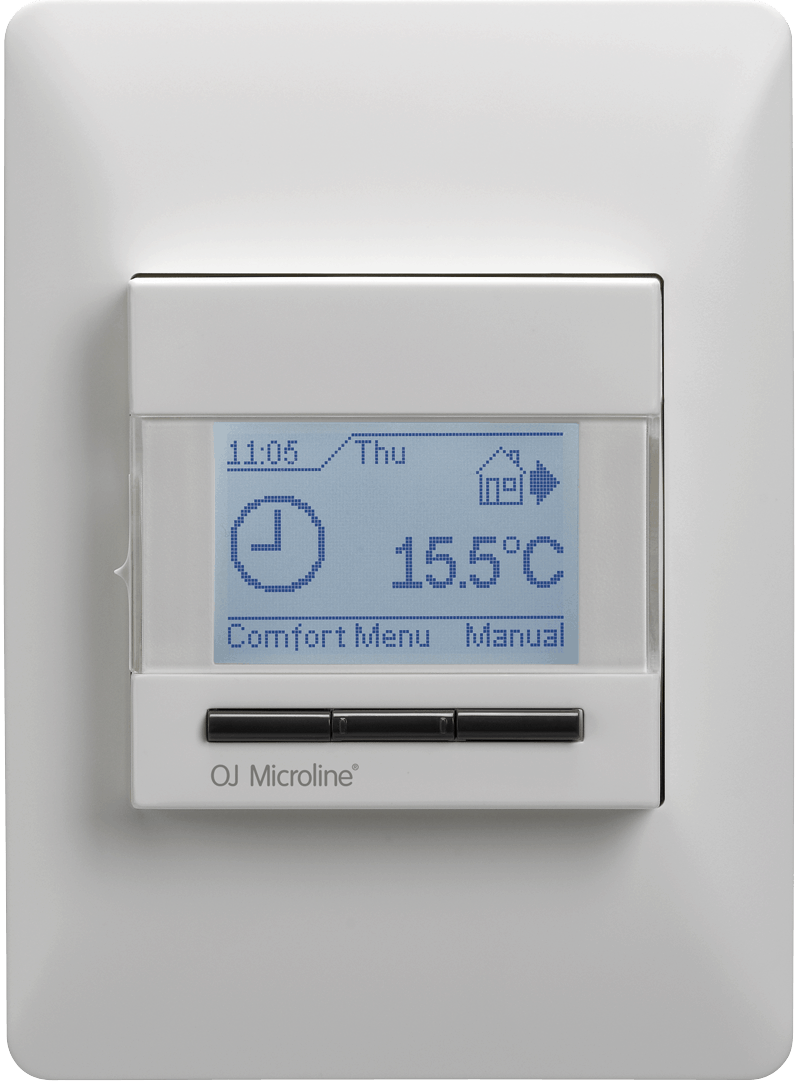
DIMENSION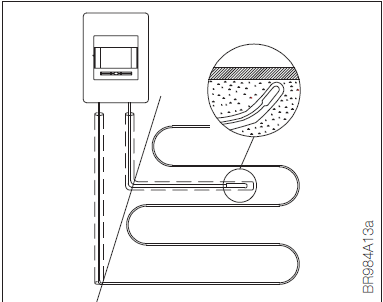
INTRODUCTION
The thermostat is an electronic on/off thermo-stat for temperature control by means of an NTC sensor located either externally or inter-nally within the thermostat.
The thermostat is for flush mounting in a wall socket. A baseplate for external wall mounting is available.
IMPORTANT SAFETY INSTRUCTIONS
Warnings: To avoid electric shock, disconnect the heating system power supply at the main panel before carrying out any work on this thermostat and associated components.
- Installation must be carried out by qualified per-sonnel in accordance with appropriate statutory regulations (where required by law).
- Installation must comply with national and/or local electrical codes.
Cautions
This instruction must be observed, oth-erwise the liability of the manufacturer shall be voided.
Any changes or modifications made to this thermostat shall void the liability of the manufacturer.
Maximum product lifetime is achieved if the product is not turned off but set at the lowest possible set point / frost protection when heat is not required.
Notice
The language used in the original docu-mentation is English.
Other language versions are a transla-tion of the original documentation.
OJ cannot be held liable for any errors in the documentation. OJ reserves the right to make alterations without prior notice.
Content may vary due to alternative software and/or configurations.
PRODUCT PROGRAMME
Thermostat
- MCC4-1991-UA Clock-thermostat incl. floor sensor.
- MCC4-1999-UA Clock-thermostat with built-in room sensor.
- MCD4-1999-UA Clock-thermostat with 2 sensors. Floor sensor and built-in room sensor.
INSTALLATION
Mounting of sensor
- The terminals for the sensor contain a safety extra-low voltage (SELV) circuit, allowing the sensor to be placed as close to the floor surface as necessary without the risk of electric shock, should the sensor cable become damaged
Sensor cable recommendations
- The following recommendations apply to all temperature sensor cables:
- The sensor cable may be extended with ad-ditional two-core cable (max. sensor extension, see technical specification).
- The two wires from the sensor to the thermostat must be kept separate from high voltage wires/cables. Place the sensor cable in a separate conduit or segregate it from power cables in some other way. Never use two vacant wires in a multi-core cable.
- Shielded cable does not connect the shield to earth (PE).
- Mounting of external floor sensor
- Insert the cable and sensor into a non-conduc-tive conduit embedded in the floor.
- The end of the conduit must be sealed and the conduit placed as high as possible in the concrete layer.
- The floor sensor must be centred between loops of heating cable.
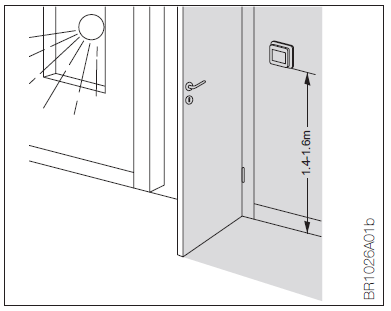
- Mounting of thermostat with built-in room sensor
- The thermostat must be mounted on the wall approx. 1.4 – 1.6 m above the floor in such a way as to allow free air circulation around it. Draughts and direct sunlight or other heat sources must be avoided.
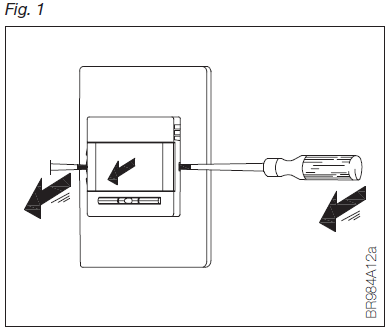
Opening the thermostat
- Slide the power button down to Off “0”.
- Release the front cover ONLY by inserting a small screwdriver into the hole on either side of the thermostat (fig. 1).
Connections
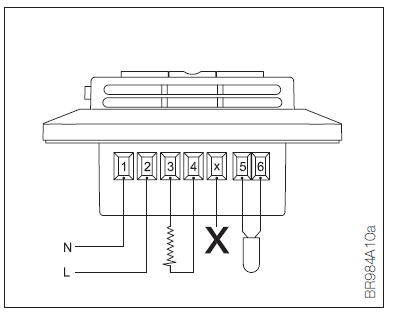
Ensure that the main and load cables are con-nected as shown in the figure.
- Term. 1: Neutral (N
- Term. 2: Phase (L) 230 V ±10%, 50/60 Hz Term. 3–4: Load, max. 16 A / 3600 W
- Term. X: Do not connect
- Term. 5-6: External floor sensor
Mounting of thermostat
- Connect the wires in accordance with the diagram (fig. 2).
- Mount the thermostat in the wall socket. Please note that the adapter plate is properly clipped on the thermostat.
- Fit the frame and carefully press the cover onto the thermostat. Ensure that both the power slide button on the cover and the power switch pin are down.
- Click the cover into place by applying light, even pressure. Warning! Do not apply pres-sure to the corners of the display cover.
DO NOT open the thermostat by releasing the four fixing clips on the back.
OPERATING THE THERMOSTAT
First time settings
The first time the thermostat is connected, push the power slide button to On “I”. Language, time and date must be set using the buttons:
- Set language
- Set time
- Set date
Programming
See user manual.
Fault location
If the sensor is disconnected or short-circuited, the heating system is switched off. The sensor can be checked against the resistance table
(fig. 5).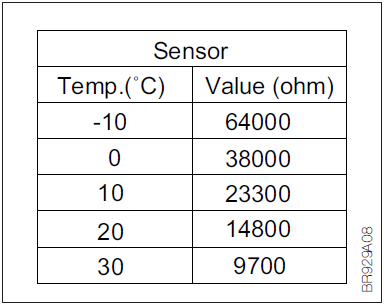
Error codes
- E0: Internal error. The thermostat must be replaced.
- E1: Built-in sensor short-circuited or disconnected.
- E2: External sensor short-circuited or disconnected.
- E5: Overheating, The temperature is too high in the thermostat and switch off the heating.
MAINTENANCE
The thermostat is maintenance free.
Keep the thermostat’s air vents clean and unob-structed at all times.
The thermostat may only be cleaned with a dry cloth.
APPROVAL AND STANDARDS
Regulations
OJ Electronics A/S hereby declares that the product is in conformity with the following direc-tives of the European Parliament:
- LVD – Low Voltage Directive
- EMC – Electromagnetic Compatibility
- RoHS – Restriction of the use of certain Hazardous Substances
- WEEE – Waste Electrical and Electronic Equip- ment Directive
Applied standards
According to the following standard:
- EN 60730-1
- EN 60730-2-9
Classification
Protection from electric shock must be assured by appropriate installation. Must be installed according to the requirements of Class II (rein-forced insulation).
DISPOSAL AND RECYCLING Environment and recycling
Protect the environment by disposing of the package in compliance with local regulations for waste processing.
Recycling of obsolete appliances Equipment containing electrical components must not be disposed of along with domestic waste.
It must be separately collected to-gether with electrical and electronic waste in accordance with current local regulations.
TECHNICAL SPECIFICATIONS Safty
- Control pollution degree……………………………… 2
- Software class………………………………………….. A
- Built-in circuit breaker………………… 2-pole, 16 A
- Enclosure rating..………………………………….. IP 21
- Overvoltage category………………………………… III
- Rated impulse voltage……………………………. 4 kV
- Ball pressure temperature (TB)……………… 125°C
- SELV limits realised…………………………. 22 V DC
- Temperature range (ambient).…………… +0/+25°C
Supply
- Voltage ..…………………. 230 VAC ±10% 50/60 Hz
- Max. pre-fuse……………………………………….. 16 A
Output
- Output relay………….. Make contact – SPST – NO
- Output…………………………… Max. 16 A / 3600 W
Mounting
- Terminal wire size……………………… 1.5 – 2.5 mm2
- Method of mounting ………………………………Must be mounted independently in a wall box in the fixed installation.
- Dimensions………………… H/115, W/84, D/40 mm
- Build-in depth……………………………………. 20 mm
- Sensor type…………………………………..NTC 12kΩ
- Max. sensor extension…………….3 m / max 30 m
- Features
- Temperature range…………………………. +5/+40°C
- Control principle.……………………………… PWM/PI
- Purpose and construction of control……………….. Electronic room thermostat for regulating electric under floor heating
- Type of action.……………………………………….. 1.B
- Stand-by power.…………………………………. 0.6 W
- Battery backup.………………………………… 5 years
- Display.…….. 100×64 pixel STN – white backlight
- Patent
- EU Registered Design ……… 001101349-0001/2
CONTACT INFORMATION OJ ELECTRONICS A/S
- Address: Stenager 13B · DK-6400 Sønderborg
- Tel: +45 73 12 13 14 ·
- Fax: +45 73 12 13 13
- [email protected] ·
- www.ojelectronics.com
REFERENCE:
DOWNLOAD MANUALS:
OJ ELECTRONICS MCC4 Clock Thermostat Instruction Manual
OTHER MANUALS:
OJ ELECTRONICS MCC4 Clock thermostat User Manual