OJ ELECTRONICS MWD5-WiFi WiFi Thermostat
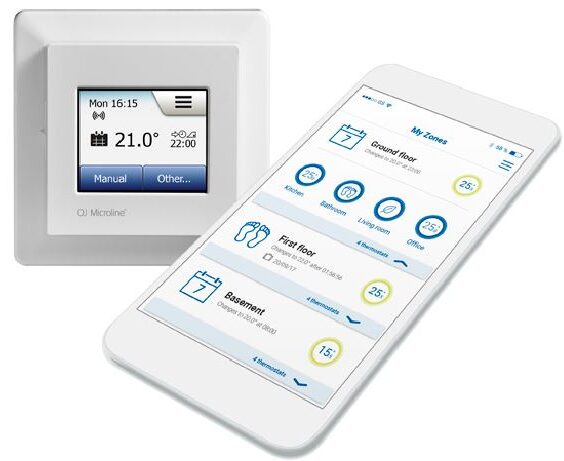
- Remote access and control via a user-friendly app
- Simple set-up with the installation wizard
- For individual control or heating zone control
- No gateways required
Full control. Any time, anywhere
The OJ Microline® WiFi Thermostat MWD5 allows users to control electric underfloor heating systems on any scale via an app, giving them easy access to full control.
Key features are
- Troublefree setup and use
- No Gateway required
- Redundant control – full control at the thermostat
- Full app control of
- Heating Zones
- Individual thermostats
- Heating schedules
- Heating Modes
- Support of Multiple User Access
Individual control or heating zones? You decide
- With the OJ Microline® WiFi Thermostat MWD5 users can choose to have each thermostat individually controlled – or to combine them in one or more jointly controlled heating zones.
- The system can be easily expanded and reconfigured to match changing needs.
Easy control – and full details
- The OJ Microline® app makes it easy for users to organize their thermostats to exactly match their temperature control needs. What is more, detailed information on energy consumption, etc. allows users to control the heating to maximize their energy savings.
High system accessibility
- even if Internet access is interrupted
- The robust system design means that users will retain full control of the heating even if their Internet access is interrupted.
- Users can always access all programming options and functions via the built-in display you already know from the OJ Microline® Touch Thermostat MCD5 2” color touchscreen.
Demission
Easy, fully guided commissioning
Each OJ Microline® WiFi Thermostat MWD5 has built-in WiFi, which means that you won’t need any additional components such as gateways.
The built-in wizard takes you simply and swiftly through every single step, ensuring trouble-free commissioning.
Connecting to the app takes seconds
The user-friendly OJ Microline® app, available for Android and IOS, offers detailed assistance on how to install and connect with the MWD5 thermostat.
Key features are
- Multiple languages for the highest user-friendliness
- Wizard guidance for trouble-free installation
- Integrated QR-reader for easiest connection with thermostats
- Full graphical user interface for ease of use
- Extensive system information for easy support
PRODUCT PROGRAMME
- Type: Product
- MCD5-1999-xxPx: 2” Touch Thermostat
- MWD5-1999-xxPx: 2” Touch + Wifi Thermostat
- MWD5-1999-xxCx: 2” Touch + Wifi + Voice Control Thermostat
TECHNICAL DATA
- Purpose of control Electric underfloor heating
- Method of mounting. Wall mounted in a socket or mounting box
- Supply voltage 100-240 VAC ±10% 50/60 Hz
- Max. pre-fuse 16 A
- Built-in interpreter 2-pole, 16 A
- Enclosure rating IP 21
- Wire size, terminals
- Current ≤ 13 A – 1.5 mm2, solid core wire
- Current > 13 A to 16 A – 2.5 mm2, solid core wire
- ELV limits realized SELV 24 VDC
- Output relay Make contact – SPST – NO
- Output, load Max. 16 A / 3600 W
- Max. Load/supply 1800 W at 120 Vac
- 3120 W at 208 Vac
- 3600 W at 240 Vac
- Control principle PWM/PI
- Standby consumption ≤0.5 W
- Battery backup 5 years (storage)
- Battery life, typically 5 years (storage) and 10 years (powered)
- RF frequency band* 2.4 GHz
- WIFI IEEE 802.11 b/g/n – 2.4GHz
- Security WPA/WPA2
- Dimensions H/84, W/84, D/40 mm
- Build-in depth 22mm
- Weight ≤200 g
- Display 176×220 pixels TFT – resistive touch
- Control pollution degree 2
- Overvoltage category III
- Type of action 1. B
- Software class A
- Rated impulse voltage 4kV
- Ball pressure-temperature (TB) 125°C
- EU registered design DM/082270
- Note: At very low ambient temperatures the display may respond slowly.
OJ can accept no responsibility for possible errors in catalogs, brochures, and other printed material. OJ reserves the right to alter its products without notice. This also applies to products already on order provided that such alterations can be made without subsequential changes being necessary in specifications already agreed. All trademarks in this material are the property of the respective companies. OJ and the OJ logotype are trademarks of OJ Electronics A/S. All rights reserved.
FHEL-1-02.22-MWD5-Wifi-GB · Subject to alterations · ® The OJ trademark is a registred trademark belonging to OJ Electronics A/S
© 2022 OJ Electronics A/S
REFERENCE:
DOWNLOAD MANUALS:
OJ ELECTRONICS MWD5-WiFi WiFi Thermostat Product Specifications Guide
OTHER MANUALS:
OJ ELECTRONICS MWD5-WiFi WiFi Thermostat User Manual

OJ ELECTRONICS MWD5-WiFi WiFi Thermostat Product Specifications Guide