De Dietrich Smart TC° Connected Room Thermostat

Connected room thermostat: for remote control of heating and domestic hot water production via an app available for free download
The SMART TC° app is free to download from Play Store and Apple Store, and is compatible with any smartphone and tablet with an Android or IOS (Apple) operating system (not compatible with Windows 10).
SMART TC° can be connected as a room sensor on all our appliances (boilers or heat pumps) equipped with a Diematic Evolution, E-Pilot or IniControl 2 panel. But it can also be installed on all appliances equipped with an Opentherm room sensor or ON/OFF thermostat input.
SMART TC°: FOR PERFECT CONTROL OF YOUR INSTALLATION
- The De DIETRICH SMART TC° connected room thermostat and its free appli-cation enable communication with a central heating system.
- There are different versions of SMART TC° to adapt to the different commu-nication buses on the market.
- The same application can be used to control the different versions of SMART TC° :
- SMART TC° – R-Bus (De Dietrich proprietary bus) – wired version
- SMART TC° – OpenTherm and ON-OFF – wired version
- SMART TC° RF – R-Bus and OpenTherm and ON-OFF – wireless version
- When connected to the internet, it is possible to control the heating and domestic hot water production from a smartphone or tablet, at any time and from anywhere.
- The SMART TC° can be connected to several smartphones, allowing any member of the family to control the heating.
- A smartphone can control several SMART TC°s: the main and secondary residences.
OVERVIEW OF SMART TC°
THERMOSTAT WIRED
The SMART TC° connected room thermostat works like a classic room sensor, and is easy and intuitive to set up and use: only two buttons activated by a brief or long press, and a knob for scrolling through the menus, selecting and accessing options and confirming modifications. The entire heating and domestic hot water production system can be controlled very precisely in manual or programmed mode: temperature settings, 3 weekly programs with quick programming guide, holiday mode configuration, consumption monitoring, secure installer access to advanced parameters and the log, etc.

OVERVIEW OF THE MAIN MENU AND ITS SETTINGS
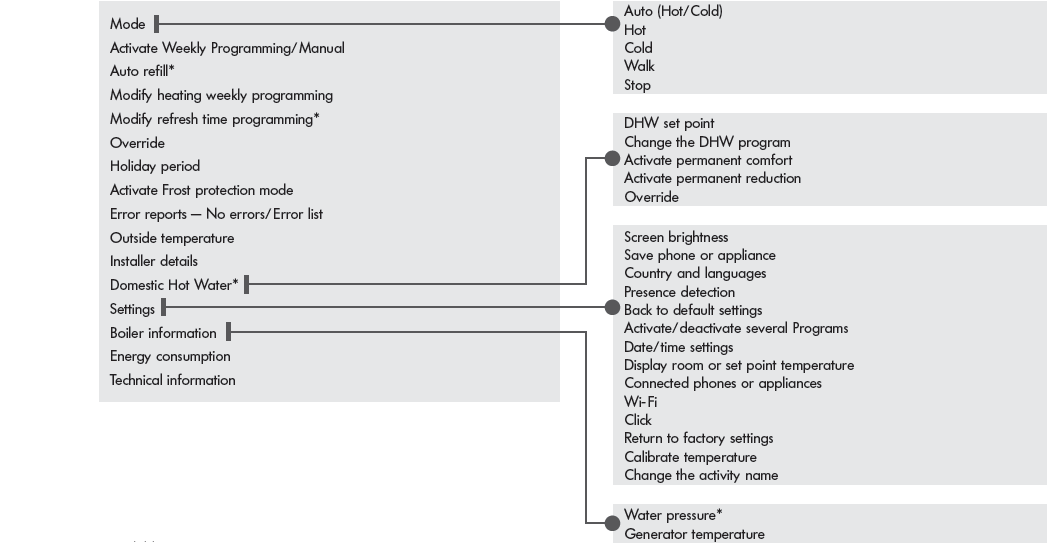
available according to model
EXEMPLES
OVERVIEW OF SMART TC° RF
THERMOSTAT WIRELESS
The SMART TC° connected room thermostat works like a classic room sensor, and is easy and intuitive to set up and use: only two buttons activated by a brief or long press, and a knob for scrolling through the menus, selecting and accessing options and confirming modifications. The entire heating and domestic hot water production system can be controlled very precisely in manual or programmed mode: temperature settings, 3 weekly programs with quick programming guide, holiday mode configuration, consumption monitoring, secure installer access to advanced parameters and the log, etc.

OVERVIEW OF THE MAIN MENU AND ITS SETTINGS

- available according to model
WARNING: the time programme and holiday mode settings are only accessible from the application
EXEMPLES
COMMON APPLICATION FOR WIRED AND WIRELESS VERSIONS
If you prefer to control your system remotely via a smartphone or tablet, you will need to download the “SMART TC” app The app’s home screen has a user wizard.
HOME SCREEN

USER WIZARD SCREEN
BASIC USER FUNCTIONS
- Complete overview of weekly programming
- 3 programs to be defined with temperature time range selection (Caution: programming must be activated in the “Settings” menu of the SMART TC° thermostat):
- a quick programming guide,
- holiday mode configuration,
- monitoring of the consumption expressed in € or kWh for heating and DHW production
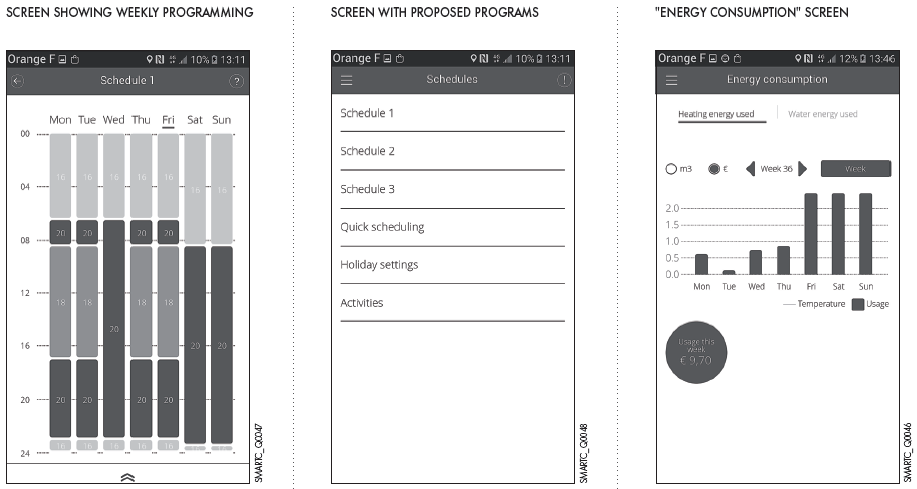
IMPORTANT: Quick programming, accessible in the main menu under “Programs”, guides you bys asking questions and configures the programming based on your responses.
APPLICATION
ADVANCED FUNCTIONS, INSTALLER ACCESS: The SMART TC° can be connected to several smartphones or tablets: each member of the family can access the system and control it remotely.
It is also possible to grant secure access to your installer to perform initial diagnostics or access advanced functions sending him/her a temporary login code by invitation. The installer is responsible for downloading the app to his/her smartphone or tablet, creating an account and confirming in his/her inbox.
“CONNECTED APPLIANCES” SCREEN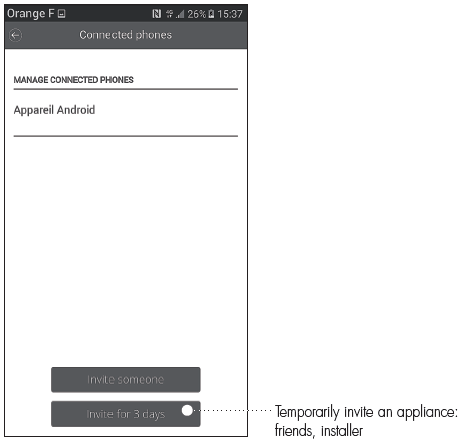
CONNECTION CODE
The installer will therefore have access to the system parameters in his/her menu: e.g. heating curve.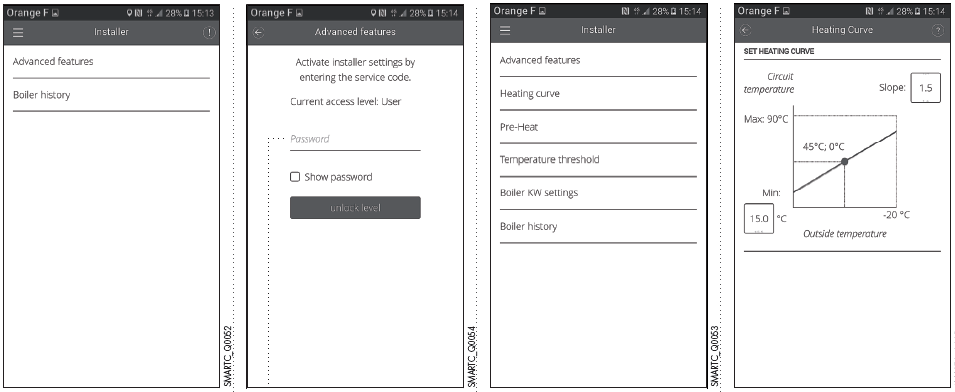
COMMISSIONING THE SMART TC°
DELIVERY
The SMART TC° (package AD311) is supplied as standard with an interface that enables it to communicate with the heating system. The SMART TC° RF (package AD341) is supplied as standard with an interface that enables it to communicate with the heating system.
MAIN DIMENSIONS

LOCATION: The wireless version can either be installed on a piece of furniture or fixed to the wall in a reference room. The SMART TC° wired thermostat is installed on the wall in a reference location. One SMART TC° can be installed per heating circuit.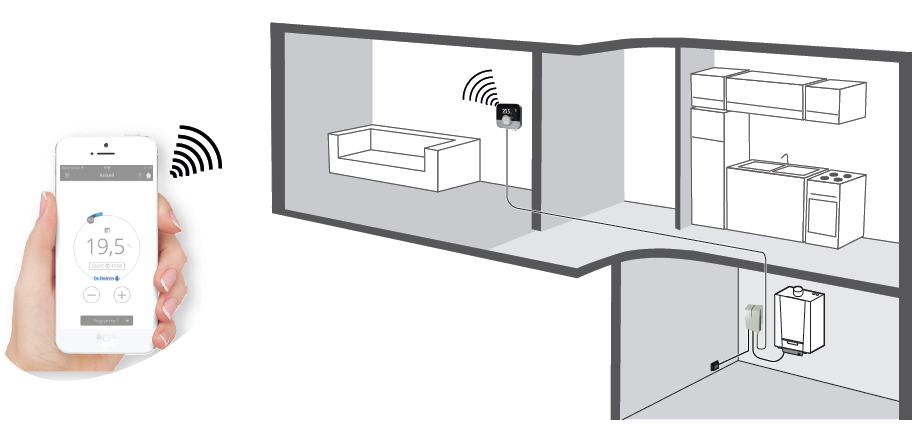
INSTALLATION PRINCIPLE
ELECTRICAL CONNECTION
SMART TC° is connected to the room sensor terminal block (green label) either directly or via a wired or wireless interface.
TRANSFORMATEUR D’ALIMENTATION DE L’INTERFACE
INFO: Prise non fournie pour la version RF.To connect the interface to the boiler, use the connection terminals for the room sensors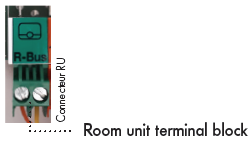
MONITORING
The interface is equipped with an LED that allows the connection status to be quickly analysed.
REMARKS
- When the SMART TC° is connected, it can receive available updates,
- The SMART TC° can operate without being connected to the Wi-Fi. In this case, it operates like a conventional room sensor.
CONNECTING THE SMART TC° TO A SMARTPHONE OR TABLET
Connection is a 4-step process:

- Connect the SMART TC° to the home Wi-Fi: in Parameters, “Settings menu”, go to the Wi-Fi line and enter a password

- Launch the app and wait for it to request a pairing code from the SMART TC°
- I n Parameters, SMART TC° “Settings menu”, select “Save phone or appliance”
- A code (or QR code) is generated. Enter it in the phone
- Complete the saving process:
- create an account on the smartphone (or tablet) by entering an email address.
- confirm the account in your inbox.
BDR THERMEA France
- ADDRESS: S.A.S. with corporate capital of 229 288 696 € 57, rue de la Gare – F – 67580 Mertzwiller
- Tel. +33 3 88 80 27 00 –
- Fax +33 3 88 80 27 99
- www.dedietrich-heating.com
REFERENCE:
DOWNLOAD MANUALS:
De Dietrich Smart TC° Connected Room Thermostat User Manual