lifesmart LS130 Smart Thermostat
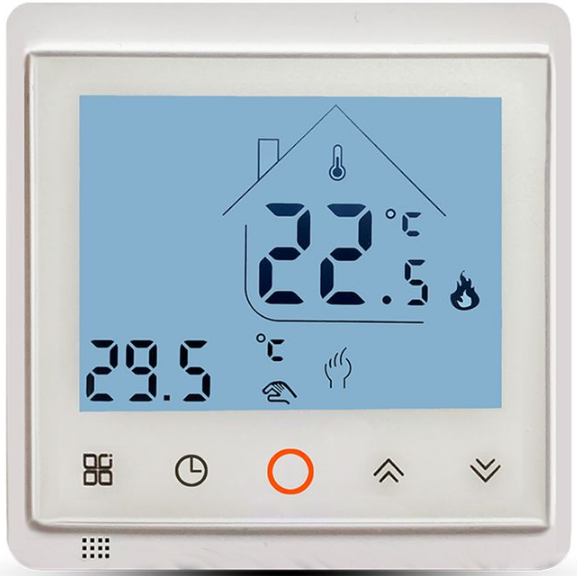
PRODUCT INTRODUCTION
Combine the LifeSmart Smart Underfloor Thermostat with your LifeSmart Smart Station and other devices to make your life simple, and to let our monitor, control and even automate your home or office environment. Perfectly integrated into the home thermostat solution, it provides the most comfortable home warmth in the cold winter.
Product Features
- Auto keypad lock to prevent kids from false operation
- You can either control it manually or use the programmed schedule to turn it ON/OFF
- Different temperatures can be set for up to 6 different time periods
- 3 schedule templets : Week days + Weekend (5+2) Mode, Mon.-Sat. + Sun. (6+1) mode and Everyday (7) to choose from
- Fire-Retardant plastic martial made, stylish and safe
SPECIFICATIONS
- POWER: AC 100-250V
- MAXIMUM LOAD: 10A
- INTERVAL: 0.5℃/Step
- TEMPERATURE ACCOUNTED: 0.1℃
- BUILT-IN SENSOR: NTC Thermistor B=3380 10k@25℃
- Monitor Range 0-40℃ Setting Range 5-35℃
- EXTERNAL SENSOR: NTC Thermistor B=3380 10k@25℃
- Monitor Range 0-95℃ Setting Range 0-90℃
0℃’ will be shown on screen if the temperature monitored is or below 0℃
Smart Underfloor Thermostat
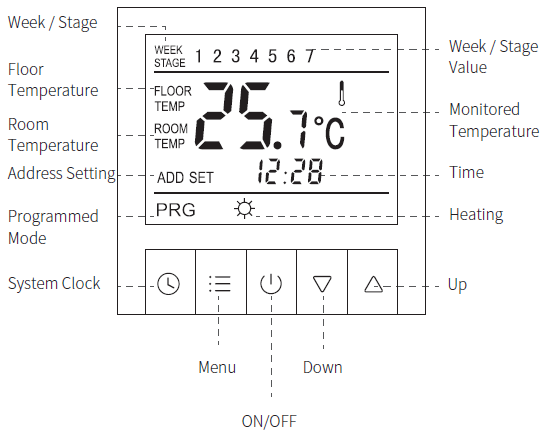
WIRE OPERATIONS
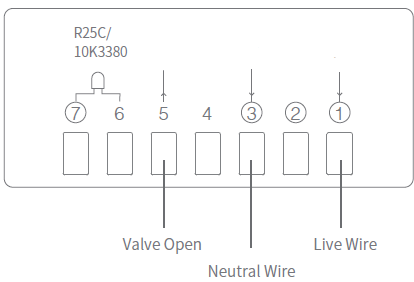
- Please install wires in strict accordance with the wiring layout on the back of the power box. Or we won’t be responsible for the damage of the product.
PRODUCT INSTALLATION
HOW TO INSTALL
- Separate the outer frame and the thermostat;
- Separate the power box bottom with iron stand and the panel with the display screen;
- Install wires in strict accordance with the wiring layout on the back of the power box;
- Fix the iron stand of the power box to embedded bottom case with screws;
- Put the outer frame on and place the panel into the power box.
HOW TO UNINSTALL
- Remove the outer frame and the panel;
- Remove all the screws and pull out the thermostat.
LifeSmart Smart Underfloor Thermostat is a high precision electronic apparatus. Please treat carefully.
App Installation
Get LifeSmart by scanning the QR code below:
- Power on, press and hold “
 ” for at least 5 seconds until the indicate light flashes, then click “Start Pairing”.
 - Smart Thermostat starts pairing. When it’s connected, click “Confirm” to finish pairing.
- If pairing is failed, please repeat the steps above until pairing is successful.
OPERATIONS
Turn ON/OFF
- Press “
 ” to turn ON/OFF. Room temperature and ‘OFF’ will be shown when it’s turned off.
Parent Control
- Press and hold “
 ”and“
”and“ ” for 2 seconds, the keypad will be locked. To unlock it
 , press and hold “ ”and“ ” for 2 seconds again.
System Clock Setting
- To set or adjust the system clock, press and hold “ ” for 5 seconds to enter. Press “ ” to choose a flashing option from Week, Hour, Minute, then press “
 ” or “ ” to adjust the value. Press “ ” to jump back to previous option anytime during setting up. Press “ ” again to finish clock setting.
Switch Between Manual/Programmed Control
- Press “ ” to switch.
- Manual Control
- The thermostat follows your instant input to control the temperature. PRG or STAGE VALUE won’t be shown on screen.
- Programmed Control
- The thermostat automatically function with high performance of energy saving following programmed schedules. PRG will be shown on screen when programmed control is activated. WEEK and STAGE VALUE will be shown in flash alternately in 5 seconds interval, and number from 1 to 7 indicates Monday to Sunday or pre-set time period.
MONITOR METHOD AND DISPLAY
Choose from 3 different monitor methods upon 2 sensors to gain the best experience you require. Enter System Menu to set up.
- Monitor Method (IN)
- The internal sensor monitors room temperature. “ROOM TEMP” and room temperature value will be shown on screen, target temperature and current time value will be shown in flash alternately in 5 seconds interval.
- Monitor Method (OUT)
- The external sensor monitors floor temperature. “FLOOR” and floor temperature value will be shown on screen.
- Monitor Method (ALL)
- Both internal and external sensor work together to monitor room and floor temperatures. If a temperature excursion of underfloor heating is detected, the thermostat shuts down the heating automatically. Press “ ” and “ ” together to view floor/room temperature, with “FLOOR” or “AIR” shown in flash alternately in 5 seconds interval.
- Both internal and external sensor work together to monitor room and floor temperatures. If a temperature excursion of underfloor heating is detected, the thermostat shuts down the heating automatically. Press “
SETTING
TIME PERIOD SETTING
You can easily set up different time periods to allow the thermostat to operate the programmed control automatically, once for all. There are up to 6 time periods and 3 schedule templets including Week days + Weekend (5+2) Mode, Mon.-Sat. + Sun. (6+1) mode and Everyday (7) to choose from. Each time period consists of duration data and a temperature input.
- Press and hold “ ” for 5 seconds to enter time period setting. Then press “ ” again to choose a flashing option from Hour, Minute and Temperature.
- Press “ ” or “ ” to adjust the value. Press “ ” to jump back to previous option anytime during setting up. If you want to delete a time period setting, press and hold “ ” until “OFF” can be read on screen.
Weekdays + Weekend (5+2) Mode is in default. Detailed data is below. You can customise the time period anytime.
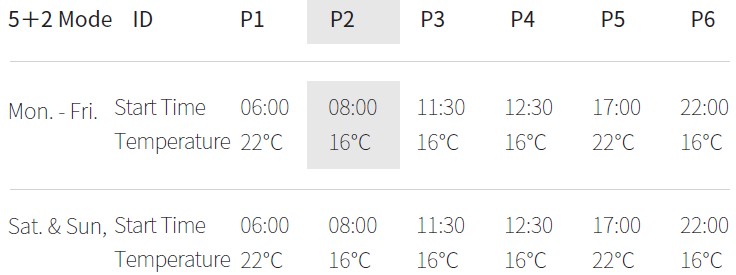
e.g. The unit in grey indicates: Thermostat works with 5+2 mode. If it’s anytime between 08:00 and 11:30 on a Weekday morning, then the screen will read Stage 2, TEMP 16℃
- The system menu contains very important configurations, please do not edit any of them. In which case, you don’t.
Enter System Menu
- Press “ ” and then“ ” within 1 second when the thermostat is off (“OFF” can be read on screen) to enter system menu.
- Press“ ” and “ ” or “ ” to choose and adjust the options and values.
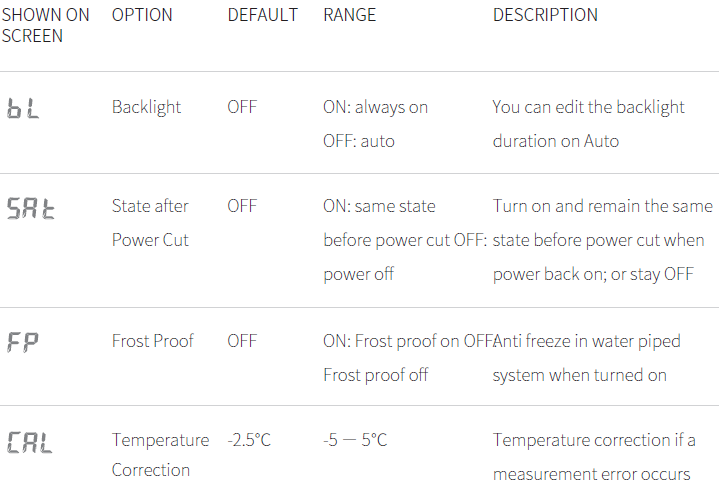
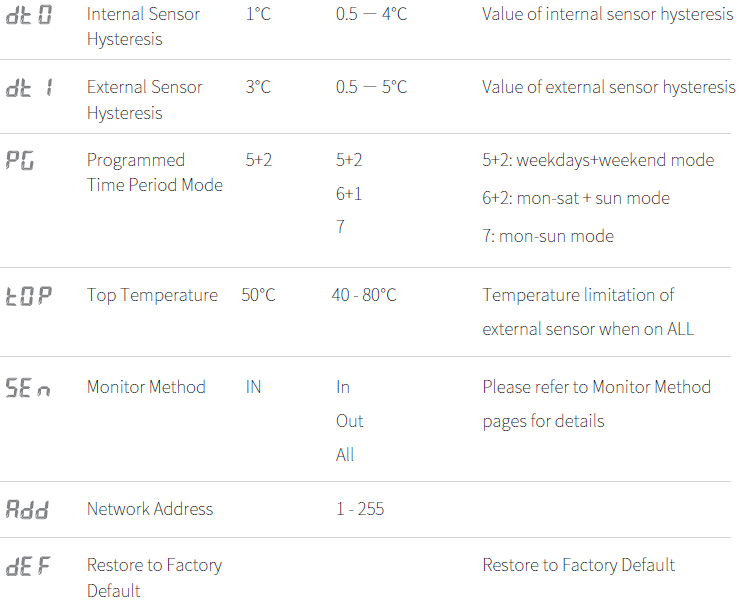
To save new setting, you have to go through ALL options and then quit the menu. Please refer to the sheet below to view the options.
Q & A
Why can’t I read anything on the screen?
- Please check if the power is on.
- Wiring is wrong. Please check the layout again.
- No read on screen if the temperature is not in working temperature range.
- Wrong or poor connection between power box and the main panel
- Damage or failure of the product. Please install carefully to prevent it.
Why is there a fracture of the screen of my thermostat?
Please avoid any strong physical impact onto the screen.
Why is the screen blank?
Check if there is any heating object around. If so, remove.
Why can’t I read the full text on screen?
Check if the panel is installed properly. Please adjust the.
Why the backlight is not on?
- Please check if the cable of the backlight is connected and not damaged.
What does Er0 / Er1 mean?
- Er0
Internal sensor failure. Check if the sensor is damaged during installation. - Er1
- External sensor failure. Check if the sensor is damaged during installation.
- External sensor not connected under Monitor Method ALL.
Why is the backlight always lit?
Check if you have already chose Backlight On in system setting. Or a damage has occurred to the backlight chip.
Why is there an obvious error on monitoring temperature?
- The thermostat should NOT be placed in confined spaces or stagnant air.
- The thermostat should NOT be placed near any heat source or under direct sunlight.
- Check if the screws are placed tight at the back of the product.
Is it normal that a “0℃” is always read on the screen?
- If the temperature is or below 0℃, the thermostat will only read 0℃ on screen.
- If your questions cannot be found above, please consult our customer service team.
WARRANTY DESCRIPTION
Thank you for purchasing this LifeSmart product. In order to protect your right, please read the following content carefully: The warranty period of our company’s products is one year from the date of purchase or longer if local laws impose a longer minimum term, in which case the minimum term is the warranty period. During the warranty period. any faults caused by the product itself for quality problems that arise under.
IN YOUR PACKAGE
- Panel with screen 1
- Screws patch 1
- Power Bottom Box 1
- User Guide 1
Please contact our customer service team before you send over for replacement through 400-886-1911
ATTENTION
The following conditions are not covered by
- Product failure or damage caused by installation, use, and maintenance that is not in accordance with the product instructions;
- Products beyond the warranty period;
- Products that have the barcode tampered with or removed;
- Devices that have been tampered with or customized outside of LifeSmart Terms of Service as on the LifeSmart APP and website;
- User-Caused damage. such as inappropriate voltage input, high temperature, accidental spillage, physical damage, etc;
- Product failure or damage caused by force majeure such as earthquakes, fires or floods; Product failure or damage caused by other problems except the product itself.
TECH SUPPORT
- Email: [email protected]
- Telephone: 400-886-1911
- QQ: 4008861911
- Website: www.ilifesmart.com
DECLARATION
LifeSmart is a trademark of Hangzhou LifeSmart Technology Co., Ltd. As for the trademarks, product logos and product names from other companies presented within this manual, they are possessed by their own right holders. Without our written permission, no entity or individual shall extract, copy or disseminate in part or the whole of the manual contents in any form. Due to product version upgrades or other reasons, the content of this manual may change. Our company reserves the right to change the contents of this manual without any notice. This manual is used only for instructional purposes. We strive to provide accurate information in this manual, but we are not able to ensure that the content of this manual is current. Statements, information and advice in this manual do not constitute any expressed or implied assurance. Updated manuals are available on our website at www.ilifesmart.com or by contacting our Happiness Team. www.ilifesmart.com
Reference:
Download manuals:
lifesmart LS130 Smart Thermostat User Guide