Reliance TIME100001 Wireless Programmable Thermostat

Specification
- Power source: 1.5V LR6*AA
- Temperature setting range: 5~35°C
- Display accuracy: 0.1°C
- Setting accuracy: 0.5°C
- Storage temperature: -10~60°C, 0~90%RH
- Ambient temperature: 0~50°C, 0~80%RH
- Wireless frequency: Lora 868MHz
Note:
For connecting to the internet you must use the Reliance Valves Gateway – GWAY100001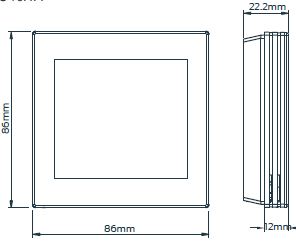
Important safety information
- Read all of the information in this manual before installing this thermostat.
- Only a professional contractor should install this thermostat.
- All wiring must conform to local and national building and electrical codes and regulations.
- If the system is not operating properly, check the wiring and replace the fuse if necessary.
- Use this thermostat only as described in this manual.
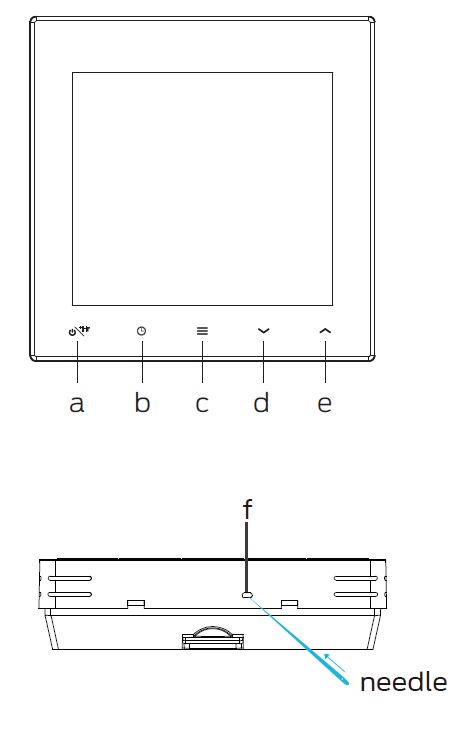
Thermostat display
 ON/OFF/Boost
 Time setting
 Menu button
 Lower temperature setting
 Raise temperature setting
- Reset
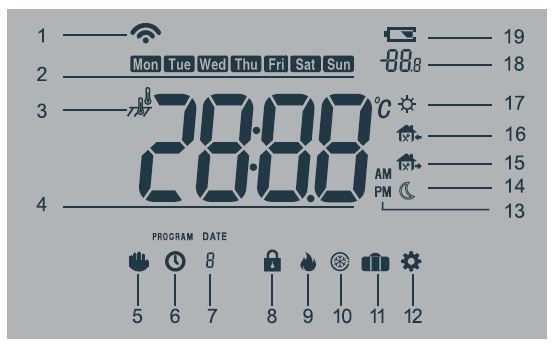
- If the icon
 is not shown then WiFi is not connected
- If the signal is lost after connection the icon will flash
- Weeks icon
- Mode: Room mode, floor mode, dual temperature mode
- Room temperature/time display
- Manual mode
- Programming mode
- Zone number – If flashing then the connection to the wiring centre has been lost
- Key lock
- Boiler On/Off
- Frost protection
- Holiday mode
- Settings menu
- AM/PM
- Sleep mode
- Away mode
- Back home mode
- Wake up
- Temperature setting/Boost display
- Low power alarm
ON/OFF function
Press to turn the thermostat ON. Press and holdagain to turn the thermostat OFF.
Key lock function
In the main display interface, press and hold  at the same time to activate or cancel the key lock. When activated, no keys can be used. The thermostat will display
Boost function
- Press to switch the setting temperature or boost control.
- When the display shows +0, press to select boost. The length of time the heating will be boosted is displayed.
- When the time elapses the screen returns to the temperature display.
- Press to cancel and go back to the temperature display setting
Holiday mode
With the power on, press to switch between manual mode, programming mode and holiday mode. After selected holiday mode will display and will run at 16°C. Press to cancel holiday mode. Boost function can be used during holiday period
Open window function
If the room temperature drops 6°C in 4 minutes, the open window function will activate and display  , then turn down all heating. When the room temperature increases by 2°C the thermostat will return to normal operation. Press any button to cancel the open window function while it is active.
Anti-seize function
If the thermostat has not been activated for over 1 week then to prevent the valve and pump from seizing, the thermostat will run the system for 5 minutes.
Frost protection
In frost protection mode, when the temperature drops below what has been selected, the thermostat will start the heating until the temperature has been raised by 3°C.
Intelligent function
The intelligent function adjusts the starting time for home heating according to the temperature measured within the building. It preheats your rooms to the temperature according to your schedule.
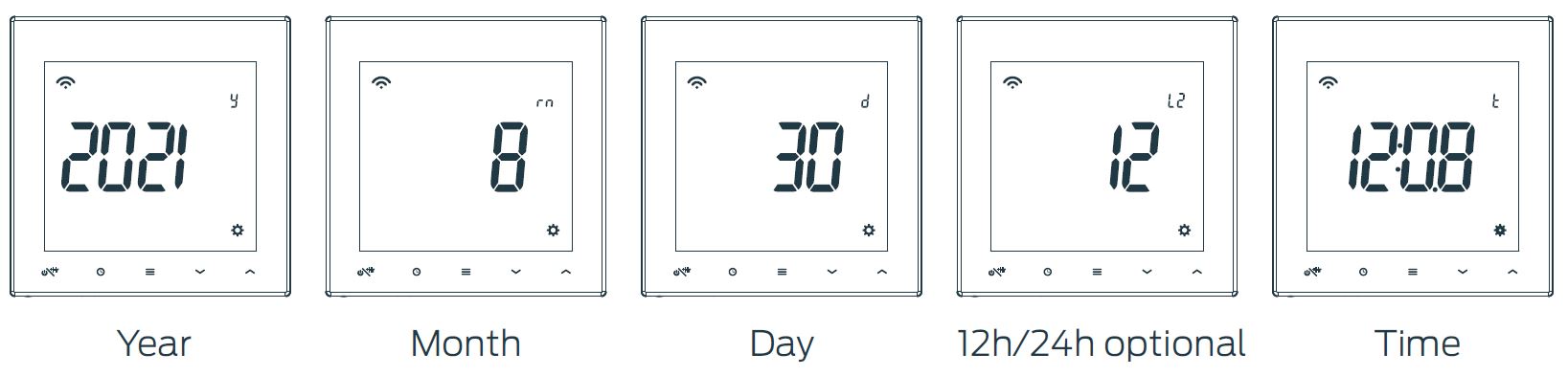
Time setting
Press and hold for 4 seconds, press to select year, month, day, time scale, time, press to adjust setting, press to confirm. If there are no actions for 10 seconds, the thermostat will return to temperature display mode. Press to check time, year, month, day.
Setting the date and time on initial start up
Plug in the power supply. Press to set year, press to set month, day, time scale, time, press to adjust the setting.
Program setting
- Programme settings: 4/6 period programming optional (factory default: 6 period).
- When the thermostat is on, press and hold ‘ ’ to enter the programming mode.
- Press to select the programming week (5+2, 5+1+1 or 7 individual day optional).
- Press to enter time setting mode. Press to select time, press to enter temperature setting mode, Press to select temperature.
- Press to save and exit. If no buttons are pushed for 10 seconds, the thermostat will exit the programme setting automatically
Default programming (6 period programming)
(4 period programming)

Operation mode
Programming mode (The factory default is programmable)
The thermostat will run according to the pre-set schedule. The screen will show
Manual mode
From programming operation mode, press to enter the manual mode, the screen will display  . Press to immediately adjust the temperature and save automatically.
Temporary hold mode
The thermostat will keep the room at the temporary set temperature, and will resume the programme operation mode when you enter the next programme. In programming operation mode, press to enter the temporary hold mode, the screen display  . Press to immediately adjust the temperature and save automatically
Alarm instructions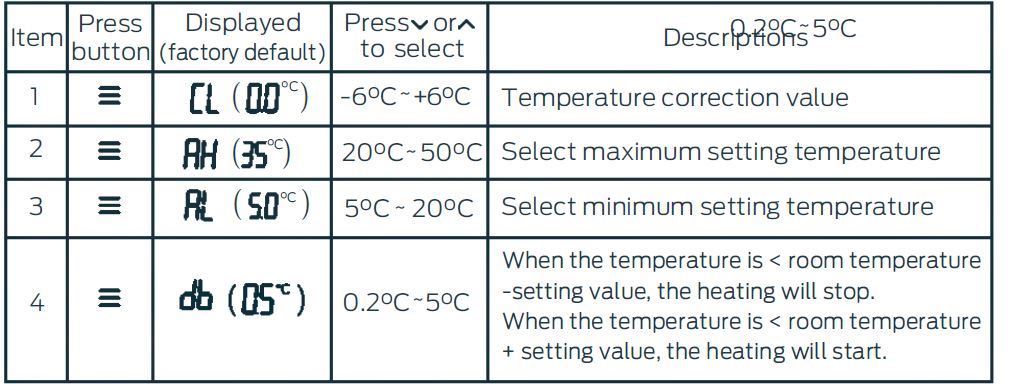
Pairing
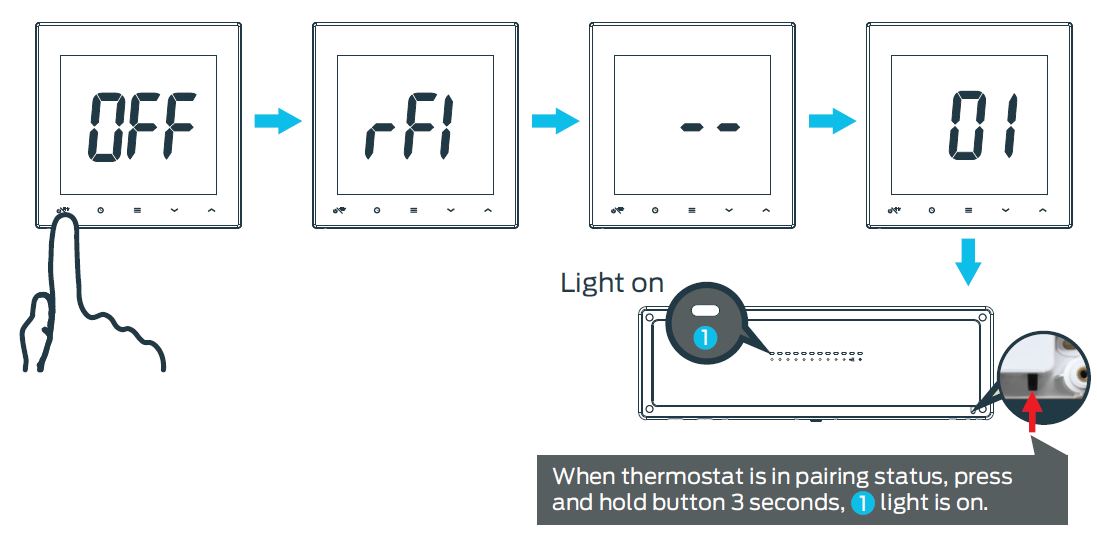
- With the thermostat power off, press and hold the on/off button for 4 seconds to enter pairing mode (display should show “ rF1”).
- Press the on/off button again to send a signal to the wiring centre (display should show “ ”)
- On the Wiring Centre, press and hold the pairing button for 3 seconds to enter pairing mode
- Use the Wiring Centre pairing button to select the desired zone, indicated by the LED
- Leave the wiring centre for 3 seconds. The LED should flash to indicate it is pairing to the thermostat
- Once paired, the wiring centre LED will move to the next available zone.
- Press and hold the pairing button once again to exit the pairing mode
- The thermostat is now connected to the chosen zone
Installation
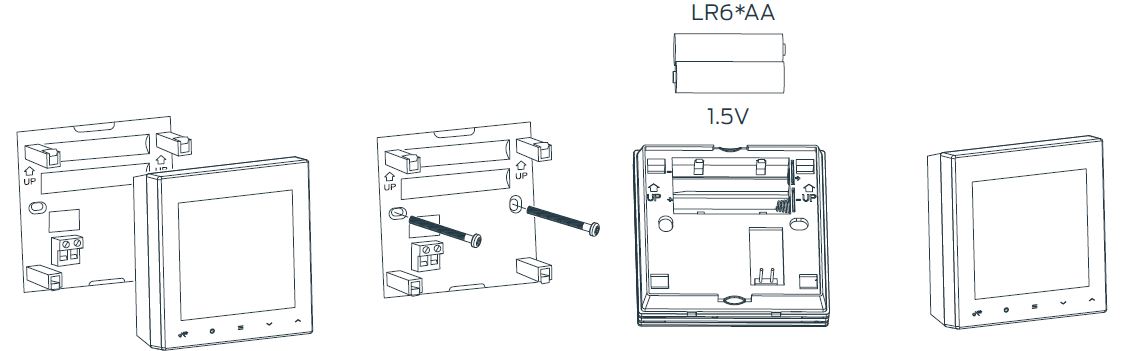
- Separate the front and back parts of the thermostat
- Attach the backplate to the wall with suitable fixings
- Insert the batteries
- Clip the front part to the backplate
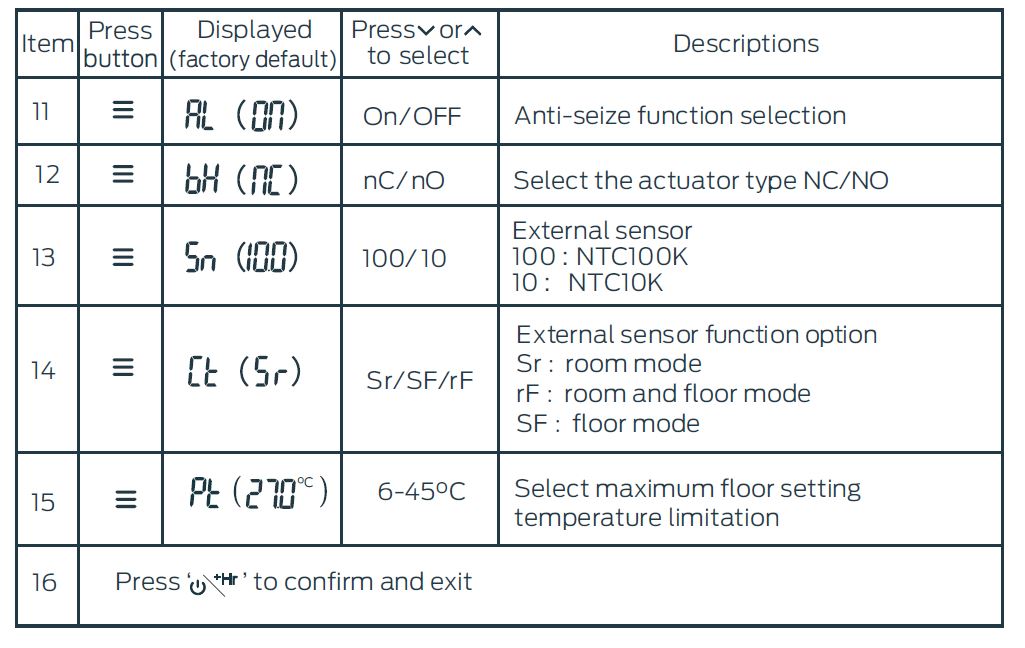
Configuration menu
With the thermostat turned off, press and hold ‘= ‘to enter the configuration menu. Press ‘=’ to select different parameters. Pressto adjust parameters. Press and hold ‘ ’ for 3 seconds, display ‘ ’, indicates all the configuration settings have reverted to factory default setting. The thermostat will return to ‘OFF ’ mode if no buttons are pushed within 10 seconds.
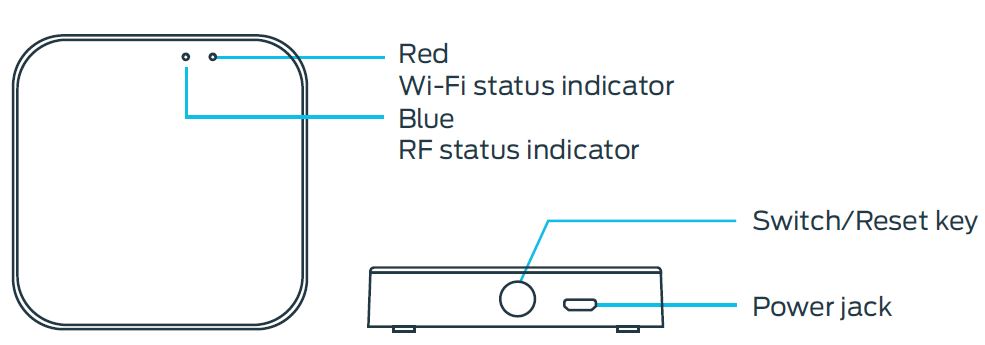
Gateway specification
- Adapter output: 5V— 1A
- Working temperature: -10°C~55°C
- Working humidity: 10%-90%(no condensation)
- Wifi frequency: 2.4G Wi-Fi
- Wireless frequency: Lora 868MHz
- Dimensions: 60.5 × 60.5 × 16.1mm
Connecting the App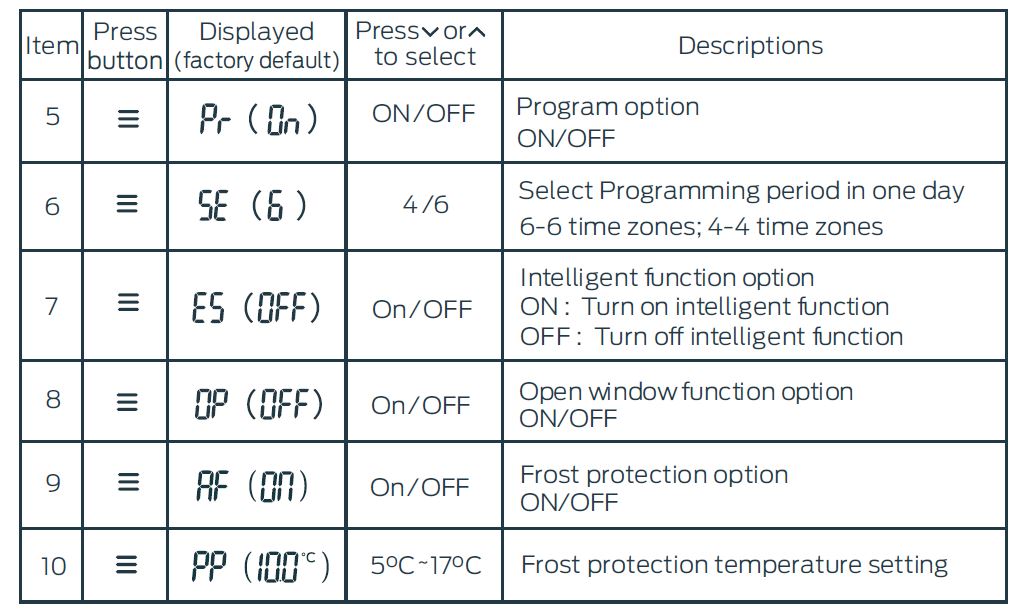
Download and register
Click App store (click Android application market) Search for ‘Reliance Controls’ and download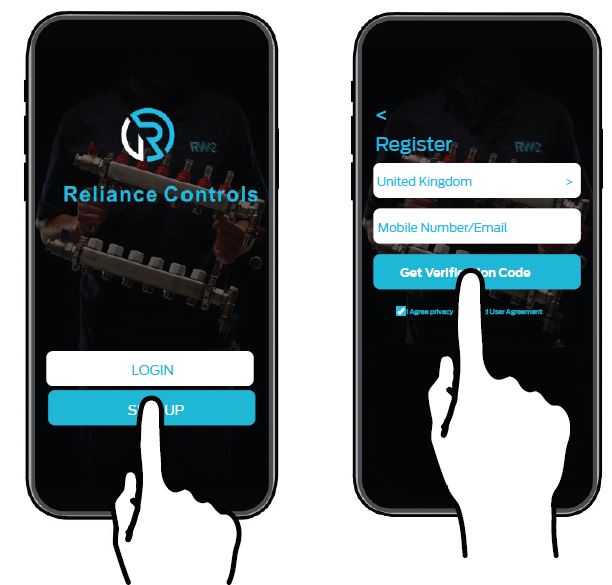
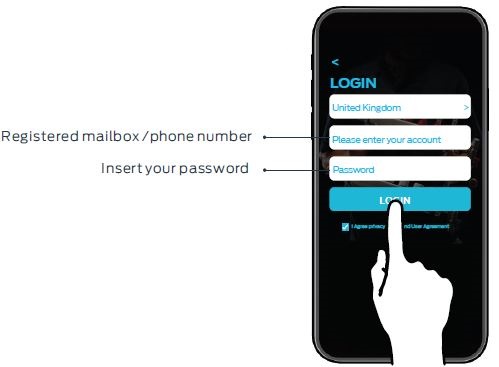
Login
When you finish the registration, log into your email and click on the link to activate your account. Your APP is now ready to use.
Connecting to the Gateway
Tips: First, please turn on the location of your phone. Press and hold the reset key of gateway until the light turns red and blinks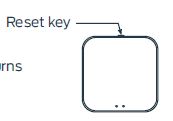
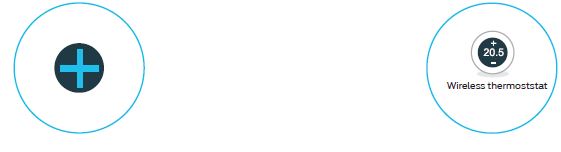
- Enter the ‘HOME’ interface of the app, click the ‘
 ’ on the top right.
 - Click ‘Wireless thermostat’.
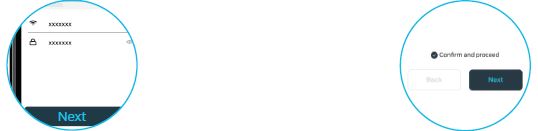
- Enter your Wi-Fi account and password. Click ‘Next’
- Tick ‘Confirm and proceed’,then click ‘Next’ (Follow instruction to reset device)
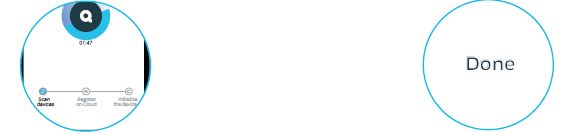
- Adding device…
- Click ‘Done’, it means the gateway has been added successfully
Add thermostat
Before adding the thermostat, press and hold ‘ ’ for 3 seconds, press to select ‘rF2 ’, then press ‘ ’ to enter code match status and it will display ‘ ’ then then follow these steps to connect the app.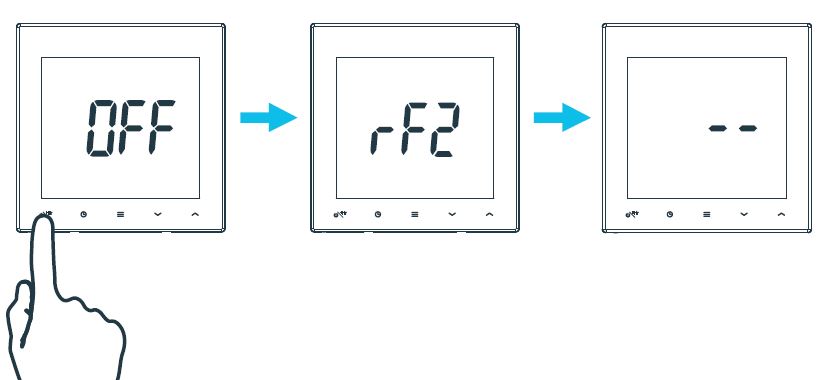
- Click ‘ ’Add subdevice
- Adding device
- Added successfully Click ‘Done’.

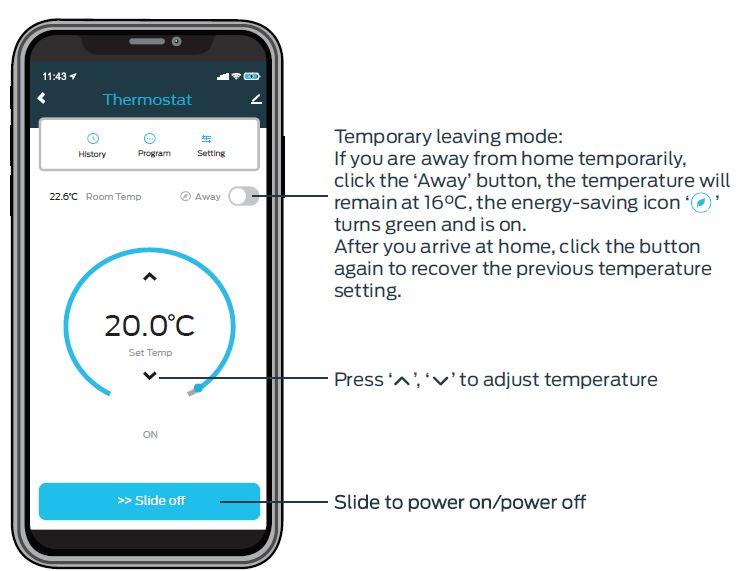
APP Setting-programming
APP Setting-Multi-day Programming
- Click the ‘Program’ to enter the programming mode
- Slide up and down to select the time, press ‘ ’ ‘ ’ to set the temperature in different
- Click ‘Submit’ to confirm

Optional Parameter Setting
Remove devices
Voice command
Amazon Alexa
- Alexa, turn on bedroom.
- Alexa, raise the bedroom by 1 degree.
- Alexa, drop the bedroom by 1 degree.
- Alexa, set the bedroom to 16 degrees.
Google Assistant
- Ok, Google, turn on bedroom.
- Ok, Google, turn oF bedroom.
- Ok, Google, set the bedroom to 16 degrees
Reliance Worldwide
- Corporation (UK) Limited
- Horton Road
- West Drayton
- UB7 8JL
- United Kingdom
- Tel: +44 (0) 1895 449233
- Reliance Worldwide Corporation
- (UK) Limited reserves the right to make changes to the product which may aBect the accuracy of information contained in this leaflet
- www.reliancevalves.com
Reference:
DOWNLOAD MANUALS:
Reliance TIME100001 Wireless Programmable Thermostat Installational Manual

Reliance TIME100001 Wireless Programmable Thermostat Installational Manual