
Terneo VT SMART Thermostat
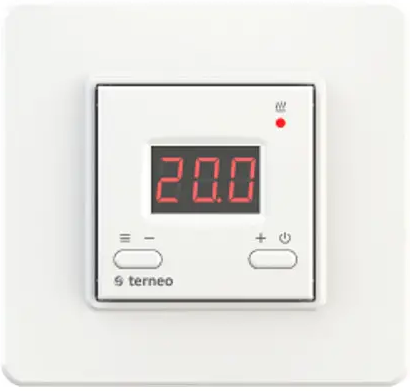
terneo vt thermostat is designed to maintain constant temperature from 0 to 35 °С in electric heating systems. According to data from the internal temperature sensor, the thermostat turns off the heating when the desired temperature is reached and turns on when it decreases by 1 °C.
IN THE BOX
- Thermostat, frame 1 piece
- Technical data sheet and installation and operation manual and warranty card 1 piece
- The packing box 1 piece
TECHNICAL DATA
| Adjustment range | 0…35 °С |
| Maximum load current (for category AC-1) | 16 А |
| Rated load capacity (for category AC-1) | 3 000 VА |
| Input voltage | 230 V ±10 % |
| Weight in the complete set | 0,18 kg ±10 % |
| Overall dimensions (w × h × d) | 75 × 75 × 39 mm |
| Temperature sensor | NTC thermo-resistor 10 kOhm 25 °C (R10) |
| Number combinations under heat, at least | 50 000 cycles |
| Number of combinations without heating, no less than | 20 000 000 cycles |
| Temperature hysteresis | 1 °С |
| Degree of protection GOST14254 | IP20 |
IMPORTANT. Before the installation and operation of the device, please read by the end of this document. This will help to avoid possible danger, mistakes and misunderstandings.
RELIABILITY OF THE POWER RELAY provides protection against frequent switching in the thermostat. If there was less than 1 minute between relay switching, the relay activation will be delayed, marking the countdown with a flashing dot.
NON-VOLATILE THERMOSTAT STORAGE saves all settings in the event of a power outage.
THE EFFECT OF INTERNAL HEATING OF COMPONENTS ON TEMPERATURE MEASUREMENT IS TAKEN INTO ACCOUNT BY THE THERMOSTAT CORRECTION SYSTEM. Be sure to enter data on the connected load power in settings (Tab. 1). After a short-term voltage outage, it may take some time to stabilize the measurements (no more than 50 minutes).
WIRING
Power voltage (230 V ± 10 %, 50 Hz) is supplied to terminals 4 (neutral, N) and 5 (phase, L).
Load (connecting wires from heating element) is connected to terminals 3 and 6.
THE THERMOSTAT IS MOUNTED AND CONNECTED after the installation and load testing.
INSTALLATION
- The thermostat is designed for indoor installation. The ingress risk of moisture or liquid into the place of installation must be minimized. When installed in a bathroom, toilet, kitchen, swimming pool the thermostat should be installed at the place out of reach of casual spraying.
- The ambient temperature during installation must be between –5 … + 45 °C. The installation height of the thermostat should be in the range 0,4 1,7 m above the floor level.
- To protect against short-circuit in the load circuit the circuit breaker (CB) has to be installed before installing the thermostat. The circuit breaker is installed in the gap of phase conductor, as shown in the Wiring 1. It should be designed for not more than 16 A.
For installation you must:
- make a hole in the wall for box mounting and wall chase for power wires and the sensor;
- take the power wires of the heating system to the mounting box;
- perform the compounds according to the passport data;
- fix the thermostat in the mounting box.
The thermostat terminals are designed for a wire with section not more than 2,5 mm . To reduce the mechanical loads on the terminals it is desirable to use a soft wire. The wires are tightened in the terminals using
a screwdriver with a blade width no more than 3 mm. The terminals should be tighten with torque 0,5 N·m. Use of aluminum is not desirable The sections of the wires, which is connected to the thrmostat, must be at least copper 2 × 1,0 mm. The screwdriver with a blade width more than 3 mm can cause mechanical damage to the terminals. This may result in the loss of right for warranty. It is important to remember that it is desirable to place the on the inner wall of the room. It is recommended to store out the thermostat of direct sunlight and drafts (Fig. 1). It is necessary for the thermostat to switch the current to no more than 2/3 of the maximum current specified in the specification. If the current exceeds this value, the load must be connected through a contactor (magnetic actuator, power relay), which is optimized for this current (Wiring 2).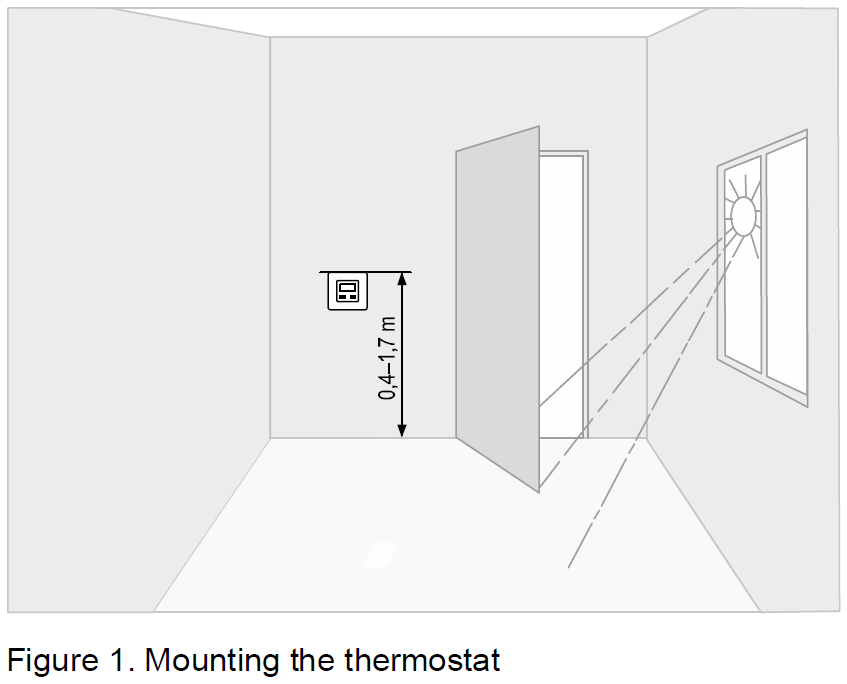

SET THE LOAD POWER TO 100 W WHEN CONTROLLED VIA CONTACTOR for correct measurement of air temperature by thermostat.
WARRANTY TERMS
The warranty for devices is valid for from the date of sale, provided that the instructions are followed. The warranty period for products without a warranty certificate is counted from the date of production. terneo 36 months If your device is not working properly, we recommend that you first read the section «Possible problems». If you cannot find an answer, contact Service Center. In most cases, these actions resolve all issues. If you continue to have issues with the device, please send it to a Service Center or to the store where you purchased the device. If your device is defective due to our fault, we will repair or replace it under warranty within 14 business days. Please see the full text of the warranty and the data you need to send to your Service Center on the website https://www.ds-electronics.com.ua/en/. If you have a warranty case, please, contact the General distributor in your area.
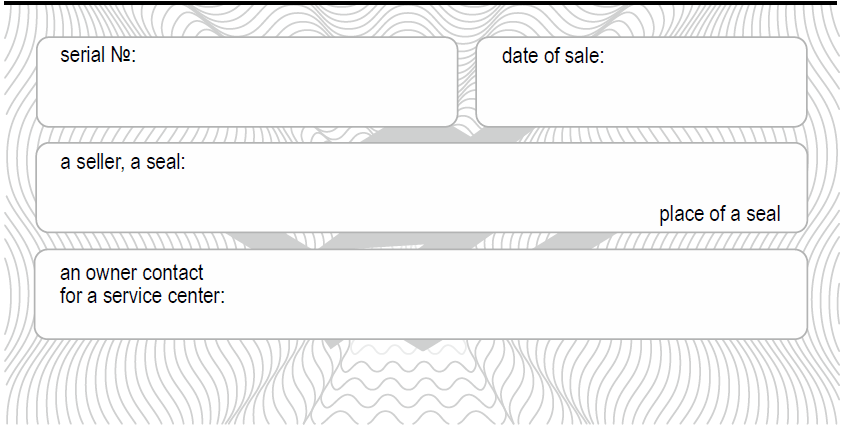
WARRANTY CARD
EXPLOITATION
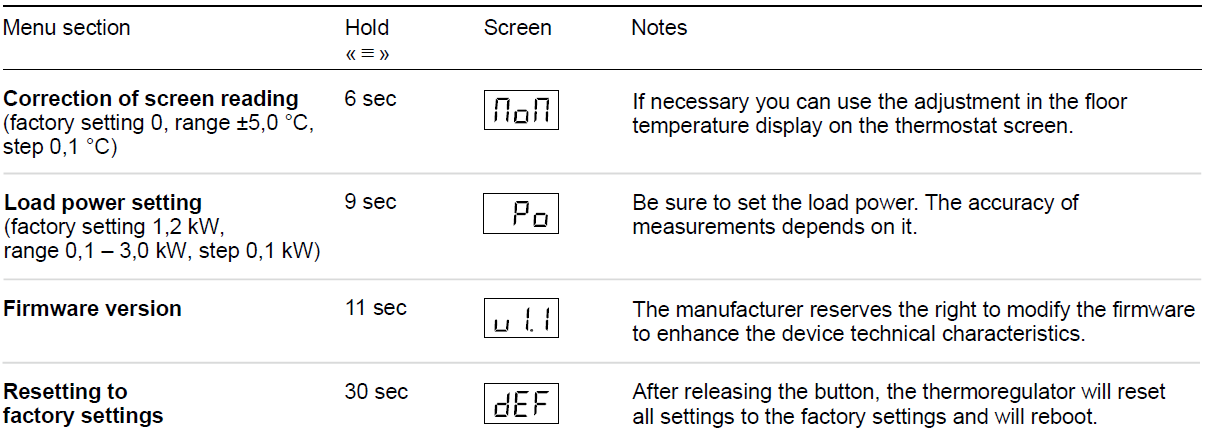
Hold down  button for a certain number of seconds (see Table 1). Then change the parameter with the
 and buttons. 3 seconds after the last pressing, the thermostat will automatically return to the sensor temperature display. In the waiting mode (when the buttons aren`t currently being used) the brightness of the indicator and the screen will be reduced to 30 %.
Preset temperature (factory setting 25 °С)
When button or is pressed thermoregulation switches to the mode of display and change of preset temperature. While flashing, if button is pressed tpreset will be increased, if button is pressed tpreset will be decreased.
Switching to sleep mode
 Hold down the button for 4 seconds (three dashes will appear on the screen one after the other) until
  appears on the screen. To turn it off completely, you need to turn off the automatic switch.
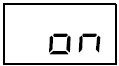 To exit sleep mode, also hold the button for 4 seconds until
  appears on the screen.
Button blocking (child and public protection)
 In order to enable disable button blocking press the and buttons at the same time for 6 seconds till the
 () sign appears on the screen.
Table 1. FUNCTION MENU
POSSIBLE PROBLEMS, CAUSES AND WAYS TO OVERCOME THEM
Heating temperature does not correspond to the settings
- Possible cause: load power is not correctly set.
- It is necessary: to correctly set the load power (Tab. 1). If it is installed correctly, contact the Service Center.
Load is off, screen and indicator are off
- Possible cause: No power supply.
- It is necessary: make sure that the supply voltage is available. If power supply is available, contact the Service Center.
The load does not work, the  flashes on the screen
 The temperature inside the housing exceeded 8 °C, the protection against internal overheating worked.
- Possible cause: internal overheating of the thermostat, which can be caused by: poor contact in the terminals of the thermostat, high ambient temperature, exceeding the power of the switching load, or the cross section of the wires for connection is incorrectly selected.
- It is necessary: to check the tightening of power wires in the terminals of the thermostat, make sure that the switching load power does not exceed the permissible one, the cross section of the wires for connection are selected correctly.
- Features of the protection against internal overheating: when the temperature inside the housing drops below 80 °C, the thermostat will resume operation. When the protection is triggered more than 5 times in a row, the thermostat will be blocked until the temperature inside the housing drops below 0 °C and one of the buttons is pressed.
Every 5 seconds the screen displays «Ert»
 Possible cause: is a break or short circuit of the internal overheating sensor. Internal overheating is not monitored.
- It is necessary: to send the thermostat to the service center. Otherwise, overheating control will not be carried out.
ADDITIONAL INFORMATION
- Do not fire and do not throw away the device with the household waste.
- After the end of its service life, the product must be disposed of in accordance with applicable law.
- Transportation of goods carried in the package, ensuring the safety of the product.
- The devi e is transported by any kind of transport (rail, sea, motor, air transportation).
- Date of manufacture is on the back side of device. Application time is unlimited.
- The device does not contain harmful substances.
- If you have any questions or you something will not clear, call the Service centre the telephone number listed below.
SAFETY INSTRUCTIONS
- Carefully read and become aware of yourself these instructions.
- Connection of the device must be done by a qualified electrician.
- Do not connect 230 V mains voltage instead of the sensor (it leads to failure of the thermostat).
- Before the installation (dismantling) and connection (disconnection) of the device, turn off voltage supply and also act according to the «Rules of an arrangement of electric installations».
- Do not immerse the sensor with a connecting wire in the liquid medium.
- Do not switch the non assembled device to the network.
- Turning on and off or and configure the device should be with dry hands.
- Do not connect the device to the network disassembled.
- Avoid hitting of water or moisture to the device.
- Do not expose the device to extreme temperatures (higher than 40 ºС or below –5 °C) and high humidity.
- Never clean the device with the use of chemicals such as benzene, solvents.
- Do not store the device and do not use it in areas with the dust.
- Do not attempt to disassemble and repair the device.
- Do not exceed the landmarks value adaptor and power.
- To protect against overvoltage caused by lightning discharges, use a lightning protector.
- Protect the children from games with the working device, it is dangerous.

Manufacturer and vendor: DS ELECTRONICS, LTD
- 04136, Ukraine, Kyiv region, Kyiv, 1–3 Pivnichno-Syretska str.
- +38 (091) 481-91-81, Service Center : +38 (091) 481-91-81
- [email protected]
- www.ds-electronics.com.ua/en/
SERVICE CENTER CONTACT:
- +38 (091) 481-91-81
- WhatsApp Viber Telegram [email protected]
Reference
Download Manual:
Terneo VT SMART Thermostat Technical Datasheet