
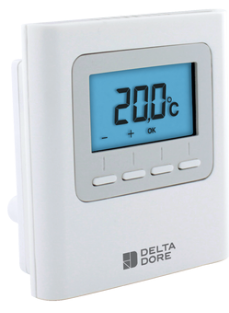
Delta Dore 8000-TA-RF Wireless Programmable Thermostat
TECHNICAL CHARACTERISTICS
- Power supply by the bus, 24V
- Bus Input/output 2 wires
- Class III insulation
- Surface-mounted or on flush-mounting box
- Dimensions: 81 x 88 x 21 mm
- Degree of protection: IP 30
- Operating temperature: 0 to +40°C
- Storage temperature: -10 to +70°C
- Installation in an environment with normal pollution levels
DESCRIPTION
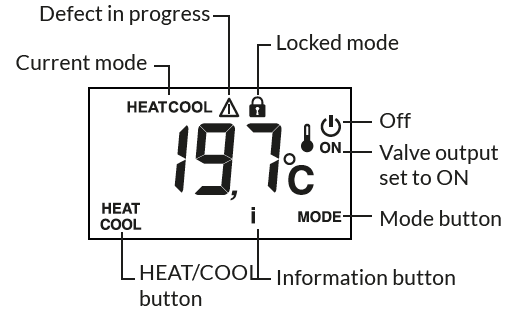
- HEAT/COOL button: appears in OFF mode, if the thermostat is ‘Master’ and according to the system’s configuration. Press and hold the button to switch from one mode to another.
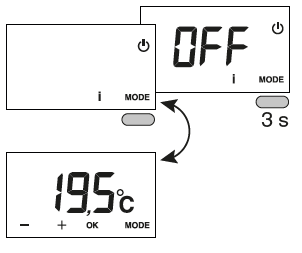
- MODE button: Toggles from OFF to ON mode. If a ‘Master’ thermostat is used, press 3 seconds.
- i button: tap the button repeatedly to display the temperature values (setting or measured) and any defects.
- ON valve output: this display is only available if it has been configured (CF04 = 1).
- Controlled mode: ‘OFF’ is displayed when the Shutdown mode is controlled(e.g. with a programmer or Master thermostat) or if it is a Master thermostat.
- HEAT or COOL mode: is displayed for the Heat/ Cool production type (reversible heat pump).
USE
WAKING UP THE SCREEN
The screen goes to ‘Sleep’ after a 10-second time-out period (if CF11=0). To wake it up, press any button.
SETTING TEMPERATURE SETTINGS
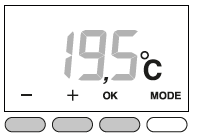
- Press + or – to set the value.
- Press OK to confirm.
LOCKING DOWN SETTINGS
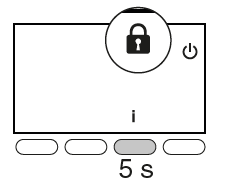
Press and hold the ‘i’ button for 5 seconds. The symbol appears. Release.
In this mode:
- settings are deactivated,
- only the temperature display is authorised
To unlock, press and hold the i button for 5 seconds
HELP
When a defect is detected on the system, the symbol flashes on the thermostat display. Press ‘i’ to display the type of defect.
ERROR MESSAGES
 |
Address error. Several products were assigned to the same output (CF20). |
 |
Thermostat internal sensor shorted. |
 |
Thermostat internal sensor cut off. |
Reference
Download Manual:
Delta Dore 8000-TA-RF Wireless Programmable Thermostat Instruction Manual
Delta Dore 8000-TA-RF Wireless Programmable Thermostat Instruction Manual