
SIEMENS REV34-XA Room thermostat

Heating applications
- Mains-independent, battery-operated room temperature controller featuring user-friendly operation, easy-to-read display and large numbers.
- 3-position controller with PI mode and optimum start control.
- Possibility to adapt volume and control gain.
- Operating mode selection:
- 7-day automatic mode with max. 3 heating phases.
- Continuous comfort mode.
- Continuous energy saving mode.
- Frost protection.
- Exception day (24 hour operation) with max. 3 heating phases.
- A separate temperature setpoint can be entered in automatic mode and for the exception day for each heating phase.
- Heating zone control.
Room temperature control in:
- Single-family and vacation homes.
- Apartments and offices.
- Individual rooms and professional office facilities.
- Commercially used spaces
FUNCTION
- PI control.
- 3-point control.
- 7-day time switch.
- Remote control.
- Preselected 24-hour operating modes.
- Override button.
- Holiday mode.
- Party mode.
- Frost protection.
- Holiday mode.
- Information level to check settings.
- Reset function.
- Sensor calibration.
- Optimum start control in the morning (P.1).
- Adaption of integral action time (volume adaption).
- Adaption of control gain (heat output adaption).
- Synchronization to radio time signal from Frankfurt, Germany (REV34DC).
Type summary
- Room temperature controller with 7-day time switch
- Room temperature controller with 7-day time switch and receiver for time signal from Frankfurt, Germany (DCF77)
Ordering
Please indicate the type number as per the “Type summary” when ordering
Delivery
The controller is supplied with batteries.
Mechanical design
Plastic casing with an easy-to-read display and large numbers, easily accessible operating elements, and removable base. The housing contains the controller’s electronics, DIP switches, and the relay with potential-free changeover contact. The easily accessible battery compartment allows for easy exchange of two 1.5 V alkaline batteries, type AA. The base with terminal block provides lots of space to connect the wires.
Display and operating elements
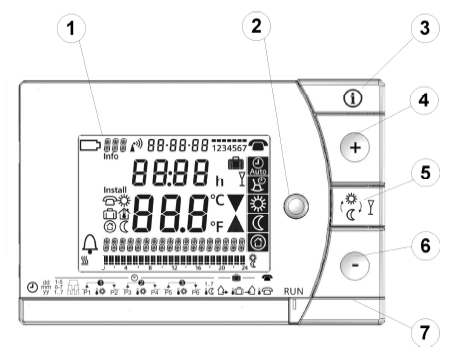

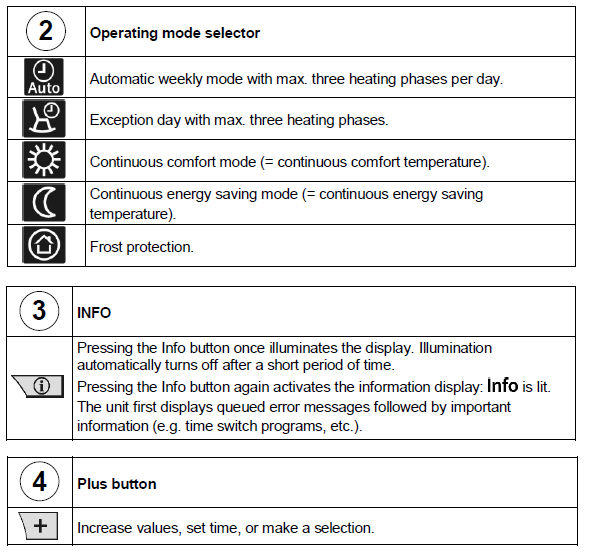
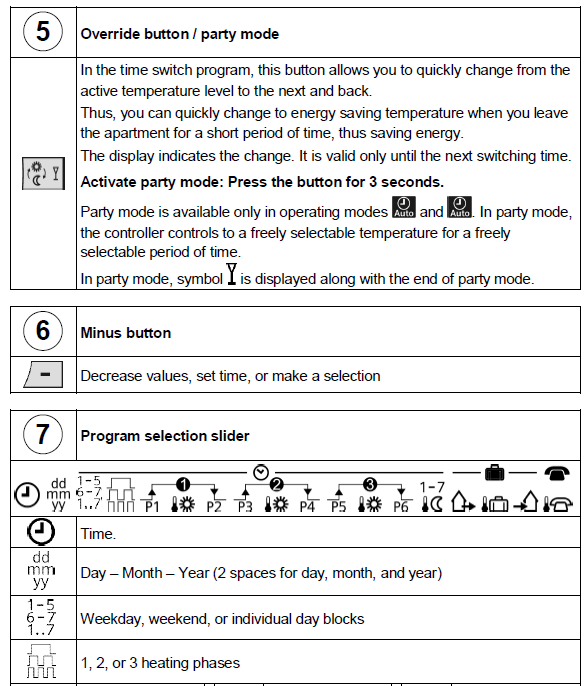
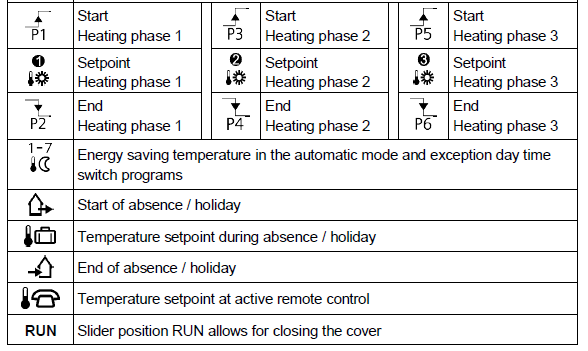
Operating modes
Operation with time switch program
The controller offers the two time switch programs Enter a start time and end time for each heating phase. Also comfort temperature setpoint can be freely entered for each heating phases. Between the heating phases the controller always switches to the same, freely selectable energy-saving temperature setpoint
Example with 3 heating phases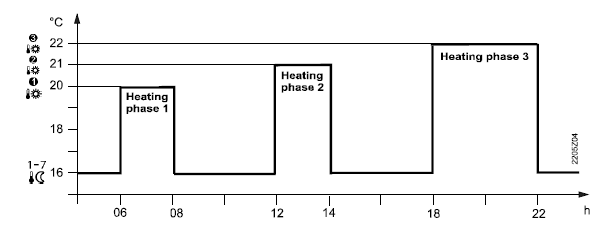
Continuous operating modes
The controller also offers the three 3 continuous modes comfort mode,
  energy saving mode, and
 frost protection mode
Setpoints
- You can freely adjust the setpoints for the weekly and 24-hour operating modes.
- Setting range for all setpoints without setpoint limitation 3…35 °C.
- Setting range for all setpoints with setpoint limitation 16…35 °C.
Factory setting
| Factory settings: Switching times | ||||||
| Heating phases | P1 | P2 | P3 | P4 | P5 | P6 |
1. |
07:00 | 23:00 | PASS | PASS | PASS | PASS |
2. |
06:00 | 08:00 | 17:00 | 22:00 | PASS | PASS |
3. |
06:00 | 08:00 | 11:00 | 13:00 | 17:00 | 22:00 |
7-day time switch
Three different switching patterns are available to simplify entry of switching times. These can be assigned as blocks to the corresponding weekdays 1…5 and weekend days 6…7. As a result, you need to adapt the switching times and room temperatures only once for each block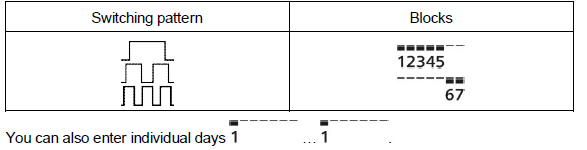
Enter holidays or absences
You can enter the beginning, temperature and end of your holidays. At the beginning of the holidays, the controller switches to the desired holiday temperature and returns to the previously set operating mode at the end of the holidays. In holiday mode, symbol is displayed along with the end of holiday mode.
Proceed as follows to enter your settings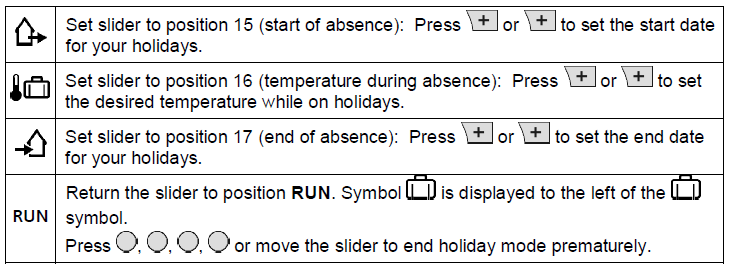
Remote control
Use a suitable remote control unit to activate the “Remote control” temperature setpoint in the controller. Changeover takes place by making a potential-free contact connected to terminals T1 and T2. A flashing
 symbol indicates active remote control mode. After the contact opens, the previously set operating mode is reactivated
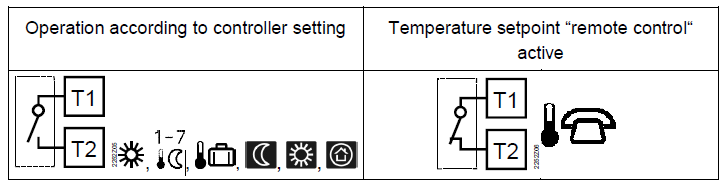
Enter temperature for active remote control
You can freely select the temperature for active remote control. Activating remote control immediately enables control to the remote control temperature regardless of the currently active operating mode. When you deactivate remote control, the controller returns to the set operating mode. A flashing symbol indicates active remote control mode
Proceed as follows to enter your settings:
| |
Set slider to temperature position for active remote control: Press or to set the desired temperature for active remote control. |
| RUN | Return the slider to position RUN. |
Technical features
DIP switches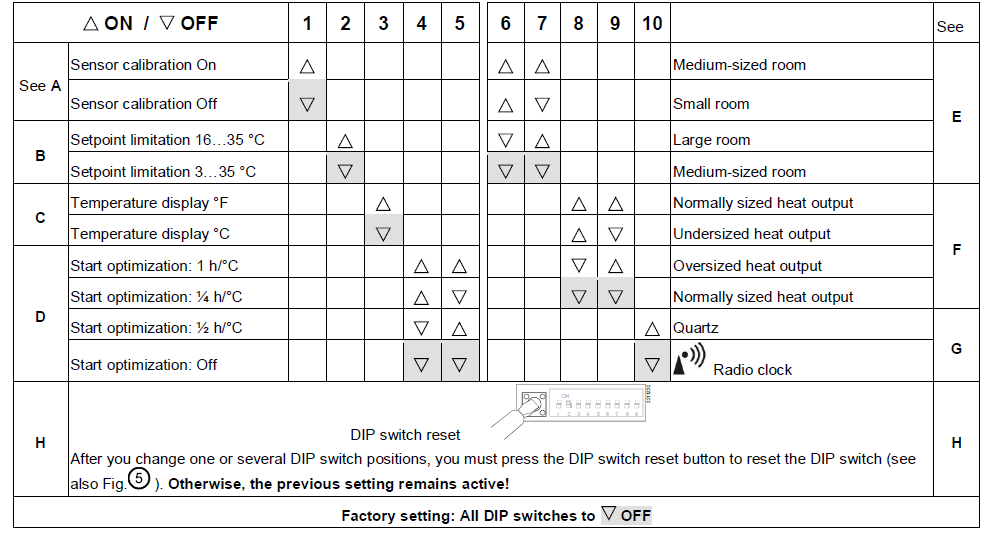
Sensor calibration: DIP switch 1
If the displayed room temperature does not match the measured room temperature, the temperature sensor can be recalibrated. Set DIP switch to ON and press the DIP switch reset button: CAL symbol is displayed. The currently measured temperature flashes. Press or to recalibrate by max. ± 5 °C. Set DIP switch to OFF and press the DIP switch reset button to save the settings.
Setpoint limitation: DIP switch 2
The minimum setpoint limitation of 16 °C prevents undesired heat transfer to neighboring spaces in buildings featuring several heating zones. DIP switch ON: Setpoint limitation 16…35 °C. DIP switch OFF: Setpoint limitation 3…35 °C (factory setting). Press the DIP switch reset button to save the settings.
Temperature display in °C or °F: DIP switch 3
DIP switch ON: Temperature display in °F. DIP switch OFF: Temperature display in °C (factory setting). Press the DIP switch reset button to save the settings.
Start optimization: DIP switches 4 and 5
Optimization advances the switch-on point P.1 to ensure that the selected setpoint is reached at the desired time. The setting depends on the controlled system, i.e., on heat transmission (piping system, radiators), building dynamics (building mass, insulation), and heat output (boiler capacity, flow temperature). DIP switches 4 ON and 5 ON: 1 h/°C For slow controlled systems. DIP switches 4 ON and 5 OFF: ¼ h/°C For fast controlled systems. DIP switches 4 OFF and 5 ON: ½ h/°C For medium controlled systems. DIP switches 4 OFF and 5 OFF: OFF Off, no effect (factory setting). Press the DIP switch reset button to save the settings.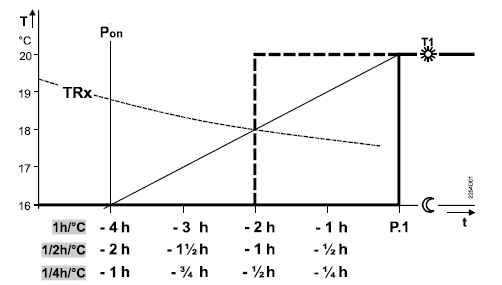
Key for diagram:
- T Temperature (°C)
- t Forward shift of switch-on point (h)
- TRx Room temperature actual value
- Pon Starting point for optimized heat-up time.
Integral action time (Volume adaption): DIP switches 6 and 7
- DIP switches 6 ON and 7 ON:
- Normally sized controlled system, see factory setting.
- DIP switches 6 ON and 7 OFF:
- Fast controlled system: For small rooms, light radiators (plate heat exchangers), well insulated building or fan coils.
- DIP switches 6 OFF and 7 ON:
- Slow controlled system: For large rooms, heavy radiators (cast iron radiators), poorly insulated building, and large masses.
- DIP switches 6 OFF and 7 OFF (factory setting):
- Normally sized controlled system: For normal-size rooms, normally sized radiators (steel pipe radiator) and average insulated building.
- Press the DIP switch reset button to save the settings
Control gain (Heat output adaptation): DIP switches 8 and 9
- Press the DIP switch reset button to save the settings.
- DIP switches 8 ON and 9 ON:
- Normally sized heat output, see factory setting.
- DIP switches 8 ON and 9 OFF:
- Undersized heat output:
- For low boiler/flow temperatures, undersized radiators (area) and undersized volumetric flow (valve nominal width).
- DIP switches 8 OFF and 9 ON:
- Oversized heat output:
- For high boiler/flow temperatures, oversized radiators (area) and oversized volumetric flow (valve nominal width).
- DIP switch 8 OFF and 9 OFF (factory setting):
- Normally sized heat output.
- Press the DIP switch reset button to save the settings.
Radio clock: DIP switch 10
- Only applicable to REV..DC (with integrated DCF77 receiver to receive time signal from Frankfurt, Germany)!
- DIP switch ON: Clock run by controller-internal quartz.
- DIP switch OFF: Time signal DCF77 from Frankfurt, Germany.
- Press the DIP switch reset button to save the settings.
Note on synchronization
During startup, REV..DC synchronizes automatically to the time signal (DCF77) from Frankfurt, Germany. Synchronization takes max. 10 minutes. Synchronization restarts each time you press the button or move the program selection slider from the RUN position during these 10 minutes. Siemens recommends to set the desired settings upon startup, install the REV..DC in the desired location, and not carry out any actions on the REV..DC for the next 10 minutes. In normal operation, the REV..DC synchronizes to the radio clock every day at 3:10 a.m.
Note on reception
The time signal from Frankfurt is modulated to a radio signal. The reception of this radio signal depends on the distance to Frankfurt, atmospheric conditions as well as the location where the REV..DC is installed. Siemens cannot guarantee that the REV..DC can receive the time signal from Frankfurt at any time and any place
No reception
The radio clock symbol is deactivated and an error message is displayed if the clock was not able to synchronize the time for 7 consecutive days. The controller then runs on the internal quartz.
DIP switch reset
After you change one or several DIP switch positions, you must press the DIP switch reset button to reset the DIP switch. Otherwise, the previous setting remains active!.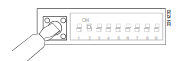
Access to the expert level
Set the program selection slider to RUN. Press  simultaneously for 3 seconds, release the buttons, and within 3 seconds press and hold down
  and
and  simultaneously for 3 seconds, release, and press for another 3 seconds. This releases the engineering settings. is displayed. The display first shows language selection with Code 00. Press the buttons to navigate the settings. Confirm settings by pressing. Press the operating mode selector to exit the engineering settings.
| Function block | Code | Name | Factory setting | Your setting |
|
Basic settings |
00 | Language | English | |
| 01 | Sensor calibration | off | ||
| 02 | Switching differential 2-point | 0.5 °C | ||
|
LCD optimization |
10 | Illumination time | 10 seconds | |
| 11 | Background brightness | 0 | ||
| 12 | Contrast | 0 | ||
|
Clock settings |
30 |
Time zone
Deviation from time signal in Frankfurt (Central European Time CET) (see Note 1) |
0 hours |
|
| 31 | Start of daylight saving time (see Note 2) | March 31 (03-31) | ||
| 32 | End of daylight saving time (see Note 3) | October 31 (10-31) |
Functional check
- Check the display. If there is no display, check insertion and function of the batteries.
- Operating mode “Continuous comfort mode“, read displayed temperature.
- Set temperature setpoint to maximum (see operating instructions).
- After 1…5 minutes, the relay to open the actuator must switch on. Symbol is
 displayed. The actuator OPENS. If not:
- Check actuating device and wiring.
- It is possible that the room temperature is higher than the set temperature setpoint.
- Set temperature setpoint to minimum (see operating instructions).
- After 1…5 minutes, the relay to open the actuator must switch off and the relay to close the actuator must switch on. Symbol
 is displayed. The actuator CLOSES. If not:
- Check actuating device and wiring.
- It is possible that the room temperature is lower than the set temperature setpoint.
- Set the temperature setpoint for operating mode “Continuous comfort mode“ to the desired value.
- Select the desired operating mode.
Reset
User-defined settings:  simultaneously for 3 seconds: This resets all temperature and time settings of the program selection slider to default values (see also “Factory settings” in the operating instructions). The expert settings remain unchanged. The clock starts at 12 p.m., the date on 01-01-08 (01 January 2008). During the reset, all display fields are lit and can be checked accordingly.
All user-defined settings plus expert settings:
Press the DIP switch reset button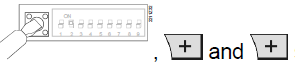 After the reset, all factor settings are reloaded. This applies to the program selection slider as well as to the expert settings. The controller starts with an initialization phase of 180 seconds after each reset. In this phase, the actuator is driven to the basic position CLOSED.
Important: Driving the actuator to the fully CLOSED position takes max. 150 seconds. After a reset, reinsert the controller in the base within 30 seconds.
Engineering
- Mount the room unit in the main living room.
- Select the mounting place so that the sensor can acquire the air temperature in the room as accurately as possible and without being influenced by solar radiation or other heat or refrigeration sources.
- Mounting height is approx. 1.5 m above the floor.
- You can mount the unit on most commercially available recessed conduit boxes or directly on the wall
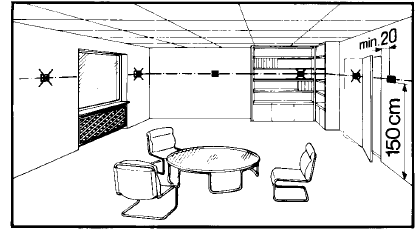
Mounting and installation
- Begin installation by first attaching and wiring the base. You can mount the base on most commercially available recessed conduit boxes or directly on the wall. Insert the controller from top to bottom in the base.
- See the operating instructions delivered with the unit for more information.
- Comply with all local regulations on electrical installations.
- Wire the remote control contact T1/ T2 separately, i.e. using a separate, screened cable.
Preparations to commission the unit
- Adapt the line diameters as per local regulations to the rated value of the installed overcurrent protection device.
- The power supply line must have an external circuit breaker with a rated current of no more than 10 A.
- Set any thermostatic radiator valves to their fully open position, if present in the reference room.
- Recalibrate the temperature sensor (see “Sensor calibration”) if the displayed room temperature does not match the room temperature measured.
Commissioning
- Remove the battery transit tab.
- The unit is ready for operation and executes a 180 second initialization period as soon as you remove the transit tab from the battery contact. In this phase, the actuator is driven to the basic position CLOSED
Select operating language
- During the above actuator initialization phase, the controller type is displayed at thetop left along with a welcome message “THANK YOU…” in all available languages.
- Press any button to interrupt the scrolling text. Operating language selection starts with “ENGLISH“ (factory setting). Press or until you reach the desired operating language. Press or move the slider to confirm the selected operating language.
- If synchronization is not yet completed after language selection, the remaining time is counted down on the display.
- Do not press any button during this time!
- If synchronization is complete after you select the operating language, you can continue to set the time of day (as needed), date, comfort phases, etc
Disposal
The device is considered electrical and electronic equipment for disposal in terms of the applicable European Directive and may not be disposed of as domestic garbage.
- Dispose of the device through channels provided for this purpose.
- Comply with all local and currently applicable laws and regulations.
- Dispose of empty batteries in designated collection points
Observe the following:
- Only replace batteries with batteries of the same type and from the same manufacturer.
- Observe the polarities (+/-).
- The batteries must be new and free from damage.
- Do not mixed new batteries with used batteries.
- Store, transport, and dispose of the batteries in accordance with local regulations, guidelines, and laws.
- Also observe information from the battery manufacturer.
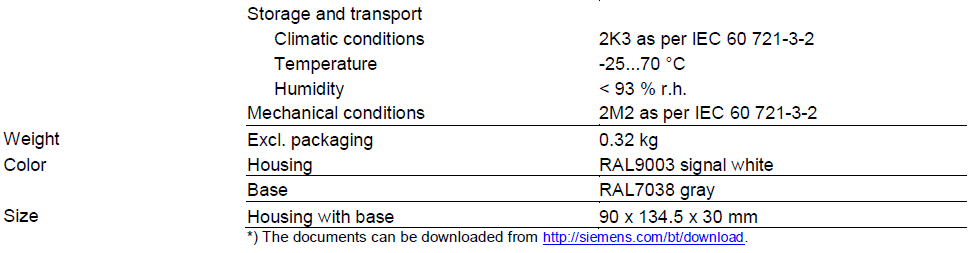
Technical data
Connection diagrams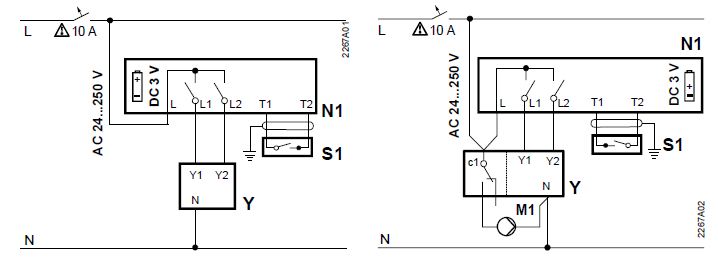
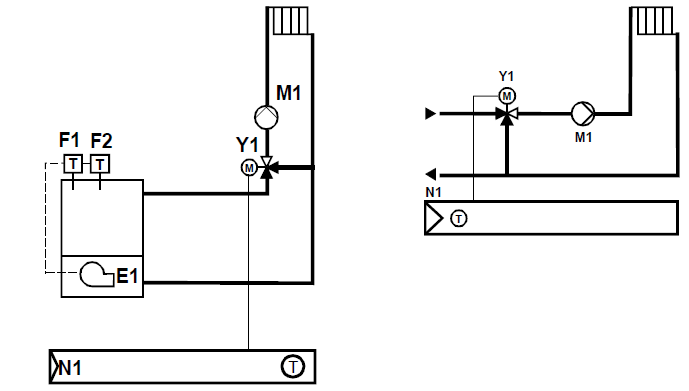
Application examples
Dimensions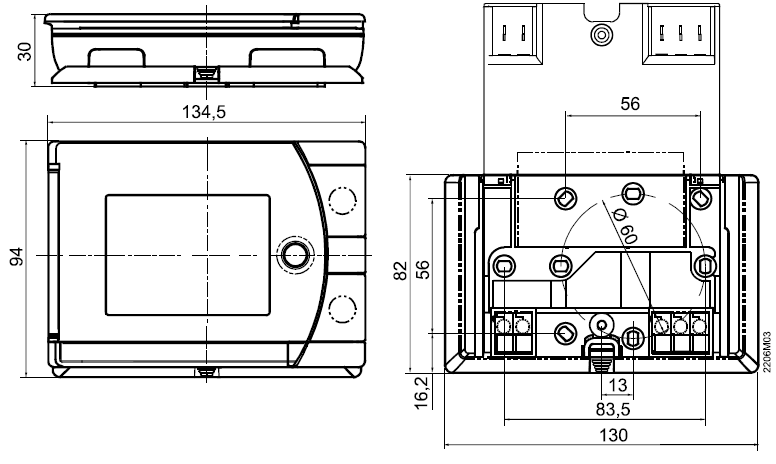
Issued by
- Siemens Switzerland Ltd.
- Building Technologies Division
- International Headquarters
- Theilerstrasse 1a
- CH-6300 Zug
- Tel. +41 58 724 2424
- www.siemens.com/buildingtechnologies
REFERENCE:
DOWNLOAD MANUALS:
SIEMENS REV34-XA Room thermostat Product Specifications Guide
OTHER MANUALS:
SIEMENS REV34-XA Room thermostat Operating Instruction
SIEMENS REV34-XA Room thermostat Product Specifications Guide