hotowell HTW-61-HT-518 Programmable Thermostat
General
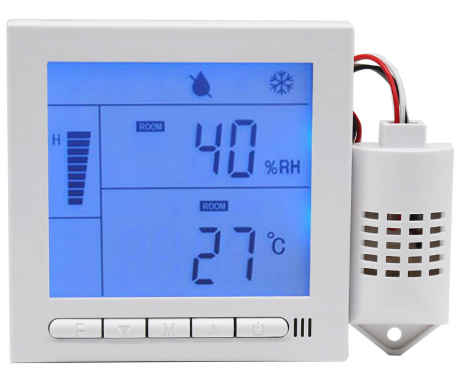
HTW-61-HT series Hygrostat + Thermostat uses microcomputer control technology, by detecting humidity/temperature to control fan/ electric valve/humidity equipment, so as to maintain a configurable set-point and humidity.
Features
- Power Supply:AC110/220/24V/Others optional
- Set-Point and Humidity Configurable
- Control Fan/Motorized valve/Humidifier/Dehumidifier equipment
- Power off memory function
- Blue backlight (Auto off without no operation after 10s)
- 8 time periods programmable.
- Temperature/Humidity display
- Modbus-RS485 communication (optional)
Technical Parameter
- Power supply: AC110/220/24V/Others optional
- Set-Point Range:5-35°C /5-90°C configurable.
- Self-Consumption: <2 W
- Humidity Setting range:10-90%RH
- Humidity display range: 0-99%RH
- Resolution: temperature 1°C , humidity 1%RH
- Accuracy:±1°C, Humidity ±5% RH
- Output Contact Capacity: AC220V/5A;
- Appearance size: 86* 86*15 mm,Installation hole distance: 60 mm
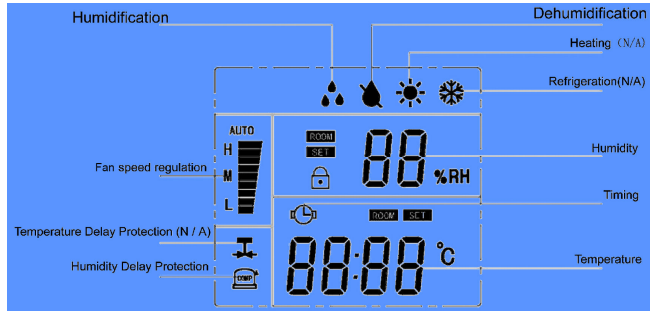
LCD icons
Operation
Humidity mode setting
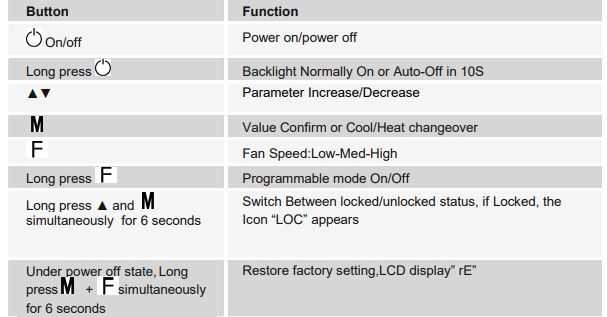
During power-on status, long press ▲+▼for 6 seconds,choose “dehumidification”or “humidification” mode. Press F and keep the value and exit setting
Time setting
- Under power off, Long press▲+▼ enter the time setting process.
In sequence set hour value by ▲ or▼ , then press F to Switch over to minute. - Finally press F key to exit setting.
Programmable work mode setting
During power on ,Press & enter into the programmable setting. Press fan speed key switchover next setting item. And set separately 8 time periods humidity(adjust hour- >minute->humidity…->over) During operation clock symbol display, the corresponding period value is displayed at the bottom of the clock. 8 time periods of humidity form under initialization
| Perio d | Time interval | humidity |
| 1 | 0:00–6:00 | 50%RH |
| 2 | 6:00–8:00 | 50%RH |
| 3 | 8:00–11:00 | 50%RH |
| 4 | 11:00–13:00 | 50%RH |
| 5 | 13:00–15:00 | 50%RH |
| 6 | 15:00–18:00 | 50%RH |
| 7 | 18:00–21:00 | 50%RH |
| 8 | 21:00–24:00 | 50%RH |
Installer Set-Up Process
Note:only recommend for technician )
- Under power off state, long press mode key M over 6s.
- Configure various parameters by ▲or▼ key M
- Press the mode key M to adjust the value, press the mode key again to confirm the value, after setting, press the On/off key to exit the engineer mode.
- The configurable parameters are as follows
| Code | Function | Range | Default values | ||
| 01 | Device ID | 0x01-0xff | 0x01 | ||
| 02 | Temperature correction range | -9~9℃ | 0℃ | ||
| 03 | Humidity correction range | -30~30%RH | 0%RH | ||
| 04 | Fan delay protection | On/Off | Off | ||
| 05 | Humidity return difference | 1~30%RH | 5%RH | ||
| 06 | Bit rate | 01:2400Bd
02:4800Bd 03:9600Bd |
03:9600Bd | ||
| 07 | humidity protection | On/Off | Off | ||
| Troubleshoot | |||||
Troubleshoot
- Room temperature sensor short circuit or open circuit alam: display E1.
- Room humidity sensor short circuit or open circuit alam: E2,Close the dehumidification/humidification valve..
- Compressor symbol
 flash display: humidity protection activated
Wiring Diagram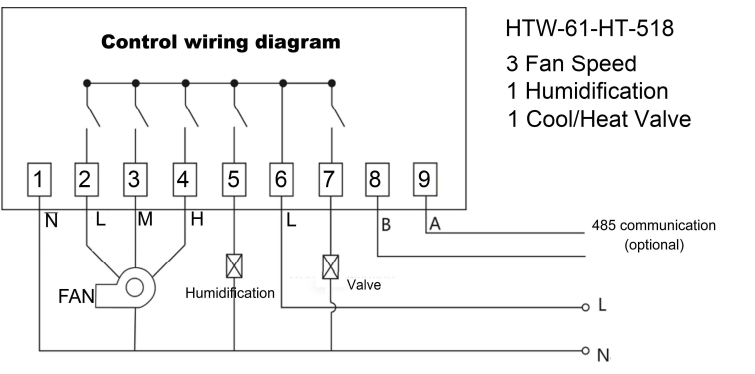
REFERENCE:
DOWNLOAD MANUALS:
hotowell HTW-61-HT-518 Programmable Thermostat User Guide
