
Comfortheat ETN4 ELECTRIC Programmable Thermostat
ETN4 MANUAL – ELECTRIC
A Comfort Heat floor heating system has been installed in your floor. Floor heating warms from the ground up providing an unparalleled feeling of comfort. This heating system is controlled by an electronic thermostat and floor sensor for optimum temperature control and efficiency.
ETN4 DETAILS
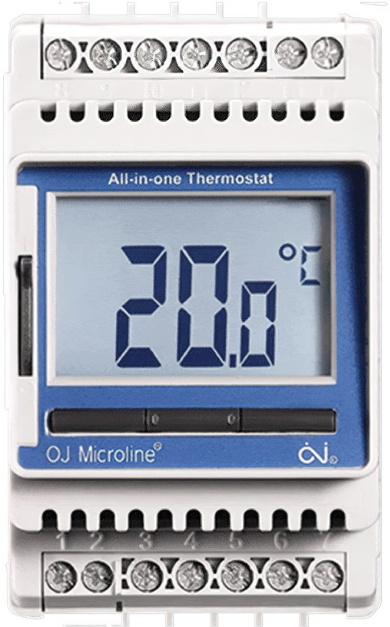
The ETN4 thermostat is a home automation-compatible thermostat. Mounted in the switch board (DIN rail), it utilises a setback temperature function. During the setback periods, the floor does not turn OFF but programs the floor temperature to a lower temperature.
PRIOR TO TURNING ON
Concrete slabs, screeds and glue must be fully cured before turning the heating system on. Wait at least 3 weeks and when turning on for the first time, increase the floor temperature gradually over 2-3 days. Under carpet and timber systems can be turned on once installation is complete.
CABLE WARRANTY & TEMPERATURE SETTINGS [FLOOR SENSING]
| AREAS | TILE [BATH] | TILE [LARGE AREA] | INSLAB | CARPET | TIMBER |
| SUGGESTED FLOOR TEMP. | 24-28ºC | 21-22ºC | 21ºC | 19-21ºC | 24ºC |
| CABLE WARRANTY | 10 years | 10 years | 10 years | 5 years | 5 years |
TECHNICAL DATA – ETN4
- Supply Voltage : 240V AC, 50/60hz
- Output Relay : 16A SPST, 3600W max
- Switching Differential : 0.4 degC
- Built-in Switch : 2 pole 16A
- Default Temp Range : 0/+40 degC
- Housing/protection : IP20
- Dimensions (HxWxD) : 86mm x 52mm x 58mm
- Mounted : Vertical/DIN rail mounted
- Thermostat Warranty : 2 years
OPERATION SETTINGS
- TURNING ON
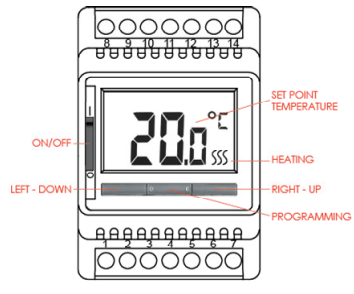
- > Slide ON the ON/OFF switch
- > Press right(up) and left(down) button to set the desired floor set point temperature.
- The thermostat screen is set to always display the set point temperature and not the current running temperature.
- The 3 heating squiggles to the right of the temperature will turn on when the floor is heating.
SETTING PARAMETER VALUES
- Parameter settings allows you to set a range of values to define heating options and temperatures.
- See the ETN4 included manual to view the full range of parameter options. Most default values need no adjustment.
- Below setting is one option you should adjust to suit;
- Night Setback / Energy Saving Function
> Press and hold programming button [centre] for 3 seconds. - > Press programming button repeatedly until you view parameters nSb / -5.0
- > Arrow right[up] and left[down] to adjust the setback temperature differential.
- This is your setback temperature. The vale is a differential value based off your set point temperature.
- A suggested set back temperature would be 5 degC if you did not want the floor heating to turn on, as it is unlikely your floor temperature will drop below this temperature.
- Example of suggested tiled bathroom setting;
- Set point temperature 25 degC
- Setback temperature -20.0 degC
- If no button is pressed after 30 seconds the thermostat returns to the home screen.
- The timer to activate the setback temperature is controlled by an external signal. See figure 1a.
CHILD LOCK
Allows thermostats in public places to be locked.
- Press and hold the left and right buttons simultaneously for 10 seconds. A symbol on the screen indicates the thermostat is locked.
- Press and hold the left and right buttons simultaneously for 10 seconds to release the child lock.
RUNNING GUIDELINES – ELECTRIC
In-slab heating systems have a large thermal mass and the ability to store heat for long periods of time. Heating slabs during off-peak times is a cost efficient heating option. Time of use electricity rates allow you to programme the ETN4 via your home automation system to heat during low cost times and based on the thermal mass of the slab, create an all day warmth. If heating during off peak times only is not enough, you can top up the slab temperature during shoulder rate periods too. Check with your electricity provider for your time of use rates and times. In-slab installations can also be programmed via automation systems to have the ‘power cut’ instead of switching to a setback temperature. Under tile [in-screed & thin-mat] installations typically heat up in around 1-2 hrs. Screeds will retain the heat for some time but heating during off peak times only is not suitable. Based on your time of use electricity rates, you can heat during off peak and shoulder rate times only, and by keeping doors closed and windows shut, retain the warmth for an efficient and comfortable room temperature. Another popular option when programming under-tile heating is to run it only when at home, for a few hours in the morning and a few hours at night, at any electricity rate, based on your comfort temperature and lifestyle. Under carpet & timber mats warm in around 15 mins and are best programmed to turn on when at home, based on your comfort level and lifestyle.
THERMOSTAT HEATING SCHEDULE GUIDES
IN-SLAB AREAS – SAME TIME EVERY DAY DURING OFF PEAK TIMES ONLY WITH ONE HEAT CYCLE [GUIDE ONLY
Turn ON ETN4
- > Adjust temperature using up[right] and down[left] button to 21°C.
- > Press and hold the programming button [centre] for 3 seconds.
- > Press programming button repeatedly until you view parameters nSb /
- > Adjust this parameters using up[right] and down[left] button to -16°C.
- > Schedule 1 – 5°C @ 7.00** [setback temperature]
- > Schedule 2 – 21°C @ 22.00** [set point temperature]
BATHROOMS – SAME TIME EVERY DAY WITH TWO HEAT CYCLES [GUIDE ONLY]
Thermostat Settings – Set point temperature value 25°C / Set back parameters nSb value -8°C
- > Schedule 1 – 25°C @ 5.30 [set point temperature]
- > Schedule 2 – 17°C @ 8.30 [setback temperature]
- > Schedule 3 – 25°C @ 17.00 [set point temperature]
- > Schedule 4 – 17°C @ 22.00 [setback temperature]
LARGE TILED AREAS [SCREED/THIN] – SAME TIME EVERY DAY WITH TWO HEAT CYCLES [GUIDE ONLY]
Thermostat Settings – Set point temperature value 22°C / Set back parameters nSb value -17°C
- > Schedule 1 – 22°C @ 5.30 [set point temperature]
- > Schedule 2 – 5°C @ 8.00 [setback temperature]
- > Schedule 3 – 22°C @ 17.00 [set point temperature]
- > Schedule 4 – 5°C @ 21.00 [setback temperature]
WIRING DIAGRAM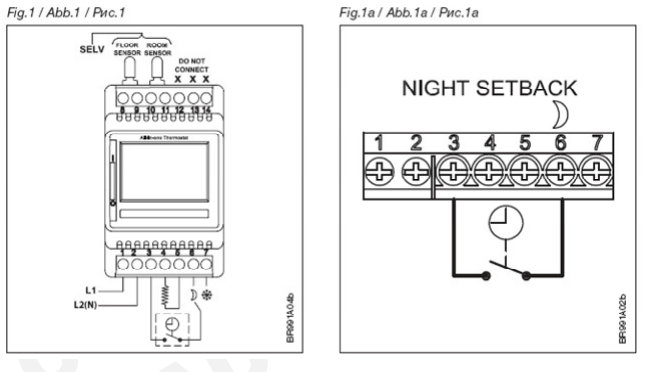
TROUBLESHOOTING
If an error message occurs, the thermostat will display one of the following errors;
- E0 : Internal failure. The thermostat is defective. The thermostat must be replaced.
- E1 : Internal room sensor defective or short-circuited. The thermostat must be replaced.
- E2 : External floor sensor disconnected, defective or short-circuited. Requires sensor reconnection or replacement.
- E5 : Internal overheating. Installation requires inspectIon.
Comfort Heat
- Comfort Heat Australia Pty Ltd ABN 64 089778941
- 8/11 Ponderosa Parade Warriewood NSW 2103
- PO Box 220 Mona Vale 1600
- Telephone +61 9979 8600
- [email protected]
- www.comfortheat.com.au
- Local call 1300 13WARM
REFERENCE:
DOWNLOAD MANUALS:
Comfortheat ETN4 ELECTRIC Programmable Thermostat Setup Manual
OTHER MANUALS:
Comfortheat ETN4 HYDRONIC Programmable Thermostat Operating Manual
Comfortheat ETN4 Programmable Thermostat User Manual
Comfortheat ETN4 THERMOSTAT Wiring Diagram
Comfortheat ETN4 ELECTRIC Programmable Thermostat Setup Manual