Ritetemp 8022C Programmable Thermostat

Caution
To avoid electrical shock and to prevent damage to the furnace, air conditioner, and thermostat, disconnect the power supply before beginning work. This can be done at the circuit breaker, or at the appliance.
Tools
You will need a small Phillips screwdriver and possibly a drill with 3/16-in. (4.8mm) bit for wall mounting.
Location
Replacement installations – mount the new thermostat in place of the old one if possible.
New installations – follow the guidelines listed below.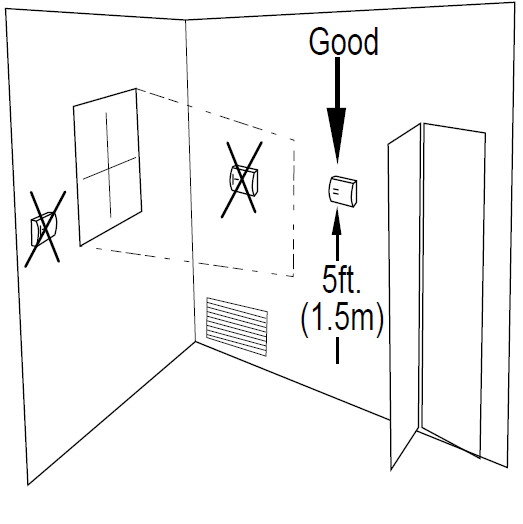
Locate the thermostat on an inside wall, about 5 ft. (1.5m) above the floor, and in a room that is used often.
- Do not install it where there are unusual heating conditions, such as: in direct sunlight; near a lamp, radio, television, radiator register, or fireplace; near hot water pipes in a wall; near a stove on the other side of a wall.
- Do not locate in unusual cooling conditions, such as: on a wall separating an unheated room; or in a draft from a stairwell, door, or window.
- Do not locate in a damp area. This can lead to corrosion that will shorten thermostat life.
- Do not locate where air circulation is poor, such as: in a corner or an alcove; or behind an open door.
- Do not install the unit until all construction work and painting has been completed.
- This thermostat does not require leveling.
Caution
- Your thermostat is a precise instrument, handle it with care.
- Turn off the electricity to the appliance before installing or servicing the thermostat or any part of the system.
- Do not turn the electricity back on until work is completed.
- Do not short (jump) across electric terminals at the control on the furnace or air conditioner to test the system. This will damage the thermostat and void your warranty.
- All wiring must conform to local codes and ordinances.
- This thermostat is designed for use with 24-volt AC and millivolt systems. The thermostat should be limited to a maximum of 1.0 amps; higher amperage may cause damage to the thermostat.
Remove old unit
IMPORTANT: LABEL ALL WIRES BEFORE DISCONNECTING THEM!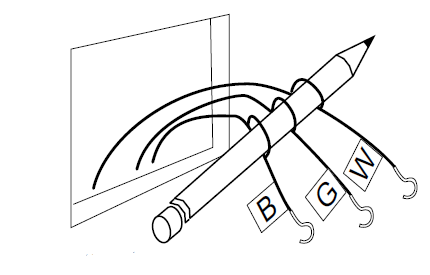
- Switch the electricity to the furnace and air conditioner OFF; then proceed with the following steps.
- Remove the cover from the old thermostat. Most are snap-on types and simply pull off. Some have locking screws on the side or front. These must be loosened. Note the letters printed near the terminals.
Attach labels (enclosed) to each wire for identification.
Caution
Read the instructions carefully before removing any wiring from the existing thermostat. Wires must be labeled before they are removed. THERE IS NO STANDARD COLOR CODE. When removing wires from their terminals, ignore the color of the wires since these may not comply with any standard - Label the wires one at a time. You must label all the wires before you proceed. With all wires labeled, remove them from the old unit.
- Make sure the wires do not fall back inside the wall. You can wind them around a pencil to keep them from falling.
- Loosen all screws on the old thermostat and remove it from the wall.
- Fill the wall opening with non-combustible insulation to prevent drafts.
Mount the 8022C

- Separate the front from the back of the unit. Press up on the catch on the bottom of the thermostat and swing the body away from the base, lift up to remove the body from the base.
- Hold the base against the wall, with the wires coming through the opening below the terminal block.
- Position the base for the best appearance. If you chose to use the optional Wall Plate, put it in position before screwing the base to the wall.
- Attach the base to the wall with the two screws provided.
If you are mounting the base to sheetrock or if you are using the old mounting holes, use the plastic anchors provided. Drill a 3/16-in. (4.8mm) hole for the insert at each screw location then mounts the base.
Before you Connect Wires
Please follow these guidelines for safe and secure wire connections.
- Strip insulation 3/8 in. (9.5mm) from wire ends.
Take care not to damage the labels for each wire in handling. - Connect labeled wires only to a terminal with the corresponding letter.
- Bend the wire slightly, insert the wire under the contact plate, and tighten the screw down onto the wire.
Caution
Do not allow wires to touch each other or parts on the thermostat.
Wires must be routed through the hole in the back plate, below the terminal block, or they will hit parts on the cover.
Optional Wire Connections
Determine which step-by-step wiring diagram you should use. Make sure your wires are labeled. This may require you to find the ‘other end’ connection for each wire on your heating or air conditioning equipment and read the label there. If you have a wire marked “C” its connection is optional. If you do connect it the thermostat will draw power from the C wire and this will extend battery life. If you have zoned heating/cooling systems with multiple thermostats. Please refer to the website at www.ritetemp-thermostats.com for installation details or call 1-888-515-2585 for assistance.
What Wires Do You Have?


- R – Single source power for heat/cool
Note: R connects to both RC and RH using the red jumper - RH or R – HEATING POWER
- RC – COOLING POWER
- W – HEATING CONTROL
- G – FAN RELAY
- C – Common side of Heating Power
- Y – COMPRESSOR
- O – DAMPER OR CHANGEOVER VALVE (POWERED IN COOL)
When you have finished making connections. hook the top of the body onto the base, swing the body down, and snap the body onto the base.
Install Batteries

- The 8022C requires batteries to operate your furnace and retain its programming in memory.
- Switch the MODE switch to OFF and the FAN switch to AUTO.
- Remove the front panel battery cover and install 2 AA alkaline batteries according to the polarity noted in the compartment.
- Initially, all LCD segments will go on.
- Press the RESET button to clear transient program memory.
NOTE: Replace the batteries when this LOW battery indicator appears on the display or once a year. When replacing batteries, you have approximately 1/2 minute before your custom program is lost.
Check Unit
- Follow these procedures to verify you have correctly installed the unit.

To check HEAT mode:
- Set the mode switch to HEAT. Set the fan switch AUTO.
- Using the TEMP UP button raise the set point to 90deg allow the system 5 min to respond.
- Verify that heat is blowing from the system.
To check COOL mode:
- Set the mode switch to COOL.
- Press the TEMP DOWN button to a temp 5 degrees below the room temperature.
- Allow the system 5 minutes to respond.
- Verify that cool air is blowing from the system.
To check Fan: (If you connected the G wire – fan relay)
Note: If you have an electric furnace system and the blower does not operate after installation, remove the thermostat, turn it, over, and find the electric/gas heat selector jumper on the back of the control unit. Switch it to “Elect”(see Diag below).
Congratulations, you have successfully installed your unit. Please proceed to the OPERATING Guide to initialize the new thermostat.
Power Options
- The 8022C can run on batteries only. (2AA Alkaline) 24VAC and MV
The batteries will last well over 1 year. If the batteries are not replaced the thermostat will stop working. - The 8022C can run on the C wire if available. 24VAC ONLY
As shown in the wiring diagrams, The C wire is the other side of the 24VAC heating transformer. If the C wire is used, the batteries are then for AC power loss only and will last much longer. The thermostat will continue working if the batteries die.

2 WIRE Heating (GAS MILLIVOLT or 24vac

- STEP 1 – Connect the R (or RH) wire to the RH terminal on the thermostat.
This connects the Heater Power to the thermostat. - STEP 2 – Connect the W wire to the W terminal on the thermostat.
This connects the heater control line to the thermostat.
Your Heater is now connected to the thermostat.
NOTE: Wires marked with the dotted line are optional.
3 WIRE

- STEP 1 – Connect the R (or RH) wire to the RH terminal on the thermostat.
This connects to the Heater Power. - STEP 2 – Connect the W wire to the W terminal on the thermostat.
This connects the heater control line to the thermostat. - STEP 3 – Connect the G wire to the G terminal on the thermostat.
This connects the Fan to the thermostat.
Your system is now connected to the thermostat.
NOTE: Wires marked with the dotted line are optional.
4 WIRE

- STEP 1 – Connect the Y wire to the Y terminal on the thermostat. This connects to the Cooler compressor.
- STEP 2 – Connect the RH or R wire to the RH terminal on the thermostat.
This connects the Heater/cooler power. - STEP 3 – Connect the W wire to the W terminal on the thermostat. This connects to the heater control line.
- STEP 4 – Connect the G wire to the G terminal on the
Thermostat. This connects to the Fan.
Your HVAC system is now connected to the thermostat.
NOTE: Wires marked with the dotted line are optional.
5 WIRE

- STEP 1 – Remove the red Jumper wire.
- STEP 2 – Connect the Y wire to the Y terminal on the thermostat.
This connects to the Cooler compressor. - STEP 3 – Connect the RH wire to the RH terminal on the thermostat. This connects to the Heater Power.
- STEP 4 – Connect the RC wire to the RC terminal on the thermostat. This connects to the Cooling Power.
- STEP 5 – Connect the W wire to the W terminal on the thermostat.
This connects to the heater control line. - STEP 6 – Connect the G wire to the G terminal on the Thermostat.
This connects to the Fan.
Your HVAC system is now connected to the thermostat.
NOTE: Wires marked with the dotted line are optional.
SINGLE-STAGE HEAT PUMP

- STEP 1 – Connect the G wire to the G terminal on the thermostat.
This connects the Fan. - STEP 2 – Add a jumper wire between W and Y.
- STEP 3 – Connect the Y wire to the Y terminal on the thermostat.
This connects the Compressor. - STEP 4 – Connect the O or B wire to the O or B terminal on the thermostat. (If you have both O and B contact
Ritetemp or your local HVAC contractor for further help)
This connects the change-over valve. - STEP 5 – Connect the R wire to the RC terminal on the Thermostat.
This connects to the 24vac power.
Your HVAC system is now connected to the thermostat.
NOTE: Wires marked with the dotted line are optional.
8022C Features

The 8022C can be used with most 24-volt gas, oil, or electric heating and air conditioning systems, single-stage heat pumps, or gas millivolt heating systems. It cannot be used with 120-volt heating systems or multistage heat pumps. Ask The Home Depot for other thermostats to control those systems.
The 8022C is programmable. There are four programming periods per day. Each period can be programmed separately.
You can use the built-in time/temperature programs, or alter them to suit your schedule.
The 8022C separately programs 7 days a week and a Special Day – for both heating and cooling.
You can easily override the programmed temperatures for as little as one programming period or for an entire vacation.
A large liquid crystal display shows the time, day of the week, room, and set temperatures. It will also remind you when the filter should be changed in your blower.
Temperature swing adjustment lets you fine-tune your system for maximum comfort and energy efficiency.
A 4-minute minimum off time in COOL protects your air conditioning system from being damaged. Two “AA” batteries (not included) are used to retain your time and temperature programs, and to run the thermostat
REFERENCE:
DOWNLOAD MANUALS:
Ritetemp 8022C Programmable Thermostat Installation Guide
OTHER MANUALS:
Ritetemp 8022C Programmable Thermostat Operational Manual
