Tekmar 554 Non-Programmable Thermostat
Introduction
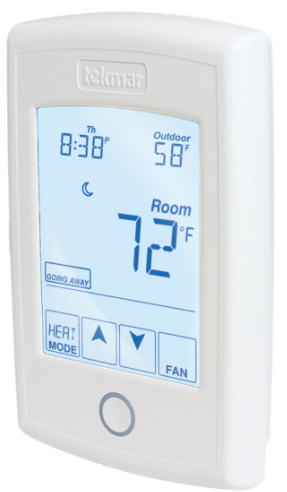
The tekmarNet® Thermostat 554 is a communicating touchscreen thermostat designed to operate one heating stage, one cooling stage, and a fan.
Features
- tekmarNet® communication compatible
- Touchscreen technology
- Radiant floor heating
- Programmable schedule
- Network schedule master or member
- Optimum start
- Air group master
- Room temperature limiting
- Temporary hold
- 2 auxiliary sensor inputs
- Away scene key
Important Safety Information
It is your responsibility to ensure that this thermostat is safely installed according to all applicable codes and standards. tekmar is not responsible for damages resulting from improper installation and/or maintenance. This is a safety-alert symbol. The safety alert symbol is shown alone or used with a signal word (DANGER, WARNING, or CAUTION), a pictorial, and/or a safety message to identify hazards.
When you see this symbol alone or with a signal word on your equipment or in this manual, be alert to the potential for death or serious personal injury.
 This pictorial alerts you to electricity, electrocution, and shock hazards.
WARNING: This symbol identifies hazards that, if not avoided, could result in death or serious injury.
CAUTION: This symbol identifies hazards that, if not avoided, could result in minor or moderate injury.
Notice: This symbol identifies practices, actions, or failure to act which could result in property damage or damage to the equipment.
WARNING: Read manual and all product labels BEFORE using the equipment. Do not use it unless you know the safe and proper operation of this equipment. Keep this manual available for easy access by all users. Replacement manuals are available at tekmarControls.com
- It is the installer’s responsibility to ensure that this thermostat is safely installed according to all applicable codes and standards.
- Improper installation and operation of this thermostat could result in damage to the equipment and possibly even personal injury or death.
- This thermostat is not intended for use as a primary limit control. Other controls that are intended and certified as safety limits must be placed into the control circuit.
NOTICE:
Do not attempt to service the thermostat. There are no user-serviceable parts inside the thermostat. Attempting to service the thermostat voids the warranty.
Getting Started
Congratulations on the purchase of your new tekmar® thermostat. This manual will step through the complete installation, programming, and sequence of operations for this control. At the back, there are tips for control and system troubleshooting.
Installation
Caution
Improper installation and operation of this control could result in damage to the equipment and possibly even personal injury or death. It is your responsibility to ensure that this control is safely installed according to all applicable codes and standards. This electronic control is not intended for use as a primary limit control. Other controls that are intended and certified as safety limits must be placed into the control circuit.
Preparation
Tools Required
- tekmar or jeweler screwdriver
- Phillips head screwdriver
- Wire stripper
- Drill (for wall anchor)
- 3/16″ drill bit
Materials Required
18 AWG LVT Solid Wire (Low Voltage Connections)
Installation LOCATION
Choose the placement of the thermostats early in the construction process to enable proper wiring during rough-in.
NOTICE:
- Install the thermostat on an interior wall.
- Keep the thermostat dry. Avoid potential leakage onto the control.
- Maintain relative humidity less than 90% in a non-condensing environment.
- Avoid exposure to extreme temperatures beyond 32-122°F (0-50°C).
- Avoid drafts, direct sun and anything else that could cause inaccurate temperature readings.
- Install away from equipment, appliances, or other sources of electrical interference.
- Install to allow easy access for wiring, viewing, and adjusting the display screen.
- Install approximately 5 feet (1.5 m) off the finished floor.
- The maximum length of wire is 500 feet (150 m).
- Strip the wire to 3/8″ (10 mm) for all terminal connections.
- Use standard 8 conductor, 18 AWG wire.
WARNING:
To prevent the risk of personal injury and/or death, make sure power is not applied to the thermostat until it is fully installed and ready for final testing. All work must be done with power to the circuit being worked on turned off.
Please be aware local codes may require this thermostat to be installed or connected by an electrician.
Removing the Thermostat Base
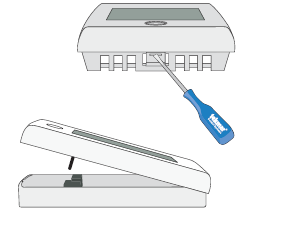
To remove the thermostat base
- Locate the tab on the bottom of the thermostat.
- Push the tab with either your thumb or a screwdriver.
- Lift the thermostat front away from the thermostat’s base.
Mounting The Thermostat Base:
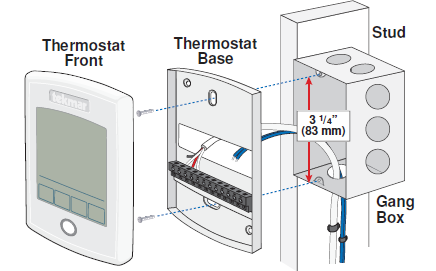
If a single gang box is used:
- Feed the wiring through the large holes of the thermostat.
- Fasten the base of the thermostat to the gang box using two screws.
- Terminate wiring to the wiring strip.
- Push the thermostat front onto the thermostat base.
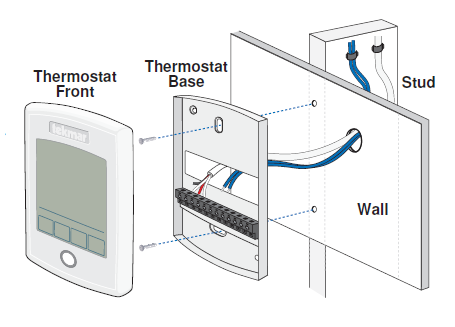
If a gang box is not used:
- Feed the wiring through the large hole in the thermostat base.
- Mount the thermostat base directly to the wall.
- Use screws in the screw holes to fasten the thermostat to the wall. At least one of the screws should enter a wall stud or similar rigid material.
- Terminate wiring to the wiring strip.
- Push the thermostat front onto the thermostat base.
Do not over-tighten wiring screws. Hand-tighten only.
Thermostat Wiring
The thermostat operates a single heating system zone and can be wired in three different ways.
- Stand Alone – Similar to tekmarNet®4 wiring with tN4 wiring terminal not used. First stage heating relay (Rh1 – W1) can be wired directly to switching relays.
- tekmarNet®4 – Allows the thermostat to be wired using 4 wires to a tN4 Wiring Center or Zone Manager. The tN4 communication bus can also be daisy-chained to allow multiple thermostats to be connected together without home-running wires back to the mechanical room.
- tekmarNet®2 – Allows the thermostat to be wired point-to-point using 2 wires to a tN2 Wiring Center, House Control, or Zone Manager. This makes wiring easy for retrofit applications.
Application-specific wiring diagrams are provided in the 554_A brochure.
Compatible Sensors
The thermostat is compatible with Indoor Sensor 076, 077, and 084, Slab Sensor 072, 073, and 079, Outdoor Sensor 070, Universal Sensor 082, and Duct Sensor 083.
caution
Only qualified personnel should perform testing procedures. A licensed electrician is recommended.
Testing the Thermostat Wiring
Testing tekmarNet®2 Wiring ——————————————
Testing the Power
If the thermostat display turns on, this indicates that the thermostat is operating correctly and there are no electrical issues. In the event that the display is off, or the display is cycling on and off:
- Remove the thermostat wiring cover.
- Check to ensure that the tN2 wires on the thermostat are connected to a zone on a House Control, Wiring Center, or Zone Manager.
- Use an electrical meter to measure DC voltage between the tN2 terminals.
- If the DC voltage is 0 V (dc) for at least 20 seconds, then there is an open or short circuit in the tN2 wires.
- If the DC voltage is 0 V (dc) for 10 seconds and then is 23 to 24 V (dc) for 5 seconds, this indicates the wiring is correct.
- If the thermostat display is off, or is cycling on and off, move the thermostat to the next available zone on the House Control, Wiring Center, or Zone Manager.
- If the thermostat display remains permanently on, there may be a fault with the previously tried zone on the House Control, Wiring Center, or Zone Manager.
- If the thermostat display continues to be off or is cycling on and off, there may be a fault on the thermostat.
If a fault is suspected, contact your tekmar sales representative for assistance.
Testing tekmarNet®4 and Stand Alone Wiring ————————–
Testing the Power
- Remove the front cover from the thermostat.
- Use an electrical test meter to measure (ac) voltage between the R and C terminals.
The reading should be 24 V (ac) +/– 10%. - Install the front cover.
Testing the Relay Outputs ——————————————–
Testing the Heat W Relay
- Set the Mode to Heat and increase the Set Heat temperature above the Room temperature.
- The “Heat On” symbol will appear on the display.
- Use an electrical test meter to measure (ac) voltage between the W and C terminals at the heating equipment location. The reading should be 24 V (ac) ±10%.
Testing the Cooling Y Relay
- Set the Mode to Cool and decrease the Set Cool temperature above the Room temperature.
- The “Cool On” symbol will appear on the display.
- Use an electrical test meter to measure (ac) voltage between the Y and C terminals at the cooling equipment location. The reading should be 24 V (ac) ±10%.
Testing the Fan G Relay
- Touch the Fan key to set the Fan to “On”.
- Use an electrical test meter to measure (ac) voltage between the G and C terminals at the blower fan equipment location. The reading should be 24 V (ac) ±10%.
Mounting the Thermostat
Push the thermostat front onto the thermostat base. Installation is now complete.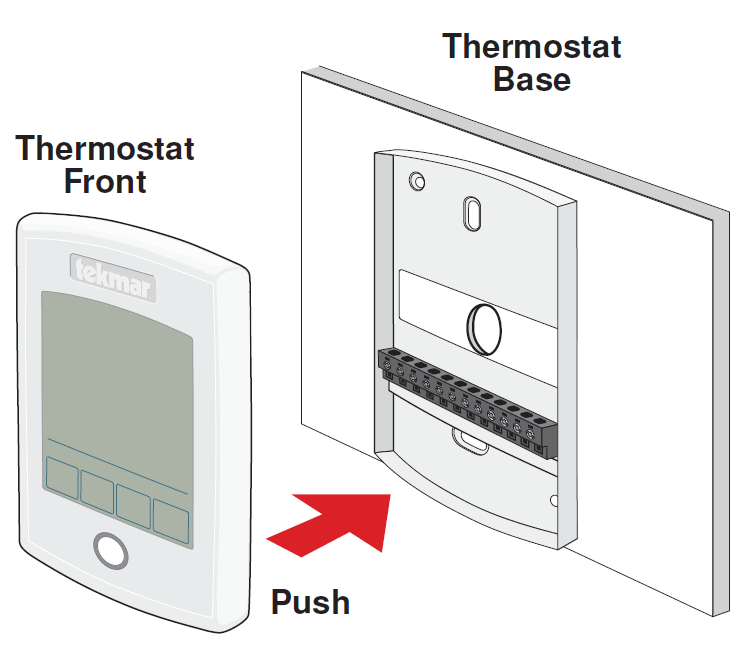
Switch Settings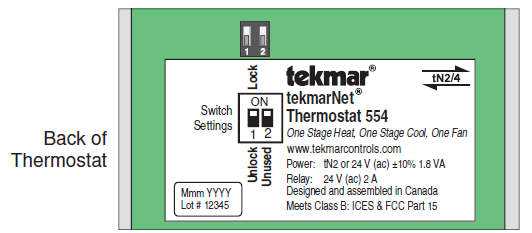
| Switch | Position | Action |
|
1 |
ON | LOCK ACCESS LEVEL A thermostat is locally locked and the access level cannot be changed. Set to Lock when installation has been completed. |
| OFF | UNLOCK ACCESS LEVEL The thermostat is unlocked and the access level may be changed. Go to the Toolbox menu to change the access level. Set to Unlock during the installation process. Note: tekmarNet® system controls include a Global Lock that locks all connected thermostats. Set the tekmarNet® system control to unlock to allow access level adjustment on all connected thermostats. |
|
| 2 | ON | Not used |
| OFF | Not used |
User Interface
Home Screen
The touchscreen of the 557 provides one-touch access to these settings.
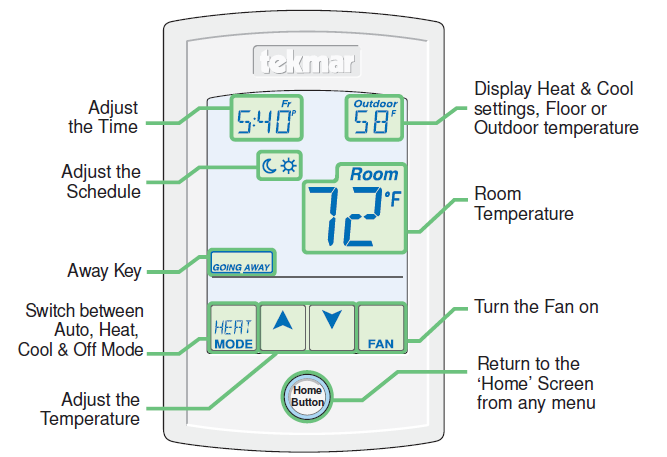
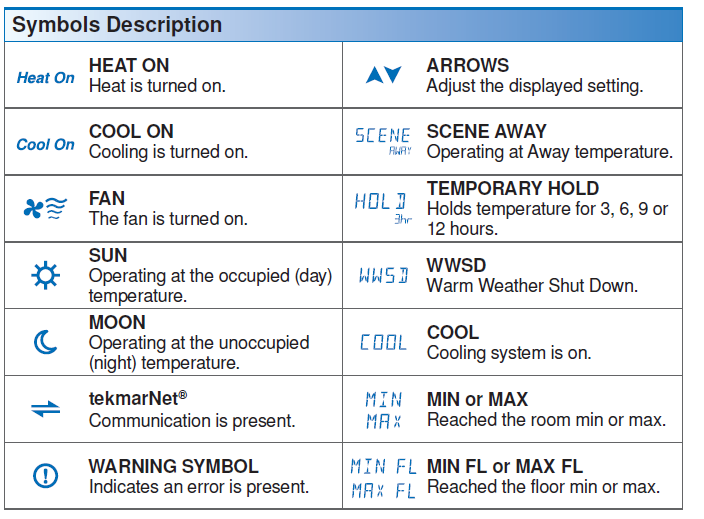
Programmable Settings
Press and hold the Home button for 3 seconds to enter the programming menus. The thermostat returns to the last programming menu previously used.
Select a Programming Menu —————————————–
- Touch “NEXT” to advance (clockwise in the above illustration) to the next menu.
- Touch “BACK” to go backward (counterclockwise in above illustration) through the menus.
- Touch “ENTER” to enter a menu.
Setting Items ——————————————————–
- Touch
 arrow to adjust the setting if required.
 - Touch “NEXT ITEM” to advance to the next item within the menu.
- Touch “BACK ITEM” to go backwards to the previous item within the menu.
- To return to the parent menu after changing a setting, press and release the Home button.
- To return to the Home screen, press and release the Home button twice or wait 30 seconds to automatically return to the Home screen.
Set Temp Menu


Time Menu

 Schedule Menu
The scheduled menu can operate on a 24-hour or 7-day repeating schedule. When a 24-hour schedule is selected, “SuMoTuWeThFrSa” is shown on the top of the screen to show that the event time applies to all days of the week. When a 7-day schedule is selected, each individual day of the week is shown with the event time.


Display Menu


Scenes Menu

Monitor Menu


Toolbox Menu


Setup Menu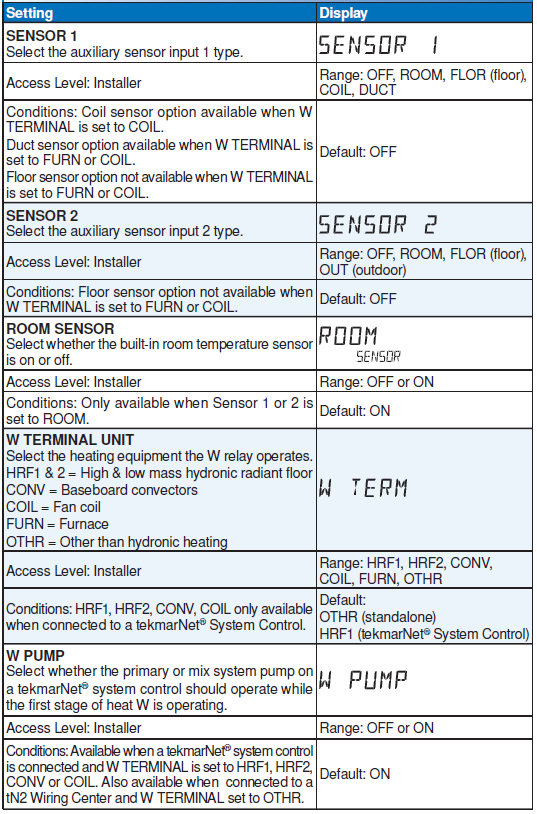
Sequence of Operation
Heating Operation
- Set Heat Temperature ———————————————–
The 557 can operate radiant floor heating, heat pump stage 1 and stage 2, and a backup heat source to provide heating in different combinations depending on the outdoor air temperature. The illustration below shows when each of the available heating units are available. The “Heat On” symbol is shown on the display when the thermostat is heating. If not operating a heat pump, the first and second stages of heat (W1 and W2) are allowed to turn on below the Warm Weather Shut Down to maintain the Set Heat Room temperature. - Floor Heating ——————————————————–
When using both a room and a floor temperature sensor, the thermostat always maintains the Floor Minimum temperature, even when the air temperature is satisfied. When the air temperature is below the Set Heat Room temperature, the thermostat operates the heating system to maintain the Set Heat Room temperature. The floor is never heated above the Floor Maximum setting in order to protect the floor covering. Suggested Floor Maximum settings are 90°F (32°C) for tile, stone, or concrete floors and 85°F (29°C) for wood floors. - Radiant Floor Baseload ———————————————-
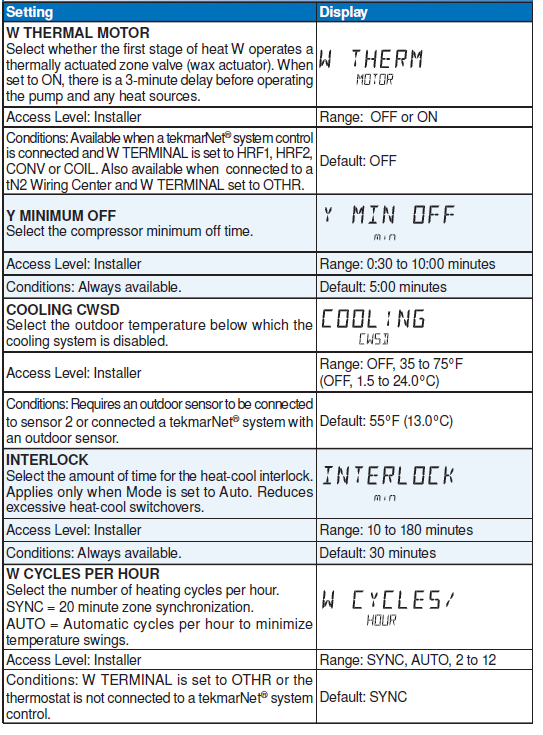
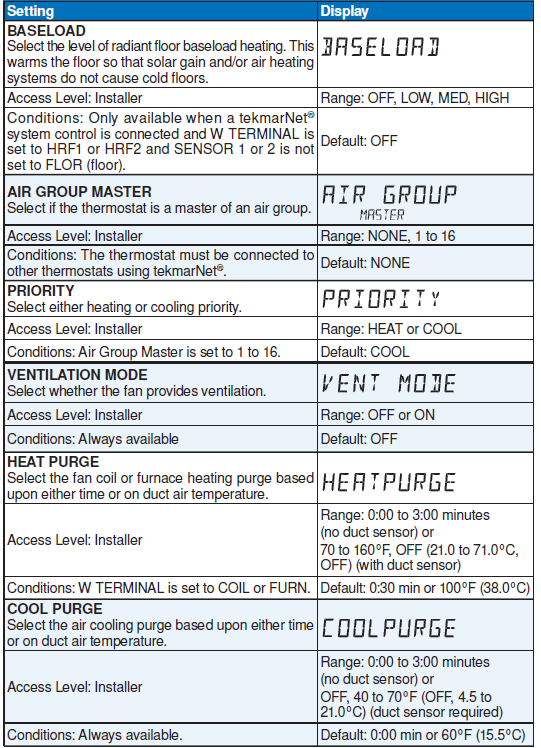
When the terminal unit is selected to be a Hydronic Radiant Floor (HRF1 or HRF2) and no floor temperature sensor is installed, the thermostat has the option to provide baseload heating. This allows the radiant floor to be heated even though the room air temperature is satisfied. This is useful in areas where a radiant floor heating zone is overlapped by an air heating system. The radiant floor heating is overwhelmed by the quick heat-up rate of the air heating system, resulting in a radiant floor heating zone that rarely turns on. The radiant baseload option allows the radiant floor to counteract the air heating system by heating the floor at a reduced output even when the room air temperature is satisfied. This is also useful in areas that experience large solar gains through windows. The radiant baseload is automatically shut off in the summer by the warm weather shutdown feature. - Warm Weather Shut Down ——————————————–
When the outdoor air temperature exceeds the Warm Weather Shut Down (WWSD) setting on the tekmarNet® main control, the heating system is shut off.
A W1 HEAT WWSD setting is available to allow the heat pump to heat the building while the radiant floor heat system is shut off during mild outdoor temperatures. This is advantageous in the spring and fall when heating is required at night and cooling is required during the day. As the outdoor temperature falls below the W1 HEAT WWSD setting, the radiant floor becomes the primary heat source and the heat pump provides supplemental heating. - Freeze Protection —————————————————-
The thermostat operates the heat whenever the room or floor temperature falls below 40°F (4.5°C) even when the mode is set to off.
Cooling Operation
- Set Cool Temperature ———————————————–
The 557 can operate a two-stage heat pump or air conditioner to provide cooling depending on the outdoor air temperature. In some cases, cooling is provided by a chilled water fan coil. The illustration below shows when each of the available cooling units are available. The “Cool On” symbol is shown on the display when the thermostat is cooling. - Cooling Cold Weather Shut Down ————————————-
When the outdoor air temperature falls below the Cooling Cold Weather Shut Down (CWSD) setting on the thermostat, the cooling system is shut off
Room Min and Max Limits
Heating and cooling minimum and maximum temperature settings are available in the Set Temp menu. These allow the installer to select start and stop limits for the temperature settings in both heating and cooling for the User and Limited access levels. This is useful in commercial installations and child/guest bedrooms where the availability of the full temperature setting range may not be desirable.
Mode Operation
The thermostat includes a mode key. Available modes are:
- Heat ― Allows the heating
- Cool ― Allows air cooling
- Auto ― Automatically switches between heating and cooling as necessary. The interlock time is applied when switching from heating to cooling or from cooling to heating.
Hydronic Pump and Valve Operation
- Exercising ———————————————————-
When connected to a tekmarNet® system control, the thermostat exercises the heat relay for 10 seconds every 3 days. Exercising helps prevent zone valves or zone pumps from failing due to precipitate buildup. During exercise, the thermostat shows “TEST” on the display. - Flushing ————————————————————
The flushing feature is for open-loop systems that use a domestic hot water tank as a heat source. Flushing ensures that fresh potable water is circulated through the system once each day. If the thermostat is connected to a tekmarNet® system control with the Flushing feature turned on, the thermostat display will display “FLUSHING” for the duration of the flushing operation. - Hydronic System Supply Pump —————————————
When connected to a tekmarNet® system control, the thermostat’s W1 Pump setting affects how the primary pump or mix pump on the system control operates. When connected to the boiler bus, the boiler system or primary pump is operated. When connected to the mix bus, the mix system pump is operated. If the thermostat operates a motorized or thermal motor zone valve, the W1 Pump setting should be set to On.
If the thermostat operates a thermal motor (wax actuator) zone valve, set the W1 Thermal Motor setting to On. This provides a three minute delay to allow the zone valve to open before the primary or mix pump is turned on. In special applications with multiple zoning manifolds, the W1 Pump setting can be set to Off. This allows a Zone Group Pump located on the Zone Manager, or Wiring Center to operate the pump for the manifold. - DHW Tank Priority —————————————————
When a tekmarNet® system control is heating an indirect Domestic Hot Water (DHW) tank, the thermostat may shut off the heating zones to allow the DHW tank to recover quickly. This is determined by the DHW priority of the tekmarNet® system control.
Fan Operation
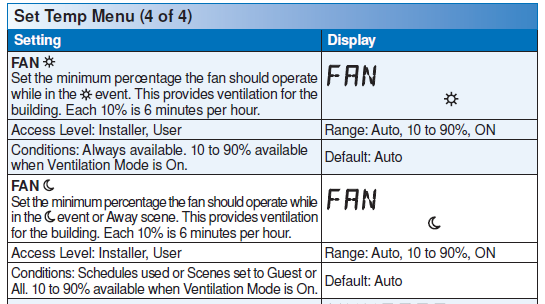
The fan operates together with the air heating or cooling systems. The user can also select to operate the fan manually by pressing the Fan button. This allows the user to choose between Auto and On. “Auto” allows the fan to operate together with heating or cooling but normally the fan is off. “On” forces the fan to operate continuously.
- Ventilation Fan ——————————————————
In order to provide ventilation to the building, the fan can also operate for additional time beyond what is required for the heating and cooling systems. Ventilation allows the user to select the fan to operate for a minimum percentage out of each hour. Options are 10 to 90%, in 10% (6 minutes per hour) increments, as well as Auto and On. This is available when the Vent Mode setting in the Setup menu is set to On. Once Ventilation is set to On, the Fan minimum run time percentage during the and events can be set so that the fan can operate on a schedule and/or together with scenes. - Fan Post Purge ——————————————————
The fan relay includes a post purge feature that operates the fan after the heating or cooling system has shut off. When a duct temperature sensor is installed the length of post purge is based on the air duct temperature and the Heatpurge or Coolpurge temperature settings. When there is no duct temperature sensor installed, the length of post purge is based upon the Heatpurge and Coolpurge time settings.
Air Group Operation
In order to prevent heating and cooling at the same time, this thermostat can operate together with other thermostats on a tekmarNet® system to form an air group. On older model thermostats the air group functionality was previously described as a cool group. In an air group, one thermostat is assigned as the air group master. The air group master operates the cooling equipment for the group. This thermostat can be set to be a member of the air group. When operating as a air group, the air temperature readings of all the air group member thermostats are communicated to the air group master thermostat and an average temperature is determined. When the air group master is in cooling operation, the air group member thermostats do not operate the heating system for air heating.
When operating a heat pump, the 557 also has the ability to prevent air group member thermostats from heating while the outdoor temperature is between the Warm Weather Shut Down (WWSD) and the Radiant Floor WWSD (W1 WWSD) setting. This allows the air system heat pump to heat the building during mild outdoor weather and avoids heating up the radiant floor slab.
If the Set Heat Room temperature is adjusted while the air group is cooling, COOL is flashed on the display to alert the user that the air group cooling system is presently on and heating is not available. Once the cooling system shuts off, heating is available if required.

Time Clock
The thermostat includes a time clock that is automatically visible in the Home menu when a programmable schedule is used. If the schedule is not used, the user has the option to select whether the time is shown in the Home menu. During a loss of power, the thermostat continues to keep the correct time and date for at least 4 hours. If the power is off for more than 4 hours, the user will need to set the time.
The thermostat supports automatic updates for daylight savings time. Simply set Daylight Save to On together with the correct day, month, and year and the time is automatically updated each spring and fall. When connected to a tekmarNet® system, adjustment of the time on one thermostat updates all connected thermostats. This option can be disabled by selecting the Local Network Group set to be On.
Temperature Adjustment
Permanent Adjustment – No Schedule
When no programmable schedule is used, touch the up or down arrows to permanently set the “Set Heat Room” or “Set Cool Room” temperature. This thermostat is capable of controlling both air and floor temperature.
Permanent Adjustment – With Schedule
When a programmable schedule is used, there are two room heating temperatures available, one for the time period and another for the time period. When touching the up or down arrows to change the temperature, only the temperature for the current time period is changed.
- to adjust the temperature for both time periods, press and hold the Home button for 3 seconds to enter the programming menus.
- Enter the “SET TEMP” menu to adjust the following settings:
- Set Heat Room
 (air heating or air heating with floor sensor)
 - Set Heat Room
 (air heating or air heating with floor sensor)
 - Set Heat Room AWAY (air heating or air heating with floor sensor)
- Floor Min (air heating with floor sensor)
- Floor Min (air heating with floor sensor)
- Set Cool Room (air cooling)
- Set Cool Room (air cooling)
- Set Cool Room AWAY (air cooling)
- Set Heat Room
Temporary Hold
A temporary hold allows a user to change the temperature for a period of time and then automatically return to the permanent temperature setting. This is especially useful in commercial buildings that are in use for short amounts of time. When selected, touching the up or down arrows changes the temperature for either 3, 6, 9 or 12 hours. If the thermostat is using a schedule, ‘Schd’ provides a temporary hold until the next scheduled event time. After the temporary hold time expires, the thermostat returns to normal operation. By default, the temporary hold feature is off.

Programmable Schedules
Energy savings can be achieved by lowering the heating temperature and increasing the cooling temperature when the building is unoccupied or during the night. When operating on a programmable schedule, or a symbol is shown in the home menu. The or indicates the current operating temperature.
All schedules are stored in permanent memory and are not affected by a loss of power.
| Display | Action |
| |
Day temperature |
| |
Night temperature |
This thermostat can operate on a programmable schedule in order to automatically lower the room temperature setting. Options include:
- Turning off the schedule (OFF)
- Operate a schedule that applies only to this thermostat zone (ZONE)
- The ability to operate one of the four system-wide schedules as a master (Schedule Master 1 through 4*)
- Join one of the four system-wide schedules as a member (Schedule Member 1 though 4*)
*Requires the thermostat to be connected to a tekmarNet® system.
Once the type of schedule has been selected, the thermostat can support schedules that have either:
- 2 events per day
- 4 events per day
Schedules with four events per day are common for residential use while two events per day are common for commercial installations.
The schedules can be repeated every:
- 24 hours
- 7 days (week)
A 7 day schedule allows a unique time to be set to change the temperature for each
day of the week.
The schedule also includes a “SKIP” option that allows the programmable schedule to skip a temperature change and remain at the previous temperature setting. The “SKIP” setting can be found between 11:50 PM (23:50 hours) and 12:00 AM (0:00 hours). When a programmable schedule is selected, there is a time delay for the room to warm up or cool down from the temperature to the temperature. The thermostat has the option to use Optimum Start to predict the heat-up or cool-down rate of the room. When Optimum Start is set to On, the heating or cooling is started in advance to allow the room to reach the Set Room temperature at the time set in the programmable schedule.
Scenes (System Override)
Scenes provide an easy way to save energy while away on vacation, or override a programmable schedule when plans change.
Away Key ———————————————————–
This thermostat includes an Away Key to quickly turn down the heating temperatures and increasing the cooling temperatures on all thermostats and suspend heating the domestic hot water tank to maximize energy savings. To enable, go the the
Scene menu and set Away Key to on.
To activate the Away scene, touch “Going Away” on the screen.
- Select PERM (permanent) a number of days using the or arrow. The range is 1 to 180 days.
- Press the home button to accept the setting or leave the screen untouched for several seconds.
- “Scene Away” is displayed on the home screen until the number of days expires.
- Touch “Cancel Away” to cancel at any time.
Note: The temperature is not adjustable while the thermostat is in Away.
Additional Scenes —————————————————
Additional energy-saving scenes are available when a User Switch or Gateway is installed. A complete listing of each scene is shown below.
| Scene Number | Scenes
= None Operation |
Scenes
= Away Operation |
Scenes
= All Operation |
Scenes
= Guest Operation |
| 1 | Permanent or Schedule |
Permanent or Schedule |
Permanent or Schedule |
Permanent |
| 2 | Scene 1 | Away | Away | Away |
| 3 | Scene 1 | Scene 1 | Permanent |
Permanent |
| 4 | Scene 1 | Scene 1 | Configurable |
Permanent |
| 5 | Scene 1 | Scene 1 | Permanent or Schedule |
Permanent or Schedule |
| 6 | Scene 1 | Scene 1 | Temporary 3 Hours |
Permanent |
| 7 | Scene 1 | Scene 1 | Temporary 4 Hours |
Permanent |
| 8 | Scene 1 | Scene 1 | Temporary 8 Hours |
Permanent |
- Recommendation on How to Use Scenes —————————–
Choosing how to use scenes depends on the needs and lifestyle of the customer using the building. - Multi-Tenant Apartments
Scenes should be disabled (None) in multi-tenant buildings where each occupant has differing heating requirements. - Residential Homes
Some residential customers may not require scenes, in which case, scenes can be disabled (None). Homeowners that wish to save on energy costs should consider using the Away scene to save energy while away from the property (example: vacation or holidays).
The use of the Guest scene is useful in residential applications where there are a number of spare bedrooms that are occupied on an infrequent basis. Each spare bedroom would be setup to operate on the Guest scene. The remaining thermostats can be setup to operate on the None, Away or All scene configuration. Normally, the spare bedrooms would operate at the moon temperature settings. When guests arrive, scene 5 can be activated through the use a User Switch or Gateway. The spare bedroom then operates atthe temperature settings or operates on a programmable schedule if a schedule has been set up. When guests depart, the scene can be changed back to scene 1 and the spare bedrooms resume operation at the temperature settings. - Commercial Buildings
Commercial buildings are typically in use on a predictable schedule and normally the building can operate in scene 1. In order to accommodate staff working overtime or cleaning staff, a 3 or 8-hour temporary override is available when installed in conjunction with a User Switch or Gateway. In these cases, the thermostats should be set up to use the All scene configuration. At the touch of a button, the whole building changes from operating on a programmable schedule (typicallyat the temperature setting when not occupied) to operating at the temperature settings for 3 hours (scene 6) or 8 hours (scene 8). After the timer counts down and expires, the scene changes back to the previous scene.
Secondary Temperature Display
This thermostat can display the outdoor, floor, relative humidity, or the room heating and cooling temperature settings in the smaller number area at the top right of the screen. To toggle the item currently displayed, touch the secondary temperature. Display of the floor or outdoor temperature requires a connection to an outdoor or floor temperature sensor, or the thermostat is connected to a tekmarNet® system that includes an outdoor sensor. The reading of the outdoor sensor connected directly to the thermostat takes precedence over any outdoor sensor reading available on the tekmarNet® system.

Access Levels
The thermostat Toolbox menu supports four access levels: Installer (INST), User (USER), Limited (LTD), and Secure (SEC). The access level can be adjusted when the thermostat is unlocked. There are two locations to lock the thermostat:
- Locally on the thermostat using the Lock switch located in the wiring area.
- Globally on the tekmarNet® system control using the Lock switch or Access level (if installed)
Both the local and global lock settings must be set to unlock before the thermostat access level is adjustable.
The selection of the access level is dependent on the use of the building and the type of occupants.
- Installer – Suitable for HVAC installers only. Times out to User access level after 24 hours.
- User – Suitable for most residential homeowners.
- Limited – Suitable for rental properties or commercial buildings where some level of temperature adjustment is required.
- Secure – Suitable for schools, churches, and other public buildings where temperature adjustment is not desired.
tekmarNet® Address
When connected to a tekmarNet® system, each thermostat will be automatically given an address. The address is useful as a troubleshooting tool to locate thermostats with errors and also allows room naming on a Gateway.
The address consists of the bus water temperature followed by the thermostat device number. Available buses are b (boiler), 1, 2 and 3. Device numbers range from 01 to 24. If the thermostat is used without a tekmarNet® system control, the bus number is not shown.
When using the thermostat together with a Gateway, it is important that each address be changed to be manually set. This allows each thermostat to be named on the Gateway.
If two thermostats are manually set to the same address, an error message will appear.
The error remains until one of the addresses is manually changed to a vacant address or to Auto.
It is highly recommended to keep a documented list of thermostat addresses. This is extremely helpful when troubleshooting errors. The tekmarNet® system control will display the addresses of thermostats that have errors. By referring to the address documentation, it simplifies the process to locate and correct error messages.
Cleaning the Thermostat
Entering the Screen Clean menu allows 30 seconds to clean the thermostat and display
with a moist cloth. Do not use solvents to clean the thermostat.
Troubleshooting


Technical Data
| Technical Data | |
| tekmarNet® Thermostat 557; Radiant Floor, 2 Heat Pump/Cool, Backup, Humidity | |
| Literature | 557_A, 557_C, 557_D, 557_Q, 557_U |
| Control | Microprocessor control. This is not a safety (limit) control |
| Packaged weight | 0.9 lb. (400 g) |
| Dimensions | 4-1/2” H x 4-3/4” W x 7/8” D (114 x 120 x 22 mm) |
| Enclosure | White PVC plastic, NEMA Type 1 |
| Approvals | Meets Class B: ICES & FCC Part 15 |
| Ambient conditions | Indoor use only, 32 to 122°F (0 to 50°C), RH ≤90% non-condensing |
| Environmental | Compatible with chlorinated swimming pool environments. Not compatible with ammonia (animal barns), methanol, ethanol, acetone. |
| Power supply | 24 V ±10%, 60 Hz, 2.0 VA standby, NEC / CEC Class 2 |
| Relays | 24 V (ac) 2 A |
| 0-10 Vdc terminal | 3.3 V (dc) for humidity sensor power, 3.0 mA max |
| Humidity sensor | 0 to 90% ± 3% RH |
| Temperature sensor | NTC thermistor, 10 kΩ @ 77°F (25°C ±0.2°C) ß=3892 |
| – Included | None |
| – Optional | tekmar type # 070, 072, 073, 076, 077, 079, 082, 084, 086 |
Limited Warranty and Product Return Procedure
Limited Warranty The liability of tekmar under this warranty is limited. The Purchaser, by taking receipt of any tekmar product (“Product”), acknowledges the terms of the Limited Warranty in effect at the time of such Product sale and acknowledges that it has read and understands same.
The tekmar Limited Warranty to the Purchaser on the Products sold hereunder is a manufacturer’s passthrough warranty which the Purchaser is authorized to pass through to its customers. Under the Limited Warranty, each tekmar Product is warranted against defects in workmanship and materials if the Product is installed and used in compliance with tekmar’s instructions, ordinary wear and tear excepted. The passthrough warranty period is for a period of twenty-four (24) months from the production date if the Product is not installed during that period, or twelve (12) months from the documented date of installation if installed within twenty-four (24) months from the production date.
The liability of tekmar under the Limited Warranty shall be limited to, at tekmar’s sole discretion: the cost of parts and labor provided by tekmar to repair defects in materials and / or workmanship of the defective product; or to the exchange of the defective product for a warranty replacement product; or to the granting of credit limited to the original cost of the defective product, and such repair, exchange or credit shall be the sole remedy available from tekmar, and, without limiting the foregoing in any way, tekmar is not responsible, in contract, tort or strict product liability, for any other losses, costs, expenses, inconveniences, or damages, whether direct, indirect, special, secondary, incidental or consequential, arising from ownership or use of the product, or from defects in workmanship or materials, including any liability for fundamental breach of contract. The pass-through Limited Warranty applies only to those defective Products returned to tekmar during the warranty period. This Limited Warranty does not cover the cost of the parts or labor to remove or transport the defective Product, or to reinstall the repaired or replacement Product, all such costs and expenses being subject to Purchaser’s agreement and warranty with its customers.
Any representations or warranties about the Products made by Purchaser to its customers which are different from or in excess of the tekmar Limited Warranty are the Purchaser’s sole responsibility and obligation. Purchaser shall indemnify and hold tekmar harmless from and against any and all claims, liabilities and damages of any kind or nature which arise out of or are related to any such representations or warranties by Purchaser to its customers.
The pass-through Limited Warranty does not apply if the returned Product has been damaged by negligence by persons other than tekmar, accident, fire, Act of God, abuse or misuse; or has been damaged by modifications, alterations or attachments made subsequent to purchase which have not been authorized by tekmar; or if the Product was not installed in compliance with tekmar’s instructions and/or the local codes and ordinances; or if due to defective installation of the Product; or if the Product was not used in compliance with tekmar’s instructions. THIS WARRANTY IS IN LIEU OF ALL OTHER WARRANTIES, EXPRESS OR IMPLIED, WHICH THE GOVERNING LAW ALLOWS PARTIES TO CONTRACTUALLY EXCLUDE, INCLUDING, WITHOUT LIMITATION, IMPLIED WARRANTIES OF MERCHANTABILITY AND FITNESS FOR A PARTICULAR PURPOSE, DURABILITY OR DESCRIPTION OF THE PRODUCT, ITS NON-INFRINGEMENT OF ANY RELEVANT PATENTS OR TRADEMARKS, AND ITS COMPLIANCE WITH OR NON-VIOLATION OF ANY APPLICABLE ENVIRONMENTAL, HEALTH OR SAFETY LEGISLATION; THE TERM OF ANY OTHER WARRANTY NOT HEREBY CONTRACTUALLY EXCLUDED IS LIMITED SUCH THAT IT SHALL NOT EXTEND BEYOND TWENTY-FOUR (24) MONTHS FROM THE PRODUCTION DATE, TO THE EXTENT THAT SUCH LIMITATION IS ALLOWED BY THE GOVERNING LAW.
Product Warranty Return Procedure All Products that are believed to have defects in workmanship or materials must be returned, together with a written description of the defect, to the tekmar Representative assigned to the territory in which such Product is located. If tekmar receives an inquiry from someone other than a tekmar Representative, including an inquiry from Purchaser (if not a tekmar Representative) or Purchaser’s customers, regarding a potential warranty claim, tekmar’s sole obligation shall be to provide the address and other contact information regarding the appropriate Representative.
Product design, software and literature are Copyright ©2012 by tekmar Control Systems Ltd.,
A Watts Water Technologies Company. Head Offi ce: 5100 Silver Star Road, Vernon, B.C. Canada V1B 3K4, 250-545-7749, Fax. 250-545-0650 Web Site: www.tekmarControls.com
REFERENCE:
DOWNLOAD MANUALS:
Tekmar 554 Thermostat Installation and Operation Manual

Tekmar 554 Non-Programmable Thermostat Installational Manual