VIMAR 02973 SMART HOME VIEW WIRELESS Thermostat

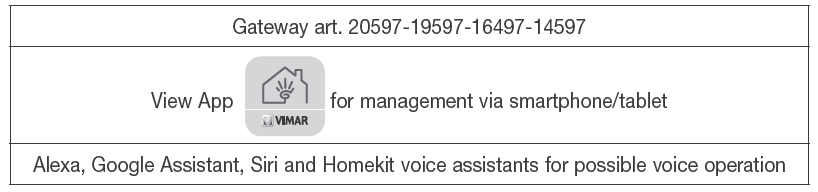
Download the View Wireless  App from the stores onto the tablet/smartphone you will be using for configuration.
You will need:
CONFIGURATION IN BLUETOOTH
- Create your Installer account on MyVimar (online).
- wire all the devices in the system (2-way switches, relays, thermostats, gateway, etc.).
- Start the View Wireless App and log in with the credentials you just created.
- Create the system and the environments.
- Associate all the devices with the environments, except for the gateway (which should be associated last).
To associate the thermostat:- Select “Add” (
 ), choose the environment to place it, and give it a name
 - Select;
 activate the Bluetooth connection on your tablet/smartphone and approach the thermostat
 - Press
 for 5 s; the ring flashes blue and the association is complete.
- Select “Add” (
- For every device, set the function, the parameters, and any accessory devices (wired or radio control and related function).
- Transfer the configuration of the devices to the gateway and connect it to the Wi-Fi network.
- Transfer the system to the Administrator user (who must have created his/her profile on MyVimar).
For full details, see the View Wireless App manual that can be downloaded from www. vimar.com website.
RESETTING THE THERMOSTAT
The reset restores the factory settings. Within the first 5 minutes of powering, press for 30 s; during these 30 s the ring flashes blue and then emits 2 white flashes to confirm the operation.
INSTALLATION RULES
- Installation and configuration must be carried out by qualified persons in compliance with the current regulations regarding the installation of electrical equipment in the country where the products are installed.
- The C-NO contact of the relay must be protected against overloads by installing a device, fuse r automatic 1-way switch, with a rated current not exceeding 10 A.
- Do not connect a SELV circuit to the C-NO terminals as there is no double insulation on the L-N terminals
- The device must be installed in a flush mounting box or surface mounting box with the related mounting frames and cover plates, at a height of 1.5 m above floor level, in a suitable position for the correct detection of the room temperature, avoiding installation in recesses, behind doors and curtains, areas affected by heat sources or subject to the flow of forced heating/ cooling ventilation sources or affected by atmospheric factors. Avoid a particular installation on perimeter walls or in association with devices that generate heat (e.g. dimmers or lamps).
CHARACTERISTICS
- Rated supply voltage: 100-240 V~, 50/60 Hz.
- Dissipated power: 0.55 W.
- RF transmission power: < 100mW (20dBm).
- Frequency range: 2400-2483.5 MHz.
- Terminals:
- – 2 terminals (L and N) for line and neutral
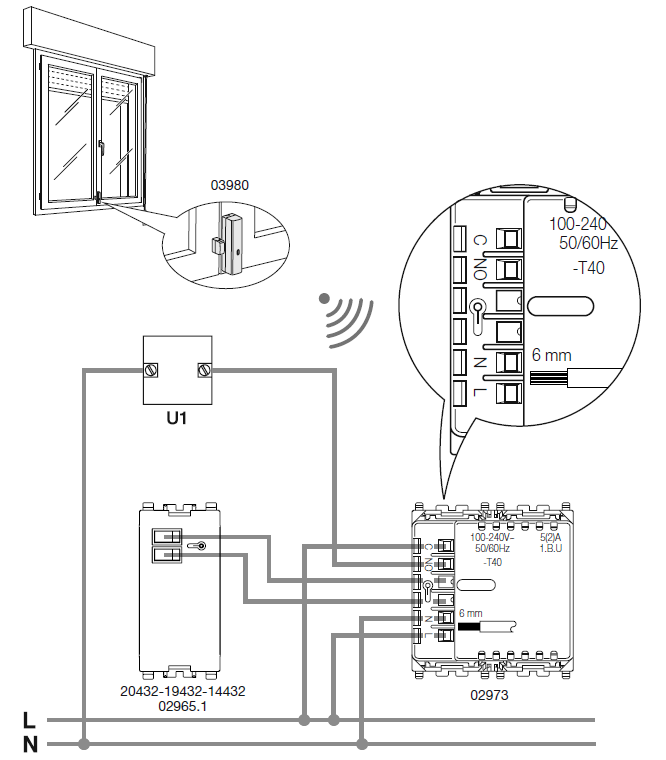
- – 2 terminals for external temperature probe (art. 02965.1 and 20432-19432-14432)
- The maximum length of the external sensor connection cable: 10 m.
- Use a twisted cable with a minimum cross-section of 0.5 mm2 (art. 01840).
- – 2 C-NO relay terminals.
- Relay output with voltage-free contact: 5(2) A 240 V~
- Current settable setpoint: 4°C – 40°C.
- Temp. measurement precision (integrated probe): 0.5°C between +15°C and 30°C, 0.8°C at the extremes
- For use for Heating/Air Conditioning (winter/summer).
- Operating modes: Automatic, Manual, Reduction, Absence, Protection, Off, Timed Manual
- Temperature control algorithms: ON/OFF or configurable PID
- 4 front buttons for control and configuration/reset
- RGB LED for configuration status (flashing blue) and output status (configurable color) signaling
- Operating temperature: T40 (0 °C +40 °C) (indoor use)
- Protection degree: IP30
- ErP classification (EU Reg. 811/2013): – ON/OFF: class I, contribution 1%. – PID: class IV, contribution 2%.
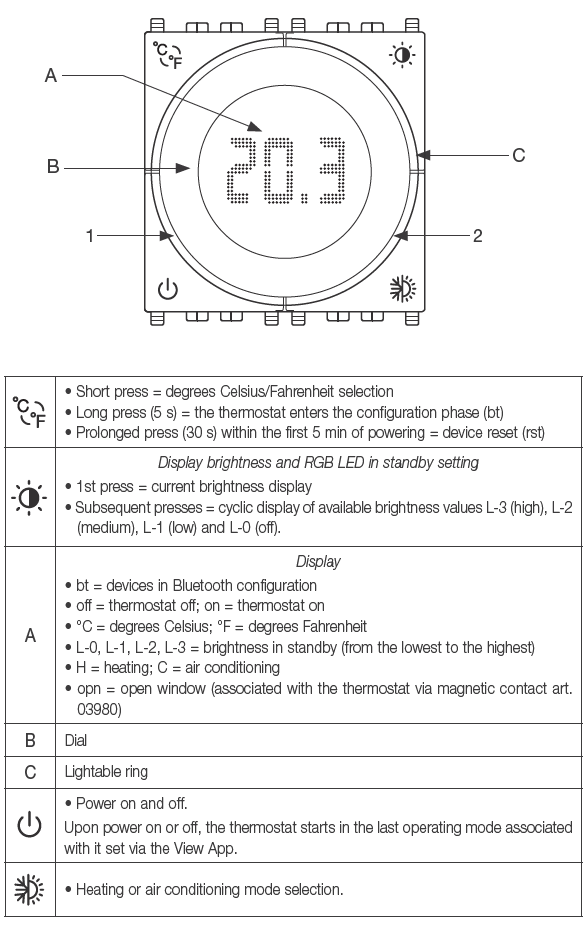
| Ring signalling | |
| All flashing blue = thermostat in configuration mode | |
| All lit amber* = thermostat in heating mode and relay active | |
| All lit blue** = thermostat in air conditioning mode and relay active | |
|
1 |
• Lit amber * = thermostat in heating mode and relay not active
• Lit blue ** = thermostat air conditioning mode and relay not active In standby, the brightness is set during configuration; otherwise, the value is the maximum one. |
|
2 |
• Flashing red = the thermostat, in automatic mode, has lost the hourly value and
has therefore switched to manual mode. When it receives the hourly value from the gateway again, the thermostat returns to automatic mode and the flashing ends. |
- Amber with automatic color or of the selected color.
- Blue with automatic color or of the selected color.
- The device in class II
- Number of manual cycles: 3,000
- Number of automatic cycles: 100,000
- Type of contact opening: micro-disconnection
- Type of action: 1BU
- Tracking index: PTI175
- State of pollution: 2
- Rated pulse voltage: 4000 V
- Software class: A
- Reading resolution: 0.1 °C
- Settings resolution: 0.1 °C
- Update of temperature displayed: every 10 s
- Room temperature display: 0 °C +40 °C
- Hysteresis adjustable via App: from 0.1 °C to 1 °C
- Hourly temperature setting (via App)
- Room temperature during transportation: -25 °C +60 °
- Clock error: ≤ 1 s per day
- With the View Wireless App, the Installer configures the thermostat and creates climate control programs.
- With the View Wireless App and the View App, the Administrator creates or modifies climate control programs.
- Controllable via View App, Alexa, Google, Siri, and Homekit voice assistant for
OPERATION
In Bluetooth technology mode, the device should be configured using the View Wireless App. The App can be used to set the following parameters:
- Lighting in standby: high, medium, low, off; default = medium
- Circular ring indication selection: automatic or monochrome; default = automatic
- RGB colour selection: in the event of the monochrome, possibility of setting the color
- Temperature calibration for heating: between -5°C and +5°C with default = 0°C
- Temperature calibration for air conditioning: between -5°C and +5°C with default = 0°C
- External probe use: deactivated, average with the internal one, replacing the internal one; default = deactivated
- Relay output status: normally open, normally closed; default = normally open
- Control type: On/Off, PID; default = On/Off
- Hysteresis for On/Off control: between 0.1°C and 1°C; default = 0.2°C
- Proportional band for PID control: between 0.5°C and 5°C; default = 3°C
- Integrative time for PID control: between 5 min and 120 min; default = 20 min
- Derivative time for PID control: between 0 and 255 s, disabled; default = 0
- Cycle time for PID control: between 10 min and 30 min; default = 10 min
- View Wireless App can also be used to associate a magnetic or wired contact of art. 03980 to turn off the temperature control system in the event of an open window; in this case, the time for reaction and reactivation of contact opening and closing can be set:
- Reaction time: between 0 minutes (instantaneous) and 30 minutes; default = 0 minutes
- Reactivation time (time after which the thermostat is reactivated even without closing the window): between 0 (disabled) and 12 hours; default = 1 hour.
The View App can be used to set:
- Time schedules (times and temperature levels T1, T2, and T3)
- Setpoint for all operating modes (Manual, Reduction, Absence, Protection)
- Manual operation time: between 1 min and 23 hours (with 1-min steps); default = 60 min
USE
The front buttons, the display, the dial, and the lighting of the circular ring around the display can be used to set and display all the operating modes of the thermostat. Use the dial to set a new setpoint. In particular, for operation in Bluetooth technology:
- in automatic operating mode, turn the dial for the thermostat to switch to manual operation for a period of time which can be set on the View App;
- in manual operation or reduction mode, the thermostat remains in this mode, and the setpoint is that set on the dial?
REGULATORY COMPLIANCE.
RED Directive. RoHS directive. ErP directive. EN 60730-2-7, EN 60730-2-9, EN 301 489-17, EN 300 328, EN 62479, EN 63000 standards. Vimar SpA declares that the radio equipment complies with Directive 2014/53/EU. The full text of the EU declaration of conformity is on the product sheet available on the following website: www.vimar.com Temperature control device regulation (EU) no. 811/2013. REACH (EU) Regulation no. 1907/2006 Art.33. The product may contain traces of lead.
WEEE – User information
The crossed bin symbol on the appliance or on its packaging indicates that the product at the end of its life must be collected separately from other waste. The user must therefore hand the equipment at the end of its life cycle over to the appropriate municipal centers for the differentiated collection of electrical and electronic waste. As an alternative to independent management, you can deliver the equipment you want to dispose of free of charge to the distributor when purchasing a new appliance of an equivalent type. You can also deliver electronic products to be disposed of that are smaller than 25 cm for free, with no obligation to purchase, to electronics distributors with a sales area of at least 400 m2. Proper sorted waste collection for subsequent recycling, processing, and environmentally conscious disposal of the old equipment helps to prevent any possible negative impact on the environment and human health while promoting the practice of reusing and/or recycling materials used in manufacture. The Apple, iPhone, and iPad logos are trademarks of Apple Inc., registered in the United States and in other Countries and Regions. App Store is a service trademark of Apple Inc. Google is a trademark of Google LLC. Amazon, Alexa, and all related logos are trademarks of Amazon.com, Inc. or its affiliates.
CONNECTIONS: Circulation pumps, burners, solenoid valves, and temperature probe
Viale Vicenza 14
36063 Marostica VI – Italy www.vimar.com
Reference:
Download Manual:
VIMAR 02973 SMART HOME VIEW WIRELESS Thermostat