Aube Technologies TH144 Electronic Thermostat

Installation
TURN OFF POWER TO THE SYSTEM AT THE MAIN POWER PANEL TO AVOID ELECTRICAL SHOCK.
Installation should be carried out by an electrician or a qualified technician.
Find a Location for the Thermostat
- For a new installation, choose a location about 5 ft. (1.5 m) above the floor and on an inside wall.
- Avoid locations where there are air drafts (top of the staircase, air outlet), dead air spots (behind a door), direct sunlight, concealed chimneys or pipes, or air diffusers.
Prepare and Connect the Thermostat

TABLE 1: Wiring Terminals

For 2H1C & 3H2C models, the AC144-02 is required to use the balance point option (compressor cut-off).

Connecting the REM input (optional)

To remotely activate the Unoccupied mode, the REM input allows connection to an optional CT240/CT241 telephone controller, a central timer or an alarm system. A closed contact remotely activates the Unoccupied mode (see 4.1).
Connecting the AC144-02 RTI (optional)
The AC144-02 Remote Temperature Interface (RTI) connects to a TH144 thermostat for remote indoor or outdoor temperature readings.
NOTE: If you wish to use the balance point cut-off function to cut the heat pump compressor when the outdoor temperature drops below the defined cut-off setpoint (see section 4.4 to define this setpoint), you must connect a remote temperature interface.
NOTE: Refer to the AC144-02 installation instructions for details on how to connect the RTI to the thermostat.

Remote Indoor Sensing
The REM icon indicates that the temperature is controlled from a remote location using the RTI’s housing sensor or the connected probe(s). Temperature averaging can be obtained using up to 4 probes. To return to local control, disconnect the RTI wires at the thermostat terminals and turn off for at least 5 seconds.

Remote Outdoor Sensing
The OUT icon indicates the outdoor temperature read from the outdoor probe connected to the RTI. On some models (2H1C & 3H2C), the outdoor temperature is used for the compressor
cut-off point.
First Power On
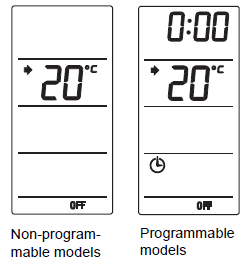
When you power TH144 for the first time, it runs a sequence of tests and resets itself, which lasts approximately 10 seconds. The default setpoint is 20°C (68°F).
NOTE: The displayed ambient temperature might be higher than the real ambient temperature if you are holding the thermostat. For the programmable models, open the thermostat’s door, and set the time (Hour and Minute) and day (Day).
NOTE: To protect the compressor, TH144 has an On/Off delay of 2 or 4 minutes (default is 2 minutes) before starting or stopping the system (see the following section).
Configure the TH144

The TH144 offers many configuration options using the DIP switches located on the back of the thermostat. Default settings are inside the shaded cells.
NOTE: After first power-up, wait at least 5 minutes while the internal battery is being charged before configuring TH144.
| Name | DESCRIPTION | UP | DOWN |
|
Display |
Select the display format. When you change the display format, the set- points revert to their default values. |
°C/24h |
°F/12h |
|
Cycle |
20 minutes = heavy commercial applications
15 minutes = residential & light commercial applications NOTE: On models not equipped with the Protect switch, the On/Off delay is set based on the cycle. That is, the On/Off delay is 4 minutes for the 20 minute-cycle and is 2 minutes for the 15 minute-cycle. |
20 min. |
15 min. |
|
Aux |
W = the compressor turns Off during auxiliary heating.
W + Y = the compressor remains On during auxiliary heating. |
W |
W+Y |
|
Keys |
Lock the keypad. The icon is dis- played when any button is pressed to indicate that the setpoint or operating mode cannot be modified. On the pro- grammable models, the schedule can- not be modified as well. |
Lock |
Unlock |
|
Protect |
To protect the compressor against too frequent On/Off, TH144 provides an On/Off delay selectable via this switch. |
4 min. |
2 min. |
| Stages | Select between 2H2C and 1H1C. | 1H1C | 2H2C |
|
Valve |
Select the polarity of the reversing valve. B= the valve is energized during heating. O= the valve is energized dur- ing cooling. |
B |
O |
Basic Configuration


Select the Control Mode
The mode indicates which system is used for temperature control. Use the Heat / Cool button to select one of the following modes:

Predefined Setpoints
Predefined setpoints represent the temperature that you wish to have during the day, at night or while you are away. The Comfort and Economy setpoints are used with the Automatic mode (schedule, for programmable models) while the Unoccupied setpoint can be used with the Unoccupied mode (activated manually or remotely). This table displays the default setpoints:

To Modify the Predefined Setpoints
NOTE: If your thermostat controls both HEATING and COOLING, the predefined setpoints must be configured for both applications.
NOTE: The Cool setpoints cannot be lower than the Comfort Heat setpoint. If this should happen, the TH144 will automatically set your Cool setpoint 1°C (1°F) higher than your Comfort Heat setpoint.

View the Current Setpoint
To view the current setpoint, briefly press one of these buttons once. The arrow indicates the setpoint.

Programming
Program Your Schedule
The TH144 allows four setting changes for each day of the week. There are no pre-set programs. For each day, enter the time at which you wake up (P1), the time you leave for work (P2), the time you return home (P3) and the time you go to bed (P4):

NOTE: For temperature increases (P1 and P3), allow at least 15
minutes per 1°C (2°F). For example, if you have lowered the temperature
by 3°C (6°F) during the night and you wake up at 7 a.m., program
the change for 6:15 a.m.
To reduce energy costs, you must lower the temperature for a period
of 2 to 3 times the delay required to bring the temperature back to
your comfort level.
Set or Modify the Programs
- After 60 seconds of inactivity, the thermostat will automatically exit programming mode.
- It is sometimes faster to program the same schedule for the entire week and then modify the exception days.
- Press Program. MO and P1 are displayed.
- If necessary, press Day to select the day to be programmed orhold Day for 3 seconds to select all days of the week.
- Press Hour and Minute to set the start time.
NOTE: To clear an entry, press Clear; the time zone indicates (- – : – -) when the program is inactive. - Press Program to select the next program.
- Repeat steps 2 to 4 for remaining programs.
- Press Mode/Return to exit.
Programming Example
Comfort (programs 1 and 3):
- starts at 6:00 a.m. and 4:00 p.m. from Monday to Friday
- starts at 6:00 a.m. on Saturday and Sunday
Economy (programs 2 and 4)
- starts at 8:30 a.m. and 11:00 p.m. from Monday to Friday
- starts at 11:00 p.m. on Saturday and Sunday

To program this schedule

- Press Program. MO and P1 are displayed.
- Press and hold Day for 3 seconds to select all days of the week (MOTUWETHFRSASU).
- Set the time (6:00) using Hour and Minute.
- Press Program to select P2. Set the time (8:30) using Hour and Minute.
- Press Program to select P3. Set the time (4:00 p.m.) using Hour and Minute.
- Press Program to select P4. Set the time (11:00 p.m.) using Hour and Minute.
- Press Mode/Return to exit
To erase programs 2 and 3 for Saturday and Sunday
- Press Program to access programming mode.
- Press Program until P2 is selected.
- Press Day to select Saturday (SA) and press Clear.
- Press Day to select Sunday (SU) and press Clear.
- Repeat steps 2 to 4 for P3.
- Press Mode/Return to exit.
Select the Operating Mode

The TH144 offers 2 operating modes:
Automatic

This mode executes the programmed schedule.
To activate:
Press Mode/Return until is displayed. The associated program setpoint icon is also displayed.
NOTE: This mode can be bypassed for up to two hours (see 4.2).
Manual
Maintains a constant temperature. To activate:
- Press Mode/Return until is displayed.
- Set temperature OR quickly press or or to use a pre-defined setpoint

if you are using the automatic changeover mode, see 2.1 and 4.5.
Other Information
Remote Unoccupied

When the REM input is connected to a central system or a telephone controller and a signal is received through this input, the TH144 will switch to the unoccupied setpoint.
- The
 yellow LED on top of the display turns on when the unoccupied mode is activated (1H1C/2H2C models only).
 - The icon is displayed.
- For details on how to operate your telephone controller (CT240/CT241), refer to its manual.
- When this mode is activated remotely it can only be deactivated remotely. Although, it can be bypassed for a 2-hour period (see 4.2).
2-hour Temporary Bypass
When the TH144 is in Automatic or Remote Unoccupied mode, you can temporarily bypass the current setpoint for a 2-hour period after which it will return to the previous mode.
Automatic (schedule programs)
- Set the desired temperature or quickly press or to use a predefined setpoint. Remote Unoccupie
- Set the desired temperature . On non-programmable models, all buttons are locked except for the buttons. On programmable models, all buttons are locked except for the , Day, Hour and Minute buttons.
- All other buttons or most buttons are locked depending on the thermostat model.
- The yellow LED on top of the display remains on (1H1C/2H2C models only), but the icon disappears.
Fan Modes (Fan button)
The TH144 thermostat is equipped with a fan button offering two fan settings: On and Automatic.
- When On: ( ) the fan runs continuously.
- The Automatic setting allows the fan to run only during heating or cooling cycles.
Balance Point Cut-Off
The 2H1C et 3H2C models require the AC144-02 Remote Temperature Interface and the outdoor sensor to use this function. This option allows the user to define the temperature setpoint at which the heat pump compressor will be cut-off and only the auxiliary heat will be used when heating is required. The auxiliary heat is automatically activated on a call for heat when
the outdoor temperature falls below the balance point. The heat pump compressor will be re-activated only when the outdoor temperature is at least 1°C (1°F) higher than the cut-off setpoint. The default balance point cut-off is -8°C (17°F).
- Press and hold Heat/Cool until the setpoint is displayed.
- Use the buttons to set the new balance point.
- Press Heat/Cool to exit.
Automatic Changeover

When the AUTO mode (automatic changeover) is selected, the thermostat analyzes the system’s requirements and automatically alternates between HEAT and COOL mode to provide occupant comfort. There are two ways to use the automatic changeover mode
Fixed Setpoint
When you set the temperature using the arrow buttons, the TH144 uses this unique temperature setpoint for temperature control. The thermostat automatically switches to HEAT mode when the ambient temperature drops under the temperature setpoint whereas the COOL mode is activated when the temperature rises above the temperature setpoint. In order to switch modes, the ambient temperature must be maintained over or under the control band for more than 12 minutes. Predefined Setpoint ( , or ) When a predefined setpoint button is selected, the TH144 uses the corresponding COOL and HEAT setpoint temperatures for temperature control. The thermostat automatically switches to COOL mode when the ambient temperature rises above the COOL setpoint whereas the HEAT mode is activated when the ambient temperature drops below the HEAT setpoint. In order to switch modes, the ambient temperature must be maintained over or under the setpoint control band for more than 12 minutes

Technical Specifications
- Power supply: 24 VAC
- Maximum load: 1.5 A / 30 VAC per output
- Remote input: dry contact, 24 VAC / 10 mA
- Heat setting range: 5°C to 28°C (40°F to 82°F)
- Cool setting range: 15°C to 35°C (60°F to 95°F)
- Balance point setting range:-40°C to 5°C (-40°F to 41°F)
- Temperature display (ambient): -9°C to 70°C (16°F to 158°F)
- Temperature display (outdoor): -50°C to 70°C (-58°F to 158°F)
- Temperature resolution (display): 1°
- Accuracy: ± 0.5°C (0.9°F)
- Anticipation: Electronic anticipation independent from the load
- Controller: Deadband adaptive
- Cycles: 15 or 20 minutes (at 50% operation)
- Clock protection: 2 hours
- Programming: protected memory
- Dimensions (H/W/D): 4.94 x 3.83 x 1 inches (125.4 x 97.3 x 25.4 mm)
Accessories
- AC144-02 Remote temperature interface with 10-foot indoor/outdoor probe.
- AC144-03 Indoor/outdoor probe with 10-foot cable.
- CT240 Telephone controller with one low voltage 12 VDC output and one universal relay output (simultaneous operation).
- 9 VAC adapter and phone cable included.
- CT241 Telephone controller with four universal relay outputs (independent operation). 9 VAC adapter and phone cable included
Warranty
AUBE warrants this product, excluding battery (if applicable), to be free from defects in the workmanship or materials, under normal use and service, for a period of three (3) years from the date of purchase by the consumer. If at any time during the warranty period the product is determined to be defective or malfunctions, AUBE shall repair or replace it (at AUBE’s option).
If the product is defective,
- return it, with a bill of sale or other dated proof of purchase, to the place from which you purchased it, or
- contact AUBE. AUBE will make the determination whether the product should be returned, or whether a replacement product can be sent to you.
This warranty does not cover removal or reinstallation costs. This warranty shall not apply if it is shown by AUBE that the defect or malfunction was caused by damage which occurred while the product was in the possession of a consumer. AUBE’s sole responsibility shall be to repair or replace the product within the terms stated above. AUBE SHALL NOT BE LIABLE FOR
ANY LOSS OR DAMAGE OF ANY KIND, INCLUDING ANY INCIDENTAL OR CONSEQUENTIAL DAMAGES RESULTING, DIRECTLY OR INDIRECTLY, FROM ANY BREACH OF ANY WARRANTY, EXPRESS OR IMPLIED, OR ANY OTHER FAILURE OF THIS PRODUCT. Some provinces, states or regions do not allow the exclusion or limitation of incidental or consequential damages, so this limitation may not apply to you. THIS WARRANTY IS THE ONLY EXPRESS WARRANTY AUBE MAKES ON THIS PRODUCT. THE DURATION OF ANY IMPLIED WARRANTIES, INCLUDING THE WARRANTIES OF MERCHANTABILITY AND FITNESS FOR A PARTICULAR PURPOSE, IS HEREBY LIMITED TO THE THREE-YEAR DURATION OF THIS
WARRANTY. Some provinces, states or regions do not allow limitations on how long an implied warranty lasts, so the above limitation may not apply to you. This warranty gives you specific legal rights, and you may have rights which vary from one province, state or region to another
Technical Assistance
- 705 Montrichard Avenue
- Saint-Jean-sur-Richelieu, Quebec
- J2X 5K8 Canada
- Tel.: (450) 358-4600
Toll-free: 1-800-831-AUBE - Fax: (450) 358-4650
- Email: [email protected]
- Service Centre 10 rue Ampère 95500 Gonesse, France
- Tel.: 33 (0) 1 34 07 99 00
- Fax: 33 (0) 1 34 07 99 19
- Email: [email protected]
For more information on our products, go to www.aubetech.com
REFERENCE
Download Manual
Aube Technologies TH144 Electronic Thermostat user Guide
