Fantini cosmi CH193 WEEKLY PROGRAMMABLE THERMOSTAT
INSTALLATION
The CH193 chronothermostat must be installed in a 3-module recessed box, in the middle of the apartment, preferably 1.5 m off the ground.
PERFORM THE FOLLOWING OPERATIONS:
- Act on the master switch on the electric panel to cut power to the electrical system;
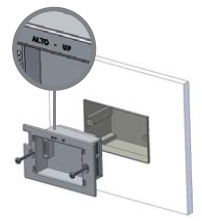
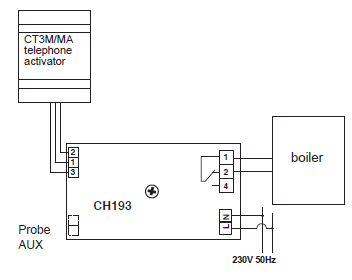
- Connect the two wires of the boiler to terminals 1-2 of the chronothermostat;
- Connect the two power cables L-N;
- Screw the frame onto the box using the provided screws, paying attention to the indicated assembly direction;
- Switch the electric system back on;
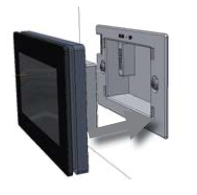
- Insert the thermostat body in the frame fixed to the wall.
ELECTRICAL CONNECTIONS
N.B. When CH193 is disconnected, the boiler contact remains in its current position.
Unscrew the lid to connect the auxiliary probe.
Use compatible Fantini Cosmi probes:
- EC18 external probe
- EC19 floor probe
- EC20 room probe
 BUFFER BATTERY FUNCTION
During black-outs, the programmed parameters will not be lost as the settings are stored in a non-volatile memory. Even when there are long power failures, the time/ date remain stored thanks to an internal battery.
MAINTENANCE
- Use only a soft cotton cloth to clean the chronothermostat without any detergent.
- Do not use paper tissue to clean the screen
KEYBOARD BLOCK
To make sure you don’t change any settings on the chronothermostat unintentionally while cleaning, enable the keyboard block by pressing the middle of the display for 5 seconds. The text “BLOCKED” appears on the display when the keyboard has been blocked. The keys will re-enable automatically after 30 seconds.
DESCRIPTION OF KEYS/DISPLAY
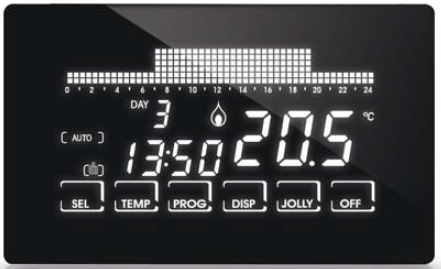
The chronothermostat is equipped with 6 keys, the function of which varies depending on the situation. It is described by the symbol which appears on the display next to the key.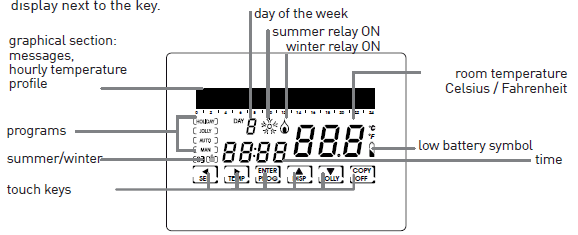
SETTING TIME AND DATE
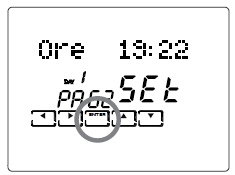
After the device switches on, press the key PROG briefly: the text “Setup” is displayed; now press to enter the “Hours” page. Set the hour by pressing
  . Then press to go to the “Minutes” setting. Again press to select, in order, the Year, Month and Day. Pressing again allows you to choose whether to disable automatic change of summer/winter time: initially this function is active can but can be deactivated by pressing “NO” using the keys . Pressing
  allows you to go back to the previous page. To exit the Setup menu, press ENTER.
OPERATING PROGRAMS
The CH193 chronothermostat has different operating modes, called programs:
“AUTO” WEEKLY PROGRAM:
one of the four programmable temperatures can be associated to each half hour for each day of the week. This is the program displayed when the chronothermostat is switched on and is generally the one most used.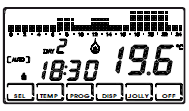
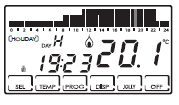
HOLIDAY” DAILY PROGRAM:
Like in the AUTO program, you may select one of the 4 programmable temperatures for each half hour, but the identical sequence will be repeated every day.
JOLLY” TEMPORARY PROGRAM:
you may choose to hold a certain temperature for a certain number of hours, after which it will go back to the previously active program.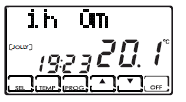
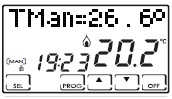
“MAN” MANUAL PROGRAM:
the chronothermostat maintains a fixed temperature, for an unlimited amount of time until another program is selected.
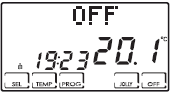
SYSTEM OFF OR WITH ANTIFREEZE PROGRAM “OFF/ANTIFREEZE”:
the system remains off or else maintains a very low temperature (from 2 to 7°C) to prevent the fluid in the heating system from freezing.
SETTABLE TEMPERATURES
Four different temperatures can be set and one can be selected for each half hour of the day in the AUTO and HOLIDAY programs. Three of these temperatures (T1, T2 and T3) can have values from 2° to 40°C, while the fourth, T antifreeze (TA), can range from 2° to 7°C, or be set at “OFF” (system off). The manual program has its specific temperature (TMan), like the JOLLY program (Tj), which are set in the respective screens and can range from 2° to 40°C. The ANTIFREEZE/OFF program, on the other hand, follows the temperature TA which, as we have said, can range from 2° to 7°C; or else, it can be set at “OFF”, switching the plant completely off
SETTING OPERATING PROGRAMS
PROGRAM SELECTION
press SEL to select, in cyclical sequence, the different operating programs: AUTO -> MAN -> OFF -> HOLIDAY.
PLEASE NOTE: the JOLLY temporary program is not included in the program sequence, but can be selected directly by pressing the JOLLY key.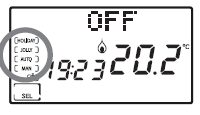
SETTING THE TEMPERATURES
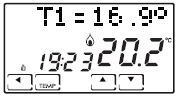
press TEMP in the AUTO, HOLIDAY and OFF programs to change the value of the 4 programmable temperatures: when you press TEMP several times, the values T1, T2, T3, Ta appear in sequence; stop at the T you want to change and use the arrow keys  and
and to increase or decrease the temperature by a tenth of degree at a time. Press
 to go back to the initial status. Remember that T1 will always be less than T2, and T2 than T3. Pressing TEMP in the JOLLY program allows you to modify its temperature using the keys . Press to go back to the page displaying the hours, allowing you to modify them using . The MAN program allows you to modify the fixed temperature TMan using the keys .
EDITING CURRENT DATE AND TIME
Press PROG briefly to enter the “SETUP” menu. Using  allows you to modify: winter/ summer, hours, minutes, year, month, day, summertime. These values can be changed using the keys .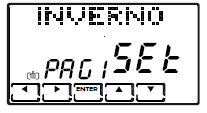
CUSTOMISATION OF WEEKLY “AUTO” PROGRAMMING AND DAILY “HOLIDAY” PROGRAMMING
Keep the key PROG pressed until the text “Config” is displayed. This menu allows you to program the weekly profiles (AUTO program) and daily profiles (HOLIDAY program) and to set the advanced functions (see the following paragraphs for their description).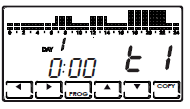
PLEASE NOTE: if the text “Setup” appears instead of “Config”, you did not press the key long enough and you must press ENTER to go back to the normal operating condition and try again. When you enter the “Config” menu, a page appears which allows you to choose the desired temperature (T1/T2/T3/Ta) for each half hour of the indicated day (from 1 to 7 indicating the days from Monday to Sunday).
PLEASE NOTE: T1/T2/T3/Ta are displayed on the right of the screen with the symbols
- Pressing allows you to move one half hour at a time to the right or to the left.
- Pressing allows you to go from one programmed temperature to another.
- Pressing PROG (briefly) switches you to the next day (DAY 1 -> 2 -> 3 -> 4 -> 5 -> 6 -> 7 -> H).
- Press COPY to copy the temperature profile of the current day on the following day.
- After H (profile of the Holiday daily program) you go to the Correction parameter page.
- Then pressing ENTER from the Correction page allows you to the exit the “Config” menu.
N.B.: press at the start of day 1 to go right to the Correction page.
“JOLLY” PROGRAM SETTING
- In all programs, except MAN, pressing the key JOLLY selects the temporary program: this program allows you to define the desired temperature and its duration in hours (up to a maximum of 240, so to say 10 days).
- For example, you may want to keep a lower temperature during the entire weekend when no one is home.
- When you enter this program, you may modify the duration, which initially is one hour, and increase the number of hours by pressing, or decrease them by pressing
- Pressing TEMP allows you to view and modify temperature Tj, again using the keys
- Pressing sends you back to view the duration of the JOLLY program.
- When this time elapses, you go back to the initial program.
“OFF/ANTIFREEZE” PROGRAM SETTING
- Pressing OFF from any program switches the chronothermostat to the off/ antifreeze status. The antifreeze temperature (Ta) can be programmed by pressing
- TEMP, from OFF (boiler always off) to an interval between 2.0 and 7.0°C, using the arrow keys .
- Go back to the OFF status by pressing
- Pressing OFF again sends you back to the previous operating status.
ALTERNATIVE DISPLAYS
Other information can be viewed in the AUTO and HOLIDAY programs in place of the temperature profile, by pressing the key DISP several times. The first time it is pressed the programmed temperature for the current halfhour appears, the second time it displays the date, the third time it displays the temperature of the external probe and the fourth time it goes back to the initial temperature profile.
FUNCTIONS IN DETAIL
AVAILABLE PROGRAMS
CH193 has several operating modes (programs):
- “AUTO” weekly program
- “HOLIDAY” daily program
- “JOLLY” temporary program
- “MAN” manual program
- system off or with antifreeze “OFF”program
“AUTO” WEEKLY PROGRAM
4 temperature levels can be used in the AUTO operating mode (Ta, T1, T2, T3), according to a programming with 30 minute steps, 24 hours a day, 7 days a week. The days are numbered from 1 to 7 and correspond to the seven days of the week, starting from Monday. To simplify programming, you may set the first day and copy it on the following days.
The default for days 1 – 5 (Monday to Friday) is:
- 00:00 – 06:30 T1
- 06:30 – 09:00 T2
- 09:00 – 11:30 T1
- 11:30 – 14:00 T2
- 14:00 – 17:00 T1
- 17:00 – 22:30 T3
- 22:30 – 24:00 T1
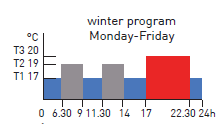
while the default for days 6 and 7 (Saturday and Sunday) is:
- 00:00 – 08:00 T1
- 08:00 – 11:30 T2
- 11:30 – 23:00 T3
- 23:00 – 24:00 T1
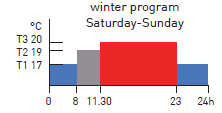
The value of the 4 temperatures can be programmed using the TEMP function. The temperature profile (hourly variation) can be programmed using the PROG function.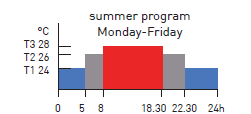
“HOLIDAY” DAILY PROGRAM
4 temperature levels can be used in HOLIDAY operating mode, according to a programming with 30 minute steps, 24 hours a day. This achieves a daily programming, regardless of the days of the week. The default temperature profile is:
- 00:00 – 08:00 T1
- 08:00 – 11:30 T2
- 11:30 – 23:00 T3
- 23:00 – 24:00 T1
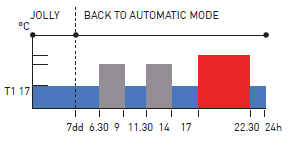
The value of the temperatures can be programmed using the TEMP function. The temperature profile (hourly variation) can be programmed using the PROG function.
JOLLY
The JOLLY mode allows you to set a programmable temperature (Tj) for a programmable number of hours (from 1 to 240). It is used when you wish to introduce a temporary variation to programming without changing the parameters, for example to maintain a high temperature for longer when spending an evening with friends or to keep it low when no one is home the weekend. If you enter JOLLY mode using the specific function key, when time is up it goes back automatically to programming in progress.
MANUAL
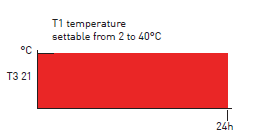
- MAN mode allows you to set a fixed temperature manually (Tman), ranging from +2.0 to +40.0 degrees, without expiring and without needing to modify the weekly or daily program.
- For example it can be used to keep the house at a different temperature than that of the daily program when no one is home, or to switch on the system remotely, bringing it to a constant temperature.
OFF
- OFF mode is used when you want to switch the system off.
- It uses the temperature TA (antifreeze) as a reference, to guarantee protection of the system at low temperatures.
- TA is normally set at +5 degrees, but it can also be set at OFF, to switch the boiler completely off. Weekly or daily programs remain unchanged
settable TEMPERATURES
The system can use 4 different temperature levels, three for normal use and one, called “antifreeze”, to be used when you wish to keep the boiler off, but without risking having the fluid in the system freeze.
Programming of the three T is conditioned by reciprocal values:
- T1 cannot be higher than T2,
- T2 cannot be higher than T3.
- The temperatures are set using the key TEMP .
- T1 ranges between +2.0 and +T2 degrees, with variations every tenth of a degree [default 17.0].
- T2 ranges between +T1 and +T3 degrees, with variations every tenth of a degree [default 19.0].
- T3 ranges between +T2 and +40.0 degrees, with variations every tenth of a degree [default 20.0].
- TA (antifreeze) ranges between +2.0 and +7.0 degrees, with variations every tenth of a degree, or a can be OFF, when the boiler remains off [default 5.0].
ADVANCED KEYS AND FUNCTIONS
USING THE SEL KEY
The SEL key allows you to select the operating mode of the chronothermostat, according to the following programs:
- HOLIDAY
- AUTO
- MANUAL
- OFF
To change the selected program, press SEL in sequence (cyclical). The first 3 statuses are signalled with a small text on the left of the display, while the OFF status appears in the graphical area at the top.
USING THE TEMP KEY
In AUTO, HOLIDAY and OFF
- Pressing TEMP allows you to enter the programming of the 4 temperatures used in these statuses.
- Change the temperatures using the arrow keys , as long as T1 is no higher than T2, T2 is not lower than T1 and higher than T3, T3 is not lower than T2.
- Press TEMP to go to the next temperature (cyclical) T1>T2>T3>Ta>T1.
- Press to go back to the home page.
In JOLLY
- Press TEMP to program Tj;
- Using allows you to change Tj (between +2 and + 40°) while pressing sends you back to the home page.
USING THE PROG KEY
PROG (brief) -> SETUP
Winter/PAG1/Set
using you switch from Winter to Summer and vice versa press to go to the next page and ENTER to exit from PROG
Hours HH: MM/PAG2/SEt
pressing cyclically increases the hours while decreases them. press to change page and press ENTER to exit PROG.
Min. HH:MM /PAG3/SEt
pressing cyclically increases the minutes while decreases them. press to change page and press ENTER to exit PROG.
Year: YYYY/PAG4/SEt
pressing increases the years while decreases them press to change page and press ENTER to exit PROG.
Month: MM/PAG5/SEt
pressing cyclically increases the months while decreases them. press to change page and press ENTER to exit PROG.
Date: DD/PAG6/SEt
pressing cyclically increases the days while decreases them. press to change page and press ENTER to exit PROG.
PLEASE NOTE: when the date is set, the chronothermostat automatically determines the day of the week.
Summer Time YES/PAG7/SEt
Automatically selects summer time, applicable in Europe and some of the countries. This set up automatically updates the time when it changes (March and October). Use to say YES or NO. Press to go back to page.1 (Winter/Summer) and press ENTER to exit PROG.
PROG (long) -> CONFIG.
- The display of day 1 appears, with the graphical display of the temperatures each half hour, indication of the half hour and the associated temperature ( ).
- Day 1 corresponds to Monday, and so on. Day H is the Holiday, which does not Change during the week.
- Pressing moves forward a half hour
- Pressing moves up or down from tA to t1 to t2 to t3.
- Press PROG (briefly) to change the day (1, 2, 3, 4, 5, 6, 7, H).
- After H you go to page1 (Correction).
- Press COPY to copy the temperature profile of the current day on the following day. From page 1 on, pressing ENTER allows you to exit programming.
- Press to go back to the previous half hour (even the day before).
N.B.: press at the start of day 1 to go right to page 1 (correction).
Correction/PG01/XX.X°
- This allows you to modify the read temperature, which due to the recessed wall installation or perhaps a non-ideal height might not indicate the true temperature perceived.
- It is recommended to calibrate it by comparing it with a thermometer placed at the desired height/area.
- Use to modify the temperature value on the display.
- Press to go to page 2 and ENTER to exit.
Celsius/PG02/XX.X°
- This allows you to choose the temperature display scale between Celsius and Fahrenheit degrees.
- Press to switch from Celsius to Fahrenheit.
- Press to go to page 3 and ENTER to exit.
Light ON Xs/PG03
- Allows you to set the switch on mode (timed or stable) of the display back lighting.
- Pressing allows you to time switch-on between 2 and 29 seconds, or else steady switch-on identified by the text ON. Press to go to page 4 and ENTER to exit.
Int. Light X/PG04
Allows you to modify the luminous intensity of the display, at 10 levels. Press to modify the brightness level (1-10). Press to go to page 5 and ENTER to exit.
Italiano/PG05
Allows you to change the language used during programming. Press to cyclically switch from one language to another. Press to go to page 6 and ENTER to exit.
Block? NO(YES)/PG06
- Allows you to block the keyboard, with the 4-digit password. It only works once and then must be re-enabled.
- Pressing switches from NO to YES, and press ENTER to request the password, entered with the arrow keys , selecting the digits with .
- Press ENTER to store it, going back to the normal operating display, where only the function key ENTER is visible.
- When you press it you are requested to enter the password, using the arrow keys , followed by ENTER.
- The display goes back to normal programming, enabling all the functions.
- Press to go to page 7 and ENTER to exit.
Reset? NO (YES)/PG07
- Press to switch from NO to YES. Pressing ENTER, while “YES” is displayed restores all the parameters (except date and time) to the default values.
- Press to go to page 8 and ENTER to exit.
CH193 vX.Y/–/PG08
- Displays the software version of the CH193 chronothermostat.
- Press to go to the next page and ENTER to exit.
EXT IN: —/PG12
- Allows you to modify the management mode of the auxiliary input using keys to change: —: not active
Connecting a probe- EC18 – EC19 – EC20 allows you to set:
- VIS: visualisation of the temperature;
- REG: regulation of room temperature with the external probe;
- UP: use as maximum temperature threshold, to manage it you must: press the key and set the desired maximum threshold using the keys
- This function deactivates the system when the temperature read by the external probe is higher than the set temperature.
- LOW: use as minimum temperature threshold, to manage it you must: press the key and set the desired minimum threshold using the keys
This function deactivates the system when the temperature read by the external probe is lower than the set temperature.
Connecting a voltage-free contact allows you to set:
- ALR C: views an alarm in the presence of closed contact. With this function active, you may also enable a buzzer by pressing the key followed by
- ALR 0: views an alarm in the presence of an open contact. With this function active, you may also enable a buzzer by pressing the key followed by
Having selected ALR C or ALR 0, pressing allows you to enable (ALM SND: ON) or disable (ALM SND: OFF) the buzzer after the alarm is triggered. Press to go to the next page and ENTER to exit.
BEEP ON (OFF)/PG14
enables or disables the beep upon pressing a key. The selection is made by pressing. Press to go to the next page and ENTER to exit.
LED ON (OFF)/PG15
enables or disables switch on of the front LED (1 flash every 10 seconds). The selection is made by pressing Press to go to the next page and ENTER to exit.
TOUCH TEST/PG16
This function is used by technical support. Exit by pressing . If the key ENTER is pressed accidentally, the function is activated for about 5 minutes, after which it ends automatically. Press to go back to the hourly programming menu.
TOUCH SENS. (MED)/PG18
This function indicates the level of touch sensitivity. The user can choose between 3 levels (HI-MED-LO) by pressing the and keys. Press to go back to the hourly programming menu.
USING THE DISP KEY
The DISP key allows you to view windows with different information regardless of the operating status, only when in AUTO or HOLIDAY modes.
The following windows may be viewed:
- Profile of the day/hour:min / Tamb
- Currently set temperature (e.g T3=20.0°) / hour: min /Tamb
- Dd/Mm/Yy / hour: min /Tamb
- External probe/hour: min/Tamb
- USING THE JOLLY KEY
The following window is displayed:
Duration of JOLLY status (HH h MM m) / hour: min / Tamb
Using the arrow keys allows you to change the duration of the JOLLY status with hourly steps. The Jolly temperature is set by pressing the key TEMP, which displays a window such as the following:
Tj=xx.x° / hour:min / Tamb
Modify the temperature by using the arrow keys and. Pressing allows you to go back to view the “JOLLY status duration”. To exit JOLLY status before time is up, change the number of hours to zero using the arrow key , or else press SEL to go to the desired status (AUTO, MAN, HOLIDAY, OFF).
USING THE OFF-KEY
The OFF key allows you to switch the system off, in whatever operating status it is found
OFF / hour: min / Tamb
The antifreeze temperature (Ta) can be programmed by pressing TEMP, from OFF
WASTE DISPOSAL
The symbol of the crossed-out wheeled bin indicates that the products must be collected and disposed of separately from household waste. The batteries and integrated accumulators may be disposed of together with the product. They will be separated at the recycling facilities. A black bar indicates that the product was placed on the market after August 13th, 2005. Participating in the separate collection of products and batteries contributes to the correct disposal of these materials and therefore avoids possible negative consequences for the environment and human health. For more detailed information on the collection and recycling programmes available in your country, contact the local authorities or the sales point where you purchased the product.
TECHNICAL FEATURES
- Temperature adjustment scale 2-40 ÷ 0,1 °C, increase 0.1°C
- Measurement scale/room T display -35 +60 °C
- Power supply 230V 50Hz
- Maximum absorbed power 5VA
- Connection to boiler 3 screw clamps (closed + open)
- Contact range 5(3)A / 250 Vac
- Type of action 1.B.U (micro disconnection)
- Software class A
- Minimum adjustment differential 0.1°C
- Thermal gradient of reference 4K/h
- Maximum room temperature T45
- Electric insulation double insulation
- Degree of protection IP20
- Pollution degree 2
- Pulse voltage 4000V
- Connection with CT3M or CT3MA telephone
- activator screw clamps
- Assembly recessed in 3-module box
- type 503, with 2 screws
- Dimensions 127 x 82 x 56 mm
- Compliant with standards EN 60730-1 and second parts
- ErP classification ErP Class IV; 2% (Reg. EU 811/2013 – 813/2013)
(boiler always off) to an interval between 2.0 and 7.0°C, using the arrow keys and
The following window is displayed:
- Ta=x.x° / hour: min / Tamb
- To go back to the OFF window, press the arrow key
- Pressing OFF again sends you back to the previous operating status
FANTINI COSMI S.p.A.
- Via dell’Osio, 6 20090 Caleppio di Settala, Milan – ITALY
- Tel. +39 02 956821
- Fax +39 02 95307006
- [email protected]
- www.fantinicosmi.it
REFERENCE:
DOWNLOAD MANUALS:
Fantini cosmi CH193 WEEKLY PROGRAMMABLE THERMOSTAT Instruction Manual
OTHER MANUALS:
Fantini cosmi CH193 WEEKLY PROGRAMMABLE THERMOSTAT Technical Data Sheet

Fantini cosmi CH193 WEEKLY PROGRAMMABLE THERMOSTAT Instruction Manual