Generallife HT250 SET Wireless Room Thermostat

USAGE OF ROOM THERMOSTAT
HT250S SET is a wireless room thermostat. The HT250S SET room thermostats are used in heating systems to keep the room temperature constant at the set temperature.
- Large LCD Backlight Display
- Heating Calibration
- For heating systems
- ON/OFF control
- Battery DC 3 V (2 × 1,5V AAA Alkaline battery)
USAGE AREAS
- Houses
- Apartments
- Residences
- Schools
Offices
The device can be used on combi boilers and on all on/off heating systems operating at 220V AC 7A current and voltage values.
MECHANICAL DESIGN
The device consists of 3 parts:
- Plastic body
- Battery cover
- Wall hanger
- Holder
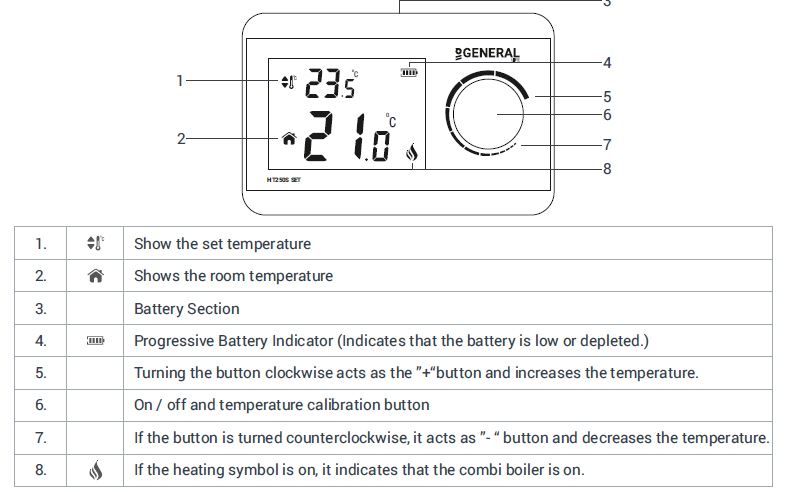
The battery cover is attached to the plastic case. After the wall bracket is mounted in the wanted area, the plastic body is attached to the wall bracket
OPERATING PRINCIPLES
HT250S SET room thermostat specifications:
- LCD with backlight
- Two-position control (ON / OFF)
- Temperature sensor (NTC)
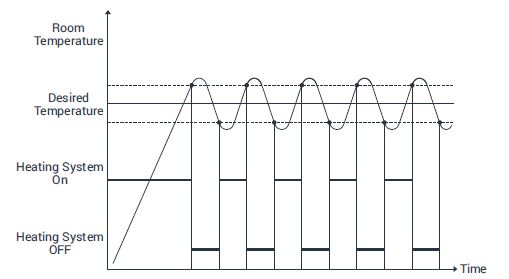
The thermostat measures the room temperature with its temperature sensor. The desired temperature value is set by turning the button to the right or left. When the room temperature rises above the set temperature value, the room thermostat sends a shutdown command to the modem. Modem Turns off the relay by receiving the command. Digital display; The set temperature, battery life, room temperature and heating symbol are displayed. The heating symbol gives information about the operation status of the boiler. The product measures 0.1oC temperature accuracy. However, there is an operating sensitivity of 0.5oC to prevent the heating unit from starting and stopping too frequently. The device manages the heating systems by the on-off operation algorithm. This working algorithm is shown in the following graph.
FUNCTIONS
Temperature Control
The room thermostat controls the room temperature according to the set value. The on / off temperature difference of the device is 0.5oC.
Calibration
The room thermostat can be calibrated if the measuring temperature wanted to be changed. The calibration range is -8oC to + 8oC.
ORDERING
When ordering, specify both the product type and the product code, for example the HT250S SET wireless room thermostat.
ROOM THERMOSTAT INSTALLATION
Remove the room thermostat by pulling it out of the wall bracket. If you want to use your room thermostat in a fixed place, mount the dismantled wall apparatus in a room you frequently use in your living space. If you want to use your room thermostat with the table bracket, place the room thermostat on the table bracket by removing the wall bracket. For example; Like your home lounge or living room. Avoid installing the room thermostat where there is a lot of air circulation, such as door entry or window edge. Also, do not place near heating units (heating panels, fireplaces etc.) and direct sunlight areas. We recommend that the room thermostat is placed at a height of 50 cm to 150 cm from the floor. You can try a few places to find where you can place the room thermostat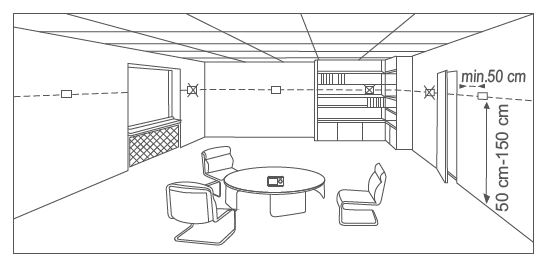
If the room thermostat is to be used with the wall bracket, the wall bracket must be mounted on a flat wall. Local electrical regulations must be observed during installation. Installation of room thermostat must be done by authorized personnel. The parts included in the room thermostat are made of ABS, PC materials. In systems with room thermostats, if there are thermostatic radiator valves, keep them in the open position.
BATTERY CHANGE
Remove the battery cover located on the back of your room thermostat. Insert a 3V DC (2xAAA) alkaline battery into the battery compartment. When installing batteries, make sure they are incorrect position. Place the room thermostat in the wall bracket or table bracket by closing the battery cover. Replace both batteries at the same time.
WARNING!
Please dispose of your discharged batteries in waste bin which is separated for battery wastes.
MAINTENANCE
The device is maintenance-free.
MODEM
- Modem Led Light
- Sync Button:
- Syncs modem and room thermostat.
- Manual Usage Button:
- Deactivates receiver and allows you to use boiler manually.
- Modem Power Cable Input
- Boiler Connection Cable Input
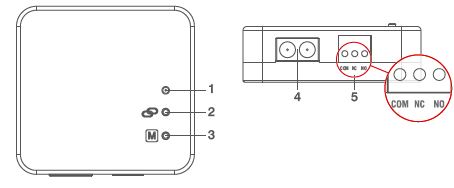
MODEM LED LIGHT COLOR EXPLANATIONS
| Green | The receiver synced with the thermostat and Works properly. |
| Green Flashing | Pressed to receiver sync button and waited for the thermostat sync signal. |
| Red | The receiver has energy but no thermostat synced. |
| Red Flashing | The boiler shut down because of, no signal from the thermostat for more than 22 minutes. |
| Orange | On Manual Mode. |
MODEM PLACEMENT
The important thing to note for receiver placement is that avoiding physical contact with the boiler and protecting against materials such as liquid, dust etc. You can place your receiver in the boiler’s cabinet without physical contact with the boiler or mount the receiver to Wall.
MODEM SETUP
- First, shut down the electrical current to which your boiler is connected (fuse, power outlet, etc.)
- Connect one of the boiler connection cables to the receiver as shown in the Connection Scheme.
- Connect other boiler connection cable end to the boiler’s room thermostat input as shown in the boiler’s user manual.
- Input the receiver power cable first to the receiver and then to plug. If there is no plug near your boiler, you can connect the cable to your boiler’s connection fuse.
- After finishing the connections, turn on the electrical current first, then turn on your boiler.
- If you want to deactivate your receiver, press the manual button for 2 seconds then you should see orange light on the receiver. After being sure that your boiler is working, press the same button and see the orange light disappear.
- Set up Room Thermostat to sync the receiver with the room thermostat.
CONNECTION DIAGRAM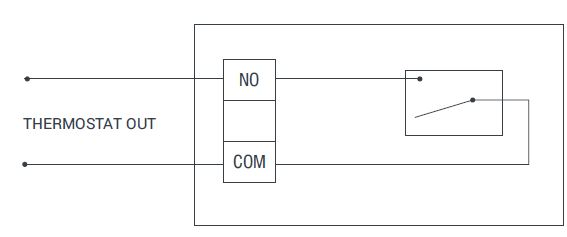
WARNING!
Only persons who have got Professional Competence should make operations electric wiring or boiler setup.
APPLICATION EXAMPLE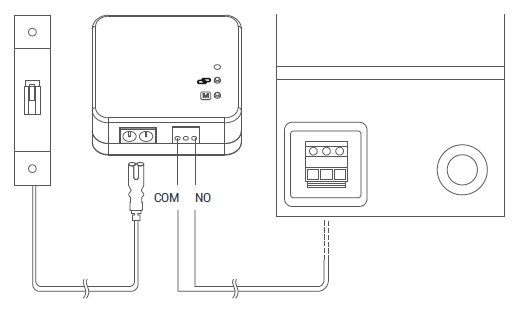
SYSTEM COMBINATION
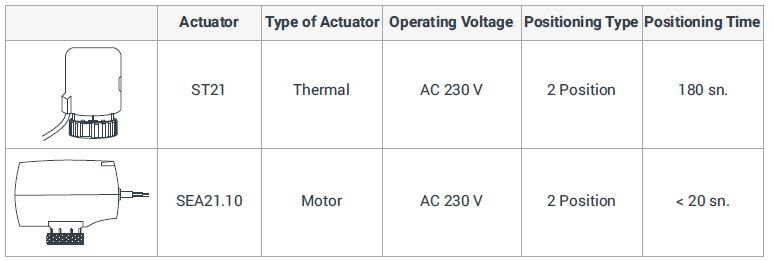
APPLICATION EXAMPLE
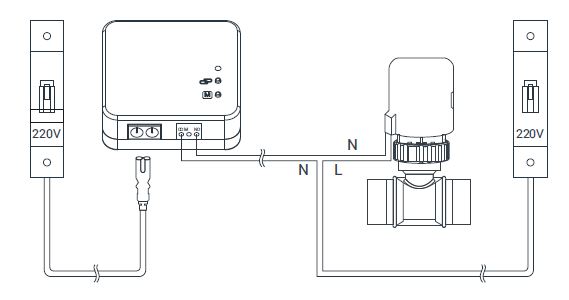
WARNING!
- Please do not connect the modem with another product’s supply line.
- Risk of fire and injury due to short circuit!
- Please comply with local regulations when determining power cable diameters.
- Please supply the power line from a fuse.
- The product is subject to the European Directive 2012/19 / EU as it is included in the electronic product category.
- It cannot be considered as domestic waste.
- You can leave the product in electronic waste collection areas.
- Follow all local and applicable laws and regulations.
- There is no internal fuse inside the product.
- External fuses must be used on all supply lines
SYNC ROOM THERMOSTAT AND RECEIVER
- Each room thermostat is matched with a modem inside the factory. In case of any signal loss, you can perform the matching by following the steps below.
- Press the button for 3 seconds when the room thermostat is off. You will see the heating calibration setting menu, after you press one more time, you will see the sync menu which is written as “Adr”.
- Primarily press the sync button of the receiver for 2 seconds and see the blinking green light of the receiver. Then turn up the button to the right or left way.
- The green light on the receiver will be stable and a signal sound will be heard from the receiver.
- Room Thermostat and Receiver synced.
ROOM THERMOSTAT HEATING CALIBRATION
If you want to take the temperature on your thermometers in your living space as a reference, you need to calibrate your room thermostat. For this:
- Press the button for 3 seconds when the device is off.
- In order to see the desired temperature, set the temperature difference by turning the button to right or left. This value can be set between -8oC and +8oC.
- Exit the menu by pressing the button.
Note: Recommended temperature calibration is “0.0oC”.
TECHNICAL DATA
Room Thermostat
| Power Supply | |
| Operating Current | 3V DC (2 x AAA alkaline battery) |
| Battery Life | 1 Years (2 x AAA) |
| Operational Data | |
| Temperature Measurement Accuracy | 0.1oC |
| Operating Sensitivity | 0.5oC |
| Operating Temperature Range | (5oC) – (30oC) |
| Environmental Conditions | |
| Operating Temperature | (0oC) – (+45oC) |
| Storage Temperature | (-10oC) – (+50oC) |
| Transport Temperature | (-10oC) – (+50oC) |
| Standards | |
| Radio and Telecommunications Terminal Equipment Regulation | 2014/53/EU (R&TTE/RED EN 301 489-1 V2.1.1:2017,
EN 300 220-1 V3.1.1:2017, EN 301 489-3 V2.1.1:2017, EN 300 220-2 V3.1.1:2017, EN 62479: 2010, EN 60730-2-9:2010, EN 60730-1:2011) |
| Electromagnetic Compatibility Regulation | 2014/30/EU (EMC EN 61000-6-3: 2007 + A1: 2011,
EN 61000-6-1: 2007 |
| Low Voltage Directive | 2014/35/EU (LVD EN 60730-2-9:2010, EN 60730-1:2011) |
| General Data | |
| Weight (including package) | 435 g |
| Color | White |
| Material | ABS, PC |
Modem
| Power Supply | |
| Operation Current | 220V AC |
| Relay NO Switching Current | 7A (220V AC) |
| Environmental Conditions | |
| Operating Temperature | (0oC) – (+45oC) |
| Storage Temperature | (-10oC) – (+50oC) |
| Transport Temperature | (-10oC) – (+50oC) |
| General Data | |
| Color | White |
| Material | ABS |
DIMENSIONS
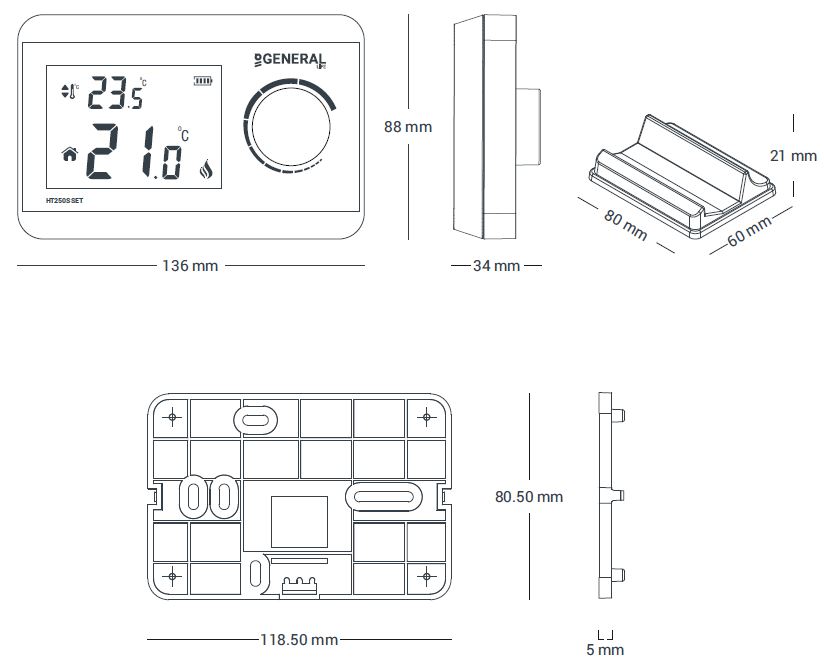
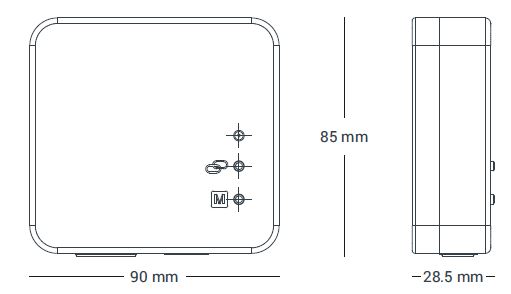
REFERENCE:
DOWNLOAD MANual:
General life HT250S SET Wireless Room Thermostat Data Sheet
