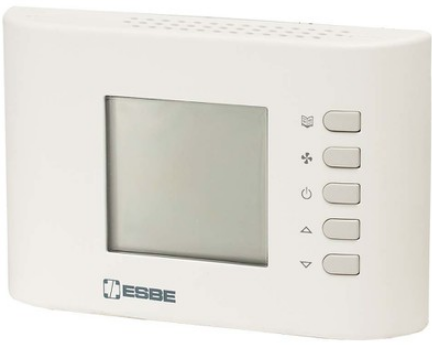
ESBE TPH114 Digital Room Thermostats
INSTALLATION
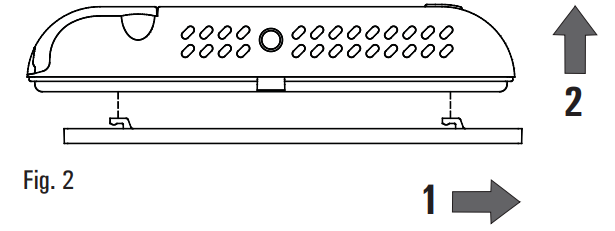
- Release the wall mount plate fitted under the base of the programmable thermo-hygrostat
- Fix the plate directly on the wall or onto 2 or 3-module junction boxes by means of the two holes for screws (distance between centres: 60 mm or 85mm), taking care to pass the wires through the opening
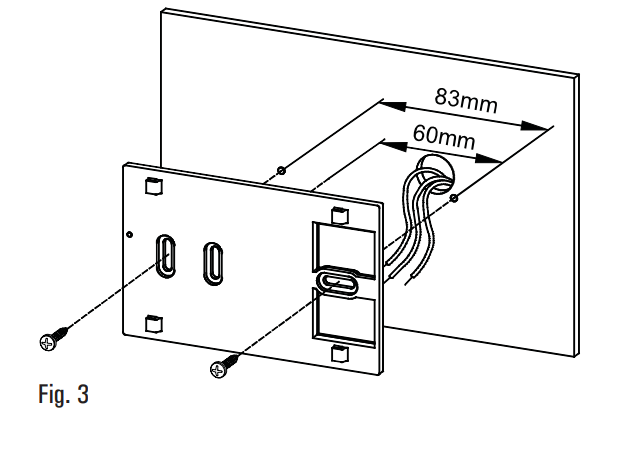
- Make electrical wirings by passing the wires through the rectangular opening in the wall plate and according to the diagram
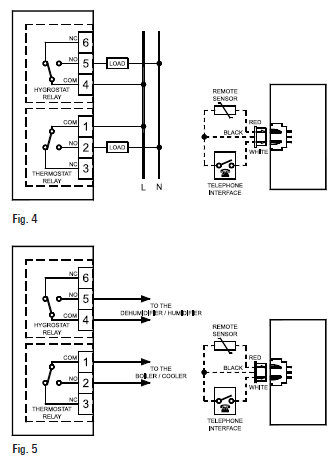
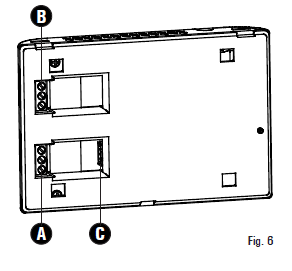
- Connect the remote sensor (if present) or the phone interface to connector ‘C’. The load for the thermostat section must be wired to the terminal block ‘A’ shown in Fig. 6, meanwhile the load for the hygrostat section must be wired to the terminal block ‘B’
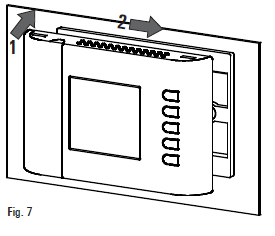
- Move the thermostat to the wall plate by fitting first the teeth of the base with the relevant holes of the plate and then exert a pressure on the device to the left side until the plastic teeth of the plate snap.
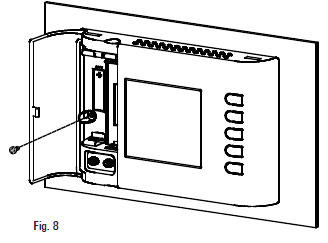
- Secure the body of the programmable thermostat to the wall plate using the supplied screw that is located inside the battery compartment
- Insert the batteries in the battery compartment see paragraph ‘ HOW TO INSERT/REPLACE THE BATTERIES ’.
WARNING
- To adjust properly room temperature, install the thermostat far from heat sources, airstreams or particularly cold walls (thermal bridges).
- In order to grant electrical safety, it is mandatory to screw the programmable thermo-hygrostat body to the wall mount plate through the two screws supplied which must be mounted in the battery holder.
- If the load controlled by the relay of the programmable thermo-hygrostat operates with mains voltage, the connection must be made via an omnipolar switch complying with current standards and with a contact opening of at least 3 mm in each pole.
- Installation and electrical wirings of this appliance must be made by qualified technicians and in compliance with the current standards.
- Before wiring the appliance be sure to turn the mains power off
QUICK GUIDE FOR SETTING THE TIME SCHEDULE
- Press button ‘ P ’.
- The display shows ‘ PrOG ’ with the icon ‘
 ‘ turned on.
 - Press key ‘ OK ’: the display shows the word ‘ dAY ’, the icon ‘ and the squares corresponding to the flashing days.
- Press buttons ‘
 ‘ and ‘
 ‘ in order to choose one of the four days combinations available as pre-set.
 - Press button ‘ OK ’ to confirm the choice.
- The display shows hour 00:00 with the relevant dash, in the upside right, flashing.
- Press one of the following buttons to select the temperature regulation level desired:
- Comfort mode: Press the ‘
 ‘ button.
 - Off / Antifreeze: Press the ‘
 ‘ button.
 - Economy mode: Press the ‘
 ‘ button.
 - Moving the time cursor: Press button ‘ ’ or ‘ ‘.
- Comfort mode: Press the ‘
- Each time the button which sets the regulation mode is depressed, the time cursor automatically jumps into the next half hour.
- Once the time schedule for the day or group of days selected has been set, press button ‘ OK ’.
- The display will show the time schedule for the next day or group of days until the whole week has been covered.
- Once the time schedule for the whole week has been set, press button ‘ OK ’. The programmable thermo-hygrostat will store the program into its memory and the word ‘ MEMO ’ is shown on the display, then it will automatically quit the time schedule setting procedure.
GENERALITIES
This device is a battery powered weekly digital programmable thermo-hygrostat for the control of room temperature and relative humidity on three levels: Comfort, Economy or Off / Antifreeze. The device can be used in heating and cooling plants. The programmable thermo-hygrostat has a large backlit LCD display for all functional indications, the program schedule set, the room temperature reading, the relative humidity reading, or, as desired, the actual time. Allows to set up to 7 different programs, one for each day of the week, with a minimum intervention time of 1/2 hour over 24 hours. In addition, the device offers the possibility of setting the Antifreeze temperature value, dew point control and sensor Offset value adjustment.
DESCRIPTION OF CONTROLS
LEGEND
- A Button with double function:
- In normal operation: activates the function 24 hours Manual / Permanent Manual / Automatic.
- In schedule programming: sets the regulation temperature into Economy mode.
- B Button with double function:
- In normal operation: turns on and off the programmable Thermo hygrostat.
- In schedule programming: sets the regulation temperature into Off / Antifreeze mode.
- C Button with triple function:
- In normal operation: displays current time or temperature.
- In schedule programming: sets the regulation temperature into Comfort mode.
- In ‘Set-Point temperatures settings’, shows either the Comfort or the Economy temperature.
- D Changes the setpoint temperature and the configuration parameters (increasing the value).
- E Changes the setpoint temperature and the configuration parameters (decreasing the value).
- F Gives access to the user parameters list.
- G Button with double function:
- In normal operation updates the values sampled by thethermostat.
- In ‘User parameters settings’, enables the selected parameter modification and confirms the modified value.
- H Screw hole for fixing the programmable thermo-hygrostat body to the wall mount plate.
- I Battery compartment.
DISPLAY SYMBOLS
In the following is explained the meaning of some symbols which may appear on the display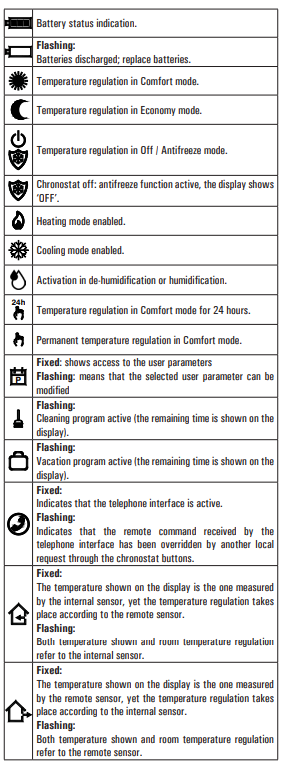
STARTING UP
When starting up for the first time:
- Insert the batteriesobserving the polarity markings shown in the battery compartment (see ‘INSERTION / BATTERIES REPLACEMENT’).
- Set the time and day of the current week.
- Set the operating mode of the thermostat (user parameter ‘C-H’):
- Heating (factory set) or Cooling.
Setting the current time and day
To set the clock of the programmable thermo-hygrostat carry out the following steps
- Open the flap of the battery compartment.
- Keep the ‘OK’ button pressed for at least 2 seconds; the hour digits will start flashing.
- Set the hour using buttons or
- Confirm by pressing ‘OK’; the minute digits will start flashing.
- Set the minutes using buttons or
- Confirm with ‘OK’; the display shows the word ’dAY’ and the square symbol corresponding to the current day flashes.
- Set the current day of the week using buttons or (the current day is highlighted by a box surrounding the number corresponding to the day of the week, 1 Monday .. 7 Sunday )
- Confirm by pressing ‘OK’; the output of the time and day setting is automatic.
Time/Temperature/Humidity Display
By repeatedly pressing the ‘ ‘ the display can alternately show the actual time, the room temperature (in °C) read by the internal sensor, distinguished by the ‘
 ‘ icon, the room temperature (in °C) read by the remote probe (if connected) distinguished by the ‘
 ‘ icon and the room humidity (in %RH) read by the internal sensor, distinguished by the ‘ ‘ icon. The temperature and humidity readings are displayed corrected by the Offset value set.
ATTENTION: In order to optimise battery duration, the programmable thermo-hygrostat performs sensor readings and error controls every 3 minutes or when ‘Ok’ is pressed and consequently, decides on activation or deactivation of the relay. Any error message must disappear within 3 minutes or on pressing the ‘Ok’ key. If the message does not disappear then problems have been detected on the sensors.
Note:
If the ‘ rEG ’ parameter is set at ‘ In ‘, but an error is detected on the internal sensor, the display will show ‘ SEnS E xx ’. In this situation the adjustment will be automatically interrupted and both relays will be placed in the Normally Open position. If the ‘ rEG ’ parameter has been set at ‘ Out ‘ but the remote probe has not been connected or is damaged, the display will show the respective wording ‘ SEnS OPEN ‘ or ‘ SEnS SHrt ‘ with the ‘ ‘ icon on.
Comfort and Economy temperatures/humidity adjustment
During normal operation, the display shows the room temperature and humidity reading and the icon relative to the current setting mode or
or . The programmable thermo-hygrostat reads the room temperature from the internal or external sensor (depending on the setting made in the ‘ rEG ’ parameter), while the humidity is only read on the internal sensor. The flashing ‘ ‘ icon indicates that the adjustment (temperature or humidity) takes place on an internal sensor, while the flashing ‘‘ icon indicates that the adjustment (temperature only) takes place on the remote probe. Activation of the relay that controls the room humidity management system is indicated on the display by switch-on of the ‘
 ‘ icon. The activation of the relay that controls the room heating/cooling management system is indicated on the display by the switch-on of the ‘
 ’ icon for heating and the ‘
  ’ icon for cooling.
Proceed as follows to adjust:
- Display the actual time.
- Press the or key once: the display shows the comfort temperature set (distinguished by ‘ ‘ icon) and the ‘ SET °C ’ icon (indicating that the setpoint temperature is being displayed).
- Press the or keys to modify the setpoint temperature displayed.
- Press the ‘ ‘ key, the display shows the economy temperature set (distinguished by the ‘ ‘ icon and the ‘ SET °C ’ icon (indicating that the setpoint temperature is being displayed).
- Press the or keys to modify the setpoint temperature displayed.
- Press the ‘ ‘ key, the display shows the comfort humidity set (distinguished by the ‘ ‘ icon) and the ‘ SET %RH ’ icon (indicating that the setpoint humidity is being displayed).
- Press the or keys to modify the setpoint humidity displayed.
- Press the ‘ ‘ key, the display shows the economy humidity set (distinguished by the ‘ ‘ icon) and the ‘SET %RH’ icon (indicating that the setpoint humidity is being displayed).
- Press the or keys to modify the setpoint humidity displayed.
- Press the ‘ ‘ key or after a few seconds of inactivity, the display goes back to showing the room temperature, memorising the values set.
Note: Normally, in order to have night -time adjustment, the economy temperature/humidity must have a value lower than the comfort value.
The programmable thermo-hygrostat will adjust the room temperature in comfort or economy mode in agreement with the hourly program set (see ‘ USER PARAMETER SETTING ‘ paragraph).
Dew point control
The dew point (managed in the user parameter ‘ C-dP ’), represents the temperature below which condensate forms on the surfaces and depends on the temperature and humidity present in the room.
ATTENTION
- The dew point control is only active if the ‘ C-dp ’ (Dew Point control) parameter has been activated.
- The dew point control is only managed in cooling and/or dehumidification mode.
- If the conditions listed above are true, on the basis of the dew point, the cooler and dehumidifier command will have priority with respect to normal adjustment (i.e. with dew point control disabled).
The table blow (table 1) shows the dew point value (expressed in °C), depending on the room temperature and relative humidity, expressed as ‘ %RH ’.
Table 1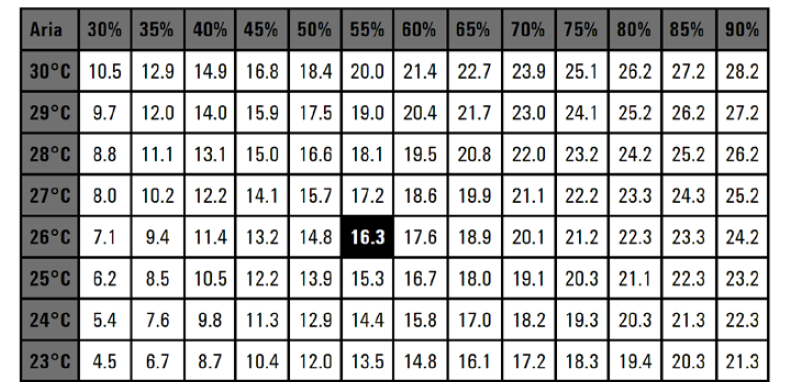
ATTENTION
- Condensate will form on the surfaces with temperature lower than or equal to that of the dew point calculated C-dP.
- The dew point is calculated automatically by the equipment when environmental conditions change.
For all details see ‘ ‘ C-dP ’ DEW POINT MANAGEMENT ‘.
Safety Control Algorithm
- The ‘ Safety Control ‘ algorithm is used to manage the two relays controlling the thermostat and the programmable thermo-hygrostat.
- The algorithm allows not to activate the two relays simultaneously, so as not to burden the electric line in the start-up phase (peak) of the temperature and humidity control systems.
- Practically, the activation is manages in a way not to have overlapping on activation of the two commands.
SETTING THE USER PARAMETERS
To enter the mode for setting the programmable thermo-hygrostat parameters, proceed as follows:
- Press the ‘
 ‘ button; the display will show the ‘ ‘ icon (bottom right) and the word ‘ PrOG ‘.
 - Press the ‘ ‘ button repeatedly to scroll through the user parameters:
- Schedule Programming ‘ PrOG ’
- Antifreeze Setting ‘ AFr ’
- Hysteresis Setting ‘ HYS ’
- Optimization Function Setting ‘ OPt ’
- Internal sensor Offset setting ‘ OFS1 ’
- Remote sensor Offset setting ‘ OFS2 ’
- Regulation sensor choice setting ‘ rEG ’
- House hold program Setting ‘ CLE ’
- Vacation program Setting ‘ HOL ’
- Setting heating or cooling ‘ H-C ’
- Programmable thermo-hygrostat hysteresis setting ‘ HYH ’
- Setting humidity sensor Offset ‘ OFSH ’
- Setting Dehumidification or Humidification ‘ dE-H ’
- Dew point control ‘ C-dp ’
- Rate of check on dew point ‘ Cndp ’
- Thermostat on time timer ‘ Cntr ’
- Reset to default data ‘ dFLt ’
- Press the ‘OK’ button to modify the selected parameter; the ‘ ‘ icon flashes.
- Configure the data associated with each individual parameter as illustrated below.
- To quit from the user parameters setting, press key ‘ ’ or wait 10 seconds wothout pressing any key.
‘ PrOG ‘: SCHEDULE PROGRAMMING
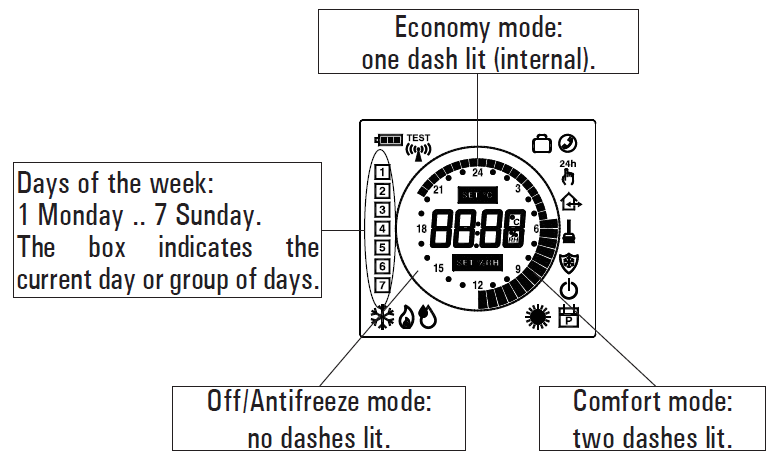
Usually the circular band of dashes in the display shows the operating mode (Comfort, Economy, Off / antifrost) of the thermostat, while the vertical strip on the left shows the current day of the week
(1=Monday .. 7=Sunday) high lighted with a square around the number to which it relates programming.
To facilitate the programming operation it is sufficient to remember this rule:
To set the program schedule proceed as described below:
Note: You will exit the programming mode without memorizing the programmed schedule if more than 10 seconds elapse and you do not press any button; or else you can confirm the settings in sequence by pressing the ‘OK’ button without making any changes.
- Select parameter ‘ PrOG ’ and press the button ‘ OK ’: the display shows the word ‘ dAy ’, icon ‘ ‘ and the square symbols corresponding to the current day or group of flashes.
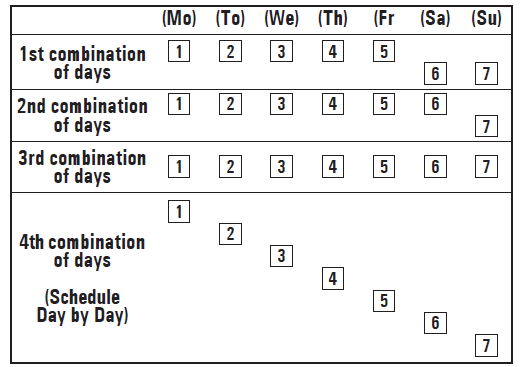
- Press buttons‘ ‘ and ‘ ‘to set the combination of days to be programmed.
- In the following the four available combinations are listed:
- Press the ‘ OK ‘ button to confirm the setting made; the display will show the schedule previously programmed for the set day or group of days and the time 00.00 (cursor flashing on the interval between 00.00 and 00.30).
- Set the operating mode.
- To facilitate the programming operation, the thermostat is factory preset with the following time intervals:
TIME INTERVALS PRESET
- Comfort mode Economy mode
- 6.00 .. 8.00 8.00 .. 11.00
- 11.00 .. 13.00 13.00 .. 17.00
- 17.00 .. 23.00 23.00 .. 6.00
For every time interval (each dash corresponds to a half hour) set the operating mode by pressing one of the following buttons:
- Comfort mode: Press the ‘ ‘ button.
- Off / Antifreeze: Press the ‘ ‘ button.
- Economy mode: Press the ‘ ‘ button.
- Moving the time cursor: Press button ‘ ‘ and ‘ ‘.
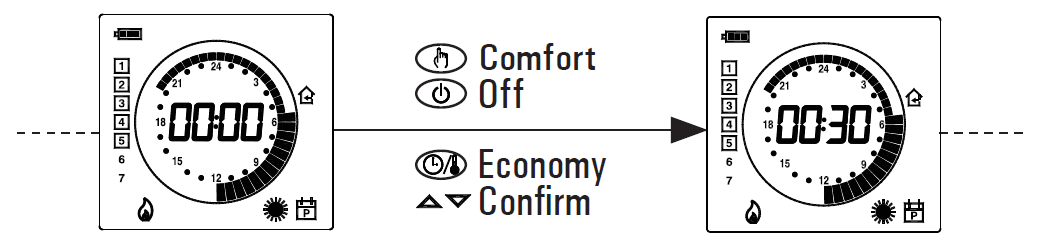
- .After programming the schedule for the day or group of days selected, press the ‘ OK ’ button.
- The display will show the program schedule for the next day or groups of days until the whole week is covered.
After programming the schedule for the entire week, press the ‘ OK ’ button. The programmable thermo-hygrostat will memorize the schedule set and the word ‘MEMO’ will appear on the display; the device will automatically exit the schedule programming mode.
WARNING
- If you want to reset the time intervals to factory settings, please reach the user parameter ’ dFLt ’ (the default data); In this case, all user parameters will be reset to factory settings.
- If you exit the time programming without pressing the ’ OK ’ button, or you do not save the settings, the time program will
- NOT be saved in memory and the previous program will be restored.
- Changes are stored in memory only when the if you enable this operation with the phase characterized by the word ’MEMO’.
‘ AFr ’ ANTIFREEZE SETTING
The Antifreeze function allows you to select a minimum temperature to be maintained when the programmable thermo-hygrostat is off, so as to protect both the room and the equipment when the room temperature falls below the set value. The device leaves the factory with the Antifreeze function set on 3°C.
IMPORTANT: the function is active only when the device has been set in heating mode.
To set the Antifreeze temperature, carry out the following steps:
- Select the parameter ‘ AFr ’ and press the ‘ OK ’ button.
- The display shows the Antifrost temperature previously set and the ‘ ‘ icon flashes.
- Press buttons‘ ‘ and ‘ ‘to change the setting (between OFF, 0.5°C..25°C); every change will be automatically memorized.
- To return to the list of user parameters, press the ‘OK’ button.
- To exit the user parameters setting and resume normal operation, press the ‘ ‘ button or wait 10 seconds without pressing any key.
‘HYS’ SETTING THE HYSTERESIS
Setting this parameter allows to define the hysteresis, in °C, which is applied to the programmable thermo-hygrostat to adjust the room temperature, whenever the ‘ C-dP ‘ (dew point) user parameter has not been enabled.
To adjust the hysteresis perform the following steps:
- Select the parameter ‘ HYS ’ and press ‘ OK ’.
- The display shows the previously set temperature and the icon flashes.
- Press the‘ ‘ and ‘ ‘to change the value (between 0.1 °C .. 5.0 °C); each change is automatically saved.
- To return to the list of user parameters, press the ‘OK’ button.
- To exit the user parameter settings and resume normal operation, press the ‘ ‘ button or wait 10 seconds without pressing any key.
‘ OPt ’ OPTIMIZATION SETTING
The optimization function consists in the option of turning on the heating or cooling earlier than the scheduled time in order to reach the set temperature by the scheduled time. The programmable thermo-hygrostat calculates the time necessary in order to reach the desired temperature and turns on the heating in advance accordingly, by the amount of time necessary to achieve the target.
The amount of time in advance may be 60 minutes at most and is calculated based on the average gradient of the previous 24 hours.
To set the optimization function carry out the following steps:
- Select the parameter ‘OPt’ and press the ‘OK’ button.
- The display shows ‘on’ or ‘Off’ and the ‘ ‘ icon flashes.
- Press button ‘ ‘ to activate (On) or ‘ ‘ to deactivate (Off) the function; every change will be automatically memorized.
- To return to the list of user parameters, press the ‘OK’ button.
- To exit the user parameter settings and resume normal operation, press the ‘ ‘ button or wait 10 seconds without pressing any key.
‘ OFS1 ’ INTERNAL SENSOR OFFSET SETTING
With this parameter it is possible to correct the temperature reading of the internal sensor by ±5°C in order to correct any systematic reading errors due to the positioning of the programmable thermohygrostat in areas unsuitable for measuring the room temperature. The device leaves the factory with the Offset set at 0.0°C.
To adjust the Offset value for the internal sensor, carry out the following steps:
- Select the ‘ OFS1 ’ parameter and press the ‘ OK ’ button.
- The display shows the Offset temperature previously set and the ‘ ‘ icon flashes.
- Press buttons‘ ‘ and ‘ ‘to modify the setting (range: -5.0°C .. +5.0°C); every change will be automatically stored in memory.
- To return to the list of user parameters, press the ‘OK’ button.
- To exit the user parameter settings and resume normal operation, press the ‘ ‘ button or wait 10 seconds without pressing any key
OFS2 ’ REMOTE SENSOR OFFSET SETTING
With this parameter it is possible to correct the temperature reading of the remote sensor by ±5°C in order to correct any systematic reading errors due to the positioning of the remote sensor in areas unsuitable for measuring the room temperature. The device leaves the factory with the Offset set at 0.0°C.
To adjust the Offset value for the remote sensor, carry out the following steps:
- Select the ‘ OFS1 ’ parameter and press the ‘ OK ’ button.
- The display shows the Offset temperature previously set and the ‘ ‘ icon flashes.
- Press buttons ‘ ‘ and ‘ ‘to modify the setting (range: -5.0°C .. +5.0°C); every change will be automatically stored in memory.
- To return to the list of user parameters, press the ‘OK’ button.
- To exit the user parameter settings and resume normal operation, press the ‘ ‘ button or wait 10 seconds without pressing any key.
‘ rEG ’ REGULATION SENSOR CHOICE SETTING
This parameter sets whether the room temperature regulation is made based on the programmable thermo-hygrostat internal sensor or the remote sensor connected to the connector ‘ B ‘ in Fig. 6.
For this parameter setting please find these directions:
- Select parameter ‘ rEG ’ then press key ‘ OK ’
- The display shows ‘In’ or ‘Out’ and the icon ‘ ‘ flashes.
- Press keys‘ ‘ and ‘ ‘to change the value (In: internal sensor –
- Out: remote sensor); each change is automatically stored in memory.
- To return to the list of user parameters, press the ‘OK’ button.
- To exit the user parameter settings and resume normal operation, press the ‘‘ button or wait 10 seconds without pressing any key.
WARNING: When the regulation is set according to the remote sensor ‘ Out ‘ and in case this sensor is missing or broken, the temperature regulation will be performed according to the internal sensor, even if the parameter remains set on ‘ Out ‘.
‘CLE’ SETTING CLEANING PROGRAM
This program is useful when the house is being cleaned and the windows are opened thus making both the heating and cooling of the premises unnecessary. In these conditions, the relays are blocked in Off for two hours.
Note:
- Access to the cleaning program is NOT allowed when the programmable thermostat is in ‘holiday mode’.
- To activate the cleaning program, select the parameter ‘CLE’ and press the ’OK’ button: the display shows the icon flashing and, in place of the clock, the time remaining before returning to normal operation is shown.
- The device will go back to the previous operating mode after two hours or if you press the ‘ ’ button again.
‘HOL’ SET HOLIDAY PROGRAM
If you intend to be away for a relatively long period it is advisable to activate the Vacation Program, which will suspend the active operating mode for the desired number of hours (from 1 to 95) or days (from 1 to 99). At the end of the set number of hours or days, the programmable thermo-hygrostat will go back into the operating mode it was in prior to activation of the Vacation Program. While it is off, and in case the device has been set to Heating mode, the antifrost function will be in any case active, and the display will show the symbol ‘ ‘ and the countdown of the time remaining to the end of the program.
Note: Access to the vacation program will NOT be enabled while the ‘ cleaning program ‘ is on.
To activate the vacation program proceed as follows:
- Select the parameter ’HOL’ and press ’OK’; the display shows the symbol ‘ ‘, the indication ’h 00’ and the ‘ ‘ icon flashing.
- Press buttons ‘ ‘ and ‘ ‘to set the vacation time; every change will be automatically memorized.
- Up to 95 hours, the programming is indicated in hours and the display will show ‘ h XX ‘.
- Once that value is exceeded, the device will automatically switch to the mode for programming the vacation time in days and display will show ‘ d XX ‘. It will be possible to increase or decrease the hour or day by one unit at a time, with values ranging from 1 .. 95 hours and 4 .. 99 days.
- To activate the holiday program for a given time, press again the
- ‘OK’ button or wait 10 seconds without pressing any key; the display showsthe ‘ ’ icon flashing and the time remaining to the end of the holiday period.
- If you have not set the time duration of the holiday (h:00), you can exit the adjustment and return to normal operation by pressing the ‘ OK ’ or ‘ ‘ or by waiting 10 seconds without pressing any key.
- To deactivate the vacation function and resume normal operation, press the button ‘ ‘.
‘H-C’ HEATING / COOLING SETTING
This setting is used to invert the operating logic of the thermostat relay according to whether a heating or air conditioning unit is being controlled.
ATTENTION:
- By modifying the relay operating logic, the setpoint values will be automatically taken back to the default values for the mode set.
- The programmable thermo-hygrostat leaves the factory set in the heating mode.
To modify the operating logic, carry out the following procedure:
- Select the parameter ’ H-C ’ and press ’ OK ’; the display shows the current adjustment mode and the ‘‘ icon flashes.
- Press thebuttons‘ ‘ and ‘ ‘to select thedesired adjustment; each change isautomatically saved.
- To return to the list of user parameters, press the ‘ OK ’ button.
- To exit the user parameter settings and resume normal operation, press the ‘ ‘ button or wait 10 seconds without pressing any key.
- During normal operation, if the heating mode is on, the ‘ ‘ icon will remain lit, whereas if the cooling mode is on, the ‘ ‘ will remain steadily lit.
‘HYH’ SETTING HYGROSTAT HYSTERESIS
Setting this parameter allows to define the hysteresis, in %RH, which is applied to the programmable thermo-hygrostat to adjust the room humidity, whenever the ‘ C-dP ‘ (dew point) user parameter has not been enabled.
To adjust the differential, perform the following operations:
- Select the ‘ HYH ’ parameter and press ‘ OK ’.
- The display will show the previously set value and the ‘ ‘ icon will flash.
- Press the ‘ ‘ and ‘ ‘ keys to modify the value (between 0.5%RH .. 10.0%RH); every modification is memorized automatically.
- To return to the list of user parameters, press the ‘OK’ button.
- To exit the user parameter settings and resume normal operation, press the ‘ ‘ button or wait 10 seconds without pressing any key.
‘OFSH’ INTERNAL HUMIDITY SENSOR OFFSET SETTING
With this parameter it is possible to correct the humidity reading of the internal sensor by ±5%RH in order to correct any systematic reading errors due to the positioning of the programmable thermohygrostat in areas unsuitable for measuring the room humidity. The device leaves the factory with the Offset set at 0.0%RH.
To adjust the Offset value for the internal sensor, carry out the following steps:
- Select the ‘ OFS1 ’ parameter and press ‘ OK ’.
- The display will show the previously set Offset value and the ‘ ‘ icon will flash.
- Press the ‘ ‘ and ‘ ‘ keys to modify the value (between -5.0%RH .. +5.0%RH); every modification is memorised automatically.
- To return to the list of user parameters, press the ‘OK’ button.
- To exit the user parameter settings and resume normal operation, press the ‘ ‘ button or wait 10 seconds without pressing any key.
‘dE-H’ DEHUMIDIFICATION/HUMIDIFICATION SETTING
This setting is used to invert the operating logic of the programmable thermo-hygrostat relay according to whether a dehumidification or humidification device is being controlled.
ATTENTION:
- The dehumidification function is not active in the heating mode.
- By modifying the relay operating logic, the setpoint values will be automatically taken back to the default values for the mode set.
- The programmable thermo-hygrostat leaves the factory set in the dehumidifying mode.
The procedure below must be followed to modify the operating logic:
- Select parameter ‘ dE-H ’ and press ‘ OK ’; the display will show the actual adjustment mode and the ‘ ‘ icon will flash.
- Press the ‘ ’ and ‘ ’ keys to select the desired adjustment mode; every modification is memorised automatically
- ‘ dEUM ‘: Dehumidification
- ‘ HUMI ‘: Humidification
- To go back to the list of user parameters, press ‘ OK ’.
- To exit user parameters setting and restore normal operation, press ‘ ‘ or do not press any key for 10 seconds.
- During normal operation, dehumidification or humidification mode activation is indicated by the ‘ ‘ icon on.
‘C-dP’ DEW POINT MANAGEMENT
Using this parameter it is possible to enable/configure the Dew Point control in order to prevent the formation of surface condensate.
Proceed as follows to set this parameter:
- Select parameter ‘ C-dP ’ and press ‘ OK ’; the display will show the actual setting and the ‘ ‘ icon will flash.
- Press the‘ ‘ and ‘ ‘keys to select the desired adjustment mode; every modification is memorised automatically.
The adjustment modes are the same:
- OFF: Dew point control disabled.
- d-EF: Dew point control with remote probe on underfloor plants.
- d-EC: Dew point control with remote probe on metal ceiling.
- d-FP: Dew point control enabled on foxed points; adjustment can take place on internal sensor or remote sensor (to set in the ‘ rEG ’ parameter).
For every adjustment mode, which activates dew point management, it is possible to modify the factory setting by proceeding as follows:
- On selection of the adjustment mode suitable for the plant to be managed, press ‘ OK ’.
- Press the‘ ‘ and ‘ ‘keys to modify the value; every modification is memorised automatically.
- If the ‘ d-FP ’ parameter is selected, by pressing ‘ OK ‘, sit is possible to use the‘ ‘ and ‘ ‘keys to modify the two thresholds in order to prevent the temperature reaching the dew point:
- TF1: second lower threshold of the dew point (expressed in °C).
- TF2: first lower threshold of the dew point (expressed in °C).
- To modify the value of the two thresholds, select TF1 or TF2 and press ‘ OK ’ and then use the ‘ ‘ and ‘ ‘ keys to modify the value; every modification is memorised automatically.
- To go back to the list of user parameters, press ‘ OK ’ and then the ‘ ‘ key.
- To exit user parameters setting and restore normal operation, press ‘ ‘ or do not press any key for 10 seconds.
WARNING
When the regulation modes ‘d-EF’, ‘d-EC’ o ‘d-FP‘ are shown, the calculated dew-point (dP) value will be alternately shown.
Dew point control limitations
- When the dew point control is active in modes ‘d-EF‘ or ‘d-EC‘, the parameter ‘rEG‘ (room temperature regulation sensor) will be automatically set to the internal sensor. The dew point temperature will be calculated according to the temperature measured by the internal sensor, meanwhile, the ceiling or floor temperatures will be calculated based on the remote sensor.
- When the dew point regulation is active in mode ‘d-FP‘ the regulation sensor will be the internal one, meanwhile, the external sensor will only be used for the measured temperature.
- The dew-point temperature will always be calculated according to the temperature measured by the internal sensor. Once the parameter ‘rEG‘ is reached, the label ‘indP‘ will be shown on the display, together with the ‘SET%RH‘ icon flashing. If the regulation sensor has to be modified, the settings for the dew-point control must first be modified
- The dew-point regulation is active only when the regulator is set on cooling and dehumidification. Otherwise access to parameter ‘C-dP‘ will not be allowed and the label ‘nOdP‘ will be shown instead.
- The dew-point measurement is taken on a regular basis, according to the value set in the parameter ‘cndP‘, from 3 minutes up to a maximum of 27 minutes.
- When the dew-point regulation is activated either when restarting from the states OFF, housekeeping or vacations, or when parameters ‘d-EF‘, ‘d-EC‘ or ‘d-FP‘ have been changed; in this case the regulator will restart for 1 minute with all relays in NC position, in order to avoid sudden activations. After this phase, the normal regulation will be activated.
For further details regarding the parameters involved in the control of the dew point, see the following paragraphs.
d-EF’ Dew point control with an external probe on underfloor plants.
When the dew point regulation is active with the ‘C-dP’ parameter set on ‘d-EF’, the regulator will control both systems attached for the cooling and de-humidification according to the comparison between the dew-point temperature and the temperature measured by the external sensor, thus applying the settings of the regulation ‘d-EF’ regulation.
The following graphics describe the dew point control mode.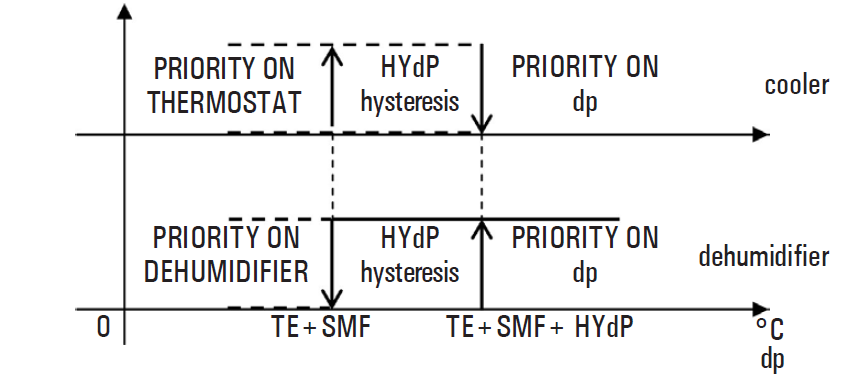
Where:
- dP: dew point (see table 1).
- TE: External temperature measured
- SMF: dew point increase set in the sub-parameter ‘ d-EF ‘.
- HYdP: dew point hysteresis equal to 0.5°C (cannot be modified).
- ‘d-EC’ Dew point control with an external probe on metal ceiling.
When the dew point regulation is active with the ‘C-dP’ parameter set on ‘d-EC’, the regulator will control both systems attached for the cooling and de-humidification according to the comparison between the dew-point temperature and the temperature measured by the external sensor, thus applying the settings of the regulation ‘d-EC’ regulation.
The following graphics describe the dew point control mode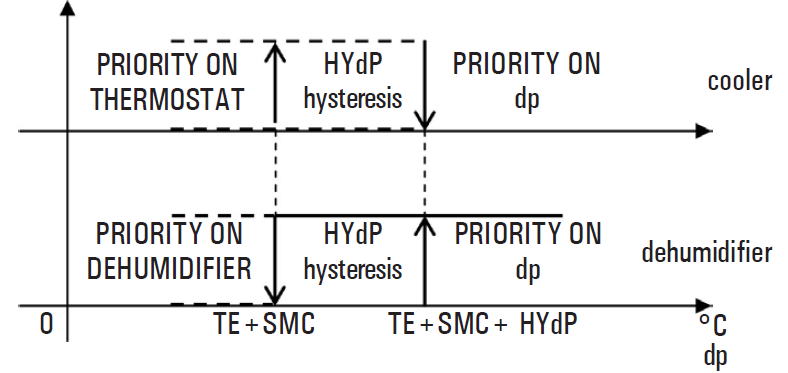
Dove:
- dP: dew point (see table 1).
- TE: External temperature measured
- SMC: incremento del punto di rugiada impostato nel sottoparametro ‘ d-EC ‘.
- HYdP: dew point hysteresis equal to 0.5°C (cannot be modified). ‘d-FP’ dew point control on fixed points
If the dew point control function, ‘ C-dP ’, is activated on ‘ d-FP ’, the programmable thermo-hygrostat controls the cooling and dehumidification devices on the basis of the comparison of the temperature value of the dew point calculated and the temperature values relative to the dew points set in the sub-parameters ‘ TF1 ’ and ‘ TF2 ’.
The following graphics describe the dew point control mode
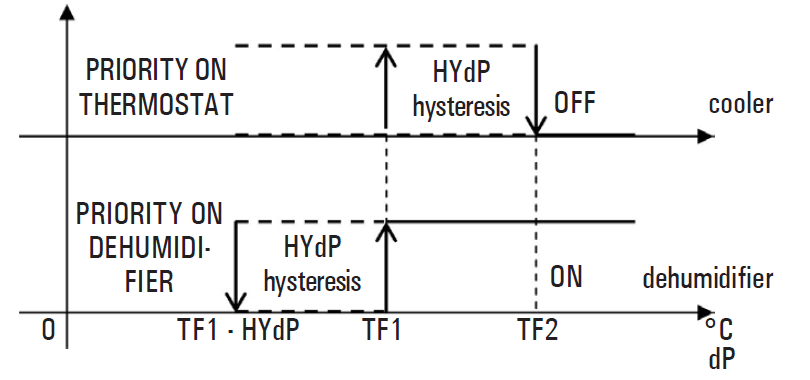
Dove:
- dP: dew point (see table 1).
- TF1: second lower threshold of the dew point (expressed in °C).
- TF2: first lower threshold of the dew point (expressed in °C).
- HYdP: dew point hysteresis equal to 0.5°C (cannot be modified).
On identification of the dew point temperature (table 1) which is to be respected, thresholds ‘ TF1 ’ and ‘ TF2 ’ will be set in order to obtain system adjustment such to prevent the formation of condensate.
Example:
dP > TF1 = the dehumidification system starts to operate, maintaining the cooling system active if it has already been activated.
The following situation then occurs:
dP > TF2 = The dehumidification system remains active, but the cooling system is deactivated.
Once the value of ‘ TF2 ’ is set lower than the minimum temperature of the cooling surface, this control allows to prevent the formation of condensate on the surface for any temperature and relative humidity value of the air.
ATTENTION
- The maximum value of ‘ TF1 ’ will be self-limited to ‘ TF2 ’ less 0.2°C.
- The ‘ TF2 ’ value must always be set with a value lower than the minimum temperature reached by the cooling surface to control or however than the coolest surface present in the room.
- The difference between the value of ‘ TF2 ’ and the minimum temperature of the coldest surface in the room will be assessed by qualified staff, according to the type of plant, thermal inertia and the various environmental conditions.
Generally, a minimum of 1°C is recommended for underfloor plants and 3°C for metal ceilings. ‘CndP’ Rate of check for the dew-point regulation
This parameter allows setting the minimum time, in minutes, which must elapse between two consecutive activations of the output relays, caused by the ‘ c-dP ‘ function intervention.
This time interval can be set in steps of 3 minutes; itwill be reinitialized every time the dew-point regulation mode is changed by the user (‘ d-EF ’, ‘ d-EC ’ or ‘ d-FP ‘).
‘Cntr’ THERMOSTAT RELAY ACTIVATION TIMER
Using this parameter it is possible to display the thermostat relay activation time meter relative to the actual day. The timer is automatically reset at midnight.
Proceed as follows:
- Select the ‘ Cntr ’ parameter and press ‘ OK ’, the device displays the hours of activation of the thermostat relay alternating with the wording ‘ Cntr ’ + the ‘ ‘ icon.
- To go back to the list of user parameters, press ‘ OK ’ and then the ‘‘ key.
- To exit the user parameters setting and restore normal operation, press ‘‘ or do not press any key for 10 seconds.
‘dFLt’ SET DEFAULT DATA
With this parameter, it is possible to reset user parameters in order to bring back all the parameters to the factory defaults.
Proceed as follows:
- Select the parameter ’dFLt’ and press ’OK’; the device automatically sets the default data and the display will show ’-dF-’ and the ‘ ‘ icon flashes.
- To return to the list of user parameters, press the ‘OK’ button.
- To exit the user parameter settings and resume normal operation, press the ‘ ‘ button or wait 10 seconds without pressing any key.
WARNING!
Restoring the Default Data will reset all settings made by the user, such as Time Program, Heating/Cooling, Set-Points, and all other programmable data.
SWITCHING OFF – ANTIFREEZE FUNCTION
- To deactivate the programmable thermo-hygrostat press the ‘ ‘ button. The display will show the word ‘ OFF ’.
- If the programmable thermo-hygrostat has been set in the heating mode, the Antifreeze function will be active and the ‘
 ‘ symbol will appear on the display; in such a case the room temperature will be controlled based on the value set for the Antifreeze temperature (see paragraph ‘SETTING THE USER PARAMETERS‘).
AUTOMATIC OPERATION / 24H MANUAL / PERMANENT MANUAL OVERRIDE FUNCTION
With the ‘ ‘ key, the programmable thermo-hygrostat may be forced to adjust the room temperature and humidity according to the comfort temperature and humidity set, regardless of the time programming settings. By pressing the ‘ ‘, button repeatedly you can switch from Automatic to 24-hour Manual, from 24-hour Manual to Permanent Manual, and from Permanent Manual back to Automatic. During operation in manual mode, the display does not show the time program, but only the room temperature, the status of the relays (any switch-on of the ‘ ‘ or ‘ ‘ or ‘ ‘ symbols), the ‘ 24h ‘ symbol (manual 24h) or ‘ ‘ (permanent manual) and the ‘ ‘ symbol. Pressing the ‘ ‘ button once will activate the 24-hour Manual mode and the programmable thermo-hygrostat will remain in this mode until the time 23:59 is reached, after which it will go back into the Automatic mode.
Note: If the device is set in the 24h Manual mode and the Vacation program is activated, after the Vacation period has elapsed, if it is past the time 23.59, the programmable thermo-hygrostat will go back into the Automatic mode and follow the set program schedule. Pressing the ‘ ‘ button a second time will switch the programmable thermo-hygrostat into the Permanent Manual mode and it will remain in this mode until you press the ‘ ‘ button again.
TIME/TEMPERATURE/HUMIDITY DISPLAY
By repeatedly pressing the ‘ ‘ button, the display can show the actual time with the icon relative to the temperature adjustment probe (internal ‘ ‘ or external ‘ ‘), the room temperature read by the internal sensor, distinguished by the ‘ ‘ icon, the room temperature read by the remote probe (if connected) distinguished by the ‘ ‘ icon and the room humidity read by the internal sensor, distinguished by the ‘ ‘ icon. The temperature and humidity readings are displayed and corrected by the Offset value set.
Note: If the ‘ rEG ’ parameter is set at ‘ In ’, but an error is detected on the internal sensor, the display will show ‘ SEnS E xx ’. In this situation, the adjustment will be automatically interrupted and both relays will be placed in the Normally Open position. If the ‘ rEG ’ parameter has been set at ‘ Out ‘ but the remote probe has not been connected or is damaged, the display will show the respective wording ‘ SEnS OPEN ‘ or ‘ SEnS SHrt ‘ with the ‘ ‘ icon on.
ATTENTION:
- In order to optimize battery duration, the programmable Thermo hygrostat reads the room temperature every 3 minutes and, consequently, decides on the activation or deactivation of the relays.
- Press the ‘ OK ’ button briefly to perform an instant refresh.
BACKLIGHTING
The display backlight turns on whenever and button is pressed. It turns off automatically 20 seconds after the last pressing of a button.
HOW TO INSERT / REPLACE BATTERIES
The battery charge status is constantly displayed by means of the ‘ ‘ symbol. The battery charge is at a maximum if all three level indicators are lit inside the symbol. If the ‘
 ‘ symbol (completely empty) flashes, it means that the batteries are depleted and must be replaced. In this case, both the relays are placed in the safety position(N.C.) and the display alternately shows the time (or temperature or humidity) and the word ‘ BATT ’. If the batteries are not replaced as soon as possible, the ‘ ‘ or ‘ ‘ symbols will also flash indicating that the device is blocked.
To replace the batteries proceed as follows:
- Open the flap of the battery compartment (Fig. 1).
- Remove the batteries, prying them out with the aid of a tool if necessary.
- Insert the new batteries, which must be alkaline 1.5V type AA.
- Check for the correct time and date and eventually reset it.
CONNECTION TO A TELEPHONE INTERFACE
- The programmable thermostat allows connecting a telephone interface with the continuous operation (latching relay) to the connector ‘ B ‘ in Fig. 6.
- The use of a suitable telephone interface does not require any setting to be made on the programmable thermo-hygrostat; for directions on using the telephone interface see the instruction manual provided.
- Via a telephone interface, it is possible to turn the programmable thermo-hygrostat Off or turn it On in the Permanent Manual mode. Depending on the commands received from the telephone interface the programmable thermo-hygrostat will act according to the following operating logic:
- Telephone interface contact closed: The programmable thermo-hygrostat will switch into the ‘Permanent Manual’ mode: the ‘ ‘ and ‘
 ‘ symbols will be shown on the display.
 - Telephone interface contact open, after (and only after) a previous closure, if no buttons have been pressed (Manual/Off): The programmable thermo-hygrostat will be switched off and the word ‘OFF‘ will be displayed along with the ‘‘ symbol. If the ‘Antifreeze’ function is active the ‘ ‘ symbol will be displayed.
- Telephone interface contact closed: The programmable thermo-hygrostat will switch into the ‘Permanent Manual’ mode: the ‘
IMPORTANT:
- The commands input by pressing the control buttons will always have priority over the commands received from the telephone interface.
- If you press the ‘
- ‘ or ‘ ‘ button on the programmable Thermo hygrostat, the device will change its status and the ‘ ‘ icon will flash to indicate that the interface command has been overridden by a command input with a control button.
- The ‘ ‘ icon will stop flashing if the telephone interface sends the programmable thermo-hygrostat the same command as the one made with the button or if the telephone interface is reset. In such a case the status set by means of the control button will not be changed and the programmable thermo-hygrostat will be ready to receive a new command.
IMPORTANT
If an Off command is sent to the programmable Thermo hygrostat via the telephone interface (contact open), it is a good idea to check that the command has been executed by the programmable thermo-hygrostat by carrying out the following realignment procedure:
- Using the functions of the telephone interface, check that the contact is open, sending an Off command if necessary.
- Send a command to the telephone interface to close the contact (the programmable thermo-hygrostat will turn on).
- Using the functions of the telephone interface, check that the contact is closed.
- Send a command to the telephone interface to open the contact (the programmable thermo-hygrostat will turn off).
- During this sequence, no commands should be input with the control buttons as they have priority over the interface commands.
TECHNICAL CHARACTERISTICS
- Power supply: 2 x 1.5V, alkaline batteries (Type AA)
- Battery life: >1 year
- Backlight turns off: 20 sec. after the last pressing of a button
- Thermostat section
- Range of adjustment: comfort: 5°C .. 40°C
- economy: 5°C .. 40°C
- Asymmetrical differential: 0,1°C .. 5°C (Default 0,2°C)
- Thermostat relay
- contacts capacity: 5(1)A 250V~ SPDT
- Hygrostat section
- Range of adjustment: comfort: 10%RH .. 95%RH
- economy: 10%RH .. 95%RH
- Differential: 0,5%RH .. 10.0%RH (Default 2.0%RH)
- Hygrostat relay
- contacts capacity: 5(1)A 250V~ SPDT
- Sensor type: Internal (temperature/humidity)
- Humidity reading saturation: Probe temp. <10.0%RH (- – – -)
- Probe temp. >90.0%RH (E E E E).
- Temperature accuracy (-40°C .. 120°C):
- Humidity accuracy (0%RH .. 100%RH @25°C):
- Resolution: 0.1°C. (-9.9°C .. 50°C)
- 0.1%RH (10%RH .. 90%RH)
- Internal sensor Offset:
- Temp.: ± 5.0°C. (Default 0.0°C)
- Humidity: ± 5.0% RH. (Default 0.0°C)
- Remote probe type: NTC 10K Ohm ±1% @ 25°C (optional)
- Remote probe Offset: ± 5.0°C. (Default 0.0°C)
- Antifreeze: OFF / 0.5°C .. 25.0°C (Default 3.0°C)
- Dew point: OFF / d-EF / d-EC / d-FP (Default d-FP)
- Ext. Interface Input: On/Off type continuous signal.
- Protection rating: IP 30
- Class of protection against
- electric shock: II (
 )
) - Number of manual cycles: 1,000
- Number of automatic cycles: 100,000
- Type of action: 1CU
- Tracking index: PTI 175
- Pollution situation: 2 (normal)
- Overvoltage category: II
- Operating temperature: 0°C .. +40°C
- Storage temperature: -10°C .. +50°C
- Humidity limits: 20% .. 80% RH non-condensing
- Enclosure: Material: ABS+PC V0 self-extinguishing
- Color: Signal white (RAL 9003)
- Light grey (RAL 7035)
- Weight: ~ 156 gr.
CLASSIFICATION UNDER REG. 2013.811.EC
- Class: I
- Contribution to energy efficiency: 1%
NORMATIVE REFERENCES
The product complies with the following standards (EMC 2004/108/EC and LVD 2006/95/EC):
- EN-60730-1 (2011)
- EN-60730-2-7 (2010)
- EN-60730-2-9 (2010)
DIMENSIONS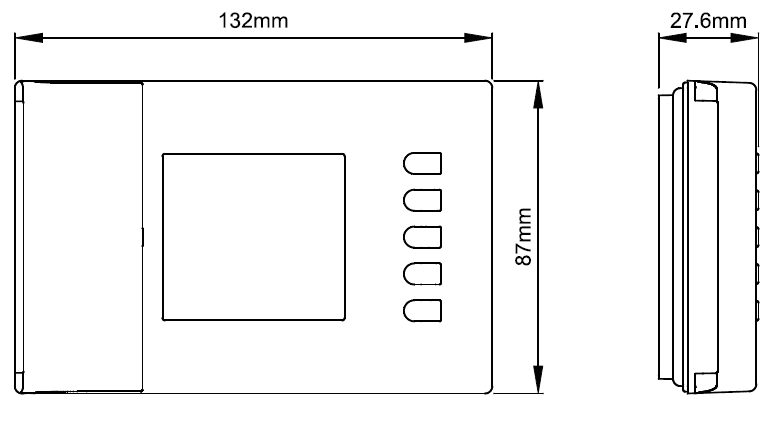
WARRANTY
In view of the constant development of their products, the manufacturer reserves the right for changing technical data and features without prior notice. The consumer is guaranteed against any lack of conformity according to the European Directive 1999/44/EC as well as to the manufacturer’s document about the warranty policy. The full text of the warranty is available on request from the seller.
REFERENCE:
DOWNLOAD MANUALS:
ESBE TPH114 Digital Room Thermostats Installation Instruction

ESBE TPH114 Digital Room Thermostats Installation Instruction