Emerson 1F98EZ-1421 Programmable Thermostat
WORD TO HOMEOWNER
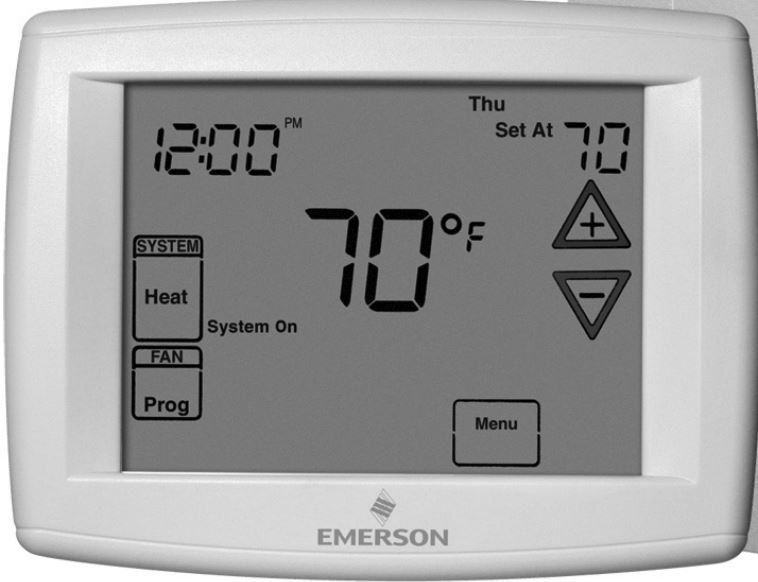
You are now in command of one of the most sophisticated and easy-to-use home comfort systems available. Your Emerson Blue Thermostat will provide you and your family with improved comfort, optimal energy efficiency, and enhanced reliability and performance. Your Blue Touchscreen Thermostat interface constantly communicates with your heating and cooling system to reliably and efficiently provide you with the utmost in-home comfort and peace of mind. The Blue Thermostat System is so smart it even lets you know when a service call or maintenance is needed to protect your heating and cooling investment. Now you can relax in total comfort in your home. Please read on to learn more about your new Emerson Blue Thermostat System
DIAGNOSTICS
System Problem Screen
If your thermostat detects a problem with the system, the touchscreen thermostat Home Screen Display will indicate “Call for Service” and CHECK CROSSOVER in the scrolling message area. When this is present contact your qualified service technician. The Fault message and the “Call for Service” clears itself when faults have been corrected.

Reset Operation
If a voltage spike or a static discharge blanks out the display or causes erratic operation, you can reset the thermostat. To reset the thermostat, touch  the SYSTEM keys at the same time. The thermostat will go blank and then all segments will be displayed momentarily. Note: When the thermostat is reset, the Thermostat Options Configuration Menu settings, time, and programming schedule will reset to the factory settings. Refer to the customized settings for your thermostat and system on the back cover of this book. Use this Guide to return Menu options as they were before the thermostat Reset. For your convenience, Factory Settings are as shown
Enter the Heating Program
- Touch the Menu key to display additional key choices.
- Touch the Set Schedule key. The top of the display will show the day being programmed. The time and Set At temperature are also displayed. “MORNING” will also be displayed to indicate the period.
- Touch SYSTEM key to select Heat in the SYSTEM switch area indicating the active mode being programmed.
- You can change to the other mode by touching the SYSTEM key at any time.
- Touch key to change the temperature to your selected temperature for the 1st heating period (Morning).
- Touch
 key to adjust the start time for period. The time will change in 15 minute increments.
 - Touch FAN to select Auto or Prog.
- After you have set the time and the temperature for the period to begin, touch Set Schedule to advance to the next program period.
- Repeat steps 4 through 7 until all of the program times and temperatures are set for all program periods for that day.
- Use the Copy Key to copy the program as described previously or touch Advance Day to change to the next day and repeat steps 4 through 9 until\ programs for all days are entered
- When programming is complete and all of the times and temperatures match your desired heating schedule, touch Run Schedule. The thermostat will now run your program.
Enter the Cooling Program
- Touch the SYSTEM key until the Cool icon appears.
- Follow Enter Heating Program instructions for entering cooling times and temperatures
Programmable Fan
The indoor fan/blower can be selected to turn on and off with the cycle of the system or to run all the time whether the system is on or off. In the Set Schedule mode, the FAN key is used to select the fan operation during a program period. The default state of the FAN key is FAN Auto. It can be changed to FAN Prog. In the Run Schedule mode, during a program period that has FAN Prog scheduled, the fan will turn on and stay on during the complete period. The display will show FAN On Prog. The programmable fan can be overridden by touching the FAN key to select Auto or On.
DISPLAY OVERVIEW
Home Screen Display
Touch Keys for Programming and Configuration Items
Worksheet for Re-Programming 7 Day Program
PROGRAMMING YOUR THERMOSTAT
Planning Your Program – Important
- This thermostat is set up for 7 independent day programming with 4 time/temperature periods per day.
- The Heating and Cooling Worksheet on page 17 allows you to pencil in your own program times and temperatures. Factory settings are listed on Monday (for Monday thru Friday), Saturday and Sunday.
- If you are re-programming all 7 days, fill in all lines with the times and temperatures you want. Use this worksheet as a guide to reprogram the thermostat.
- Keep the following guidelines in mind when planning your program.
- In Heating, lower temperatures will save energy.
- In Cooling, higher temperatures will save energy.
- If you plan on using Auto Changeover, do not program the heating temperatures higher than those for cooling
Programming Tips: Copy Program
When programming your thermostat, you may copy the program from one day to another day or to all six other days. To copy a program from one day to all other days:
- In Set Schedule mode, enter the program for the day or select the day you wish to copy by touching the Advance Day key.
- Touch the Copy key. The day of the week that will be copied is on and the other days of the week will be flashing. The scrolling message will show “COPY EVERY DAY”
- Touch the Copy key again. The scrolling message will change to “MORNING”.
- The day you copied will remain on.
- Touch the Run Schedule key to return to normal operation.
To copy a program from one day to another day:
- In Set Schedule mode, enter the program for the day or select the day you wish to copy by touching the Advance Day key.
- Touch the Copy key. The day of the week that will be copied is on and the other days of the week will be flashing. The scrolling message will show “COPY EVERY DAY”
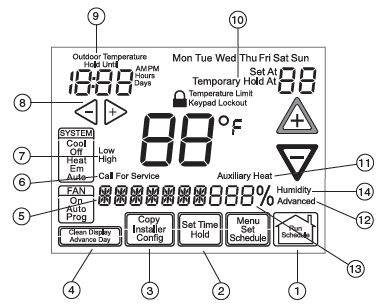
- Run Schedule touch key to exit any menu and begin operating the program.
- Set Time touch key used for setting thermostat time (page 7) or Hold touch key used to permanently override program temperature (page 10).
- Copy touch key used to copy programs (page 16) or Installer Config touch key used to enter menu to set thermostat options (page 12).
- Clean Display touch key allows 30 seconds to wipe off the display. Clean Display will also reset change filter, change humidifier pad, and change UV light (page 11). Advance Day touch key used for programming (page 16).
- SCROLLING MESSAGE CENTER Displays system information or maintenance reminder during thermostat operation. Displays thermostat information during setup and programming.
- “Call For Service” indicates a fault in the heating or cooling system (page 19). It does not indicate a fault in the touchscreen thermostat.
- “Low” indicates when heating or cooling first stage is called for. “High” indicates when a second stage is called for (page 9). and used in programming to set time and in configuration menu to change selections (page 12).
- “Outdoor Temperature” indicates the outdoor temperature is being displayed. Outdoor temperature reading will display in time of day area. This feature is only available for heat pump systems
- “Hold At” is displayed when the thermostat is in the Hold mode (page
- “Temporary Hold At” is displayed when the thermostat is in a temporary Hold mode (page 10).
- “Auxiliary Heat” indicates the auxiliary heating or emergency heating is on (page 9). (Heat Pump system only.)
- “Advanced” indicates the Advanced Installer Configuration Menu used by your contractor during setup.
- “RH XX%” displays the indoor relative humidity (page 12).
- Displays the active humidification / dehumidification setpoint.
Battery Location
“AA” alkaline batteries are included in the thermostat to keep time during a power outage. They are also required for armchair programming (see below). If “LOW BATTERY” is displayed in the scrolling message area, the batteries are low and should be replaced with fresh batteries. For best results use premium brand alkaline batteries, such as Duracell® or Energizer®. To replace batteries, set thermostat SYSTEM touch key to Off, remove thermostat from wall by grasping the top and bottom of the thermostat and pulling it straight away from the wall. The base will remain on the wall. Install the batteries in the rear along the top of the thermostat. Reposition the thermostat over the base plate and gently snap into place.
Armchair Programming
The thermostat uses 24 Volt AC power supplied by the system for normal operation. However, with “AA” batteries installed, the thermostat can be removed from the wall for convenient programming. Set thermostat SYSTEM touch key to Off before removing it from the wall.
System Power Loss
- When thermostat loses 24 Volt AC power supplied by your heating or cooling system, the scrolling message area will display “Power Fail

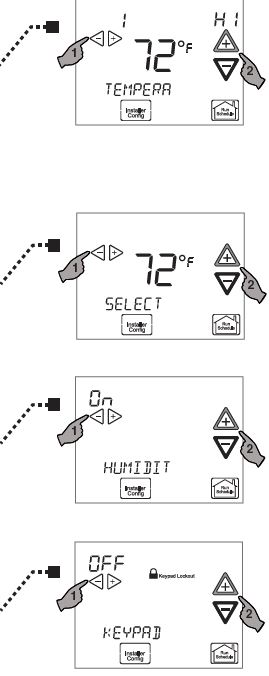
- Select temperature offset. The scrolling message will show “TEMPERATURE ADJUSTMENT”. Your thermostat was accurately calibrated at the factory, however this option allows you to change the display temperature to match your previous thermostat if you prefer. Default is 0° with current temperature. Adjustment can be made from 5° Lo to 5° HI to change the displayed temperature.
- Select temperature display as Fahrenheit or Celsius. Scrolling message will show “SELECT TEMPERATURE DISPLAY”. This option selects the temperature display as °F or °C.
- Select humidity display. Scrolling message will show “HUMIDITY DISPLAY”. Turning ON will show RH in scrolling message area and the current Humidity.
- Select keypad lockout. Scrolling message will show “KEYPAD LOCKOUT”. Keypad lockout keeps unauthorized users from changing the settings or desired temperature on your thermostat. Turning this feature ON will enable keypad lockout. You will be asked to enter a 3-digit “PIN” number which you will use to unlock your thermostat.
 Select program days per week. The scrolling message will show “PROGRAM TYPE”. Default is 7 Days to indicate individual day programming. It can be changed to 0 Days to indicate no programs will be run. When set for 7 Days, the thermostat will follow the factory program or the program that you entered.
- Select heat high limit. Scrolling message will show “HEAT HIGH LIMIT”. Selecting a temperature from 62-98 will enable the heating high limit. The heat high limit is the highest temperature that your thermostat can be set to in heat.
- Select cool low limit. Scrolling message will show “COOL LOW LIMIT”. A selection from 44-82 will enable the cooling low limit. The cool low limit is the lowest temperature your thermostat can be set to in cool.
- Select fast stages. Scrolling message will show “FAST STAGES”. Turning ON will enable this feature. If you need to rapidly heat or cool your home, manually changing the setpoint by 3 degrees or more will enable all stages of heat or cool.
Set Current Time and Day
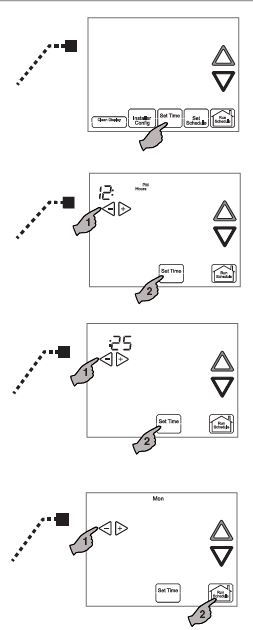
- On the Home Screen Display, touch the Menu key to display additional key choices
- Touch Set Time once to display hour and AM or PM designation in clock display.
- Touch either the or key until you reach the correct hour and AM or PM designation. Then touch Set Time again to display minutes only in clock display.
- Touch and hold either the or keys until you reach the correct minutes.
- Then touch Set Time once again to display the day of the week
- Touch either the or key until you reach the correct day.
- Touch Run Schedule to save the Time and Day settings and return to the Home Screen Display.
Choose the System Mode (Cool, Off, Heat, Em, Auto)
Touch the SYSTEM key to select:
- Cool: Cooling is on.
- Off: Heating and Cooling are off.
- Heat: Heating is on.
- Em: Emergency heat setting available only with heat pump systems (see page 9).
- Auto: Auto Changeover is used where both heating and cooling may be
required during the same day. Auto allows the thermostat to automatically select heating or cooling depending on the indoor temperature and the selected heat and cool temperatures. The desired temperature must be equal to or higher than the desired temperature for cooling when using auto changeover
Energy Saving Factory Pre-Program
This touchscreen thermostat is programmed with the energy saving settings shown in the table below for all days of the week. If this program suits your needs, simply touch the Run Schedule key.
Factory Pre-Programmed heating and cooling schedule for all days of the week
Select humidifier pad maintenance reminder.
Scrolling message will show “HUMIDIFIER PAD MAINTENANCE”. Default is OFF. It can be changed to a setting from 25 to 1975 hours in increments of 25 hours to select the amount of time for the reminder. Setting of 100 hours is typically 6 months of run time. Based on this setting, the scrolling message area will show “CHANGE HUMIDIFIER PAD” to indicate maintenance is required.
Select beeper (audio prompt)
Default is On for the beeper to sound with any touch key press. It can be changed to OFF.
Select continuous display light.
Scrolling message will show “DISPLAY LIGHT”. When selected ON, the display light will be on continuously with power to the system. Selecting OFF will allow the display light to turn on momentarily when any key is touched. If system power is off, and thermostat is operating on battery only, the display light will not turn on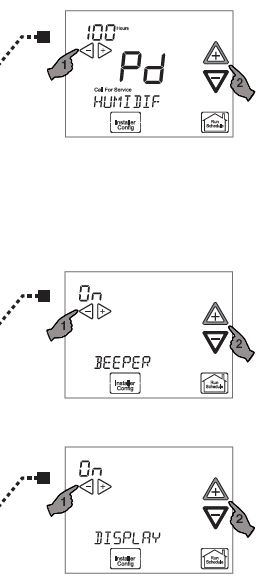
SETTING UP YOUR THERMOSTAT OPTIONS
The Thermostat has comfort and performance options that can be selected and adjusted. These options are in the Thermostat Options Configuration Menu. On the Home Screen Display, touch the Menu key to display additional key choices.
NOTE:
When in the Thermostat Options Configuration Menu, holding the Installer Config key for 3 seconds again will change the display to the Advanced Installer Configuration Menu which is used by your contractor. To exit this menu and return to the Thermostat Options Configuration Menu, press the Menu key, or press Run Schedule to return to the Home Screen Display.
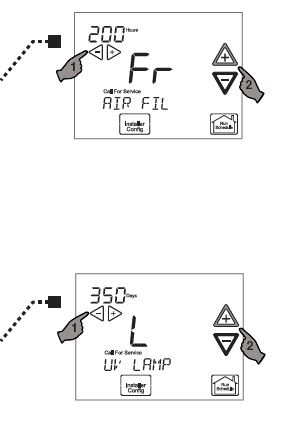
- Select air filter maintenance reminder. Scrolling message will show “AIR FILTER MAINTENANCE”. Default is OFF. It can be changed to a setting from 25 to 1975 hours in increments of 25 hours to select the amount of time for the reminder.
- Consult your contractors for the hours and type of filter. Setting of 225 hours is typically 3 months of run time.
- When the system has run for the selected length of time, the scrolling message area will show “CHANGE FILTER” to indicate maintenance is required.
- Select UV lamp maintenance reminder. Scrolling message will show
- “UV LAMP MAINTENANCE”. Default is OFF. It can be changed to a setting from 25 to 1975 days in increments of 25 days to select the amount of time for the reminder. Setting of 350 days is an annual reminder.
- Based on this setting, the scrolling message area will show “CHANGE UV LAMP” to indicate maintenance is required.
USING YOUR THERMOSTAT
System Operation
Touch the SYSTEM key to select the thermostat operating mode desired. When the system is calling for first stage heat or cool, “Low” will display on the touchscreen. When second stage is required, the display will show “High”. The setpoint temperature can be changed by touching the or keys.
Auxiliary Heating
Heat Pump Only
The system automatically activates Auxiliary Heating when the outside temperature is too cold for the heat pump to efficiently heat the home. When Auxiliary Heating is called for, the display will show “Auxiliary Heat”.
Emergency Heating
Heat Pump Only
Heat pump malfunction is rare, but should it happen, Emergency Heat can be manually activated by touching the SYSTEM key to Em. This will start the electric or fossil fuel system to provide heat. The display will show “Auxiliary Heat”.
Temporary Temperature Hold
You can temporarily adjust the temperature in your home at any time while your thermostat is running a program by touching either keys. The display will indicate “Temporary Hold At” to the left of the setpoint temperature. To cancel the temporary setting before the next period begins, touch Run Schedule to return to the program
Example: If you turn up the heat during the Morning program, it will remain at the new temperature until the time for the next program period (Day program).
Permanent Temperature Hold
The Permanent Temperature Hold feature bypasses the program and allows you to permanently hold a temperature. The temperature you set in Hold will be maintained indefinitely. Touch Run Schedule to cancel Hold and resume the programmed schedule. Touch keys to adjust the temperature. The Hold key will appear on the screen. Touch the Hold key to maintain the new setpoint temperature. “Hold At” will display to the left of the setpoint temperature. To cancel the permanent hold setting at any time and return to the program, touch Run Schedule.
Example: If you turn up the heat during the Morning program and touch the Hold key, it will remain at the new temperature until you touch Run Schedule or you manually adjust to another temperature
Choose the FAN Setting (Auto or On)
FAN Auto is the most commonly selected setting and runs the fan automatically when the heating or cooling system is . FAN On selection runs the fan continuously for increased air circulation or to allow additional air cleaning.
Non-Programmable Mode
If Program days per week is set for 0 days (Non-programmable) in the Thermostat Options Configuration Menu, the thermostat will not follow any program periods. Time of day and day of the week will not display. Touch the SYSTEM key to select Heat or Cool and use the buttons to adjust the temperature to your desired setting.
Auto Mode
In Programmable mode or Non-programmable mode, you can touch the SYSTEM key to select Auto to allow the thermostat to automatically change between Heat and Cool. When the SYSTEM key is touched to select Auto the thermostat will change to Heat or Cool, whichever ran last. If it switches to heat but you want cool, or it changes to cool but you want heat, touch both keys simultaneously to change to the other mode.
Maintenance Reminder Message
A reminder will display in the scrolling message area when it is time for accessory maintenance if selected in the Thermostat Options Configuration Menu. When a reminder appears, it can be cleared by touching the Clean Display key. This will also reset the timer to begin a new time period for the reminder.
Maintenance reminders are

REFERENCE:
DOWNLOAD MANUALS:
Emerson 1F98EZ-1421 Programmable Thermostat USER GUIDE